
What if a single “quick” email attachment could cost your firm $51,744 in FTC civil penalties? For tax professionals in 2026, the stakes for secure document transfer for tax have never been higher. To securely receive tax documents without violating IRS rules, you must use end-to-end encryption and a Written Information Security Plan (WISP) as mandated by IRS Publication 4557. This involves using secure portals or a Secure Virtual Desktop that ensures taxpayer data remains protected from the moment it leaves the client’s hand until it reaches your firm’s internal environment.
We understand the anxiety of facing potential data breaches and the frustration of using complex portals that clients often reject. It’s difficult to find a balance between rigorous security and a smooth user experience. In this article, you’ll learn how to implement compliant protocols that protect your clients and satisfy the FTC Safeguards Rule. We’ll preview the specific encryption types you need and provide a clear, professional workflow that offers peace of mind during an IRS audit and builds lasting client trust.
Key Takeaways
- Understand why standard email fails the “reasonable safeguard” test under IRS Publication 4557 and how to transition to a truly protected environment for taxpayer data.
- Identify the specific technical controls, including Multi-Factor Authentication (MFA), required by the FTC Safeguards Rule for all professional tax offices.
- Learn how to implement a compliant workflow for secure document transfer for tax by conducting an IT assessment and selecting tools that meet NIST standards.
- Discover how to bridge the gap between technical tools and regulatory compliance by documenting your transfer procedures within your mandatory Written Information Security Plan (WISP).
What is Secure Document Transfer for Tax Professionals?
Implementing a protocol for secure document transfer for tax involves the end-to-end protected exchange of sensitive client data. It isn’t just about moving a file; it’s about ensuring that Personally Identifiable Information (PII) like Social Security Numbers, W-2s, and bank statements remains unreadable to unauthorized eyes. True security requires a dual approach. First, you need “security in transit,” which protects data as it moves through the web using protocols like SSH File Transfer Protocol (SFTP). Second, you must have “security at rest,” which encrypts the file once it sits on your server or cloud drive. Without both, your client’s data is essentially left in an open envelope.
Why Email is a Compliance Risk for Your Practice
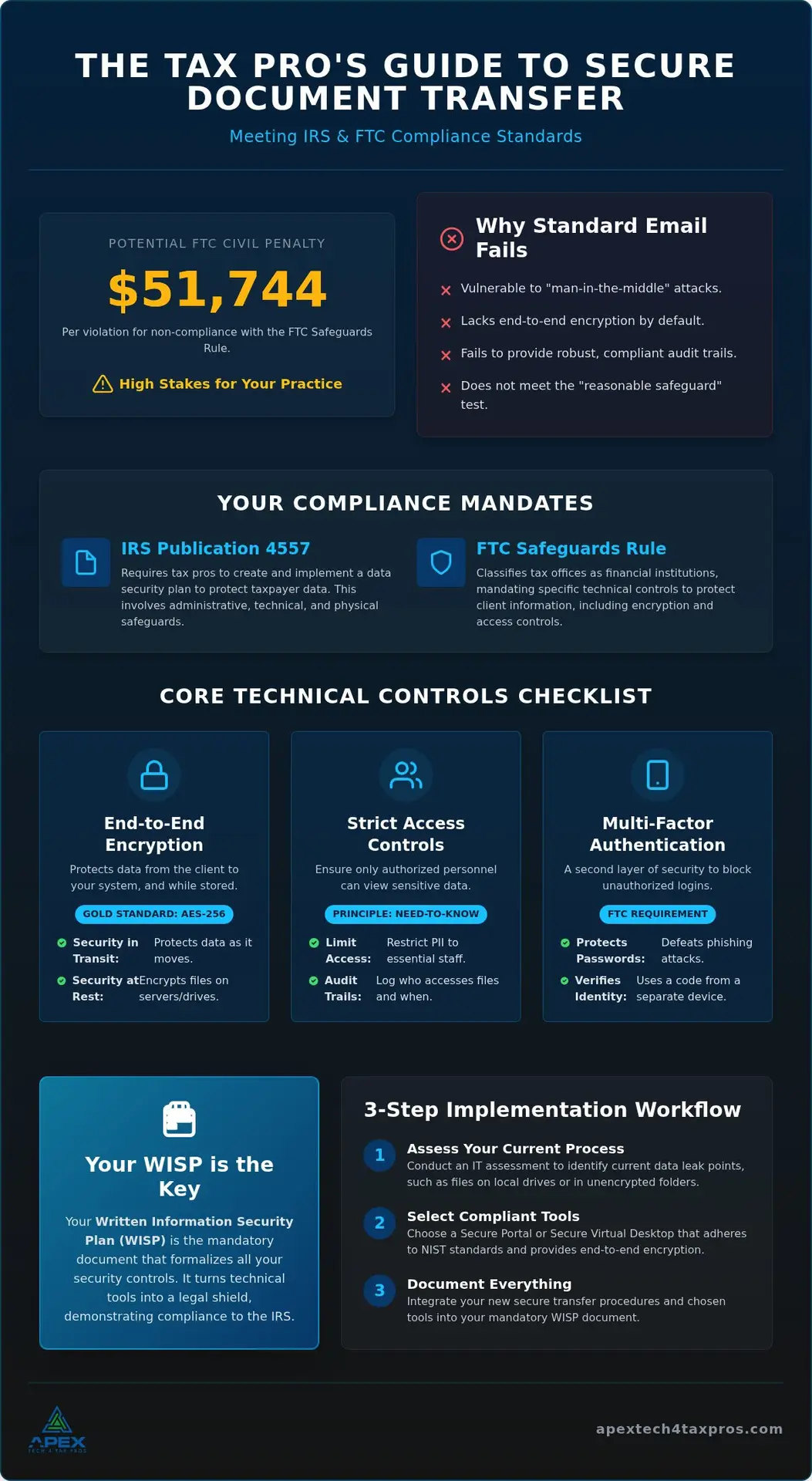
Standard email is a major vulnerability because it was never designed for privacy. It’s susceptible to “man-in-the-middle” attacks where hackers intercept unencrypted messages during transmission. Beyond the risk of theft, email lacks the robust audit trails required by federal standards. You can’t prove who accessed a file or when, which leaves your practice defenseless during a regulatory review. Relying on basic attachments fails the “reasonable safeguard” test expected by the IRS.
The Role of IRS Publication 4557 in Document Security
The IRS doesn’t just suggest security; it mandates it. IRS Publication 4557 requires tax pros to implement administrative, technical, and physical safeguards, mirroring the FTC Safeguards Rule. These requirements should be formalized in your custom WISP template. Implementing secure document transfer for tax fulfills a core technical safeguard. It moves your practice to verifiable compliance, showing the IRS and your clients that you take data stewardship seriously.
How Do I Comply with the FTC Safeguards Rule for File Sharing?
Complying with the FTC Safeguards Rule requires tax pros to act as disciplined guardians of client data. Because the law classifies tax offices as non-banking financial institutions, you must implement specific technical controls for secure document transfer for tax. This alignment with IRS Pub 4557 standards includes “Zero Knowledge” encryption and robust audit trails. These logs track exactly who accessed a file and when they did it, providing vital evidence during a regulatory review.
Encryption Standards: AES-256 and Beyond
AES-256 bit encryption is the industry gold standard for a reason. It’s the same level of security used by the military and top-tier banks to protect secrets. When selecting a tool, ensure it offers end-to-end encryption. This means the data stays scrambled from the moment your client hits “send” until it safely lands in your Secure Virtual Desktop. It prevents any third party from intercepting the information while it’s in transit across the web.
Access Controls and Multi-Factor Authentication (MFA)
MFA acts as a secondary lock that a password alone can’t open. Even if a hacker phishes a password, they’re blocked without that temporary code from a physical device. The FTC also requires you to limit access to PII on a “need-to-know” basis. Only employees who actually need the data to perform their jobs should have access. Documenting these access controls within your IRS-Mandated Written Information Security Plan turns technical tools into a legal shield, offering relief from the burden of compliance uncertainty. Integrating secure document transfer for tax into your workflow ensures you stay ahead of these requirements. You might consider starting with a professional IT assessment to see where your current file-sharing process stands.
How to Implement a Secure File Sharing Workflow in Your Tax Practice
Moving from the “why” to the “how” doesn’t have to be overwhelming. A structured transition ensures you meet compliance without disrupting your busy season. First, conduct a thorough IT Assessment to identify current data leak points. This step reveals where sensitive files might be lingering on local drives or in unencrypted folders. Next, select a portal or a Secure Virtual Desktop that adheres to NIST standards. This provides a clean, controlled environment for secure document transfer for tax. Finally, update your engagement letters to mandate these protocols and provide Cybersecurity Awareness Training so your team can confidently guide clients through the new process.
Choosing the Right Secure Portal for Your Clients
Client adoption is the biggest hurdle in any security upgrade. If a portal is clunky, clients will revert to risky email attachments. Choosing a user-friendly platform for secure document transfer for tax keeps your clients happy and your office compliant. Evaluate tools based on their mobile compatibility. Many taxpayers prefer to snap a photo of their documents on a smartphone, so a mobile-responsive upload feature is essential. Look for a balance between high-level encryption and a “one-click” user experience to keep your workflow moving smoothly.
Onboarding Clients to Your Secure System
Frame the switch as a premium service. Instead of telling clients they “must” use a new tool, explain that you’ve invested in a private vault to protect their identity. This peer-to-peer approach turns a technical hurdle into a value-add for their peace of mind. Providing a simple, one-page PDF with screenshots of the upload process can eliminate 90% of support calls. If you’re ready to modernize your office, you can book an assessment to build a workflow that actually works for you and your clients.
Integrating Secure Transfers into Your IRS-Mandated WISP
Having the right technology is only half the battle for a modern firm. A tool for secure document transfer for tax is effectively useless in the eyes of the IRS if you don’t have a written policy to back it up. Federal law requires a Written Information Security Plan (WISP) that details exactly how you protect client data. By documenting your transfer procedures in a Custom WISP Template, you turn a technical process into a verifiable legal safeguard. This document acts as your “shield” during an IRS inquiry or security audit, proving you’ve done your due diligence and followed every mandate.
To simplify this burden, we offer Seasonal ($649.99) and Yearly ($1,099.99) subscriptions that include a customized WISP. These plans ensure your documentation is as robust as your technical infrastructure without requiring you to become an IT expert overnight. It’s about creating a repeatable, defensible process that protects your license and your clients’ identities. When you have a plan in writing, you aren’t just guessing at security; you’re following a professional roadmap.
Annual Risk Assessments and Updating Your Transfer Protocols
The IRS requires an annual review of your security plan to ensure it stays current with evolving threats. You can’t simply “set it and forget it” in a high-stakes environment. As we navigate 2026, you must evaluate if your current tools for secure document transfer for tax still meet the latest security benchmarks. This annual assessment helps you spot new vulnerabilities before they become breaches, keeping your firm agile and compliant with the ever-changing digital landscape.
The Relief of Full Compliance
Completing your WISP and setting up a secure transfer system feels like a massive weight off your shoulders. It’s the transition from a state of potential vulnerability to one of secure, professional confidence. You’ll no longer worry about audit surprises or the fallout of a data leak. If you’re ready to finalize your security posture before the next deadline, book a WISP assessment to get started and ensure your office is fully protected.
Securing Your Practice for the 2026 Tax Season and Beyond
Protecting your firm requires more than just a strong password; it’s about building a culture of compliance that combines technical tools with mandatory documentation. We’ve explored how implementing secure document transfer for tax fulfills your technical obligations under the FTC Safeguards Rule while protecting your clients’ identities. Remember that your Written Information Security Plan (WISP) is the legal foundation that validates your security efforts during an IRS inquiry. With over 20 years of combined tax and IT experience, we specialize in making IRS Publication 4557 compliance a straightforward process rather than a technical burden.
Our Seasonal and Yearly subscriptions even include a free customized WISP to ensure you have the necessary “shield” in place. Don’t wait for a data breach or an audit to verify your defenses. You can Book a WISP Assessment Today or email info@at4tp.com to finalize your security posture. Taking these steps now offers a true sense of relief, allowing you to focus on serving your clients with professional confidence.
Frequently Asked Questions
Is a password-protected PDF sent via email considered secure enough for the IRS?
Password-protected PDFs don’t meet the “reasonable safeguard” standard on their own because email remains an unencrypted transmission channel. IRS Publication 4557 requires technical safeguards that protect data in transit and at rest. Standard email lacks the necessary audit trails to prove who accessed the file. Using a dedicated portal for secure document transfer for tax ensures you have verifiable encryption and access logs that satisfy federal auditors.
What is the difference between the Safeguards Rule and a WISP?
The FTC Safeguards Rule is the federal law that mandates how financial institutions, including tax offices, must protect data. In contrast, a Written Information Security Plan (WISP) is the specific document you create to show how your firm complies with that law. Think of the Safeguards Rule as the legal requirement and the WISP as your firm’s customized roadmap and proof of compliance for the IRS.
Do I need a secure portal if I only have a few clients?
Yes, federal regulations apply to all tax professionals regardless of their client volume or firm size. The FTC Safeguards Rule and IRS Publication 4557 don’t offer exemptions for smaller practices. Every taxpayer’s data deserves the same level of protection. Implementing a secure document transfer for tax workflow protects you from high civil penalties and helps build a professional reputation of trust with every client you serve.
How long should I keep document transfer logs for audit purposes?
You should maintain document transfer logs for at least three years to align with standard IRS recordkeeping requirements. However, many professionals keep these records for up to seven years to account for varying state statutes of limitations and potential civil litigation. These logs are vital evidence during an audit because they provide a clear, timestamped history of who accessed sensitive taxpayer information and when those transfers occurred.
What should I do if a client refuses to use my secure portal?
Start by educating the client on the high risks of identity theft associated with unencrypted email. Explain that your portal is a private vault designed specifically for their protection. If they still refuse, offer a secure alternative like a physical hand-off or a password-protected thumb drive. You should never compromise your firm’s compliance by accepting sensitive documents through standard email, as this creates a liability for both parties.