
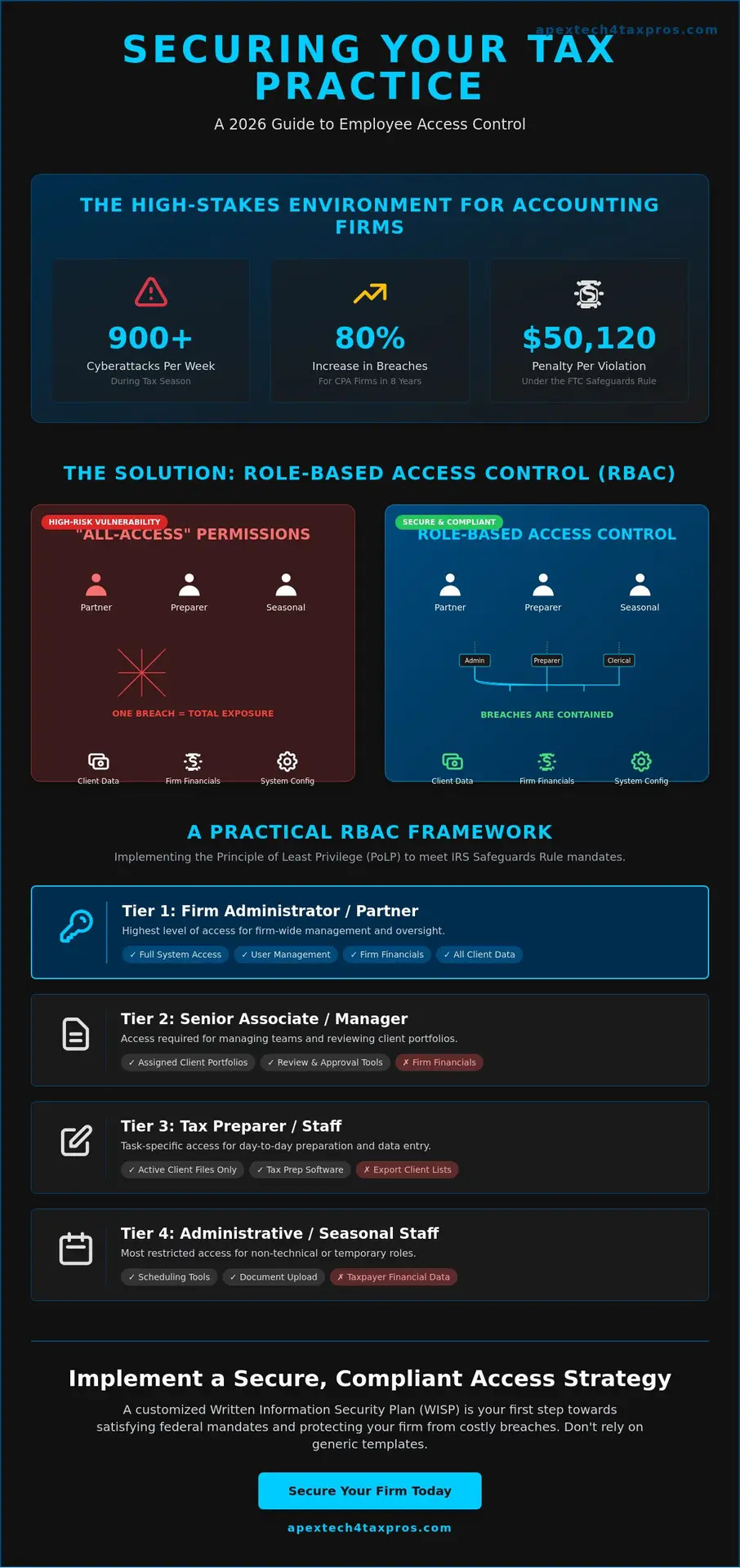
With accounting firms targeted by an average of 300 cyberattacks every week, a figure that surges to over 900 during the height of tax season, your firm’s data integrity is under constant pressure. You likely feel the weight of these threats, especially when trying to balance strict IRS Publication 4557 compliance with a workflow that doesn’t grind to a halt. It’s difficult to manage employee security roles and permissions when high staff turnover makes manual oversight feel like a losing battle, yet the FTC Safeguards Rule now carries penalties of up to $50,120 per violation as of January 2025.
This 2026 guide will show you how to structure these access levels to satisfy federal mandates and stop internal data breaches before they happen. We’ll provide a clear framework for role-based access that bridges the gap between technical security and your daily tax operations. By the end of this article, you’ll have a pragmatic roadmap to secure your client data and protect your practice from the 80% increase in breaches that CPA firms have faced over the last eight years.
Key Takeaways
- Eliminate the “all-access” vulnerability by implementing a systematic approach to data visibility across your entire practice.
- Align your employee security roles with the IRS Safeguards Rule to ensure your firm meets federal mandates for limiting access to sensitive taxpayer information.
- Establish a clear Role-Based Access Control (RBAC) hierarchy that provides a professional framework for managing permissions without slowing down your daily workflow.
- Follow a practical, step-by-step transition plan that includes a Data Access Audit to accurately map staff responsibilities to secure digital tiers.
- Understand why a customized WISP is essential for integrating granular security controls that a generic template simply cannot provide.
Understanding Employee Security Roles in a Modern Tax Practice
Managing a tax practice requires a delicate balance between accessibility and absolute data integrity. Employee security roles provide the systematic framework necessary to maintain this balance by ensuring that sensitive taxpayer data is only visible to those who require it for their specific tasks. In many small accounting firms, the default setting is often “all-access” for every team member to avoid workflow bottlenecks. This creates a massive security gap. When every staff member has administrative privileges, a single compromised password can expose your entire client database to ransomware or identity theft. By defining specific roles, you create a controlled environment where data flows only where it is needed.
It’s vital to distinguish between functional job titles and technical security permissions. A “Senior Tax Associate” is a title that describes professional experience; however, their technical role might be restricted to specific client folders or tax software modules. This dual-expert approach protects your firm from internal errors and external threats while simultaneously improving operational efficiency. When permissions are standardized, your team spends less time troubleshooting access issues and more time focused on accuracy and compliance.
The Shift from Individual to Role-Based Access Control (RBAC)
Assigning permissions to a specific role rather than an individual user simplifies your administrative burden. During the high-pressure environment of the tax season, your firm may onboard several seasonal preparers. Instead of manually configuring dozens of individual settings, you simply assign them the “Preparer” role. This ensures they have the tools to work without granting them the power to export your entire client list or change system configurations. This concept of inheritance allows permissions to flow down your organizational chart automatically, making onboarding and offboarding a seamless process that leaves no lingering security holes.
Why 2026 Standards Require Granular Control
The threat landscape in May 2026 is defined by sophisticated, AI-driven phishing and supply chain attacks that target the most vulnerable entry points. Accounting firms currently face an average of 300 cyberattacks per week, a number that can triple during peak filing months. Granular employee security roles prevent lateral movement, which occurs when a hacker uses a low-level account to navigate through your network toward higher-value data. Role-Based Access Control is a proactive defense strategy that limits a user’s digital footprint to only the resources essential for their job; this effectively contains potential breaches within a single, isolated segment of your network.
Federal Compliance: The IRS Safeguards Rule and Access Control
The IRS Safeguards Rule explicitly mandates that tax professionals limit access to customer information to only those who have a legitimate business need. This isn’t a suggestion; it’s a core requirement that must be documented within your firm’s Written Information Security Plan (WISP). Effective employee security roles serve as the technical enforcement of your WISP’s policies. Without these roles, your security plan is merely a paper document lacking real-world application. Bridging the gap between these regulatory mandates and your actual IT setup is the only way to ensure your firm remains on the right side of federal law.
Regulatory bodies don’t just look for the existence of a plan; they look for proof of implementation. If your firm faces an audit or a data breach investigation, federal regulators will examine your audit trails to see who accessed what data and when. Properly structured roles provide this evidence by default. Failing to meet these standards carries heavy consequences. As of January 2025, the FTC Safeguards Rule allows for penalties of up to $50,120 per violation. When you consider that data breaches at CPA firms have increased by 80% over the last eight years, the risk of non-compliance is both a financial and reputational threat.
The Principle of Least Privilege (PoLP)
The Principle of Least Privilege is the foundational strategy for IRS Publication 4557 compliance. It dictates that every team member should have the minimum level of access necessary to complete their specific tasks. In a practical tax office setting, this means your seasonal administrative staff shouldn’t have access to the firm’s payroll records or internal bank details. By restricting these permissions, you significantly reduce the “blast radius” of a potential account compromise. You can start building this protective layer today with a FREE WISP Download Template to help outline your firm’s specific access policies.
FTC Safeguards Rule: Access and Encryption
The FTC mandates that firms regularly review access privileges to ensure they still align with current staff duties. This requirement is closely tied to Multi-Factor Authentication (MFA), which is now mandatory for all systems containing sensitive client data. Your employee security roles dictate the scope of this MFA requirement and determine how encryption is applied. Federal standards require encryption for data at rest and in transit; however, roles ensure that only authorized personnel possess the digital keys to decrypt that sensitive information. This granular control is what separates a compliant firm from one that is vulnerable to the rising tide of ransomware and AI-powered phishing attacks.
Defining Role-Based Access Control (RBAC) for Accounting Firms
Designing a functional hierarchy for a tax practice isn’t about creating barriers; it’s about defining the safe lanes where your team operates. For small-to-mid-sized firms, a one-size-fits-all approach often fails because it doesn’t account for the unique workflow of tax preparation. Structuring employee security roles requires a departure from generic IT templates, focusing instead on the specific data touchpoints within your practice management software and document portals. Even in smaller offices where a single staff member might handle both administrative duties and basic preparation, you must maintain separate digital identities for these tasks to prevent accidental data exposure.
Hybrid roles are a common reality, but they shouldn’t serve as an excuse for unrestricted access. If an employee wears multiple hats, their permissions should be additive and reviewed quarterly rather than granted through a permanent “Super User” account. Additionally, incorporating “View-Only” roles is a professional necessity when working with external auditors or non-preparer staff who need to verify document receipt without seeing sensitive financial figures. This methodical approach ensures that your firm remains agile while adhering to the strict standards of data integrity required by your clients.
Standard Tax Firm Security Tiers
- Firm Administrator: Possesses full system access, configuration rights, and the authority to manage the firm’s WISP documentation.
- Tax Preparer: Granted access to assigned client files and tax software modules, but restricted from changing firm-wide system settings.
- Administrative Staff: Limited to scheduling tools and client contact information; they cannot view or edit tax return data or financial statements.
- A Seasonal Preparer role is defined as a time-limited security profile that automatically expires or restricts access upon the conclusion of the peak filing period.
Column-Level and Document-Level Permissions
Granular control is the most effective way to protect highly sensitive information like Social Security Numbers (SSNs) and bank account details. Modern employee security roles allow you to implement column-level security, where a preparer might see a client’s name but not their full tax ID unless it’s necessary for a specific form. This level of precision extends to your document portal; you can permit a staff member to upload files while restricting their ability to delete or move them. This prevents “permission creep,” where staff members accumulate unnecessary access levels over several years, eventually creating a significant internal risk that could lead to a regulatory violation.
Implementing Security Roles: A Step-by-Step Transition
Moving from a loose, “open door” digital policy to a structured model of employee security roles requires a methodical approach. It doesn’t have to disrupt your workflow, but it does require an honest assessment of your current digital landscape. The transition begins with a Data Access Audit to identify exactly who holds the keys to your sensitive client data. By mapping your existing staff to the role definitions we’ve established, you can bridge the gap between your firm’s daily operations and the technical requirements of federal compliance. Once these roles are defined, you must configure your tax software, CRM, and cloud storage to reflect these limits, ensuring that your digital environment matches your professional standards.
The final step in this implementation is documenting the new structure within your firm’s official Written Information Security Plan (WISP). This isn’t just an administrative task; it’s a legal necessity. Your WISP should clearly outline the permissions associated with each role and the process for reviewing them. If you’re unsure where your firm currently stands, you can schedule a professional Risk Assessment to identify hidden vulnerabilities before they become liabilities.
The Security Role Audit
A Permissions Matrix is the most effective tool for visualizing firm access. This matrix lists every staff member against every software platform and data folder your firm uses. During this audit, pay close attention to “Ghost Accounts.” These are active credentials belonging to former employees or independent contractors who haven’t worked with your firm in years. The FTC Safeguards Rule mandates that firms regularly review access privileges to ensure they remain appropriate. For a disciplined tax practice, a quarterly review is the professional standard to prevent unauthorized access from lingering indefinitely.
Staff Training and Communication
Communication is vital when introducing new employee security roles. Frame these changes as a protective measure for the firm and its clients rather than a lack of trust in your team. Explain that limiting access reduces the risk of accidental data loss and protects individuals from being the entry point for a cyberattack. Train your staff on their specific responsibilities within their assigned tiers and establish a clear protocol for “temporary elevation” of privileges. This allows a team member to gain higher-level access for a specific project or deadline, provided that the access expires automatically once the task is complete.
Securing Your Firm with a Customized WISP
A generic Written Information Security Plan is often the first resource a tax professional reaches for when they realize they’re out of compliance with federal mandates. While these templates provide a basic starting point, they frequently fail to address the granular employee security roles that actually protect your sensitive taxpayer data. If your WISP claims you limit access but your tax software remains configured with “all-access” accounts for every staff member, you’re essentially providing the IRS with evidence of your own non-compliance during an audit. A customized WISP bridges the gap between high-level federal law and the specific technical configurations of your firm’s digital environment.
At Apex Tech 4 Tax Pros, we act as the guardian of your firm’s compliance by employing a “Dual-Expert” approach. We combine decades of experience in both tax preparation workflows and high-level IT security to ensure your permissions aren’t just theoretical. We understand that your regulatory burdens are heavy, and our mission is to provide the protective reassurance you need to focus on your clients. By formalizing your security structure, you transform a required document into a pragmatic shield for your practice’s longevity and reputation.
Beyond the Template: Tailored Security Plans
Your security roles must be documented with precision to survive the scrutiny of an IRS or FTC investigation. A “copy-paste” WISP is a significant liability; it often describes security measures that don’t exist in your actual office, which can lead to the maximum penalties of $50,120 per violation as of January 2025. When permissions are tailored to your specific staff tiers, every technical setting is backed by a written policy. This documentation is further strengthened by Cybersecurity Awareness Training, which reinforces these employee security roles by teaching your team the specific risks associated with their access levels.
Your Next Steps Toward Compliance
A professional Risk Assessment is the most reliable method for identifying internal gaps in your current permission structure. This assessment allows you to verify that your data integrity measures are functioning as intended and that no “ghost accounts” remain from previous tax seasons. Additionally, implementing a Secure Cloud Backup solution ensures that the data each role accesses is protected by off-site redundancy. This protects your firm from the 40% increase in ransomware and extortion attacks currently targeting the accounting industry. To begin securing your practice, Download our Free WISP Template or schedule a professional consultation today.
Securing Your Practice for the Future
Transitioning your firm to a structured model of employee security roles is no longer a luxury; it’s a fundamental requirement for maintaining client trust and regulatory standing. By moving away from universal access and toward granular permissions, you effectively contain risks and satisfy the rigorous standards of IRS Publication 4557. Your technical settings must always mirror the policies documented in your Written Information Security Plan to survive a federal audit. This alignment ensures that your firm remains resilient against the evolving threats of the 2026 tax season.
Apex Tech 4 Tax Pros brings over 20 years of experience in high-compliance IT to help you bridge the gap between complex tax regulations and your daily technology needs. As a family-owned firm, we’re dedicated to acting as your technical guardian, ensuring your firm meets every mandate of the FTC Safeguards Rule. You don’t have to manage these technical burdens alone. Ensure your staff access meets IRS standards with a customized WISP from Apex Tech 4 Tax Pros.
Your dedication to accuracy in tax preparation deserves a security foundation that is just as precise. Protecting your data is the best way to protect your legacy and your clients’ peace of mind.
Frequently Asked Questions
Do I really need security roles if I only have two employees?
Yes, firm size doesn’t exempt you from federal compliance mandates. The FTC Safeguards Rule classifies all tax preparers as financial institutions, meaning you’re legally bound to protect data even with a minimal team. Implementing employee security roles for just two people prevents a single compromised account from exposing your entire client database. It’s a pragmatic safeguard that ensures your firm remains disciplined and compliant.
What is the most common mistake when setting up employee security roles?
The most frequent error is granting “Administrator” privileges to all staff for the sake of daily convenience. While this avoids temporary access hurdles, it violates the Principle of Least Privilege and creates massive vulnerability. If one account is breached, the attacker gains total control over your entire system. It’s better to manage occasional permission requests than to risk a total data wipe or a ransomware event.
How does the IRS Safeguards Rule define “authorized access”?
Authorized access is defined as the minimum level of data visibility required for an individual to fulfill their specific job duties. The IRS Safeguards Program, governed by Internal Revenue Code Section 6103, emphasizes that access must be restricted to prevent unauthorized disclosure of Federal Tax Information (FTI). Your firm must be able to prove that every instance of data access was necessary for a legitimate business purpose.
Can I use my tax software’s default settings for security roles?
Default settings are rarely sufficient because they’re designed for broad usability rather than your specific firm’s risk profile. Most software ships with permissive defaults that don’t align with the granular employee security roles required by a customized WISP. You must manually configure these settings to ensure they meet the 2026 standards for data integrity and satisfy federal compliance during a formal audit.
How often should I review my employees’ access permissions?
You should conduct a formal review of all access permissions at least once every quarter. The FTC Safeguards Rule mandates regular reviews; however, the high turnover and seasonal nature of the tax industry make more frequent checks necessary. Immediate reviews are also required whenever an employee changes roles or leaves the firm to prevent “ghost accounts” from lingering in your system indefinitely.
What happens if an employee accesses data they aren’t supposed to see?
This is classified as a security incident and must be handled according to your firm’s written Incident Response Plan. You’re required to document the scope of the unauthorized access and determine if any sensitive data was exfiltrated. Under the 2025 FTC guidelines, failing to address and document these internal lapses can result in fines of up to $50,120 per violation and increased regulatory oversight.
Is multi-factor authentication (MFA) required for every security role?
Yes, Multi-Factor Authentication is a non-negotiable requirement for all users, regardless of their assigned tier. Since the FTC Safeguards Rule update in June 2023, MFA must be enabled for any system that stores or accesses sensitive client information. This includes email, tax software, and cloud storage portals. It’s the most effective secondary defense against the sophisticated, AI-powered phishing attacks currently targeting accounting firms.
How do I document security roles in my WISP?
Documentation requires a clear mapping of job titles to specific technical permissions within your Written Information Security Plan. You must describe the tiers of access and the process for granting, reviewing, or revoking privileges. This section of your WISP serves as the primary evidence for auditors that your firm has a methodical, professional process for managing data security and protecting taxpayer integrity.