
A VPN is a secure connection, not a complete security plan. A VPN for accountants working remotely can encrypt internet traffic and help staff access firm systems through Remote Desktop Protocol (RDP). Pair it with unique login credentials, multi-factor authentication, and firm-managed devices to protect access to client information.
Remote work can make it harder to keep sensitive files and accounting systems within a firm’s usual security controls. A carefully configured VPN extends those controls beyond the office, while clear instructions and tested connections help staff work securely.
This guide explains what to look for in a VPN, how to use it to access firm systems securely, and which safeguards should accompany it. You’ll also learn how a written security plan and practical risk assessment can help organize your firm’s remote-work protections.
Key Takeaways
- Plan remote access around the files and accounting software staff need, then document and test the connection process.
- Protect client confidentiality with layered safeguards; a VPN supports secure connections but doesn’t replace sound access controls.
- Assess how staff will reach firm servers and data so remote access is limited to approved users and work needs.
- Understand how encrypted tunnels and masked IP addresses work before comparing VPN options for your firm.
1. How can accounting firms work remotely – and securely?
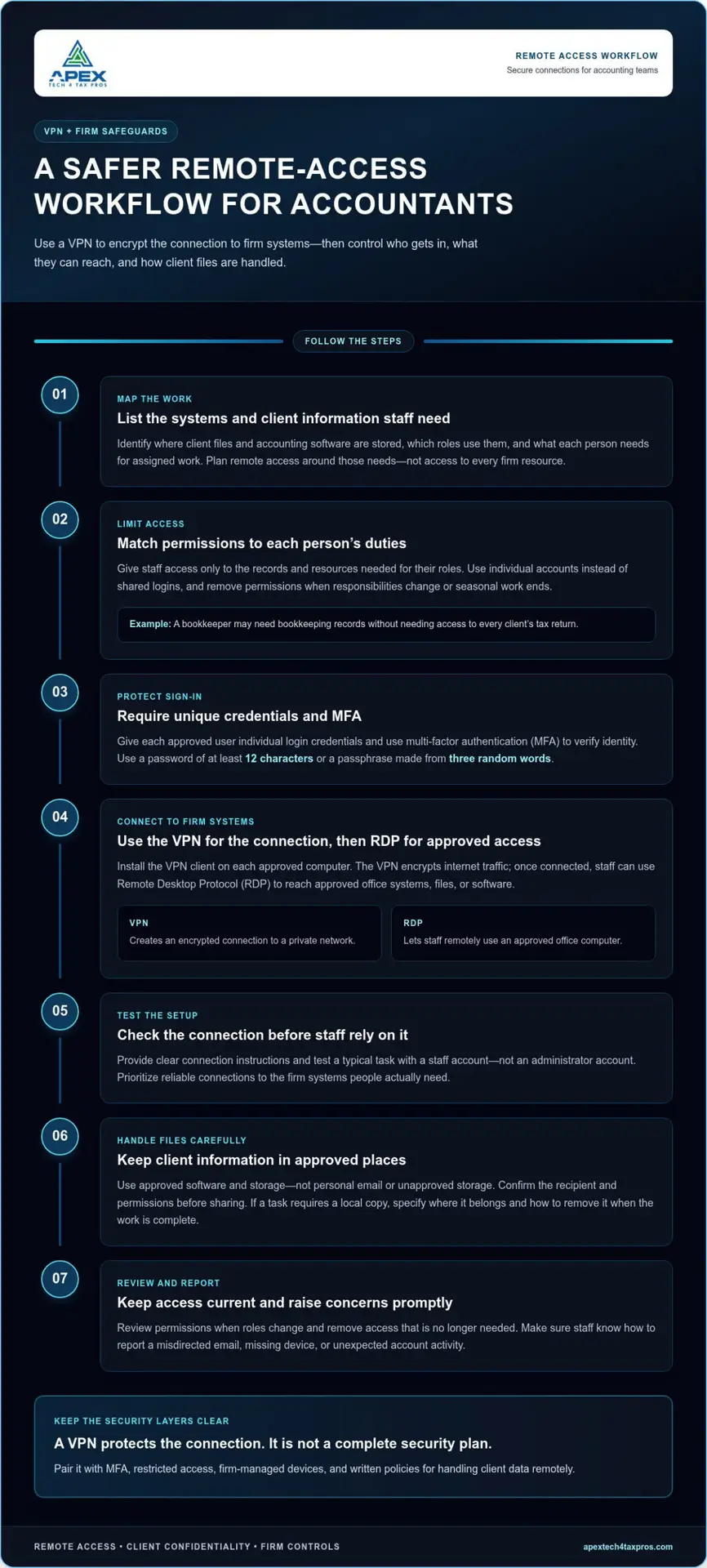
Remote accountants need secure access to files, tax records, and accounting software. Identify needed systems, then limit access to approved users and firm resources. A private network connection encrypts internet traffic, but pair it with unique credentials and multi-factor authentication (MFA). Use a password of at least 12 characters or a passphrase made from three random words. A VPN for accountants working remotely should match the firm’s actual access needs.
For an office computer, a VPN can provide a protected connection for Remote Desktop Protocol (RDP). The accountant signs in with unique credentials, then uses RDP to access approved files or software. This setup works best when access is limited to authorized staff. Install VPN client software on each approved computer, provide clear connection instructions, and test the setup before employees rely on it.
Best VPNs for accountants working remotely in 2026: Choose a VPN that encrypts traffic, supports individual logins, and lets the firm control access. Prioritize reliable connections to firm systems over a long feature list.
VPN vs. zero-trust network access: A VPN connects a device to a private network, while zero-trust access can limit connections to specific applications or resources. Choose based on the systems accountants need and the boundaries your firm sets.
Business VPN vs. consumer VPN: A business VPN is generally better suited to managed access to firm resources. A consumer VPN primarily protects an individual’s internet connection, so it may not provide the controls a firm needs.
U.S. privacy and security rules: Treat VPN use as one safeguard, not a complete compliance program. Pair it with MFA, restricted access, and written policies for handling client data remotely.
Business VPN cost per user: Per-user pricing depends on licensing, administration, and support. Compare recurring costs with the access controls and management tools your firm needs.
Risks and limitations: A misconfigured VPN can expose firm resources, while downtime can disrupt work. Keep devices updated, separate work access from personal use where possible, and give staff tested connection instructions.
2. Protecting client trust and confidential information
Client trust depends on more than protecting records during transmission. Tax returns, bank details, identification documents, and correspondence can also be exposed through careless storage or sharing. Nearly 70% of small and medium-sized businesses are cyberattack victims, making consistent handling practices important for accounting firms. A clear process helps staff treat every client file as confidential, whether it appears in accounting software, email, or a printed document.
Set permissions according to job responsibilities. For example, a bookkeeper may need access to bookkeeping records but not every client’s tax return. Ask staff to verify recipients before sending files, and use approved channels instead of personal email or unapproved storage. For shared work, name files clearly and keep sensitive information out of subject lines and filenames that others could see.
- At intake: Collect only the documents needed for the client’s work and place them in the firm’s approved location.
- During preparation: Keep records inside approved software, and lock the screen when stepping away from a workstation.
- When sharing: Confirm the recipient and permission before sending a document or granting folder access.
- After a concern: Tell staff how to report a misdirected email, missing device, or unexpected account activity.
Training helps staff follow these steps under deadline pressure. Use realistic examples, such as an email that appears to come from a client and requests a change to payment details. Staff should pause, verify the request through a known contact method, and report suspicious messages rather than replying or opening attachments. Review procedures when software or work practices change.
A written plan can assign responsibility for protecting client information and documenting these practices. A written security plan for protecting client information helps connect staff expectations with the firm’s day-to-day handling of confidential records.
3. Accessing firm servers and confidential client data remotely
Start by mapping where client information is stored and who uses it. A tax return may involve source documents, bookkeeping records, and completed forms kept in separate systems. Record which roles need access to each location, then grant access only for assigned duties. A VPN for accountants working remotely should support this access design, not provide broad access to every firm resource.
Review permissions when employees change roles or seasonal responsibilities end. For example, a staff member assigned to one client group shouldn’t retain access to unrelated folders. Use individual accounts instead of shared logins, so the firm can review who accessed a record and update the right person’s permissions.
- Document which systems contain client files and who is responsible for them.
- Assign access according to each employee’s current duties.
- Remove permissions that are no longer needed.
- Test a typical task using a staff account, not an administrator account.
Decide how accountants should handle local copies. If a task requires downloading a document, specify the approved storage location and how to remove the copy when the work is complete. If staff work in a virtual environment, document where files are saved and how completed work is returned to firm records.
Make the process practical during busy periods. Provide a brief reference showing which system to use for common tasks, such as reviewing a client document or updating an accounting record. Include a way to report access that seems broader than necessary. Review the access map and permissions when software, staff duties, or client workflows change, so access continues to match actual work.
4. How VPNs mask IP addresses and create encrypted data tunnels
A virtual private network (VPN) routes a computer’s internet traffic through an encrypted connection to a VPN server. Websites and services generally see the server’s public IP address rather than the device’s original address. This can make the device’s network location less visible, but it doesn’t make the user anonymous or protect every account and file.
The encrypted tunnel protects data traveling between the computer and the VPN endpoint. For example, an accountant using public Wi-Fi to connect to the firm’s VPN gains protection for traffic on that connection. The VPN doesn’t necessarily encrypt data beyond its endpoint, secure a compromised computer, or stop an employee from sharing a file with the wrong person.
What security features should accountants look for? Look for strong encryption, a well-supported VPN protocol, individual user accounts, and multi-factor authentication. AES-256 is an encryption option, while WireGuard is a VPN protocol; they serve different roles, so assess both the encryption and connection setup.
Does a VPN protect client financial data on public Wi-Fi? It encrypts traffic between the device and VPN endpoint, helping protect information in transit over public Wi-Fi. It doesn’t protect against phishing, unsafe downloads, or access to an unlocked device.
For an accounting firm, a VPN’s value depends on how it works with existing access controls. Require staff to sign in individually, restrict access to approved firm resources, and keep work devices updated. Test the connection using the software and workflows employees need, such as opening accounting applications and client records. If the tunnel drops, staff should pause work involving confidential data until the secure connection is restored.
Write down who may use the VPN, which firm resources it allows, and how staff should report access problems. A customized written security plan can document those remote-access procedures as part of the firm’s broader data-protection practices.
Apex Tech 4 Tax Pros: Customized Written Information Security Plan (WISP)
Apex Tech 4 Tax Pros creates a Customized Written Information Security Plan (WISP) that helps accounting firms document how they protect client information, including during remote access. Use a WISP to record who may connect to firm systems, which safeguards support VPN use, and what employees should do if a device or account is compromised.
If your remote-work procedures need clearer documentation, a customized WISP for your firm can put responsibilities and security practices into a written plan. Cybersecurity Awareness Training can help staff follow those procedures, while Risk Assessments can identify areas needing attention. Secure Cloud Backup can support the firm’s data-protection approach.
For help documenting your firm’s remote-work safeguards, contact Apex Tech 4 Tax Pros or visit apextech4taxpros.com.
Make remote access part of your firm’s routine
Choosing a VPN for accountants working remotely is only the first step. Next, turn remote-access decisions into everyday practices your team can follow, from assigning permissions to handling a lost device or unexpected login. Clear documentation helps keep those practices consistent as staff, software, and work arrangements change.
Apex Tech 4 Tax Pros can help firms document safeguards in a Customized Written Information Security Plan, identify weaknesses through Risk Assessments, and reinforce employee practices with Cybersecurity Awareness Training. These steps connect technical controls with the people and procedures that protect client records.
Choose a practical next step for your firm’s remote-work security. Contact Apex Tech 4 Tax Pros to discuss your information-security needs and build a clearer path forward.
Frequently Asked Questions
How can accounting firms work remotely and securely?
Accounting firms can support secure remote work with clear routines for every employee and device. Before starting work, staff should use firm-approved equipment, follow the approved connection process, and confirm access to scheduled applications. Keep taxpayer files in approved storage rather than personal email or desktop folders. At sign-off, close work sessions and lock the computer so confidential records aren’t left open.
How can a VPN help you and your firm?
A VPN helps protect information moving between an accountant’s device and the VPN endpoint, which is useful on networks the firm doesn’t control. Staff can establish the firm-approved connection before opening a work application from a shared workspace. A VPN doesn’t verify whether a login is legitimate or a file share is appropriate, so account permissions and careful handling still matter.
What is a VPN?
A VPN, or virtual private network, creates an encrypted connection between a device and a VPN server, then routes network traffic through that server. Think of it as a protected passage for data in transit, not the accounting application itself. A VPN isn’t a remote desktop or backup service either; those have different functions and need their own controls.
How should accounting firms configure VPN access to accounting software and cloud services?
Set access according to whether each application runs on the firm’s network or in the cloud. Define the approved route for office-based software, then use each cloud service’s organization-approved sign-in and access controls. Test a representative workflow with a non-sensitive record: sign in, save a change, and confirm it syncs. Document troubleshooting steps and tell staff whom to notify if access fails.
Best VPNs for accountants working remotely in 2026
Choose a VPN that encrypts traffic, supports individual logins and multi-factor authentication, and lets the firm restrict access to approved resources. Prioritize reliable connections to firm systems and assess the encryption and VPN protocol, such as AES-256 and WireGuard.