
What if the most critical document in your tax practice this year isn’t a complex return, but a single report that proves you’ve checked your digital locks? For many firms, the thought of technical audits brings a sense of dread, especially with FTC fines reaching up to $100,000 per violation. You likely feel the weight of these regulations but lack the time to become an IT expert overnight. Learning how to conduct a security risk assessment for a CPA firm is the first step toward lifting that burden and ensuring your practice remains compliant with IRS Publication 4557.
To conduct this assessment, you must identify every location where client data is stored, test your current safeguards like multi-factor authentication and encryption, and document any gaps in a written report. We agree that your focus should be on your clients, not deciphering technical manuals. This guide provides a clear, step-by-step roadmap to evaluate your vulnerabilities and meet federal standards without the overwhelm. We will cover the specific requirements of the FTC Safeguards Rule and show you how to turn your assessment into a completed Written Information Security Plan (WISP) for 2026.
Key Takeaways
- Master how to conduct a security risk assessment for a cpa firm by systematically inventorying your digital assets and identifying where sensitive client data truly resides.
- Understand the “Reasonable Safeguards” standard to ensure your security measures are appropriately scaled to the size and complexity of your specific tax practice.
- Learn to differentiate between internal vulnerabilities, such as human error, and external threats like phishing to build a more resilient defense.
- Discover how to bridge the gap between identifying risks and implementing solutions to satisfy IRS and FTC documentation requirements.
- See exactly how your assessment results form the “Risk Mitigation” core of your mandatory Written Information Security Plan (WISP).
What Is a Security Risk Assessment for CPA Firms?
A security risk assessment is a systematic review of how your firm handles sensitive data to identify gaps before they become breaches. It’s not just a simple technical scan or a one-time software check; it’s a formal process of identifying, estimating, and prioritizing risks to your firm’s daily operations. When you learn how to conduct a security risk assessment for a CPA firm, you’re essentially performing a professional diagnostic on your digital health. This activity serves as the necessary foundation for your Written Information Security Plan (WISP). While the risk assessment is the investigative work you do to find vulnerabilities, the WISP is the permanent record and roadmap that tells the IRS exactly how you plan to manage those risks.
It’s easy to get tangled in federal acronyms, but the distinctions are clear. The FTC Safeguards Rule is the actual federal law that mandates these protections for any business acting as a financial institution. In contrast, IRS Publication 4557 serves as your practical guidance, providing the standards and “Security Six” checklist you need to follow. Think of the Rule as the legal “why” and the Publication as the technical “how.” Conducting a thorough risk assessment ensures you aren’t just guessing at compliance but are meeting the specific legal thresholds required for your practice in 2026.
Why is a Risk Assessment Mandatory in 2026?
The regulatory environment has shifted toward proactive accountability. Under the FTC Safeguards Rule, CPA firms are classified as financial institutions, which means you must designate a qualified individual to oversee a written security program. IRS Publication 4557 reinforces this by requiring tax professionals to protect taxpayer data as a condition of their professional standing. Most importantly, completing an annual assessment is now a core requirement for your PTIN renewal. Without a documented review of your firm’s vulnerabilities, you risk audit failures and potential IRS penalties that can disrupt your entire tax season. This process is designed to give you peace of mind, ensuring your clients’ most sensitive information remains under your protection.
The Core Components of an IRS-Compliant Risk Assessment
Understanding how to conduct a security risk assessment for a CPA firm begins with a clear view of your digital and physical assets. You can’t protect what you haven’t identified. This is why a comprehensive “Inventory of Assets” serves as the foundation for your entire security posture. This inventory should list every laptop, server, and cloud-based application used to process taxpayer data. By mapping these assets, you can categorize your risks into the three essential pillars defined by federal guidance: Administrative, Technical, and Physical safeguards.
The IRS and FTC don’t expect a small practice to maintain the same infrastructure as a global corporation. Instead, they look for “Reasonable Safeguards.” This means your assessment should be scaled to the size and complexity of your firm. For smaller offices, IRS Publication 5708 provides a tailored framework that simplifies these requirements. It’s helpful to remember a guiding principle for your documentation: “An effective risk assessment does not seek to eliminate every possible threat but to manage them through informed, documented decisions.” This approach provides a clear audit trail that satisfies FTC Safeguards Rule requirements while protecting your professional standing.
Administrative and Technical Safeguards
Administrative safeguards focus on your firm’s human element and operational policies. During your assessment, you should evaluate employee access levels to ensure “need to know” protocols are strictly enforced. On the technical side, you must verify that your firewalls are active and that Multi-Factor Authentication (MFA) is required for every system access point. Many firms are now moving toward a Secure Virtual Desktop to centralize these technical controls and simplify the process of vulnerability scanning. This move often provides an immediate sense of relief from the burden of managing individual hardware security.
Physical and Environmental Security
Physical security is just as vital as your digital firewall. Your assessment needs to review how you control office access and whether you have a clear-desk policy to keep sensitive documents out of sight. You also need a defined process for the secure disposal of old hardware. For firms with remote staff, it’s critical to assess the risks associated with mobile devices and tablets used for tax preparation. If you’re feeling overwhelmed by the inventory process, starting with a professional IT assessment can give you the clarity needed to move forward with confidence.
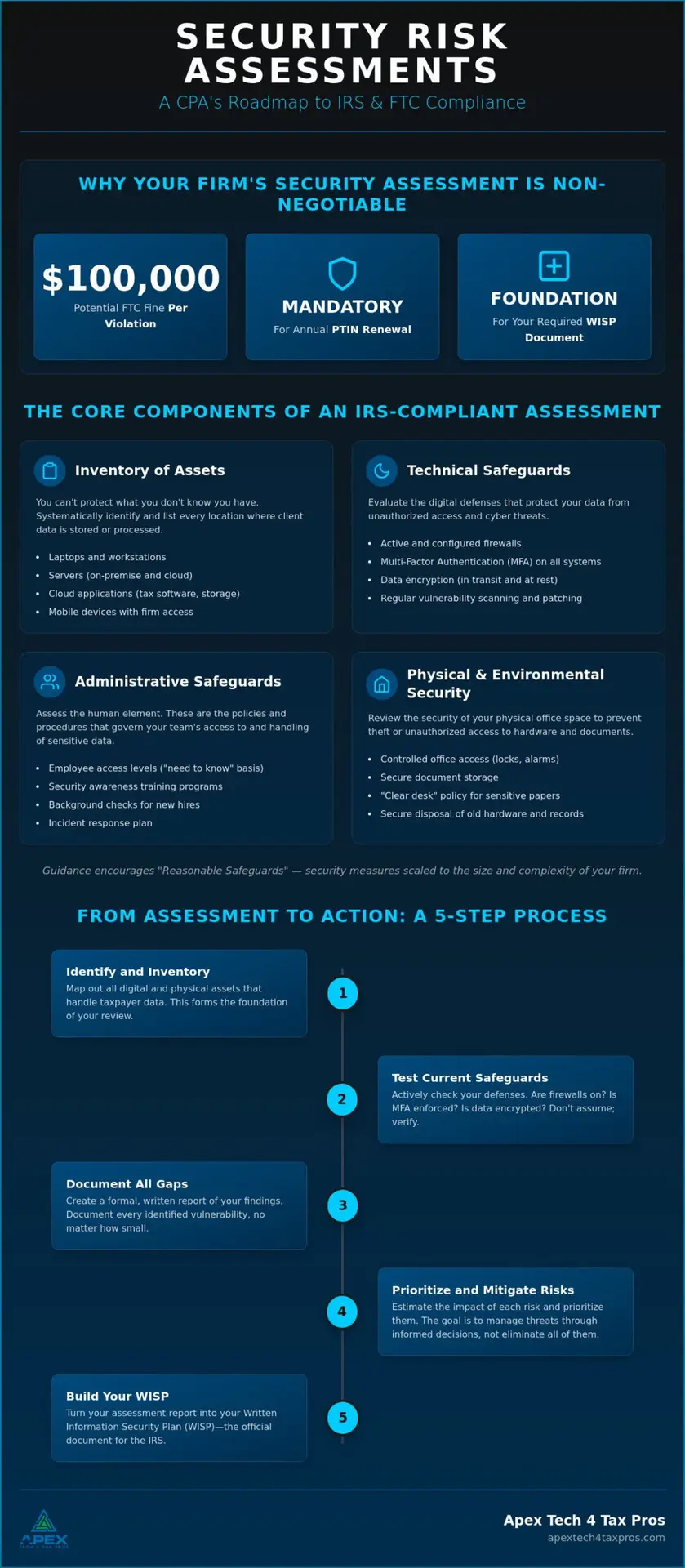
Step-by-Step: How to Conduct Your Firm’s Security Risk Assessment
Moving from regulatory theory to practice requires a methodical approach. Once you understand the landscape, you need a practical plan for how to conduct a security risk assessment for a CPA firm. This process isn’t about finding every tiny flaw; it’s about identifying the most likely paths a data breach could take. By following these four steps, you can turn a complex requirement into a manageable project for your firm.
- Step 1: Identify and Inventory. Create a comprehensive list of all hardware, software, and cloud services. You must know exactly where client data resides, whether it’s in a local tax software database or a shared cloud folder.
- Step 2: Identify Threats. Look for both internal and external vulnerabilities. Internal risks often involve staff errors, which account for 74% of data breaches according to 2026 industry data. External threats include phishing and ransomware attacks.
- Step 3: Analyze Controls. Evaluate your existing defenses. Determine if your current Secure Office Networks and MFA protocols are sufficient to stop the threats you identified in Step 2.
- Step 4: Document and Prioritize. Rank your risks based on their likelihood and potential impact. This documentation creates a remediation roadmap that shows regulators you’re making informed, proactive decisions.
Gathering Your Compliance Team
You don’t have to tackle this alone. Your team should include firm partners, your IT lead, or a qualified third-party consultant. The FTC Safeguards Rule specifically requires you to appoint a “Designated Individual” in writing to oversee your security program. This person is responsible for the results of the assessment and ensuring the firm follows through on the remediation roadmap. Having a clear leader prevents compliance tasks from falling through the cracks during the busy tax season.
Using IRS Publication 5708 as a Guide
For smaller practices, IRS Publication 5708 provides helpful checklists that align with the requirements for a small business WISP. These tools are excellent for a baseline review. However, keep in mind that professional risk assessments provide a deeper level of scrutiny than self-checklists can offer. If you want to ensure your firm is fully protected and ready for an audit, book a professional WISP assessment with our Dallas-based team today.
From Assessment to Action: Building Your WISP
Once you finish your evaluation, the results shouldn’t just sit in a folder. The data you gathered while learning how to conduct a security risk assessment for a CPA firm directly populates the “Risk Mitigation” section of your Written Information Security Plan (WISP). This is where you transform identified vulnerabilities into active defenses. For example, if your assessment revealed that staff struggle to identify sophisticated phishing emails, you can bridge that gap by implementing Cybersecurity Awareness Training. This turns a regulatory requirement into a practical shield for your firm’s reputation.
To make this transition as smooth as possible, we offer specialized support through our Seasonal ($649.99) and Yearly ($1,099.99) subscriptions. Both options include a free customized WISP, allowing your assessment results to flow into a professional document without extra manual work. Using a Custom WISP Template saves you dozens of hours and ensures your practice meets the high standards required by federal regulators. We also work closely with our sister company, APEX Tax Solutions, to make sure your security protocols never interfere with the efficiency of your tax preparation services.
Maintaining Your Compliance Posture
Security isn’t a “set it and forget it” task. You should set a recurring calendar reminder to review your assessment every year, ideally before the PTIN renewal season begins. Certain triggers require an immediate update. If you hire new seasonal staff or switch to a different tax software provider, you should perform a mini-assessment of those specific changes. Keeping your documentation current ensures that if the IRS ever requests your plan, you’re ready to provide an accurate record without a last-minute scramble.
When to Seek Professional Help
While some firms choose a DIY approach, distinguishing between a self-check and an expert-led review is important. A professional service provides a deeper level of technical scrutiny that can uncover hidden risks in your network. More importantly, it “lifts the burden” of drafting complex technical documentation, allowing you to focus on your clients. If you want the peace of mind that comes with a perfectly compliant program, Book a WISP Assessment with Apex Tech 4 Tax Pros or email info@at4tp.com to secure your practice today.
Securing Your Practice for the Future
We’ve walked through the essential steps of inventorying your digital assets and mapping them to the IRS “Security Six” and FTC Safeguards Rule. By documenting your vulnerabilities and prioritizing your response, you move from a state of uncertainty to a position of professional strength. Mastering how to conduct a security risk assessment for a cpa firm is the single most effective way to protect your clients and your professional standing in 2026.
With over 20 years of combined tax and IT experience, our Dallas-based team provides IRS Publication 4557 compliant solutions trusted by bilingual tax professionals nationwide. We understand the high-stakes environment of your office and are here to help you navigate these technical requirements with ease. It’s our mission to ensure your sensitive data is in safe, capable hands so you can focus on what you do best. Book Your Professional Risk Assessment Today.
You’ve already done the hard work of educating yourself on these complex regulations. Now it’s time to put that plan into action and enjoy the peace of mind you deserve. Your secure, compliant future is just one assessment away.
Frequently Asked Questions
How often should a CPA firm conduct a security risk assessment?
You should conduct a security risk assessment at least once every year or whenever your practice undergoes a significant change. These changes include moving your office, hiring new seasonal staff, or switching to a different tax software provider. Learning how to conduct a security risk assessment for a CPA firm on a regular schedule ensures that your safeguards stay ahead of evolving cyber threats and keep you in constant compliance with IRS standards.
Is a security risk assessment the same as a WISP?
No, these are two distinct but related requirements. A security risk assessment is the investigative process you use to find digital and physical vulnerabilities, while a Written Information Security Plan (WISP) is the formal document that outlines your plan to manage those risks. Think of the assessment as the medical diagnostic and the WISP as the treatment plan. You cannot produce an accurate, IRS-compliant WISP without first completing a thorough assessment of your firm’s current environment.
What are the penalties for not having a risk assessment under the FTC Safeguards Rule?
Non-compliance with the FTC Safeguards Rule can lead to civil penalties of up to $100,000 per violation. Beyond these federal fines, the IRS can also impose civil penalties under IRC Section 6713, which are $250 per incident. Having a documented risk assessment is your primary defense against these financial burdens. It proves to regulators that you’ve taken proactive, reasonable steps to protect sensitive taxpayer data.
Can I use a free template to conduct my own risk assessment?
Using a free template is a great way to start learning how to conduct a security risk assessment for a CPA firm, but it often lacks the technical depth needed for a full audit defense. While government-provided checklists help you understand the basics, they don’t provide the specialized network testing that a professional review offers. Many firms find that a customized approach provides better long-term protection and relief from the burden of complex technical documentation.
What is the most common security gap found in accounting firms?
The most common security gap is the human element, specifically a lack of consistent cybersecurity awareness training for staff. Industry data from 2026 shows that 74% of data breaches involve a human element, such as an employee clicking a phishing link. Other frequent gaps include missing multi-factor authentication (MFA) on all cloud platforms and outdated software that hasn’t been patched against known vulnerabilities. Addressing these gaps is a core part of the risk mitigation process.