
A convincing message can still be fraudulent, so pause before acting on unexpected tax-related emails. Phishing scams targeting tax pros may imitate the IRS, a client, a colleague, or a tax software provider to obtain sensitive information. Verify unusual requests through a trusted channel, and preserve suspicious messages for reporting instead of replying or following their instructions.
Tax work depends on timely communication, but taking a moment to check an unexpected request can help prevent a rushed decision from putting client records or firm accounts at risk. A familiar-looking message is not the same as a request you have independently verified.
This article explains how to recognize impersonation patterns, understand EFIN-focused messages, and report suspicious communications to the appropriate organizations. Prepared procedures and staff awareness can also help your firm respond consistently when an unfamiliar message arrives.
Key Takeaways
- Use secure document-sharing methods and verify new-client identities before opening unexpected files.
- Recognize how impersonators use urgent messages and fake software requests to pursue credentials or EFIN information.
- Know which details to preserve and which organizations to notify when a suspicious message or possible data theft occurs.
- Build stronger, repeatable safeguards with a tailored WISP, cybersecurity awareness training, risk assessments, and secure cloud backup.
What can you do to protect yourself?
Protecting a tax practice means securing client information at every step, from the first contact through federal return filing. Verify unexpected requests, avoid unnecessary email attachments, and use secure methods to receive tax documents.
Protecting Tax Professionals and Clients
Protecting a practice means reducing the chance that a fraudulent message exposes a preparer’s accounts or a client’s tax records. The IRS security approach focuses on safeguarding taxpayer data and maintaining a written security plan. Define who can access records, how they are stored, and how staff should handle suspicious emails. Clear safeguards help protect both the tax professional and the people whose returns the firm prepares.
Use a secure client portal for uploads rather than asking clients to send sensitive documents as email attachments. A portal gives clients a consistent place to submit records and helps staff avoid handling files received in unexpected messages. Keep cybersecurity training current so preparers can recognize suspicious requests, including during busy filing periods.
Recognizing Impersonation Attempts
Impersonation attempts may appear to come from a prospective client, an existing client, or a colleague. A new prospect might send an unexpected message with a tax document attached; a familiar name might appear on a request that differs from the sender’s usual communication. Verify a new client’s identity before opening attachments, and confirm unusual requests through a known contact method.
Watch for urgency, unexpected links, and requests to change account details or share credentials. A colleague’s display name does not verify who sent the email. If a message asks for sensitive information or immediate action, pause and verify it internally before responding.
Preventing Phishing and Account Takeovers
Account-security safeguards can make stolen passwords less useful and reduce exposure to harmful files. Enable multi-factor authentication for email and tax software accounts, so signing in requires an additional identity check beyond a password. Use unique passwords, keep security software active, and avoid unexpected links or attachments, even when a message appears related to a client’s returns.
For tax software or EFIN requests, verify the request with the provider through its established portal or a trusted contact method. Don’t email EFIN documentation or follow instructions to disable security tools. The consequences and client-notification duties after a breach depend on the information exposed and the rules that apply. Preserve incident details and identify affected records promptly so the firm can determine its next steps.
Fraudulent emails claiming to be from the IRS
Phishing scams tax pros encounter may impersonate the IRS, a state tax agency, or a software provider. Treat unexpected requests for credentials, client records, or EFIN information as unverified until you check them through a trusted channel.
The IRS Dirty Dozen alerts taxpayers and tax professionals to emerging scams and schemes. For state tax agency alerts, rely on the agency’s official communications, not an email’s logos or display name.
IRS-Impersonation Messages
IRS impersonation messages are emails, texts, or other communications that falsely claim to represent the Internal Revenue Service or a tax agency. They may pressure preparers to disclose information, open a file, or follow a link.
A message might claim that a tax return needs correction or an account requires immediate attention. Phishing scams tax pros receive can imitate familiar agency language, but that appearance does not prove a message is legitimate. Don’t respond through the message. Verify its claim independently before acting.
Phishing Warning Signs
Warning signs include unexpected requests for EFIN documents, e-Services credentials, or passwords. A sender might pose as a software provider and ask you to fax EFIN information. Look for urgency, unfamiliar sender addresses, unexpected attachments, or instructions to disable security tools.
Stolen email credentials can expose conversations and let scammers impersonate a preparer or colleague. A link may capture a password, while an attachment may install malware. Don’t enter credentials through an email link; access the service using its established sign-in process.
Reporting IRS-Related Phishing
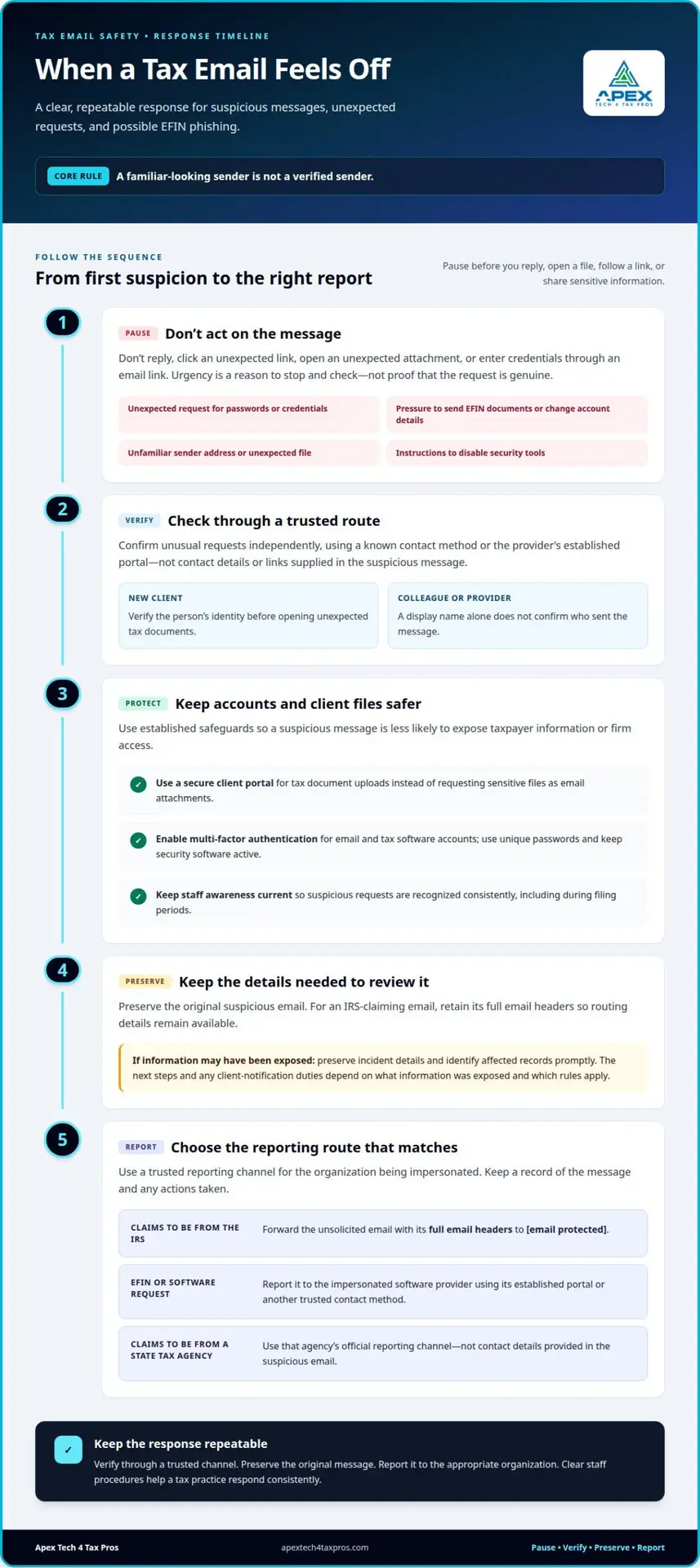
To report unsolicited emails claiming to come from the IRS or an IRS-related function, send the message with its full email headers to phishing@irs.gov, as the Internal Revenue Service instructs. Preserve the original email so its routing details remain available.
Treat unexpected EFIN-related messages cautiously and verify any request through a trusted channel. Report it to the impersonated software provider using a trusted contact method. For messages posing as a state tax agency, use that agency’s official reporting channel. Keep a record of the message and any actions taken.
How EFIN phishing scams target tax professionals
EFIN phishing uses impersonation to obtain filing credentials or firm identifiers. Knowing what scammers seek can help tax professionals understand how a single message may threaten client records and returns.
EFIN Phishing Tactics
An EFIN scam often begins with an email pretending to come from a tax software provider. It may ask the preparer to fax EFIN information or disclose credentials. Scammers also target PTINs and e-Services usernames and passwords. Verify EFIN-related requests through the provider’s established portal or a trusted contact method, not by following the message’s instructions.
EFIN information can help criminals impersonate a firm and file fraudulent returns to claim refunds. Tax professionals have faced targeted email phishing schemes, which tend to increase during filing season but can happen year-round. Treat requests involving an EFIN as sensitive, even when the sender’s display name looks familiar.
Identity Theft Against Tax Professionals
Identity theft targeting tax professionals involves stealing personal or account information to misuse the preparer’s access or identity. Stolen credentials can give a criminal access to tax-related accounts, client information, or email conversations. That access can expose records used to prepare returns and help scammers impersonate the tax professional.
Watch for unexpected requests involving e-Services, tax software, or email credentials. A message asking you to share a password or change account access needs independent verification. If a credential may have been exposed, follow the affected service’s account-security process and review activity for unfamiliar access.
Tax Scams Targeting Preparers
Scams targeting preparers may combine identity theft with technical pressure. A caller or message might try to persuade staff to share credentials, disable security software, or install remote-access tools such as AnyDesk or TeamViewer. These actions can give an outsider access to the preparer’s system and tax data.
Malicious attachments in messages from supposed new clients may contain credential-stealing malware or ransomware. Treat unexpected files as a risk, especially when the sender urges immediate action. Verify a prospective client through a separate, trusted channel before handling files, and keep security protections enabled during filing work.
Reporting phishing to the IRS and software providers
A useful report preserves the message and sends it to the organization being impersonated. If a tax-related email requests EFIN details or threatens a refund, don’t reply. Retain the original and record what happened.
For an unsolicited email claiming to come from the Internal Revenue Service or an IRS-related function, save the message and send it as an attachment to phishing@irs.gov, including its full email headers. Headers help show where the email originated and how it was routed. Keep the original rather than replacing it with a screenshot or copied text.
Also report an EFIN scam to the tax software provider being impersonated. Use contact details from the provider’s established portal or other trusted records, not the suspicious email. Describe the request and sender address, and note whether anyone replied, clicked a link, or shared information.
If client data may have been stolen, notify your local IRS Stakeholder Liaison as soon as possible. Record the message, relevant account activity, affected systems, and steps taken. An incident timeline helps the firm explain what happened and identify which tax returns or client records may be involved.
If an IRS-related scam caused monetary losses, report the incident to the Treasury Inspector General for Tax Administration, the Federal Trade Commission, and the Internet Crime Complaint Center. Include the scammer’s contact details and transaction records when available. Reporting does not replace the firm’s internal response to suspected account access or exposed client information.
A clear reporting process makes the response easier to follow under filing-season pressure. A focused tax office risk assessment can help identify gaps in incident handling and information security procedures.
Apex Tech 4 Tax Pros
Apex Tech 4 Tax Pros helps tax firms turn phishing concerns into practical security measures. A Customized Written Information Security Plan (WISP) documents how a firm approaches protecting client information. Cybersecurity Awareness Training helps staff recognize suspicious messages and follow consistent security practices.
When your firm needs to identify weaknesses in its processes, Risk Assessments can help pinpoint gaps to address. Secure Cloud Backup supports the protection of important firm data and connects security planning with everyday tax-office operations.
Together, these offerings support a more organized approach to staff awareness, risk review, written security practices, and data protection. Consider which area needs attention first based on your firm’s workflows and current security procedures.
Make phishing readiness part of your firm’s routine
Preparedness works best when it fits the way your office operates. Set a regular time to review who handles security questions, how staff raise concerns, and where response decisions are recorded. Clear responsibilities help your team act deliberately, rather than improvise, when a suspicious message arrives during a busy filing period.
Apex Tech 4 Tax Pros supports tax practices nationwide with cybersecurity guidance shaped by more than 20 years of combined tax and IT experience. The team provides comprehensive, bilingual support for practices across the country. That combination helps connect the realities of tax-office workflows with the technical and documentation needs involved in protecting sensitive business information.
Choose a next step that suits your firm’s needs. Contact Apex Tech 4 Tax Pros by emailing info@at4tp.com to discuss an assessment and practical ways to strengthen your security approach. A steady process can make your team’s next decision clearer and help keep protection part of everyday operations.
Frequently Asked Questions
What should you do?
Pause before acting on any unexpected message involving taxpayer information, EFIN details, or account access. Don’t reply, open attachments, or follow links in the message. Verify the request through a contact method you already trust, then preserve the original email if it appears fraudulent. If you already interacted with it, promptly tell your firm’s designated security contact and follow your incident response process.
What phishing scams commonly target tax professionals?
Common schemes include fake new-client inquiries with malicious attachments, messages impersonating existing clients or colleagues, and emails posing as tax software providers to obtain EFIN information. Some seek email or e-Services credentials; others use harmful links or attachments to install malware. A scam may also pressure staff to disable security tools or install remote-access software such as AnyDesk or TeamViewer.
How do phishing emails and texts targeting tax pros trick recipients?
Scammers make messages feel familiar or urgent by using a client’s name, a colleague’s display name, or IRS-related language. They may claim a return needs attention or direct the recipient to a sign-in page. A link can capture an email address and password, while an attachment may carry malware. Check the sender’s actual email address and verify unexpected instructions independently.
What should a tax preparer do after clicking a phishing link or sharing credentials?
Act promptly: notify your firm’s internal security contact, identify the account or device involved, and follow the provider’s process to secure the affected account. Change exposed credentials through the legitimate sign-in page, not a message link, and review account activity for unfamiliar access. If a device may have downloaded malware, stop using it for client work and involve the person responsible for the firm’s incident response.
How can tax professionals report phishing to the IRS, state agencies, and law enforcement?
Send unsolicited IRS impersonation emails with full headers as an attachment to phishing@irs.gov, following the Internal Revenue Service’s reporting instructions. Report an impersonated software provider through its trusted reporting channel, and use the state tax agency’s official reporting route for state impersonation. If an IRS-related scam caused monetary loss, report it to TIGTA, the FTC, and the Internet Crime Complaint Center.
What are current IRS and state tax agency phishing scam alerts for tax preparers?
The IRS Dirty Dozen alerts taxpayers and tax professionals to emerging scams and schemes. For state tax agency alerts, rely on the agency’s official communications, not an email’s logos or display name.