
Last tax season, an industry colleague realized too late that even the strongest digital firewall means nothing if someone can simply walk away with a laptop from an unmonitored front desk. Based here in Dallas, our team at Apex Tech 4 Tax Pros has spent over 20 years helping tax professionals navigate the high-stakes intersection of tax law and data security. We understand that the fear of EFIN revocation is a heavy burden, especially when IRS language feels vague and the perceived cost of compliance seems to climb every year. To help you find relief from that burden, we have developed a comprehensive physical security checklist for a tax office that turns complex federal mandates into a manageable, step-by-step audit.
I promise that by the end of this guide, you will have a clear, documented plan to secure your practice against physical breaches and satisfy IRS Pub 4557 requirements for the 2026 filing season. We are going to cover everything from perimeter security and “Clean Desk” policies to personnel vetting and media disposal. Most importantly, you will see how your Written Information Security Plan (WISP) serves as the ultimate safety net for your practice, giving you the peace of mind to focus on what you do best: serving your clients and growing your firm.
Key Takeaways
- Understand the critical distinction between the Safeguards Rule and your WISP so you can avoid penalties while meeting federal law.
- Use our physical security checklist for a tax office to audit your building’s perimeter, commercial locks, and alarm systems.
- Learn how to implement a “Clean Desk Policy” and media security protocols to protect sensitive paper records and hardware.
- Discover why employee background checks and vetting are essential physical safeguards required by IRS Publication 4557.
- See how a customized WISP provides the documented evidence you need to prove your compliance during an IRS audit.
What are the IRS physical security requirements for tax professionals?
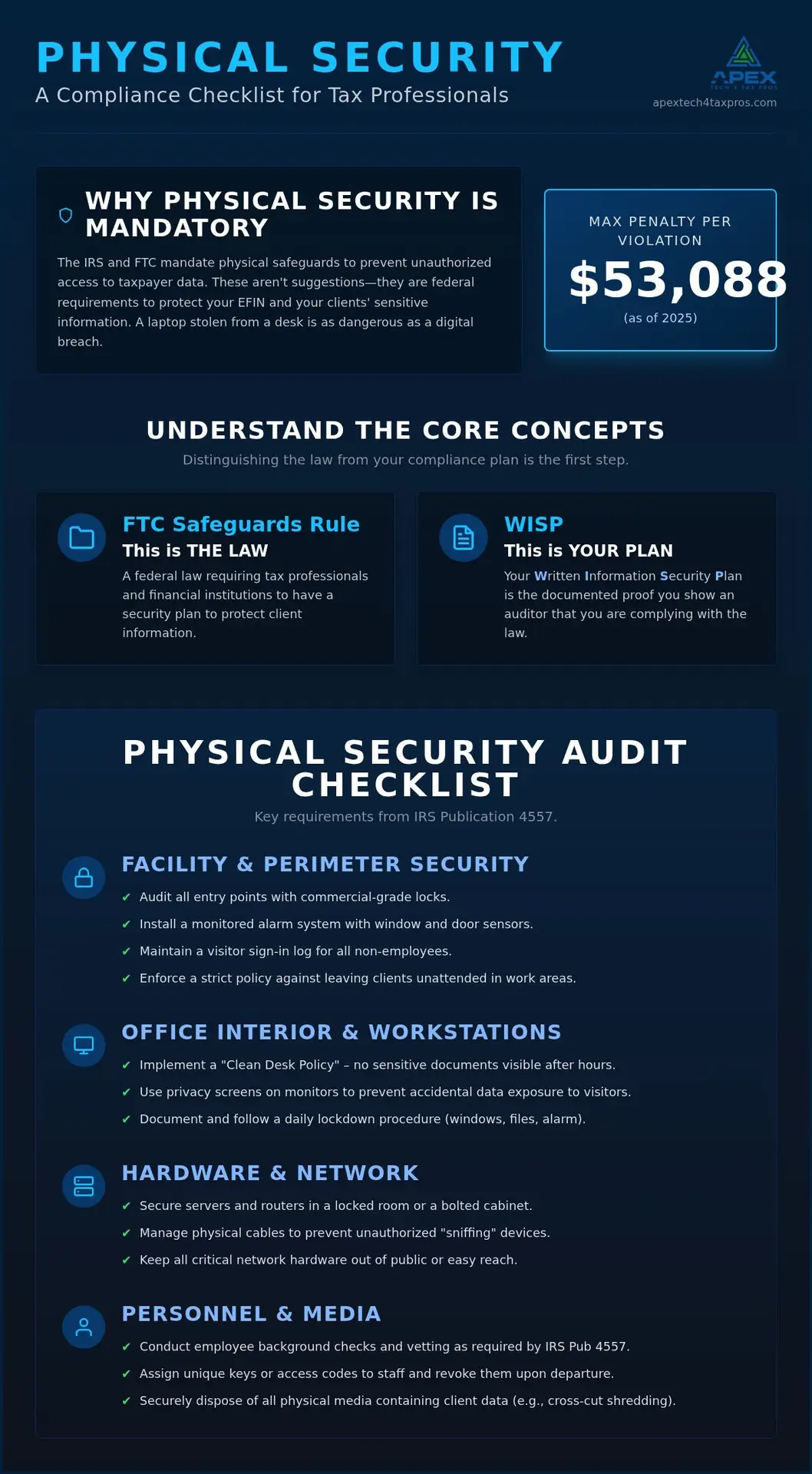
IRS physical security requirements aren’t just suggestions; they’re the “Facility Safeguards” mandated by Publication 4557 and the FTC Safeguards Rule. These rules exist to prevent unauthorized people from accessing client data. It’s helpful to distinguish between the Safeguards Rule, which is the federal law, and your Written Information Security Plan (WISP), which is your documented strategy for following that law. With the maximum penalty for non-compliance reaching $53,088 per violation as of 2025, your WISP serves as the evidence you’d show an auditor to prove you’ve done your homework.
How do I comply with the FTC Safeguards Rule physically?
Under the updated FTC regulations, physical safeguards involve protecting the actual areas where taxpayer data is stored. You’re required to designate a “Qualified Individual” to oversee these physical security concepts within your firm. Whether that’s you or a trusted colleague, this person ensures your locks, cameras, and filing systems are up to par. Our Custom WISP Template is the perfect foundation for formally documenting this role and your specific security protocols.
Why is physical security included in IRS Publication 4557?
The IRS includes a dedicated “Facilities Security” section in Pub 4557 because they know that digital firewalls can’t stop a physical thief. If someone steals a laptop or a stack of 1040s, your technical “Security Six” controls won’t matter. The IRS focuses on physical access because it’s a primary vector for EFIN theft. Using a physical security checklist for a tax office helps you close these gaps, turning compliance from a bureaucratic hurdle into a protective shield for your practice.
How do I secure my office facilities and taxpayer data?
Securing your practice starts with a perimeter check. You need commercial-grade locks on every door and window sensors integrated into a monitored alarm system. Don’t forget the human side of access. A simple visitor sign-in log and a strict rule against leaving clients unattended in work areas prevent “accidental” data exposure. These steps are part of the broader FTC Safeguards Rule requirements that treat tax offices like financial institutions. To keep things orderly, we recommend implementing a “Clean Desk Policy.” This ensures that no sensitive forms or tax returns are visible after hours or when you’re away from your desk.
Essential facility security checklist items
Creating a physical security checklist for a tax office doesn’t have to be overwhelming. Start with these three steps:
- Audit all entry points: Don’t use a master key for everyone. Assign unique codes or keys to staff so you can track access and revoke it if someone leaves the firm.
- Install privacy screens: If a client can see another taxpayer’s return on a monitor while walking to your desk, you’ve already had a breach. Privacy filters are a cheap and effective fix.
- Document your lockdown procedure: Every evening, someone must verify that all windows are shut, filing cabinets are locked, and the alarm is set. This routine should be clearly outlined in your WISP.
Securing your hardware and office network
Your “Network Closet” shouldn’t be a closet at all; it should be a vault. Servers and routers must be in a locked room or a bolted cabinet. Physical cable management is also vital. It prevents bad actors from plugging “sniffing” devices into open ports. Since 60% of data breaches involve a human element, keeping hardware out of reach is your best defense. We often suggest a professional IT Assessment to help you find these hidden hardware vulnerabilities before an auditor does. Remember, a Secure Office Network only works if the physical hardware is protected from tampering. If you’re unsure where to start, we can help you review your current office layout for compliance gaps.
What are the personnel and media security obligations under Pub 4557?
Media security isn’t just a digital concern; it covers every physical item that holds taxpayer data, from paper tax returns to USB drives and discarded hard drives. Personnel vetting is a major part of this equation. Conducting background checks isn’t just about peace of mind; it’s a specific physical security requirement that helps you verify who has access to your sensitive workspace. You should also train your staff to recognize social engineering, such as a “technician” who shows up without an appointment to “fix the router.”
A concept many preparers miss is the “chain of custody.” You need to know exactly where a physical document is from the moment a client hands it to you until it’s either returned or destroyed. This level of tracking is essential for meeting the standards in IRS Publication 4557. We also advocate for a “Shred-All” policy. Instead of wasting time deciding what’s sensitive, treat every scrap of paper as a potential risk and use a professional cross-cut shredding service for everything.
A checklist for handling physical taxpayer media
Adding these items to your physical security checklist for a tax office ensures your media remains protected throughout its lifecycle:
- Storage: Keep all active and archived returns in fireproof, locking filing cabinets that are bolted to the floor if possible.
- Transport: If you must take files or laptops out of the office, they should be in a locked case and never left unattended in a vehicle, even for a quick errand.
- Disposal: Document the destruction of every hard drive or stack of paper to prove your compliance path to an auditor.
Building a culture of security among tax staff
Your team is your first line of defense, but they can’t protect what they don’t understand. We recommend regular Cyber Security Training to keep physical threats and social engineering tactics top of mind. You should also implement a strict “No-Tailgating” rule, where every person must use their own keycode or badge to enter the office. This prevents unauthorized visitors from slipping in behind an employee. If you’re ready to formalize these rules and protect your practice, book a WISP assessment with our team today.
How can a WISP help my firm meet FTC and IRS physical safeguards?
A Written Information Security Plan (WISP) serves as the formal evidence of your security efforts during an IRS audit. While having a lock on your door is a good start, having a documented policy that mandates that lock is what actually satisfies federal law. Our Seasonal ($649.99) and Yearly ($1,099.99) subscriptions provide a ready-made framework that bridges the gap between physical hardware and regulatory requirements. This isn’t a static template. It is a living document that needs to be updated regularly to reflect new threats and office changes. For broader tax practice support beyond security, our sister company, APEX Tax Solutions, works alongside us to ensure your firm is protected from every angle.
Documenting your physical controls in the WISP
To be compliant, you must list a designated security coordinator and their specific physical duties. This person is responsible for the daily execution of your physical security checklist for a tax office. When you perform your annual risk assessment, you should include those findings directly in your WISP update. If you discovered a broken window latch or a faulty alarm sensor during the year, your WISP should document exactly when it was found and how it was remediated to show a history of active protection.
Next steps for your tax office security
Securing your 2026 filing season comes down to four pillars: Locks, Logs, Laptops, and Logs. You must ensure your doors are secure, your visitor logs are accurate, your laptops are physically anchored, and your security logs are reviewed regularly. If you feel overwhelmed by these documentation requirements, we are here to help take that weight off your shoulders. You can Book a WISP Assessment or email us at info@at4tp.com to start building your 2026 plan. Using a Custom WISP Template ensures that your physical safeguards are never a question mark during an audit.
Secure Your Practice for the 2026 Filing Season
Protecting your tax office requires more than just digital firewalls; it demands a solid physical perimeter and documented procedures. By implementing a physical security checklist for a tax office, you’re building a culture of safety that protects both your clients’ sensitive data and your professional reputation. Your Written Information Security Plan is the essential evidence that transforms these daily actions into official IRS compliance. It’s the documented proof that you take your role as a financial institution seriously.
With over 20 years of combined tax and IT experience, our team provides expert support for IRS Publication 4557 requirements. We make the process simple by offering a free customized WISP when you choose our Yearly Subscription ($1,099.99). Don’t let the weight of federal regulations slow down your practice or cause unnecessary stress. Book a WISP Assessment and Secure Your Office Today. You’ve worked hard to build your firm, and we’re here to help you protect it every step of the way.
Frequently Asked Questions
Is a physical security checklist required by the IRS?
Yes, the IRS requires you to implement and document specific facility safeguards under Publication 4557. While the IRS provides high-level guidance rather than a single official form, using a detailed physical security checklist for a tax office ensures you don’t miss requirements like locking filing cabinets or restricting office access. Documentation is key. If you’re audited, the IRS will look for evidence that these physical controls are part of your daily operations and your WISP.
Does the FTC Safeguards Rule apply to solo tax preparers?
Yes, the FTC Safeguards Rule applies to all professional tax preparers, including solo practitioners and small firms. Federal law classifies tax preparers as “financial institutions,” which means you must follow the same data security standards as larger banks. While firms with fewer than 5,000 consumers have some exemptions from specific written reporting, they’re still required to implement physical, technical, and administrative safeguards to protect taxpayer information from unauthorized access or theft.
What are the penalties for not having a WISP in 2026?
Non-compliance with the FTC Safeguards Rule carries significant financial risks. As of 2025, the maximum civil penalty for a violation is $53,088. Beyond these fines, the IRS can also suspend or revoke your Electronic Filing Identification Number (EFIN), which effectively shuts down your ability to file returns. Having a documented WISP isn’t just a legal requirement; it’s your primary defense against these penalties and the reputation damage that follows a data breach.
How should I physically dispose of old tax records?
You should dispose of old tax records using cross-cut shredding or a professional document destruction service that provides a certificate of destruction. Simply throwing sensitive documents in the trash is a violation of IRS Publication 4557. This rule applies to paper records, but it also covers digital media like old hard drives and USB sticks. We recommend a “Shred-All” policy to ensure that no taxpayer data ever leaves your office in a readable format.
Do I need a security camera in my tax office for compliance?
The IRS and FTC don’t explicitly name security cameras as a mandatory requirement, but they do require you to monitor and log access to sensitive areas. Cameras are often the most practical way to meet this standard. Including video surveillance in your physical security checklist for a tax office provides a clear audit trail of who enters your workspace. If a physical breach occurs, these logs become vital evidence for your required data breach notification procedures.