
Title Tag: 2026 WISP Review Checklist: IRS & FTC Compliance Guide
Meta Description: Stay compliant with our 2026 annual WISP review checklist. Learn how to protect your tax practice and meet mandatory IRS and FTC security standards.
2026 Annual WISP Review Checklist: Staying IRS and FTC Compliant
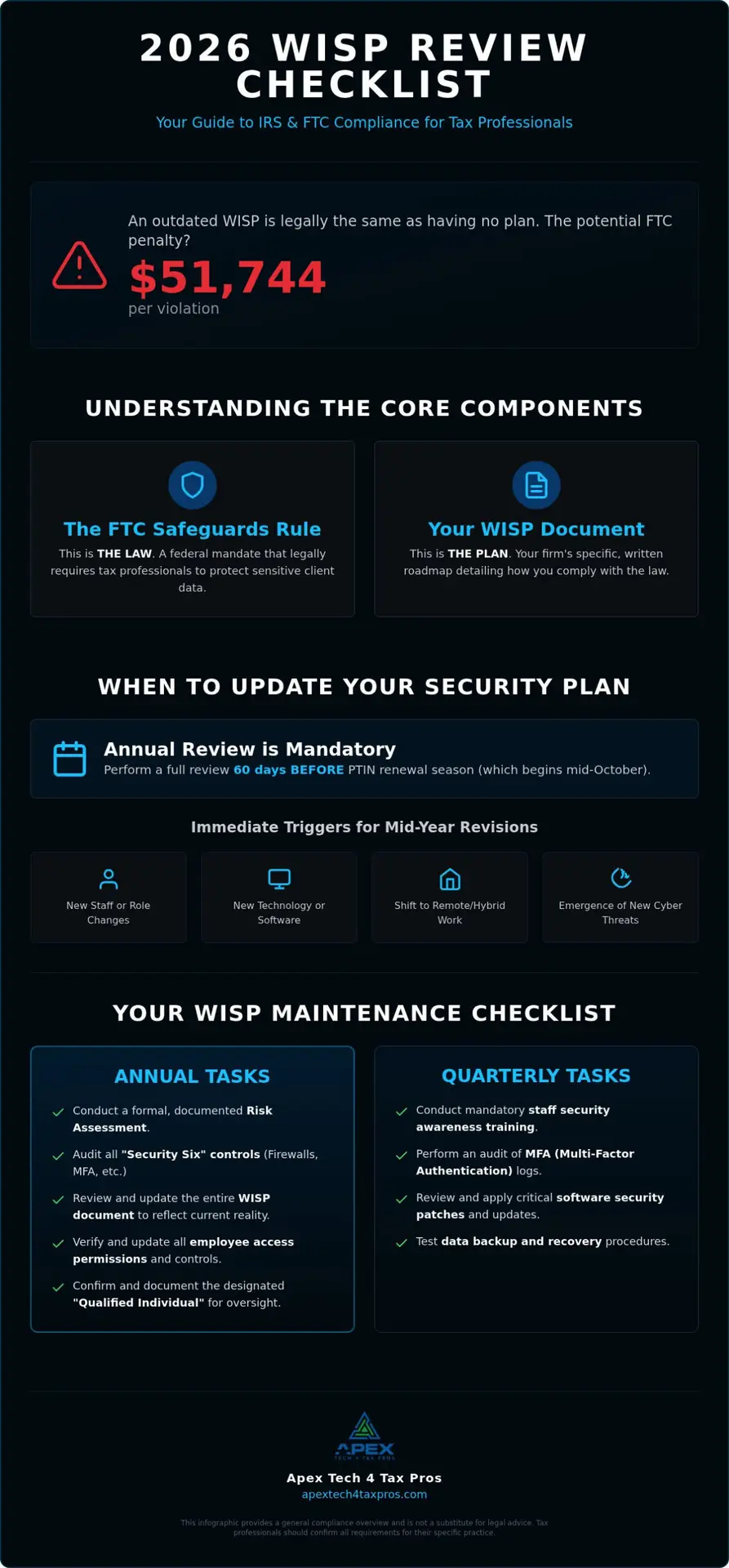
Did you know that checking the “I have a WISP” box on your 2026 PTIN renewal without actually updating your plan could expose your practice to FTC penalties of up to $51,744 per violation? It’s completely understandable if the thought of an IRS audit or technical jargon makes your head spin. You’re a tax expert, not a cybersecurity engineer; trying to keep up with the shifting FTC Safeguards Rule can feel like a full-time job. To maintain compliance, you can use our annual wisp review checklist to verify your security controls against IRS Pub 4557 standards and update your documentation to reflect changes in your technology or staff.
This guide provides the clarity you need to stay compliant and protect your clients without the stress. We’ll break down exactly how to audit your security tools, refresh your documentation for 2026, and ensure your practice meets the latest federal standards. You’ll walk away with the confidence that your security plan is a robust shield for your business, not just a dusty document on a shelf.
Key Takeaways
- Understand that an outdated Written Information Security Plan is legally the same as having no plan at all in the eyes of the IRS and FTC.
- Learn why scheduling your annual risk assessment 60 days before PTIN renewal ensures you can sign your compliance documents with total confidence.
- Use our annual wisp review checklist to stay on top of mandatory quarterly tasks like staff training and Multi-Factor Authentication (MFA) audits.
- Discover how to simplify federal compliance by bridging the gap between complex technical requirements and your tax practice’s daily operations.
How do I comply with WISP maintenance requirements?
Complying with WISP maintenance means ensuring your written plan reflects your actual office reality. It’s a proactive verification process where you confirm that your documented security measures match your current technology and staff workflows. If your documented procedures don’t match what your team does daily, your WISP is essentially void. In the eyes of the IRS and FTC, an outdated plan is legally equivalent to having no plan at all. This is vital because “security drift” often occurs when busy teams revert to unsafe habits, like sharing passwords or skipping software updates, over time. Regular maintenance is the only way to honestly sign your annual PTIN renewal on Form W-12 under penalty of perjury. Using an annual wisp review checklist helps you bridge this gap consistently and keeps your compliance status current.
The difference between a WISP and the FTC Safeguards Rule
It’s easy to confuse these terms, but the distinction is critical for your practice. The Safeguards Rule is the federal mandate that legally requires you to protect sensitive data. Your WISP is the specific, written roadmap that explains how your firm follows that law. “The Safeguards Rule tells you what is required by law, while your WISP documents how your specific practice meets those requirements.” This documentation must align with foundational information security principles to be effective. If you don’t have a starting point, you can use a custom WISP template to begin your compliance journey.
Why IRS Publication 4557 makes maintenance mandatory
IRS Publication 4557 outlines the “Security Six” requirements, which include anti-virus software, firewalls, and multi-factor authentication. You must audit these controls annually to ensure they still function as intended. The IRS also requires you to designate a “Qualified Individual” to oversee these efforts. This person is responsible for documenting the review process and ensuring all updates are recorded. Without this documented oversight, your practice remains vulnerable to significant non-compliance penalties during an unexpected IRS audit.
When should a tax professional update their security plan?
While the IRS requires a formal review at least once a year, timing is everything for a busy tax office. You should ideally complete your annual wisp review checklist about 60 days before the PTIN renewal season begins in mid-October. This buffer gives you enough time to address any vulnerabilities found during your mandatory risk assessment. A data-driven assessment reveals exactly where your practice stands compared to the standards in IRS Publication 4557. If you aren’t sure where to start, you can schedule a professional IT assessment to identify current security gaps before they become liabilities.
Maintenance is a continuous obligation rather than just a year-end task for compliance. It’s best to think of your WISP as a living document that breathes with your business. When you treat security as an ongoing process, the final annual sign-off becomes a relief from a burden instead of a source of stress.
Trigger events for immediate mid-year WISP revisions
Certain changes in your office require an immediate update to your plan. These include hiring new employees or adjusting administrative access for existing staff. If you implement new tax software, cloud storage, or a secure virtual desktop, your documentation must reflect these new data pathways. Shifting to a remote or hybrid work model is another major trigger that changes how client data is accessed and secured.
External factors requiring WISP updates
Outside forces also dictate when you should refresh your plan. New guidance in IRS Publication 5708 or changes to federal regulations often require policy adjustments. Additionally, the emergence of AI-driven phishing and advanced ransomware variants means your defense strategies must evolve. Staying ahead of these threats ensures your practice remains a safe harbor for taxpayer information. Completing your annual wisp review checklist ensures you aren’t caught off guard by these shifts. You can book a WISP assessment to see if your current plan stands up to these modern risks.
Your 2026 WISP maintenance checklist: Annual and quarterly tasks
Compliance isn’t a single annual event; it’s a rhythm that protects your practice year-round. Using an annual wisp review checklist helps you organize these duties into manageable quarterly and yearly milestones. Every three months, you should review your access logs and verify that Multi-Factor Authentication (MFA) remains active across all tax software. Simultaneously, you must conduct and document staff cybersecurity awareness training to satisfy IRS Pub 5708 requirements. Once a year, perform a full inventory of your physical and digital hardware to eliminate “shadow IT” devices that might be accessing client data without your knowledge. You also need to test your disaster recovery plan to ensure your secure cloud backup is functional and ready for an emergency.
Maintaining staff cybersecurity awareness
Your team is your first line of defense, but they need training that addresses 2026 threats like deepfake social engineering and AI-powered phishing. Static training from years ago won’t stop a sophisticated modern attack. We provide customized cyber security training for tax staff that turns your employees into a human firewall. Documenting these sessions is a mandatory step in your WISP maintenance and serves as proof of your due diligence during an audit.
Verifying technical safeguards
Technical controls must match the specific language in your WISP document. This includes confirming that firewall configurations are optimized and antivirus signatures are current. You must also verify that client data is encrypted both at rest on your servers and during transmission to clients or the IRS. When your actual office practices align with your written plan, you eliminate the fear of a failed audit. If you need help verifying your technical setup, you can book a WISP assessment with our team today to ensure your safeguards are truly up to standard.
How Apex Tech 4 Tax Pros simplifies your annual WISP updates
Managing an annual wisp review checklist shouldn’t feel like a barrier to doing your job. Our team specializes in bridging the gap between complex IT security protocols and the daily operations of a tax office. We understand that you need to focus on client service, not deciphering technical jargon. By providing a customized WISP rather than a generic, unedited template, we offer significantly better audit protection. A personalized plan proves to the IRS and FTC that you’ve actually analyzed your specific risks. This level of detail is what distinguishes a compliant practice from one at risk of civil penalties.
The benefits of the Yearly Subscription for growing firms
Our Yearly subscription ($1,099.99) is designed as a comprehensive solution for firms seeking professional compliance oversight. This plan includes a free customized WISP and ongoing support to ensure your documentation stays current as regulations evolve. We also help you designate your “Qualified Individual,” which is a mandatory requirement under the FTC Safeguards Rule. Our deep roots in the industry mean we understand both sides of the coin; while we secure your data here, our sister company, APEX Tax Solutions, provides specialized tax resolution services. This dual perspective ensures your security infrastructure supports your professional goals without getting in the way.
Getting started with a WISP assessment
Transitioning from a state of potential vulnerability to secure compliance starts with a professional review of your current environment. We look at your systems through the lens of 20 years of combined tax and IT experience, ensuring no detail is overlooked. Whether you use a custom WISP template or need a full system overhaul, we have the tools to help. Don’t wait until the next PTIN renewal cycle to find out your plan is outdated. You can Book a WISP Assessment or email info@at4tp.com today to ensure your practice is fully protected.
Secure Your Practice for the 2026 Filing Season
Maintaining a Written Information Security Plan isn’t just about avoiding a fine; it’s about building a resilient practice that your clients can trust. By following a structured annual wisp review checklist, you ensure that your technical safeguards like MFA and encryption actually match your documented policies. Security drift erodes compliance over time. However, consistent quarterly training and annual hardware inventories keep your office protected.
With over 20 years of combined tax and IT experience, our team understands the unique pressures you face. Both our Seasonal and Yearly subscriptions include a free customized WISP, providing expert guidance on IRS Pub 4557 and the FTC Safeguards Rule. You don’t have to carry the weight of federal regulations alone. Book a WISP Assessment to ensure your practice is fully compliant for 2026 today. We’re here to help you turn a complex mandate into a manageable routine. You’ve worked hard to build your practice; let’s work together to keep it safe.
Frequently Asked Questions
How often does the IRS require me to update my WISP?
Federal guidelines from the IRS and FTC mandate that you review and update your Written Information Security Plan at least once every twelve months. This annual cycle is critical because it aligns with your PTIN renewal period starting in mid-October. By completing your annual wisp review checklist before you sign Form W-12, you can truthfully attest under penalty of perjury that you have a current, functional security plan in place for the upcoming tax year.
What happens if I have a WISP but do not maintain it?
If your security plan is not regularly updated to reflect your current office environment, the IRS and FTC consider it legally void. In the event of an audit or a data breach, presenting a stale document can lead to “willful neglect” findings. This exposes your practice to FTC civil penalties of up to $51,744 per violation, per day. Maintenance ensures your plan actually protects you rather than just serving as a forgotten file.
Do I need a new WISP if I switch tax preparation software or cloud providers?
You do not necessarily need to start from scratch, but you must perform an immediate mid-year update to your existing plan. Any change in how you store or transmit client data-such as moving to a new cloud provider or virtual desktop-fundamentally alters your risk profile. Your WISP must be revised to document these new data pathways and the specific encryption standards used by your new vendors to ensure you remain compliant with the FTC Safeguards Rule.
Who is responsible for maintaining the WISP in a small tax office?
The FTC Safeguards Rule requires every firm, regardless of size, to designate a “Qualified Individual” to oversee the security program. In a small office, this is typically the owner or a senior manager. This person is responsible for coordinating your annual wisp review checklist, documenting quarterly staff training, and ensuring technical safeguards like Multi-Factor Authentication are functioning. While you can outsource the technical execution to experts, the designated individual retains the ultimate responsibility for compliance oversight.
Is a free WISP template enough for annual IRS compliance in 2026?
A free template is a helpful starting point for very small firms, but it is rarely enough to pass a dedicated IRS audit without significant customization. The IRS and FTC require your plan to be specific to your firm’s actual hardware, software, and personnel. A generic, unedited template fails to address the unique vulnerabilities of your practice, especially with the 300% spike in cyberattacks targeting tax professionals during the peak filing months of January through April.
What are the specific encryption requirements for my 2026 WISP?
According to IRS Publication 4557 and the FTC Safeguards Rule, you must encrypt all sensitive taxpayer information both at rest and during transmission. This means any data sitting on your hard drives, backup tapes, or cloud storage must be unreadable to unauthorized users. Furthermore, any emails or file transfers containing client data must use secure, encrypted channels. Your annual review should verify that your encryption protocols meet current NIST standards to ensure maximum protection against unauthorized disclosures.
How do the 2026 breach notification rules affect my security plan?
Your WISP must include a clear incident response plan that accounts for the latest federal notification mandates. As of 2026, you are required to notify the FTC within 30 days of discovering a data breach that involves the unencrypted information of 500 or more consumers. Your annual maintenance should include a review of these contact procedures to ensure your team knows exactly who to call and what steps to take if your client data is ever compromised.
Can I be penalized for a data breach even if I have a maintained WISP?
While a WISP is not a 100% guarantee against a breach, having a maintained and documented plan serves as your primary legal defense. If a breach occurs, the IRS and FTC will look for evidence that you took “reasonable” steps to protect the data. A current annual wisp review checklist proves that you were not negligent. This can significantly reduce or even eliminate the massive civil penalties associated with unauthorized disclosures under IRC Section 6713, which can reach $50,000 for identity theft related instances.
How does the “Security Six” relate to my annual maintenance tasks?
The IRS “Security Six” represents the foundational technical controls every tax pro must have: anti-virus software, firewalls, two-factor authentication, backup software, drive encryption, and data deletion policies. During your annual review, you must verify that each of these six items is not only present but correctly configured and updated. Documenting this verification process in your WISP is what turns a list of tools into a legally compliant security program that satisfies federal auditors.