
Is your office router a genuine security tool, or is it just a digital screen door left wide open for hackers? For tax professionals facing the 2026 filing season, a firewall is no longer optional; it is a mandatory technical safeguard required by the FTC Safeguards Rule and IRS Publication 4557. Establishing a robust access control policy for accounting firms begins with this critical gatekeeper. It’s the primary defense that stops unauthorized traffic before it ever touches your client’s sensitive taxpayer data.
We know that keeping up with shifting federal regulations often feels like a second full-time job. You want to protect your firm from data breaches without becoming an IT expert overnight. This article promises to simplify that process. You’ll learn how to implement a firewall that satisfies IRS requirements and provides true peace of mind. We will explore the legal necessity of these tools, compare hardware and software solutions, and give you a practical framework to ensure your office stays compliant and secure throughout the year.
Key Takeaways
- Understand why IRS Publication 4557 mandates firewalls as a foundational technical safeguard to protect sensitive taxpayer data from unauthorized access.
- Learn to distinguish between hardware and software firewalls so you can select the most efficient protection for your specific office setup.
- Discover how to document your firewall management within a formal access control policy for accounting firms to ensure your WISP is fully compliant.
- Gain peace of mind by learning how managed firewall solutions can handle the heavy lifting of security monitoring while you focus on your clients.
Why is a firewall mandatory for accounting firms under the IRS Safeguards Rule?
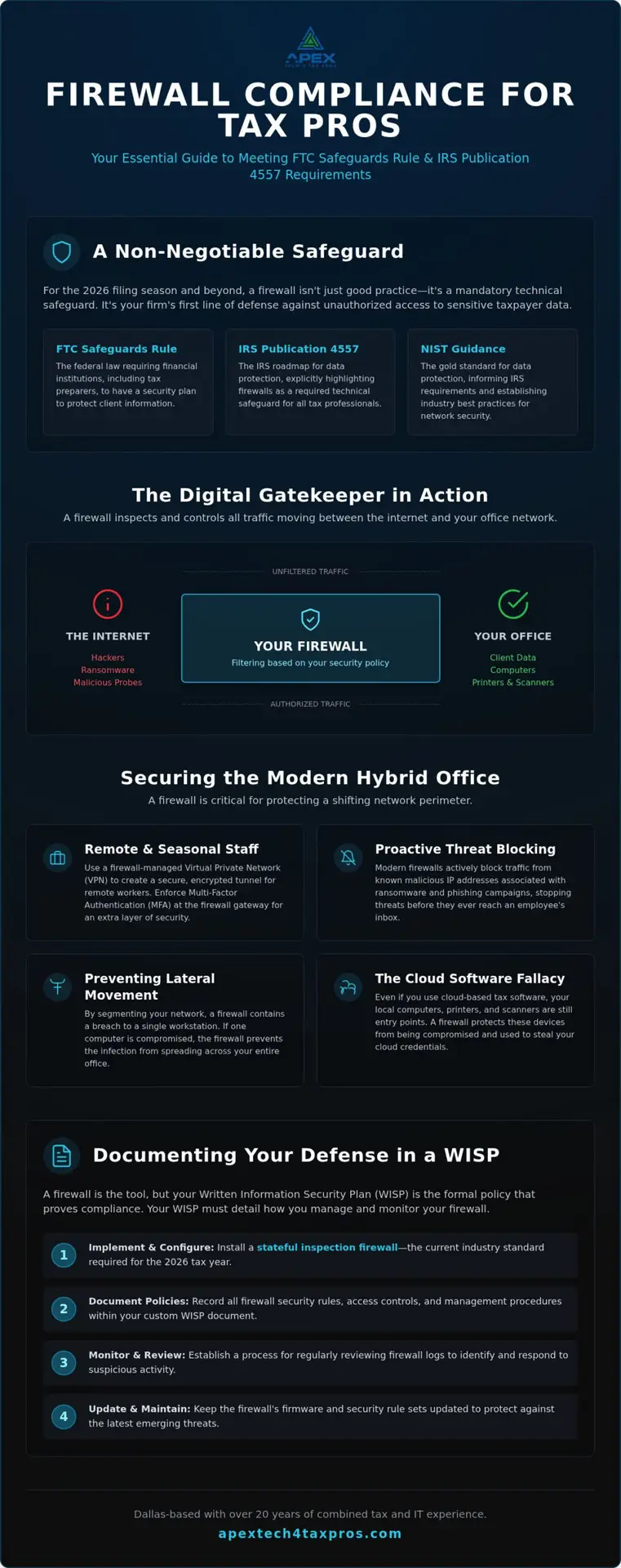
A firewall acts as a digital gatekeeper, controlling the flow of traffic into and out of your office based on a specific set of security rules. It’s a foundational network security system that prevents unauthorized users from accessing your private data. While the FTC Safeguards Rule is the federal law requiring these protections, the firewall is the actual technical tool that executes your firm’s security strategy.
Many tax pros believe that because they use cloud-based software, they don’t need a perimeter firewall. This is a common fallacy. Your local computers, printers, and scanners are still connected to the internet. If those devices are compromised, they can serve as a bridge to your cloud credentials. Implementing a comprehensive access control policy for accounting firms ensures that every device in your office has a monitored barrier between it and the open web.
The role of firewalls in IRS Publication 4557
IRS Publication 4557 serves as the official roadmap for protecting taxpayer information. It specifically highlights technical safeguards as a requirement for any firm handling sensitive data. A firewall provides the perimeter defense needed to block malicious probes and ensures that only authorized traffic enters your network. This aligns with the requirement for encrypted access, as modern firewalls help manage secure connections for staff working from home or in the office.
Meeting NIST standards for financial data protection
IRS requirements for small practices are heavily informed by NIST guidance, which sets the gold standard for data protection. For the 2026 tax year, stateful inspection firewalls are the industry standard. These devices don’t just look at headers; they monitor the state of active connections to determine which packets are legitimate. Including these settings in your access control policy for accounting firms and documenting them in your custom WISP is essential for proving compliance during a potential audit.
How does a firewall protect sensitive taxpayer data in a hybrid tax office?
In a hybrid environment, your network perimeter is constantly shifting. A firewall serves as the foundation for your Secure Office Network, managing both inbound and outbound traffic. Inbound filtering stops hackers from knocking on your digital doors; meanwhile, outbound filtering prevents data exfiltration by blocking suspicious attempts to send files to unknown external servers. This dual-layered approach is a core part of a modern network defense-in-depth strategy and should be a centerpiece of any access control policy for accounting firms.
Firewalls are especially critical for securing Remote Desktop Protocol (RDP) connections, which remain frequent targets for credential harvesting. By segmenting your network, a firewall effectively prevents lateral movement. If a single workstation is compromised by a phishing link, the firewall stops the infection from spreading across the entire office. It’s a pragmatic way to satisfy your access control policy for accounting firms without overcomplicating daily workflows.
Securing remote access for seasonal staff
During the busy 2026 season, you might bring on temporary help who need remote access. A firewall-managed Virtual Private Network (VPN) creates an encrypted tunnel for their traffic. To meet current standards, you should enforce Multi-Factor Authentication (MFA) right at the firewall gateway. This ensures that even if a seasonal preparer’s password is stolen, your firm’s data remains shielded from unauthorized eyes.
Preventing common threats like ransomware and phishing
Modern firewalls actively block known malicious IP addresses associated with ransomware gangs. This proactive filtering provides a layer of relief, as it catches threats before they reach your employees’ inboxes. For more details on the full technical stack required for compliance, see our guide on WISP IRS Requirements: The Definitive Guide for Tax Professionals in 2026. If you’re unsure about your current setup, you can always book a quick IT assessment with our expert team.
How do I choose the right firewall for my accounting practice?
Selecting the right hardware is a pivotal decision for your firm’s security architecture. While many practitioners rely on the basic tools provided by their internet service provider, a professional-grade appliance offers far more granular control. This level of oversight is essential for maintaining a compliant access control policy for accounting firms. In 2026, your solution should include Intrusion Prevention Systems (IPS) and Deep Packet Inspection (DPI) to identify threats hidden within encrypted traffic.
Should I use a hardware or software firewall?
Hardware firewalls act as your primary perimeter defense, shielding every device on your network simultaneously. Software firewalls installed on individual PCs are valuable, but they function only as a secondary line of defense. A dedicated appliance ensures that malicious traffic is neutralized before it even reaches your workstations. This aligns with the technical safeguards outlined in IRS Publication 4557, which emphasizes protecting the entire network environment.
Why is professional configuration necessary for compliance?
A firewall is only as effective as its setup. Many tax pros make the mistake of using out-of-the-box settings, which often leave default passwords active and ports unnecessarily open. Professional configuration ensures your rules are tight and your firmware is updated monthly to patch new vulnerabilities. For many, a managed firewall is a welcome relief from the burden of manual monitoring. It allows you to focus on your clients while experts handle the technical vigilance. If you’re unsure whether your current hardware meets 2026 standards, we recommend you book an IT Assessment to evaluate your specific office needs.
How do I integrate firewall management into my Written Information Security Plan (WISP)?
Installing a firewall is a major step toward security, but a tool without documentation is a compliance failure in the eyes of the IRS. To satisfy the FTC Safeguards Rule, your firm must maintain a formal WISP that details exactly how your technical tools are managed. Your access control policy for accounting firms should specifically name your firewall model, define the update schedule, and outline how often you review access logs.
At Apex Tech 4 Tax Pros, we simplify this administrative burden. Our Seasonal subscription ($649.99) and Yearly subscription ($1,099.99) both include a free Custom WISP Template tailored to your specific office. This ensures your documentation matches your actual hardware, providing a cohesive defense during regulatory reviews.
What firewall details does the IRS look for during an audit?
If an auditor requests your security records, they’ll look for evidence of due diligence. You should be prepared to show:
- Configuration Logs: Proof of the initial professional setup.
- Update History: Documentation of monthly firmware patches.
- Access Reviews: Records showing who has administrative rights to the network.
Maintaining these logs proves you’re actively monitoring your perimeter, which is a key requirement under IRS Publication 4557.
How can a managed security partner simplify my compliance?
Partnering with a specialized team allows you to focus on tax preparation while we handle the technical heavy lifting. With over 20 years of combined tax and IT experience, we understand the high-stakes environment of your office. For holistic support, we often coordinate with our sister company, APEX Tax Solutions, to ensure your business operations and security are perfectly aligned. To get started, you can Book a WISP Assessment or email our team at info@at4tp.com for personalized support.
Taking the Next Step Toward Full IRS Compliance
Implementing a robust firewall is more than a technical upgrade; it’s a commitment to protecting your clients and your professional reputation. By establishing a clear access control policy for accounting firms and documenting your hardware within a custom WISP, you satisfy the core requirements of IRS Publication 4557. This proactive approach transforms cybersecurity from a complex regulatory burden into a streamlined part of your office workflow.
At Apex Tech 4 Tax Pros, we bring over 20 years of combined tax and IT expertise to help you navigate these high-stakes requirements. Our bilingual team provides support for both English and Spanish speaking tax pros, offering the pragmatic guidance needed to achieve genuine peace of mind. We specialize in solutions that are fully compliant with federal standards, allowing you to focus on your practice while we handle the technical vigilance. Don’t let security confusion hinder your firm’s growth.
Book Your WISP Assessment and Secure Your Firm today and step into 2026 with confidence.
What are the most common questions about firewalls for accounting firms?
Do I need a firewall if I only use cloud-based accounting software?
Yes. Even if your data lives in the cloud, your local computers and printers are still connected to the open web. These devices often act as entry points for hackers seeking to steal your login credentials or install malicious software. A firewall secures your entire office perimeter, which is a core component of a compliant access control policy for accounting firms and ensures your local network isn’t the weak link.
Is the built-in Windows or Apple firewall enough for IRS compliance?
Generally, no. Built-in firewalls are workstation-level defenses that protect only a single device. IRS Publication 4557 and the FTC Safeguards Rule emphasize the need for network-level protection. You need a dedicated hardware appliance that guards the point where your internet service enters the building. This provides a unified shield for every device in your office, including those without robust built-in security features like scanners.
What is the difference between a router and a firewall for an accounting office?
A router is like a mail sorter that directs data, while a firewall is like a security guard inspecting every package. Most standard routers lack the deep packet inspection needed to spot modern threats. A professional firewall actively analyzes traffic against your access control policy for accounting firms, blocking suspicious patterns and unauthorized access attempts that a basic router would simply let through without a second look.
How often do I need to update my firewall settings to stay compliant?
You should review and update your firewall settings at least once a month. Cybercriminals constantly develop new methods to bypass security, and manufacturers release firmware patches to block these vulnerabilities. Regular updates are necessary to maintain the technical safeguards required by the IRS. Keeping a log of these monthly updates in your WISP proves your firm is practicing active, ongoing security management and technical due diligence.
Does the IRS Safeguards Rule require a specific brand of firewall?
The IRS and FTC don’t mandate a specific brand, but they do require your equipment to meet certain technical standards. Your firewall must be capable of stateful inspection, encrypted traffic management, and secure remote access. Rather than focusing on a brand name, ensure the device supports the technical safeguards outlined in your Written Information Security Plan (WISP) and can handle the traffic volume of a busy tax office.
Can a firewall protect my firm from phishing emails?
While a firewall can’t stop a staff member from opening a suspicious email, it can neutralize the threat. Modern firewalls use real-time threat intelligence to block known malicious IP addresses and phishing domains. If a user accidentally clicks a fraudulent link, the firewall can block the malware from “calling home” to the attacker’s server, preventing your sensitive taxpayer data from being exfiltrated from the network during tax season.