
WISP maintenance keeps your written security plan connected to the way your tax practice actually works. If your plan no longer reflects your systems, staff, or everyday procedures, it may be less useful when you need to guide security work. Creating a WISP is an important first step, but the document can fall out of date as your firm changes.
A practical review checks whether the people, tools, and procedures named in your plan are still accurate, then documents meaningful updates. Review the plan when changes affect your operations, such as adopting software, changing IT providers or workflows, adjusting staff responsibilities, or responding to a security incident. A focused review can help identify differences between written safeguards and actual practice without turning the process into a paperwork exercise. This article explains what to revisit, which changes may prompt an update, and how to keep supporting records aligned. You’ll also learn when an assessment or customized WISP support can make the work clearer and easier to manage.
Key Takeaways
- WISP maintenance helps keep documented safeguards and responsibilities aligned with how your tax practice actually operates.
- Changes to staff, technology, data handling, or business operations can signal it’s time to review the plan. A change alone doesn’t mean a breach or violation occurred.
- A simple process of comparing, updating, and recording relevant details can make reviews more manageable.
- A WISP IT System Assessment can help identify gaps between written procedures and current technology or workflows.
What Does WISP Maintenance Mean for a Tax Practice?
WISP maintenance keeps a tax firm’s Written Information Security Plan aligned with its actual operations and applicable guidance. It means reviewing whether the safeguards, procedures, and assigned responsibilities in the document still describe how the firm protects taxpayer information.
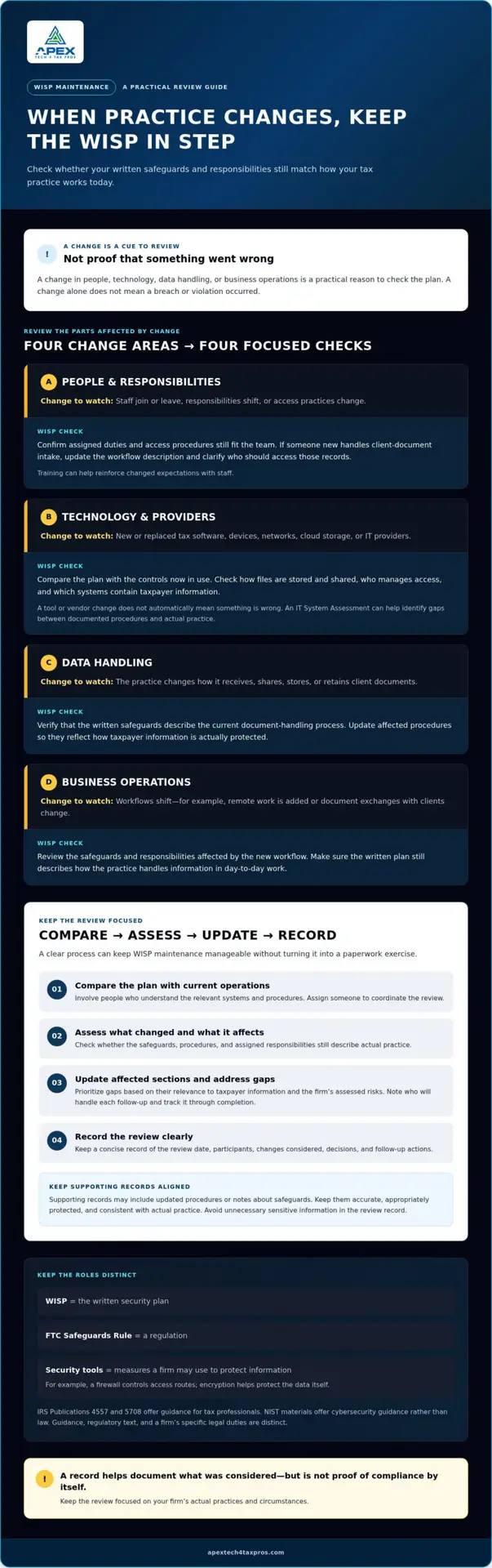
WISP maintenance is the practical review and updating of a firm’s written security plan so its documented safeguards and responsibilities continue to reflect how the practice operates. The WISP is the plan, the FTC Safeguards Rule is a regulation, and security tools are measures a firm may use to protect information. For example, a firewall controls access routes, while encryption helps protect data itself. These concepts relate to broader information security principles, but they serve different roles.
Why Is a WISP More Than a One-Time Document?
A plan can become outdated as staff responsibilities, software, vendors, or data-handling practices change. If a WISP still describes an old system or assigns a task to someone who no longer handles it, the document may be less useful during routine security work. Reviewing the plan helps identify what still matches practice and what needs revision. A change by itself doesn’t mean a breach or violation has occurred.
Which Official Sources Should Tax Professionals Check?
IRS Publications 4557 and 5708 offer tax professionals guidance on safeguarding taxpayer data and documenting a WISP. The FTC Safeguards Rule provides regulatory requirements that may apply to a firm, while NIST materials offer cybersecurity guidance rather than law. These sources provide useful context, but guidance, regulatory text, and a firm’s specific legal duties are distinct. Consider your firm’s circumstances when determining which requirements apply.
A customized WISP document provides a practical foundation for recording firm-specific safeguards and responsibilities. Keeping that foundation current helps make the plan useful as the practice evolves.
What Changes Should Trigger a WISP Review?
A change in how your practice handles taxpayer information is a practical reason to check whether your WISP still describes the work accurately. Significant operational changes should prompt a documented review of the safeguards and responsibilities they affect. A trigger is a cue to assess the plan, not proof of a breach or violation.
Consider changes in four areas:
- People: Staff join or leave, responsibilities shift, or access practices change.
- Technology: The firm adopts or replaces tax software, devices, networks, or cloud storage, or changes service providers.
- Data handling: The practice changes how it receives, shares, stores, or retains client documents.
- Business operations: Workflows change, such as adding remote work or revising how staff exchange documents with clients.
The IRS offers IRS guidance on Written Information Security Plans for tax professionals. Use applicable guidance alongside a review of what your own firm actually does.
How Do Staff and Process Changes Affect a WISP?
Check whether the plan’s assigned responsibilities and access procedures still fit the team. For example, if someone new handles client-document intake, update the workflow description and clarify who should have access to those records. If procedures or responsibilities have changed, cybersecurity awareness training can help reinforce expectations with staff.
How Do Technology and Vendor Changes Affect a WISP?
A new tax platform, device, cloud service, network, or IT provider can change where taxpayer data flows and which safeguards protect it. Compare the written plan with the controls now in use. For example, check whether the plan still describes how the firm stores and shares files, who manages access, and which systems contain taxpayer information. A tool or vendor change doesn’t automatically mean something is wrong. A WISP IT System Assessment can help evaluate current systems and identify gaps between documented procedures and actual practice.
For tax-focused cybersecurity and WISP support, explore Apex Tech 4 Tax Pros.
How Can You Maintain a WISP Without Creating Unnecessary Work?
Keep the review focused on what has changed and whether the written plan still matches how the firm protects taxpayer information. A clear process makes wisp maintenance manageable without turning it into a paperwork exercise.
Compare the plan with current operations, assess changes, update affected sections, and record what you reviewed and what happens next. Assign someone to coordinate the review so updates don’t get overlooked, while involving staff who understand the relevant systems and procedures. The coordinator doesn’t need a specially titled role.
What Should a Practical WISP Review Record?
Keep a concise record of the review date, participants, changes considered, decisions, and follow-up actions. Supporting records might include updated procedures or notes about safeguards. Keep them accurate, appropriately protected, and consistent with actual practice. Avoid putting unnecessary sensitive information in the review record itself. Documentation helps show what was considered, but a checklist or record alone doesn’t establish compliance.
How Should You Handle Gaps Found During Review?
Prioritize gaps based on their relevance to taxpayer information and the firm’s assessed risks. For each action, note who will address it and track progress through completion. For example, if the plan describes an outdated process for storing client documents, confirm the current practice, update the relevant procedure, and assign any needed follow-up.
If the written plan needs firm-specific changes, explore a customized WISP document. A tailored plan can make safeguards and responsibilities clearer, while review notes help organize future updates.
When Should a Tax Professional Get Help Maintaining a WISP?
Professional support can help when no one is sure who owns WISP updates, the written plan no longer reflects current operations, or a security gap remains unresolved. These situations don’t automatically mean the firm has experienced a breach. They can make it harder to see whether documented safeguards match the systems and workflows used to protect taxpayer information.
An assessment can compare written procedures with the firm’s current technology and day-to-day practices. It can help clarify whether the plan describes the systems in use, how information moves through the practice, and where additional attention may be useful. That gives tax professionals a clearer basis for prioritizing next steps and maintaining accurate documentation, without guaranteeing a compliance outcome.
What Can a WISP IT System Assessment Clarify?
A WISP IT System Assessment reviews the firm’s current systems and can identify security gaps relevant to its operations. Findings can help prioritize improvements and update plan details to reflect the safeguards and procedures actually in place. Apex Tech 4 Tax Pros brings more than 20 years of combined tax and IT experience, with bilingual support for tax and accounting professionals.
How Can a Customized WISP Support Ongoing Reviews?
A customized WISP can document the firm’s specific systems, responsibilities, and safeguards, giving staff a clearer reference as operations change. It supports ongoing security work, but it doesn’t replace carrying out safeguards, reviewing changes, or following up on identified issues. Tailored documentation can also help focus future reviews on procedures and responsibilities that may need attention.
Learn more about the WISP IT System Assessment and how it can help compare written procedures with current systems and workflows.
Keep Your WISP Aligned as Your Practice Evolves
A useful WISP reflects the firm’s current safeguards, responsibilities, and workflows. Revisiting the plan when people, technology, data handling, or operations change helps keep its documentation relevant and supports practical security work.
Make each review manageable: compare the written plan with actual practice, update the sections affected by changes, and record decisions and follow-up actions. If ownership is unclear, documentation is outdated, or security gaps remain unresolved, professional support can help clarify next steps. That’s the purpose of thoughtful WISP maintenance: keeping the plan connected to the way your tax practice operates, without treating paperwork as a substitute for safeguards.
Apex Tech 4 Tax Pros specializes in cybersecurity and compliance support for tax and accounting professionals, with more than 20 years of combined tax and IT experience and bilingual support. Book a WISP IT System Assessment to compare your written procedures with current systems and workflows. A clear, current plan can make security responsibilities easier to understand and maintain.
Frequently Asked Questions
How often should a tax preparer review a WISP?
Review your WISP when meaningful changes affect your staff, systems, vendors, data handling, or safeguards. One schedule may not fit every practice, so consult current IRS and FTC materials for requirements that apply to your firm. Record when you reviewed the plan, what you considered, and any follow-up actions. This keeps the document connected to actual operations without assuming an unsupported deadline.
What changes should prompt a WISP update?
Changes to employees, responsibilities, tax software, devices, networks, cloud services, vendors, remote-work practices, or how taxpayer information is collected and shared can prompt a review. Assess whether the plan remains accurate and update relevant details as needed. A change alone doesn’t establish that a breach or violation occurred. Document decisions and corrective actions so the firm can track what it has addressed.
Can a tax preparer maintain a WISP using a template?
Yes. A template can give your review structure, but its content should describe your firm’s actual systems, risks, responsibilities, and safeguards. Avoid leaving generic language that doesn’t match your procedures, and revisit the document as operations change. If tailoring the plan feels unclear or important gaps remain, a customized WISP or professional assessment may help make the next steps more manageable.
What records should a WISP review include?
Record when the review occurred, who participated, which operational or security changes were considered, and what actions were assigned. Keep supporting records accurate, appropriately protected, and consistent with safeguards the firm actually uses. These notes can explain the firm’s review process and help track follow-up. They’re useful documentation, but records alone don’t prove that a firm complies with applicable requirements.
Does updating a WISP guarantee FTC Safeguards Rule compliance?
No. Updating a WISP doesn’t guarantee compliance. The WISP is the firm’s written security plan; the FTC Safeguards Rule is a regulation, and security tools are controls used to protect information. Review current official sources and consider your firm’s circumstances when assessing obligations. If you need help interpreting legal requirements, seek appropriate professional or legal guidance alongside practical security support.