
What if your security policies look complete on paper but don’t reflect how your tax office actually handles information? A cybersecurity audit for tax preparers helps uncover that mismatch by comparing written safeguards with day-to-day practices and records.
For a small practice, security responsibilities can span staff, devices, tax software, and outside services. A structured review helps you see how taxpayer information moves through your office, where safeguards may be missing, and what needs follow-up. A checklist can organize the work, but it cannot replace evidence of how controls are being used.
This guide explains what to review, how to organize evidence, and how to turn findings into practical next steps. It also covers how a tax-focused assessment can help connect security documentation to your practice’s operations.
Key Takeaways
- A cybersecurity audit for tax preparers is an internal safeguards review, not an IRS examination.
- Use a consistent workflow to record the scope, evidence reviewed, gaps found, and next steps.
- Review safeguards across staff, technology, vendors, and incident-response records, including applicable Security Six controls.
- A tax-focused assessment can help identify missing controls and turn findings into prioritized improvements and a more actionable security plan.
What Does a Cybersecurity Audit for Tax Preparers Actually Review?
A cybersecurity audit for tax preparers is a structured review of the safeguards protecting taxpayer information, the records showing how those safeguards are managed, and whether they’re being used in practice. It’s an internal security assessment, not an IRS examination. The review helps a practice identify gaps and plan improvements; it does not determine the outcome of an IRS examination.
In brief: The WISP is the written plan, the FTC Safeguards Rule is a federal requirement for a security program, and security controls are the specific practices and tools used to protect information.
A WISP is mandatory for U.S. tax preparers. It needs to describe the practice’s actual operations, not just sit in a folder. If staff share logins despite a policy requiring individual access, for example, the review should record that difference. An inaccurate plan can leave the practice unprepared. Falsely certifying on IRS Form W-12, Line 11 that a compliant WISP exists is a federal crime. PTIN revocation can prevent you from preparing tax returns for compensation, EFIN suspension can prevent electronic filing, and the FTC can impose civil penalties up to $50,685 per violation and $43,792 per day for ongoing violations.
Why does a tax preparer need to examine more than the WISP?
Policies, people, and technology work together. A written rule may require access to be removed when a staff member leaves, but the practice should also verify that the account was disabled. Staff behavior matters too: training records and everyday handling of taxpayer documents can show whether procedures are understood and followed.
The plan describes the practice’s approach; tools carry out specific protections. For instance, a firewall controls network access routes, while encryption protects data itself. An audit compares the plan with evidence of implementation instead of treating a list of tools as proof that the program works.
Which federal guidance belongs in the review?
Use IRS Publication 4557, IRS Publication 5708, and the FTC Safeguards Rule as reference points for the review. They help frame the security program and its documentation. For WISP preparation, a customized WISP document can help put the practice’s procedures into writing. The plan must still match the safeguards the practice uses.
Which Tax Office Safeguards and Evidence Should the Audit Examine?
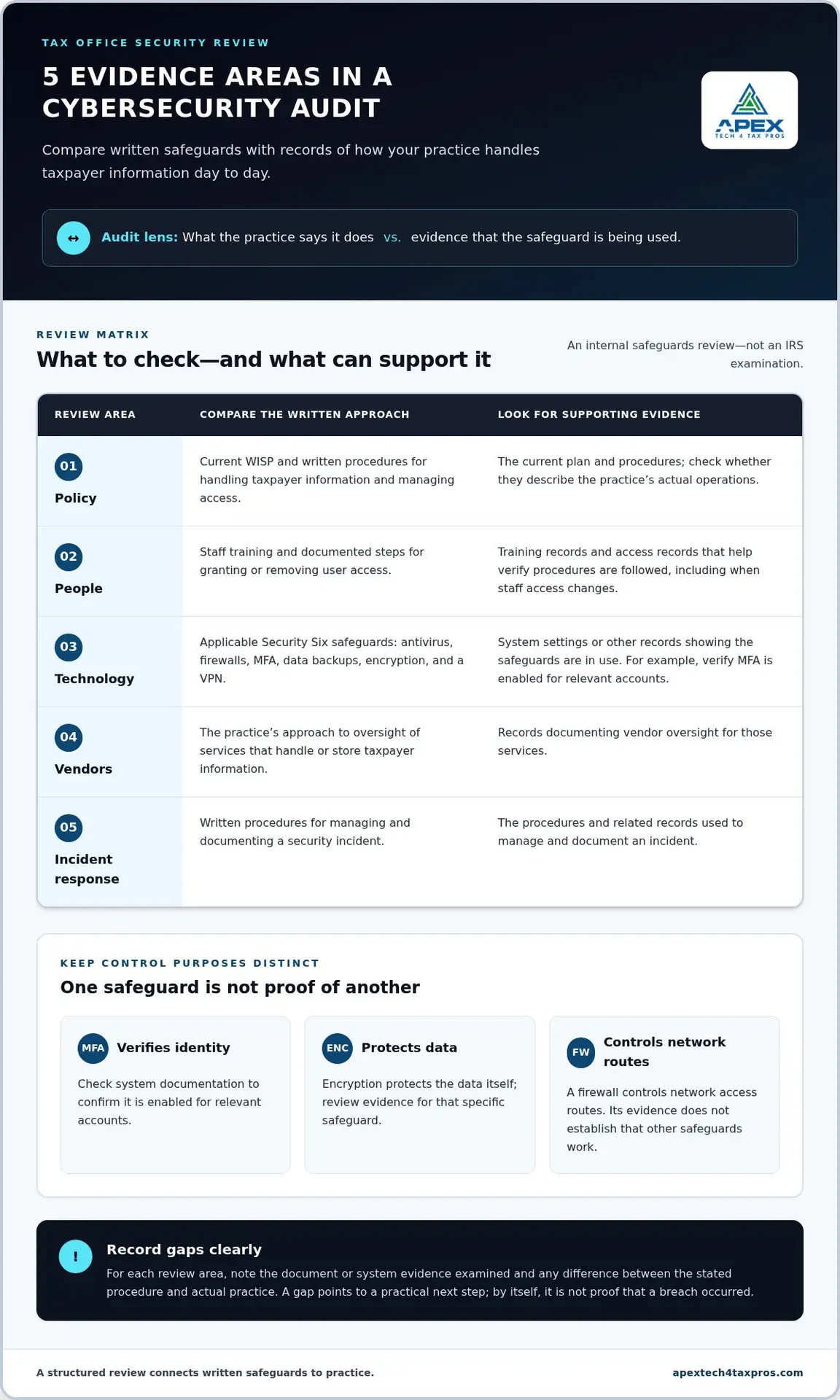
A useful cybersecurity audit for tax preparers checks both what the practice says it does and what records show it does. Group evidence into five areas to make the review manageable and keep details from getting lost:
- Policy: the current WISP and written procedures for handling taxpayer information and managing access.
- People: staff training records and documented steps for granting or removing user access.
- Technology: system settings or other records showing applicable Security Six safeguards are in use: antivirus, firewalls, multi-factor authentication (MFA), data backups, encryption, and a virtual private network (VPN).
- Vendors: records of vendor oversight for services that handle or store taxpayer information.
- Incident response: written procedures and related records for managing and documenting a security incident.
How should reviewers examine controls and records?
Compare each written procedure with evidence of implementation. A policy that requires MFA, for example, should be supported by system documentation showing it is enabled for relevant accounts. MFA verifies identity; encryption protects data; a firewall controls network access. These safeguards serve different purposes, so evidence of one does not establish that the others are working.
For each area, record the document or system evidence reviewed and any difference between the stated procedure and actual practice. A gap is a prompt for a practical next step, not by itself proof that a breach occurred.
How should vendor and staff practices fit the review?
Check what the practice documents about vendor oversight and whether staff training records support the procedures in the WISP. Training can help employees recognize phishing and handle taxpayer information appropriately. Cybersecurity awareness training for tax staff can support that work.
Review Form W-12 Line 11 carefully. Falsely certifying that a compliant WISP exists is a federal crime. PTIN revocation can prevent you from preparing tax returns for compensation, EFIN suspension can prevent electronic filing, and the FTC can impose civil penalties up to $50,685 per violation and $43,792 per day for ongoing violations. Do not certify that a compliant plan exists unless it is in place.
How Can a Tax Practice Conduct a Practical Cybersecurity Audit?
A practical cybersecurity audit for tax preparers works best when the review has a defined scope, documented findings, and clear follow-through. Use a consistent sequence and keep the records together so unresolved items do not disappear into email or meeting notes.
- Define the scope. Identify the office operations, work locations, staff roles, devices, applications, and services included. Note seasonal workflows if they change how information is handled.
- Inventory data and systems. Trace how taxpayer information moves through the practice, from intake to filing and retention. Record the systems and outside services involved, along with the person responsible for each.
- Review safeguards. Compare the practice’s procedures with available evidence of implementation. Mark items as verified, unclear, or needing follow-up so assumptions are not mistaken for evidence.
- Record each gap. Describe the affected information or process, the evidence reviewed, the issue observed, and a practical next action. Be specific enough that someone else can understand what needs attention.
- Prioritize remediation. Consider the sensitivity of the information involved and the operational importance of the affected process. Assign an owner and record progress, including any reason an action remains open.
What should a small or solo practice prepare?
Set aside the current WISP, a list of systems and vendors, staff procedures, and existing security records. Keep the review proportionate to the practice’s actual operations. A solo preparer may have fewer roles to map, but should still account for seasonal staff and workflows that change during filing periods.
How should findings become trackable improvements?
Use a simple tracking record with the finding, evidence, next action, owner, and status. Revisit open items on a set schedule and update the record when circumstances change. An assessment can help identify gaps, but it does not guarantee compliance. A WISP is a mandatory part of the security program, and falsely certifying that one exists can lead to criminal prosecution, PTIN revocation, EFIN suspension, and FTC civil penalties up to $50,685 per violation and $43,792 per day for ongoing violations.
How Can a Specialized Assessment Help Close Tax Practice Security Gaps?
A self-review can reveal where documentation and daily practice differ, but it may be difficult to decide what to address first. A tax-focused assessment can connect findings to the systems, staff practices, and taxpayer information involved, then clarify practical next steps. It supports better-informed security planning but does not guarantee compliance.
Apex Tech 4 Tax Pros offers a WISP IT System Assessment and Compliance Status Check to help identify missing controls. This can give a preparer a clearer picture of where safeguards need attention and whether the written plan reflects the practice’s actual setup. If findings show the plan needs updating, a customized WISP document can put the practice’s security approach into writing.
What support can follow an assessment?
Next steps depend on the gaps identified. A practice may need to update its WISP or address safeguards with a secure virtual desktop, secure email, multi-factor authentication (MFA), a virtual private network (VPN), antivirus, or cybersecurity training. These are distinct supports, not substitutes for a written plan. Findings can help the practice focus on relevant improvements instead of treating every tool as a solution to every gap.
The value of an assessment is clarity: which issue affects taxpayer data, what evidence points to it, and what action to consider next. The practice remains responsible for implementing appropriate safeguards and keeping its documentation accurate.
What should readers expect from the next step?
A focused review can organize security concerns into understandable priorities without promising a particular compliance outcome. Apex Tech 4 Tax Pros is built for tax professionals, offers bilingual support, and brings 20+ years of experience in tax-office security.
To discuss your findings and next steps, book a WISP IT System Assessment or email info@at4tp.com.
Make Your Next Security Review More Actionable
A cybersecurity audit for tax preparers is most useful when findings lead to clear ownership and follow-through. Revisit the security record when you add a system, change how staff access taxpayer information, or begin working with a new vendor. This helps keep the written plan aligned with daily operations.
You don’t have to sort through every technical or documentation question alone. A focused assessment can help clarify which issues deserve attention and what practical steps may address them. The goal isn’t a promise of perfect security; it’s a more informed, manageable path to protecting taxpayer information.
Book a WISP IT System Assessment to take the next step toward a clearer security plan. Each improvement can help make your practice’s protections more deliberate and easier to maintain.
Frequently Asked Questions
Is a WISP enough to pass a cybersecurity audit?
No document can guarantee a passing result. Review criteria depend on the assessment’s purpose and scope, and a WISP may need updating as the practice changes. Treat it as a working reference: note who owns each procedure and when it was last reviewed. If an assessment identifies a mismatch, update the relevant process and its documentation instead of relying on the plan’s existence alone. A WISP is mandatory for U.S. tax preparers. Falsely certifying on Form W-12, Line 11 that a compliant plan exists is a federal crime; PTIN revocation, EFIN suspension, and FTC civil penalties up to $50,685 per violation and $43,792 per day for ongoing violations may follow.
What does a cybersecurity audit for tax preparers include?
The scope should reflect the practice’s actual setup, including its tax preparation workflow, user access, technology, and outside services. One useful way to test the review is to select a routine task, such as retrieving a client file, and confirm that the steps match the practice’s documented approach. Record questions or exceptions for follow-up.
Is a cybersecurity audit the same as an IRS audit?
No. An IRS audit concerns tax matters, while a cybersecurity assessment focuses on the practice’s information security. They have different purposes and processes. If you receive an IRS audit notice, follow its instructions and handle the tax examination separately from your internal security review. Completing one process does not mean you have completed or satisfied the other.
Can a solo tax preparer conduct a cybersecurity self-assessment?
Yes. A solo preparer can conduct an initial self-review and note questions that require technical expertise or outside input. To make the review useful, set a date to revisit it after a meaningful change, such as adding a new work process or changing how the office operates. Keep conclusions factual, and distinguish what you verified from what still needs investigation. The review does not remove the requirement to maintain a WISP.
How should a tax preparer get ready for a cybersecurity assessment?
Before the review, decide what you want clarified, such as whether a particular workflow matches your written procedures or which findings need attention first. Set aside time to explain how the practice operates, including seasonal changes that affect staff responsibilities. Avoid putting taxpayer names, Social Security numbers, or return details into general assessment notes unless they’re specifically needed and handled appropriately.