
What if the weak point in your tax office’s network isn’t the firewall, but a staff device or remote connection no one thought to review? Network security for tax preparers depends on how access, devices, and taxpayer information are protected together. It’s understandable to be unsure whether your setup is secure when cybersecurity guidance can be hard to turn into practical office steps.
This checklist from Apex Tech 4 Tax Pros will help you review core safeguards and spot areas that may need attention. You’ll also see how network controls fit alongside your firm’s written security plan and staff practices.
Key Takeaways
- Map the users, devices, and business systems connected to your office network to spot overlooked access points.
- Review permissions, Wi-Fi practices, firewall coverage, and remote access against your firm’s procedures.
- Use this network security for tax preparers checklist to identify practical safeguards to review and improve.
- Assign responsibility for regular reviews and document important changes alongside staff awareness and incident procedures.
What Does Network Security for Tax Preparers Protect?
Network security is the set of controls that governs how users, devices, systems, and data connect and communicate. For a tax practice, reviewing these connections helps protect taxpayer information and the systems staff rely on to prepare and transmit returns. A secure network supports a broader cybersecurity program, but it isn’t the whole program: staff training, written procedures, and data protection practices matter too. For a foundational overview, see What is network security?
A firewall controls which network traffic is allowed through defined access routes. It can help restrict unwanted connections, but it doesn’t encrypt files or verify a user’s identity. Encryption helps protect data from being read by unauthorized parties, while passwords and multi-factor authentication help control account access. These safeguards address different risks, so one shouldn’t be treated as a substitute for the others. A tax practice’s secure office network brings relevant controls together around the firm’s actual systems and work practices.
How is a secure office network different from a WISP?
A Written Information Security Plan, or WISP, is the firm’s written plan for protecting information. Network controls are the practical measures used to carry out parts of that plan, such as managing connections and restricting access. The distinction is simple: the WISP documents the approach; technical safeguards put selected protections into practice. Network security supports the wider program, but it doesn’t replace the plan or staff training.
Which parts of a tax office network should be considered?
Use these components as a starting point, not a standard blueprint. Each firm’s setup differs, especially when staff work remotely or use different business systems. Consider how these pieces connect and who is authorized to use them:
- Office internet access, routers, and firewall coverage
- Connected workstations and the systems used to handle taxpayer information
- Approved remote connections and the users permitted to access them
This inventory gives a practical foundation for reviewing network security for tax preparers in the context of the firm’s operations.
Which Network Security Controls Should a Tax Practice Review?
For network security for tax preparers, controls work best when each has a clear job. A firewall manages which network traffic can pass; it doesn’t confirm that a person signing in is authorized or protect files if they’re accessed elsewhere. Secure Wi-Fi, managed access, and protections on connected workstations help address other parts of the same review.
What do MFA, encryption, VPNs, and firewalls each do?
Multi-factor authentication (MFA) verifies identity by requiring another proof of identity in addition to a password. A password helps restrict account access, while encryption makes protected data unreadable without the means to decrypt it. A virtual private network (VPN) creates a protected connection for remote access. A firewall filters network traffic according to its rules. Coordinating these distinct safeguards is the focus of a secure office network solution, rather than relying on one tool to cover every risk.
Layered controls are more useful than a single safeguard because each addresses a different path to systems or data. For example, a firewall may limit network traffic, while MFA adds an identity check and encryption protects data from being read by unauthorized parties.
How should a small firm think about network access?
Review who can connect to the office network, which devices are authorized, and how permissions are managed as staff roles change. Include Wi-Fi use, remote connections, and workstations in the review. Check that devices handling taxpayer information have appropriate protections, such as antivirus and encryption, and that access follows firm procedures. The right choices depend on the practice’s systems and work arrangements, so avoid assuming one configuration suits every office.
If you want help identifying network safeguards to prioritize, explore tax-focused security support.
How Can Tax Preparers Use This Office Network Checklist?
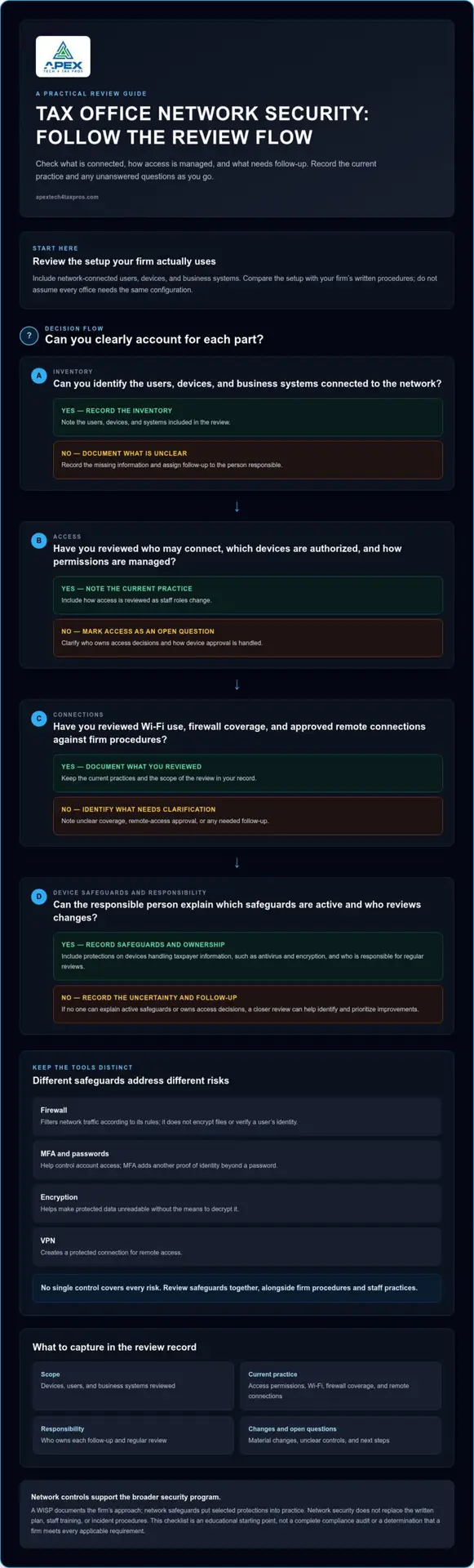
Make the review manageable by starting with what the firm actually uses. Inventory network-connected devices, users, and business systems, then compare the setup with your written procedures. The goal is to identify what’s in place, what’s unclear, and what needs follow-up. This practical approach makes network security for tax preparers easier to discuss and maintain without assuming every office has the same setup.
What should a first-pass network review record?
For each item, note what you reviewed, the current practice, who is responsible, and any follow-up needed. A simple record keeps unanswered questions visible instead of turning assumptions into findings. For example, if no one can explain how remote access is approved, record that as an open question for the person responsible for the network.
- Devices, users, and business systems in scope
- Access permissions and how they’re reviewed
- Wi-Fi use, firewall coverage, and remote connections
- Unclear controls, assigned follow-up, and next steps
This is an educational starting point, not a complete compliance audit or a determination that a firm meets every applicable requirement.
When should a firm seek a closer assessment?
A closer review can help when no one is sure who owns access decisions, devices connect without a clear approval process, or staff can’t describe which safeguards are active. These gaps don’t automatically mean a control has failed, but they do signal that the firm needs clearer answers. A structured WISP IT System Assessment can help identify and prioritize improvements based on the practice’s setup.
Turn the first-pass review into a clearer action plan with tax-focused assessment support.
How Can Tax Preparers Strengthen Network Security Over Time?
Keep network safeguards current by assigning someone to review them and record material changes. A new device, staff role, or remote-work arrangement can alter how information is accessed, so note what changed, who reviewed it, and whether procedures need updating. This creates a useful record for future reviews and helps the firm avoid relying on outdated assumptions.
How do network controls fit into a wider security program?
Technical safeguards work alongside staff awareness, data-protection practices, and procedures for responding to incidents. The WISP documents the firm’s security approach; operating controls put relevant parts of that approach into practice. A custom WISP document can help organize procedures so they reflect the safeguards the firm actually uses. Revisit the written plan when those practices change.
A checklist can help surface questions, but it can’t verify every technical control or determine whether a setup meets every requirement that applies to the firm. If a safeguard is unclear, document the uncertainty and identify who will follow up. That distinction keeps a self-review useful without mistaking it for a technical assessment or a compliance determination.
What is a practical next step if gaps remain?
If responsibility for a safeguard is unclear, changes aren’t being recorded, or the firm can’t explain how a control works, consider whether a more detailed review would help prioritize the next improvements. The right next step depends on the firm’s systems and working practices, so keep the review focused on the questions that matter for your setup.
Make Your Next Network Review More Focused
Choose one practical next step: assign an owner to an open question, document a change that needs review, or seek help prioritizing unresolved network concerns. A focused follow-up can turn a checklist into steady progress without trying to address every issue at once.
If a tailored review would help your firm decide what to address first, book a WISP IT System Assessment. Take the next step at a pace that works for your practice, with a clearer view of where to focus.
Frequently Asked Questions
Is a firewall enough to secure a tax preparer’s office network?
No. A firewall filters network traffic, but it can’t establish that a login belongs to the right person or make a saved return unreadable if someone accesses the device. MFA checks identity, encryption protects data, and endpoint protection addresses threats on workstations. Staff practices influence how these tools are used. Review safeguards together, especially when replacing a workstation or introducing a new remote-work process.
Does a tax preparer need a secure office network when working from home?
Home-based work still involves devices, internet connections, and sensitive business information, so network safeguards deserve attention even without a separate office. That doesn’t establish a universal legal answer for every preparer. Review how you access tax software, store files, and connect work devices, then compare your setup with applicable IRS or FTC guidance. Record uncertainties for follow-up in your security review.
Can MFA protect taxpayer data if the office network is not secure?
MFA adds an identity check at sign-in, but it doesn’t secure every connection or protect all stored files by itself. A tax preparer might use MFA for an account while still needing to review device protections and how data is stored. Treat MFA as one part of network security for tax preparers, alongside controls that address network traffic, devices, and information at rest.
How often should a tax practice review its network security?
Set a documented review schedule that fits your systems and working practices; there isn’t one universal interval established here for every firm. Revisit safeguards after material changes, such as staff departures, new devices, or a different remote-access arrangement. Keep a record of the review and unresolved questions. Consult current IRS, FTC, and NIST guidance for expectations relevant to your firm.
Does a WISP secure a tax office network by itself?
No. A WISP records how the firm organizes its information-security program, but it doesn’t implement or maintain technical controls on its own. The FTC Safeguards Rule is a regulation, the WISP documents the firm’s program, and tools such as firewalls and encryption are operational safeguards. Keep written procedures aligned with actual practices, and update them when systems or responsibilities change.