
What if a written security plan looks complete on paper but doesn’t match how your tax office actually protects client data? That gap is at the heart of cybersecurity compliance for tax professionals. Every U.S. tax professional with a PTIN must have a Written Information Security Plan (WISP), and compliance also depends on putting the plan’s safeguards into daily practice.
It’s understandable to feel unsure about how federal requirements translate into specific tasks. The law, IRS guidance, your WISP, and the security controls you use are connected, but they aren’t interchangeable. A WISP documents your approach; safeguards such as multi-factor authentication (MFA) and encryption help put that approach into action.
This guide from Apex Tech 4 Tax Pros explains how the FTC Safeguards Rule and IRS resources, including Publications 4557 and 5708, fit together. You’ll learn how to identify practical protections, assign responsibility, and keep your written plan aligned with your firm’s actual practices, without getting lost in generic IT advice.
Key Takeaways
- All PTIN holders need a WISP. Document a security plan that reflects your firm’s actual practices.
- Understand how the Safeguards Rule, IRS guidance, your WISP, and implemented controls each contribute to cybersecurity compliance for tax accountants.
- Use a practical sequence to identify sensitive data, assign responsibility, document safeguards, train staff, and review changes.
- Tax-professional-specific support, including a customized WISP, security tools, and cybersecurity awareness training, can help address gaps.
What Does Cybersecurity Compliance Mean for Tax Accountants?
Tax professionals need documented and implemented protections for taxpayer information. The WISP requirement applies to all PTIN holders: 100%, with no exceptions based on firm size, work location, or seasonal operations. In practice, cybersecurity compliance for tax accountants means having a written plan that accurately describes how your firm protects data, then following that plan in daily work.
Tax records can contain Social Security numbers, income details, and banking information. Protecting them means considering how information is collected, accessed, stored, shared, backed up, and eventually disposed of. A lost device, misdirected email, or former worker retaining access can expose data if your safeguards and procedures don’t account for these everyday situations.
Which tax professionals need to pay attention to these requirements?
Tax preparers, solo professionals, tax offices, and U.S. e-file providers with PTIN obligations all need to address these requirements. A small practice still handles sensitive taxpayer information, and seasonal staffing doesn’t remove the WISP obligation. Your plan should fit your actual operations, including who can access taxpayer data and how staff handle it.
Why do a written plan and real-world controls both matter?
A Written Information Security Plan (WISP) is the firm’s documented information security plan. It records responsibilities, risks, and safeguards; it isn’t itself a security tool. A customized WISP document can help you put those practices into a clear, firm-specific record.
A written policy describes the protections; real-world controls put them to work. For example, your plan may specify who should access tax software, while your firm must configure access accordingly and remove it when responsibilities change. The document should reflect practices in use, not safeguards the firm merely intends to adopt.
Compliance also carries real accountability. Claiming on Form W-12 that a compliant WISP exists when it doesn’t is false certification, a federal crime. Consequences can include PTIN revocation, EFIN suspension, and criminal prosecution. PTIN revocation means you can no longer prepare tax returns for compensation, while EFIN suspension prevents electronic filing. Having no WISP can also result in denial of cyber-insurance claims. Keep your plan accurate and connect its documented responsibilities to the protections staff actually follow.
How Do the Safeguards Rule, IRS Guidance, and a WISP Fit Together?
These four elements have distinct roles in a tax practice’s security program. The FTC Safeguards Rule is a regulation, IRS publications provide official guidance for tax professionals, a WISP records the firm’s security program, and implemented controls are the protections used in practice. Understanding the difference makes compliance requirements more concrete.
The WISP helps document how your practice addresses its obligations, but it does not replace the regulation or the safeguards themselves. Its value depends on whether the documented program reflects your firm’s real operations.
What does Form W-12 Line 11 ask tax professionals to certify?
The IRS added Line 11 to Form W-12 in 2024 as an annual renewal trigger. A “Yes” response certifies that you have an actual, compliant WISP. False certification is a federal crime. Consequences can include PTIN revocation, EFIN suspension, and criminal prosecution. Do not certify that you have a compliant WISP unless you actually have one.
What are the consequences of missing required protections?
The FTC can impose civil penalties of up to $50,685 per violation and $43,792 per day for ongoing violations. Having no WISP can also result in denial of cyber-insurance claims. If you need help identifying documentation or control gaps, book a tax-focused compliance assessment.
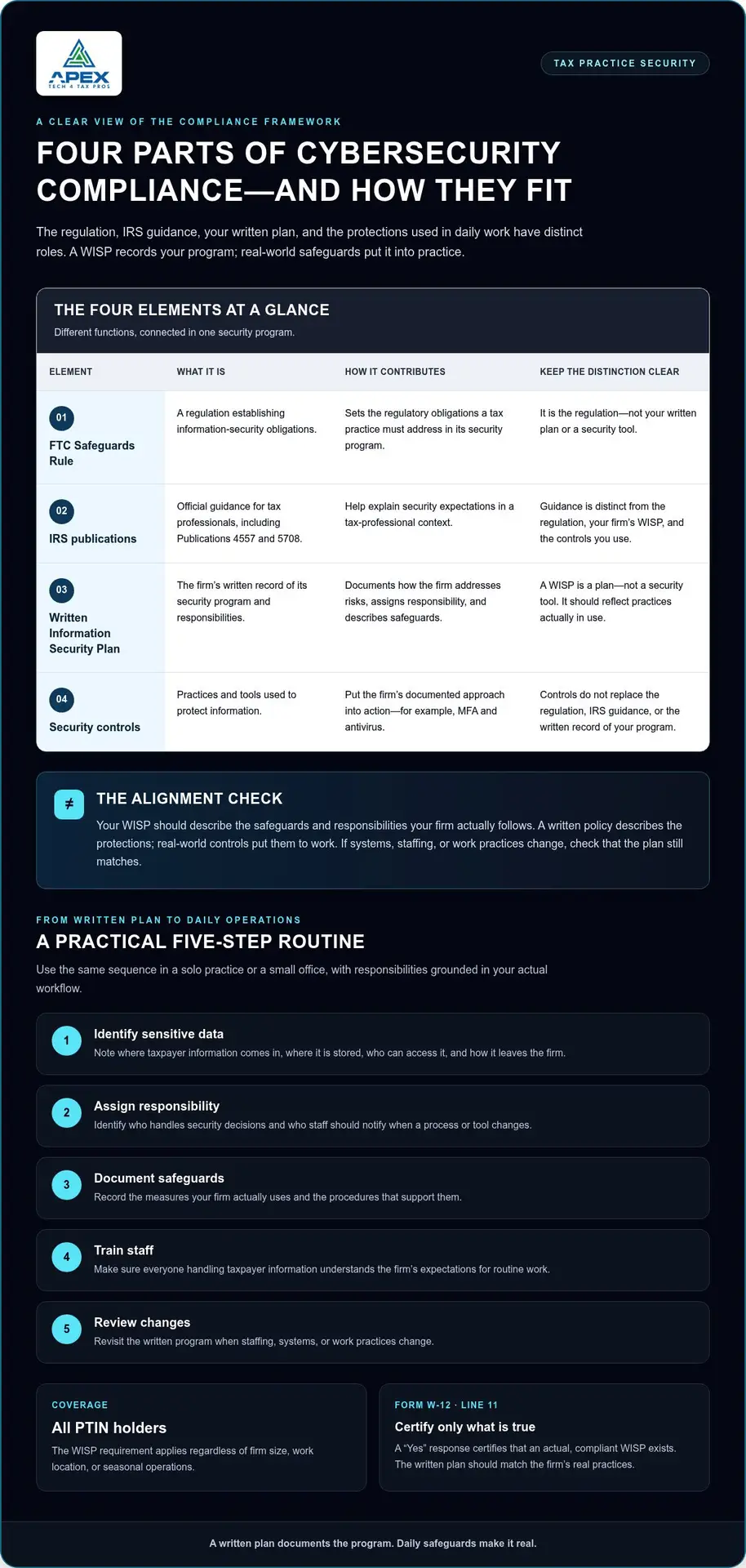
How Can a Tax Practice Put Cybersecurity Compliance Into Daily Operations?
Turn your security program into a routine your team can follow during busy filing periods and quieter months alike. This sequence keeps the work manageable for a solo preparer or small office while making ownership clear.
- Identify sensitive data. Note where taxpayer information comes in, where it’s stored, who can access it, and how it leaves the firm.
- Assign responsibility. Identify who handles security decisions and who staff should notify if a process or tool changes.
- Document safeguards. Record the measures your firm actually uses and the procedures that support them.
- Train staff. Make sure everyone handling taxpayer information understands the firm’s expectations for routine work.
- Review changes. Revisit the written program when staffing, systems, or work practices change.
How should a firm connect its written plan to everyday work?
Describe responsibilities in terms of real tasks. For example, note who receives client documents, which account they use, and how access is handled when a staff member’s role changes. If your firm adopts new software or changes its document workflow, check that the written procedures still match how information moves. Keep the plan grounded in current practice, not intended future improvements.
Why do training and access safeguards belong in the same program?
People need to know how to follow procedures and use controls correctly. MFA verifies identity, encryption protects data, and firewalls control network access routes. Staff guidance connects these distinct protections to everyday responsibilities. Cybersecurity awareness training for tax professionals can reinforce those expectations. When your written plan, staff procedures, and safeguards work together, security becomes part of how the practice operates rather than a document set apart from daily tasks.
If you’re ready to identify practical next steps for your firm, book a WISP assessment.
How Can Apex Tech 4 Tax Pros Help Tax Professionals Address Compliance Gaps?
Once you understand what your written plan and safeguards need to cover, the next step is matching those requirements to how taxpayer information is handled every day. Apex Tech 4 Tax Pros focuses exclusively on U.S. tax professionals, connecting tax-specific compliance documentation with practical security support. Its services include a customized WISP, Virtual PC (desktop), secure email, multi-factor authentication (MFA), VPN access, antivirus, and cyber training.
A Compliance Status Check helps identify missing controls, such as a WISP or MFA, so you have a clear starting point. This focused approach turns cybersecurity compliance from a broad IT concern into specific documentation and protection priorities.
What does tax-professional-specific support bring to the process?
Tax practices handle taxpayer information and e-file responsibilities that generic security advice may not address directly. A tax-focused program can help connect the written plan to your firm’s actual tools and workflows. A customized WISP document provides a starting point for recording your security program in a way that reflects your operations. Apex Tech 4 Tax Pros also provides bilingual support and brings more than 20 years of tax-office security experience.
What is a practical next step for a firm that has gaps?
Take stock of three things: whether your firm has a current WISP, which access safeguards are in use, and whether staff receive cybersecurity training. Note any difference between what your plan says and what your team actually does. This review can clarify where to focus first, whether the gap is missing documentation, an unimplemented control, or staff guidance that needs attention.
For a structured review of your firm’s documentation and security gaps, Book a WISP Assessment.
Make Your Next Compliance Step Count
A security program is most useful when it guides your firm’s next action. Compare your written plan with current practice, note any gaps, and assign a clear next step for each one. This makes compliance an ongoing part of firm operations rather than a document revisited only when a deadline approaches.
Apex Tech 4 Tax Pros helps tax professionals turn compliance questions into practical priorities. Bring your current plan and a clear picture of how your team handles taxpayer information to your review, and you’ll have a focused starting point for deciding what needs attention.
Book a WISP Assessment and take the next step toward a more manageable security program.
Frequently Asked Questions
Does IRS Publication 4557 replace the FTC Safeguards Rule?
No. IRS Publication 4557 provides tax-professional guidance, while the FTC Safeguards Rule is a regulation. Use the publication to understand security practices relevant to tax work, then assess how your firm meets its legal obligations. For example, the guidance can help you consider how client documents move through email and storage, but reading it alone doesn’t establish that your firm’s safeguards are in place.
Can a generic cybersecurity policy serve as a tax firm’s WISP?
Not automatically. A general policy may be a starting point, but it must address your firm’s taxpayer information, actual systems, responsibilities, and safeguards to function as a suitable WISP. A policy that refers to tools your firm doesn’t use, or omits how staff handle tax documents, can leave important gaps. Tailor and maintain the document so it reflects your practice.
Should a tax practice review its WISP when its systems or staff change?
Yes. A change can make written procedures inaccurate or leave access responsibilities unclear. When a new employee joins, consider whether the plan reflects who may access taxpayer records and what procedures apply. A software change or a new way of receiving client documents also warrants checking whether the WISP still describes your practice accurately. Keep updates consistent with how the firm operates.
What should a tax professional do after discovering exposed taxpayer information?
Act promptly under your firm’s incident-response procedures. Limit further exposure where possible, preserve relevant records, and document what was discovered, when, and which information may be involved. Notify the person responsible for the firm’s security and follow the applicable reporting and response requirements for your situation. Avoid speculation; if the scope or obligations are unclear, seek qualified legal or compliance guidance.
Does using MFA by itself make a tax practice compliant?
No. MFA helps verify identity, but it’s only one safeguard within a broader security program. Your firm also needs a WISP that reflects its practices and other appropriate protections for taxpayer information. The practical test is whether documented responsibilities, staff procedures, and safeguards work together, rather than whether one tool has been enabled.