
A clean desk is a practical security control, not just an office preference. A clean desk policy for accountants sets expectations for securing papers, notes, devices, and screens when a workspace is unattended or the workday ends. It isn’t a standalone legal requirement, but it can support broader data-protection obligations.
Accounting work depends on accurate records and careful handling of sensitive client information. A clean desk policy for accountants sets clear routines for what to put away, what to lock, and how to dispose of confidential documents without adding unnecessary steps.
This guide explains what to include, when a policy can help your firm, how to handle printed records and secure disposal, and what changes in shared workspaces. You’ll also see practical examples to help shape a policy that fits the way your team works.
Key Takeaways
- Define which paper records, notes, devices, and screens must be secured when a workspace is unattended.
- Set a clear process for collecting and securely disposing of confidential printouts.
- Adapt desk-clearing and screen-locking expectations for shared workstations and flexible schedules.
- Use practical policy examples to shape guidance your team can follow, then connect it with a customized WISP.
What is a clean desk policy – and should my company have it?
A clean desk policy sets expectations for securing information when a workspace is unattended or the workday ends. Accounting firms can use it to make physical and electronic security routines clear for employees, contractors, and shared work areas.
Requirements and procedures can vary by state, firm type, records handled, and office setup. A clean-desk policy is not a standalone legal requirement, but it can support broader data-protection obligations. Client information to protect includes personally identifiable information and financial records, such as Social Security numbers, account details, and tax documents.
Sensitive Information Security
A clean-desk policy defines how a firm protects confidential information in both physical and electronic form. A tax file can be exposed as a paper copy or on a computer display, so written procedures should cover both.
IRS Publication 4557 provides tax professionals with guidance on protecting taxpayer information. The FTC Safeguards Rule applies to covered financial institutions, and accounting firms should consider their activities when assessing its relevance. NIST Special Publication 800-122 emphasizes protecting personally identifiable information from improper access, use, and disclosure. A firm’s policy can translate those concerns into clear staff responsibilities, including who may handle records and how exceptions are reported.
Secure Storage and Disposal
Secure storage and disposal procedures explain how staff protect papers and portable media while they are in use and after they are no longer needed. Even when nobody is actively using a file, it can remain exposed in a work area.
Set expectations for lockable storage, access to keys, and handling notebooks or removable drives containing client details. The FTC Disposal Rule requires consumer report information to be discarded in a way that protects it from unauthorized access. Align disposal procedures with the firm’s record-retention schedule, so staff can distinguish documents ready for destruction from records still needed for business or compliance.
Shredding confidential documents
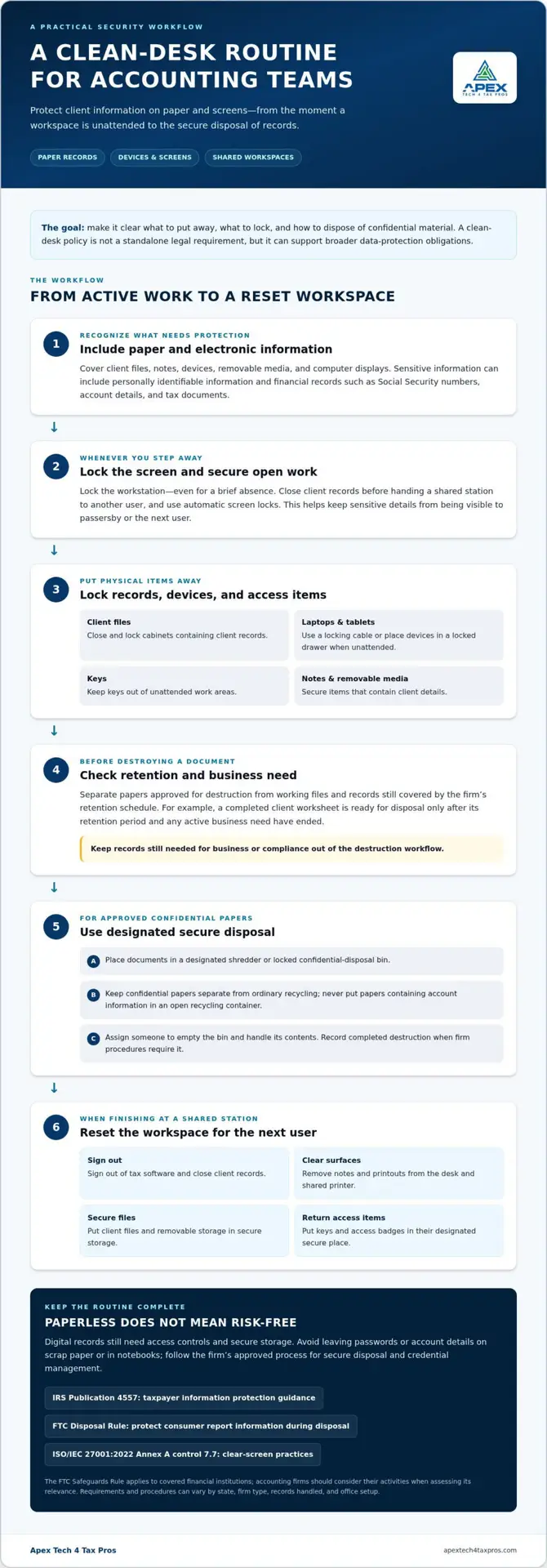
Build document destruction into the firm’s records workflow instead of leaving it to end-of-day tidying. Staff should separate papers approved for destruction from working files and records still covered by the retention schedule. For example, a completed client worksheet is ready for disposal only after its retention period and any active business need have ended.
Use a designated shredder or locked confidential-disposal bin for papers containing client details. Assign someone to empty the bin and handle its contents, so discarded tax forms don’t remain accessible. Keep ordinary recycling separate from confidential disposal. Never put paper containing account information in an open recycling container.
Passwords and access details also need careful handling. Staff should not leave credentials on scrap paper, in notebooks, or beside a workstation. Treat notes containing a password or account identifier as sensitive material, and follow the firm’s approved process for secure disposal and credential management.
- Confirm that the document is approved for destruction.
- Place it in the designated secure disposal container.
- Keep confidential papers separate from ordinary recycling.
- Record completed destruction when firm procedures require it.
Digital workflows can reduce routine printing, paper use, and physical filing. For example, staff can review a report in an approved electronic system instead of printing a copy for temporary reference. Electronic records still need access controls and secure storage, so using less paper does not eliminate the need to protect client information.
Make disposal procedures easy to follow, especially during busy periods: identify the approved container, explain which documents belong there, and name the person responsible for collection. Clear instructions help employees dispose of sensitive papers correctly without destroying records the firm still needs.
Clean-desk practices for shared workspaces
Shared desks need consistent rules because employees may use the same workspace across shifts. Establish a reset routine that protects confidential information and prepares each station for its next user.
Locking Workstations and File Cabinets
Secure devices and records whenever a shared area is unattended. Require staff to close and lock cabinets containing client files, and secure unattended laptops with a locking cable or inside a locked drawer. Keep keys out of unattended work areas. These steps reduce the chance that another employee or a visitor can access information left behind.
Screen Locks on Shared Workstations
A screen-lock rule requires employees to lock a computer before leaving a shared workstation, even briefly. Set automatic screen locks and instruct staff to close client records before handing a station to another user. Clear-screen practices are included in ISO/IEC 27001:2022 Annex A control 7.7. The purpose is to keep sensitive details from remaining visible to passersby or the next user.
Hot-desking works best when each employee leaves the station ready for the next person. Set a simple end-of-use routine for physical items and open digital sessions. For example, after a client call, an employee should sign out of tax software, remove notes, and clear printouts before leaving.
- Lock the workstation whenever the user steps away.
- Put client files and removable storage in secure storage.
- Remove printouts from the desk and shared printer.
- Return keys and access badges to their designated secure place.
Specify whether staff should secure laptops and tablets with a locking cable or in a locked drawer when stepping away. A written routine also helps employees distinguish personal items from firm records, so confidential information does not remain at the station for the next user.
Clean desk policy examples and templates
A useful written policy names the records, devices, and routines staff must secure. Accounting firms can put it into practice with clear examples, staff reminders, and consistent follow-up.
Policy Examples and Templates
A template provides a starting structure, but examples should reflect the actual workplace. For instance, a policy might say: “Before leaving, place client papers in a locked drawer, remove printouts, and lock your computer.” Add a shared-desk example, such as signing out of tax software and clearing notes before another employee uses the station. Plain language makes each action easy to understand.
Policy Contents
Include rules for paper records, screens, portable devices, and disposal. Specify that client files belong in locked storage, confidential printouts must be collected, and password sticky notes are not allowed. Explain how staff secure laptops and removable storage, and what to do with documents awaiting disposal. Name the person responsible for questions and explain how the policy works with the firm’s document-retention schedule.
Make instructions observable. “Protect client data” is broad; “lock the screen before stepping away” gives employees a clear action. Specific directions make it easier to catch a missed step before exposed information contributes to a breach.
Implementation and Enforcement
Introduce the policy in a staff meeting, then give employees a written copy to consult during busy periods. Demonstrate the closing routine at a workstation, including where papers go and how to lock screens. Managers can send reminders and address repeated lapses in private, direct conversations. Consistent expectations help seasonal staff and regular employees follow the same process.
Review the policy when workflows or workspace arrangements change. A tax firm adding hot desks, for example, should update instructions for clearing stations between users. A tax-office-specific WISP template can help connect workspace procedures with broader written security planning.
Apex Tech 4 Tax Pros: Customized Written Information Security Plan (WISP)
Apex Tech 4 Tax Pros can help accounting firms connect desk procedures with a broader security plan through a Customized Written Information Security Plan (WISP). Turn to this support when your written rules need to reflect how your firm handles taxpayer information, devices, and shared workspaces.
A risk assessment can identify security gaps that need attention, while Cyber Training reinforces employees’ role in following workplace procedures. Secure cloud backup helps protect business data by keeping backup copies available for recovery. These services address different parts of a firm’s security approach: a WISP documents the plan, while staff practices put it into action.
For help shaping a security plan around your accounting firm’s practices, contact Apex Tech 4 Tax Pros at info@at4tp.com.
Make Desk Security Part of the Workday
A written policy works best as part of the firm’s daily routine, not as a document staff see only during onboarding. Assign someone to keep the guidance current, and revisit it when workflows, staffing, or workspace arrangements change. This keeps expectations relevant during busy filing periods and quieter months alike.
Start by comparing the written rules with what employees actually do at their desks. If your clean desk policy for accountants doesn’t match how client records move through the office, revise it so the next action is clear and workable. Consistent routines help your team protect client information without relying on memory alone.
If you’d like help aligning written security planning with your firm’s practices, connect with Apex Tech 4 Tax Pros. A thoughtful next step can make desk security easier to sustain across your team.
Frequently Asked Questions
What is a clean desk policy for accountants?
A clean desk policy for accountants is a written standard for protecting client information around workstations. It should clarify who follows the rules, which spaces they cover, and how staff handle exceptions, such as an urgent client call. A clear scope helps employees understand that the policy applies during the workday, at closing, and when handing a workspace to someone else.
What are the best practices for securing paper files, checks, and tax documents at the end of the day?
Before leaving, gather checks, tax forms, and client files, then return them to their assigned secure storage. Keep checks separate from routine papers so staff can account for them during closing. Collect documents left at scanners and printers, and put records awaiting authorized disposal in the designated secure container. A closing partner can flag overlooked items without reviewing client details.
How should accountants secure computers, phones, and cloud files when leaving their desks?
Lock the computer and phone before stepping away, and sign out of applications that display client records on shared devices. Close cloud-file sessions and avoid leaving client documents visible on unattended screens. Follow the firm’s approved authentication and storage practices instead of saving sensitive files to a personal device or unapproved account.
What are the risks and penalties of failing to follow a clean desk policy?
A clean-desk policy is not a standalone legal requirement, so leaving a desk untidy does not automatically result in a fine. The risk is that exposed information may be accessed or disclosed, while separate requirements may apply to the information and the firm. For example, the FTC Disposal Rule requires consumer report information to be discarded in a way that protects it from unauthorized access.
What clean desk policy checklist should accounting employees follow?
Before leaving, employees should check their workspace for exposed client names, open documents, checks, and unattended devices. Secure records, clear shared equipment, lock screens, and remove access materials from view. When handing off a shared workstation, close client applications and leave the station ready for the next authorized user. Managers can use the same checklist during periodic walkthroughs.