
A confident security promise is not the same as a clear plan. The four questions to ask your IT provider about security should cover how your data is backed up and restored, how risks are assessed, how threats are monitored, and what happens when the provider cannot give a clear answer.
For a tax practice, security can sound technical, but the practical question is simple: can your provider explain how it protects sensitive client information and what it will do if something goes wrong? Clear answers help you see which safeguards are in place and where responsibilities or recovery steps need clarification.
Use these four focused questions to guide the conversation, and listen for specific, useful answers. The discussion covers backup and recovery, risk assessments, monitoring and incident response, and how to respond to vague or incomplete explanations, helping you make informed decisions about your firm’s security.
Key Takeaways
- Pin down what gets backed up, how recovery works, and how the process is tested.
- Learn what a useful risk assessment should examine and how its findings guide security priorities.
- Distinguish routine system monitoring from active detection of vulnerabilities and threats.
- Use unclear answers as a prompt to clarify how sensitive data is protected and who handles the next steps.
1. How should you verify backup and disaster recovery claims?
Ask how your provider backs up data and tests recovery. A useful answer explains what is copied, how often backups run, where copies are stored, and how files and systems are restored after an incident.
For a tax office, confirm that backups cover essential records and software data, not only selected folders. Business data may need to be backed up daily. Ask how backup storage is protected and whether a compromised network account could also access those copies.
Restoration tests show whether a backup is usable. A practical schedule is to restore a few files every month and confirm they open, then test a larger recovery, such as a server or virtual machine, every quarter. Walk through the full recovery plan and simulate an incident every year.
Ask how long recovery could take in different scenarios, such as a deleted file, a damaged computer, or an office-wide outage. Ransomware can leave a business unable to operate for days while it restores from backups. Tested recovery steps and realistic timelines are more useful than a general promise that backups exist.
During a ransomware incident, backups should support recovery, not be the first or only response. Ask how the provider isolates affected systems, protects clean backup copies, and coordinates restoration. A risk assessment can help identify which records and operations should take priority.
Incident reporting responsibilities matter alongside technical recovery. The SEC’s amended Regulation S-P requires covered firms to ensure their service providers report a breach within 72 hours, according to the U.S. Securities and Exchange Commission. The Federal Trade Commission says the FTC Safeguards Rule requires non-bank financial institutions to report breaches involving at least 500 consumers within 30 days of discovery. Ask how the provider will notify your firm and support its response.
2. Risk assessment methodology and frequency
Ask the provider to explain its risk assessment process, not just the software it uses. A useful assessment inventories systems, remote access, sensitive data, and vendors, then identifies threats and weaknesses. It should rank findings by likelihood and business impact, document existing safeguards, and assign actions to address gaps. A sample report with sensitive details removed can show how findings become practical priorities.
Ask how often the provider conducts a risk assessment, what changes trigger a fresh review, and how it tracks fixes between reviews. A comprehensive cybersecurity audit is different from a risk assessment, and an annual audit is not a universal requirement. Review frequency depends on the firm’s circumstances and any applicable requirements. A new tax software platform or remote access method can change who can reach taxpayer data, so review the assessment scope when those changes occur.
Provider scoping should include the MSP’s own tools and vendors. Ask how it maintains software, applies patches, restricts technician access, and monitors unusual activity. Have it explain how employee departures, subcontractors, and third-party platforms are handled, including access removal and ongoing vendor reviews. The contract and service-level agreement should define included security controls, incident communications, responsibilities, and separately billed work. Managed IT security costs depend on the scope of systems, users, tools, and services; the proposal should identify fees outside the agreed package.
Experian requires an annual EI3PA security assessment when third parties access, transmit, store, or process Experian credit reports and other regulated data. Ask whether that requirement applies to your firm’s work. Cyber insurance and contractual liability are separate matters: policy documents describe covered events, limits, and exclusions, while the agreement defines accepted responsibilities and liability. A risk assessment can inform a customized Written Information Security Plan by identifying which safeguards and responsibilities need to be documented.
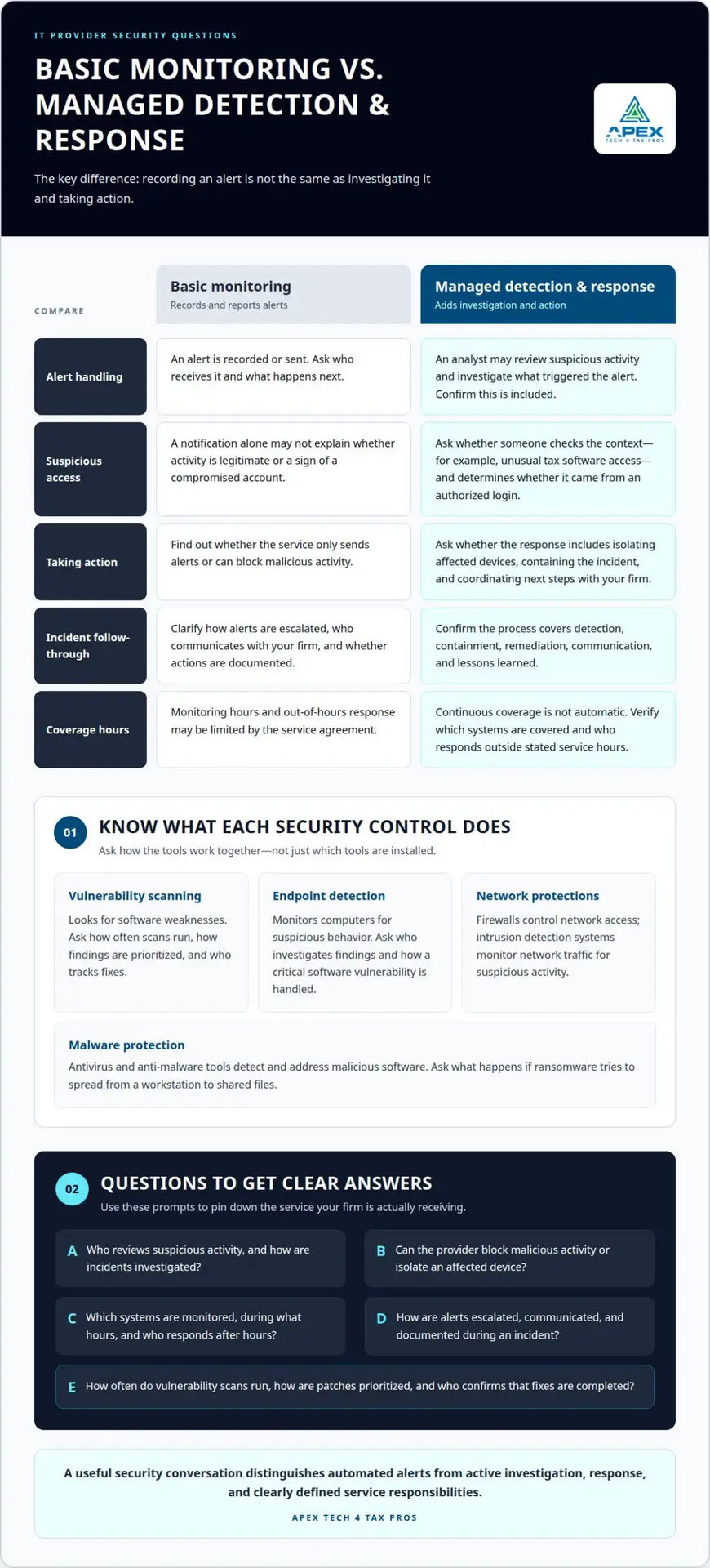
3. How do managed detection and response compare with basic monitoring?
Basic monitoring records alerts; managed detection and response adds investigation and action. Ask whether an analyst reviews suspicious activity, isolates affected devices, and explains incidents to your firm. For example, an alert about unusual tax software access is more useful when someone determines whether it came from an authorized login or a compromised account.
Vulnerability scanning looks for software weaknesses, while endpoint detection monitors computers for suspicious behavior. Ask how often scans run, how findings are prioritized, and who tracks fixes. Patch management should identify available updates, test patches before deployment, and apply them according to risk. Ask how the provider responds to a critical software vulnerability that attackers could exploit.
Security also depends on network and device controls. Firewalls control network access, antivirus and anti-malware tools detect and address malicious software, and intrusion detection systems monitor network traffic for suspicious activity. Ask how these controls work together if ransomware tries to spread from a workstation to shared files. Confirm whether the provider blocks malicious activity or only sends an alert.
Monitoring may combine automated alerts, ongoing review, and an incident response process covering detection, containment, remediation, communication, and lessons learned. Ask who receives alerts, what triggers escalation, how the provider communicates during an incident, and how response actions are documented. The answer should distinguish automated monitoring from active investigation and response.
Cybersecurity monitoring is not automatically available 24/7. Ask whether coverage is continuous, which systems it includes, and who responds outside stated service hours. The contract should define monitoring hours, escalation steps, and responsibilities rather than leaving those expectations implicit. For a tax office, also clarify how alerts involving tax software, email, or remote access reach the person responsible for security.
4. What if your IT provider can’t answer these questions?
If an answer about encryption is vague, ask for specifics. How is taxpayer data protected in transit, such as when an employee sends a file remotely, and at rest, while stored? Encryption protects information; passwords and permissions control who can use it. Ask who manages encryption keys and how access is removed when an employee no longer needs it.
Data protection should cover the full lifecycle: collection, use, storage, sharing, retention, and disposal. Ask how a provider protects a tax document as it moves from an employee’s computer to shared storage, including copies created during routine work. Discuss backup copies, too. Ask how restoration tests confirm that recovered files remain protected and accessible only to authorized users.
Ask how the provider keeps customer data separate. Could one firm’s information be exposed through another customer’s account, a shared folder, or an administrative error? The provider should explain how permissions and data structures prevent different businesses’ information from being mixed together.
If employees use artificial intelligence tools, ask whether they may enter taxpayer information into public or third-party systems. A written policy should explain which tools and data are permitted, what human review is required, and who approves exceptions. Clear rules help employees avoid sharing sensitive client records while using software to draft or summarize work.
Layered protection combines measures with different jobs: encryption protects data, a firewall controls network access, and multifactor authentication verifies identity. Ask for a practical example of how these controls work together during a remote login or suspected breach. If answers stay unclear, document the unanswered points and request specific procedures, responsible roles, and testing evidence. A focused security assessment can help turn those gaps into a prioritized action plan.
Apex Tech 4 Tax Pros: Customized Written Information Security Plan (WISP)
Apex Tech 4 Tax Pros creates a Customized Written Information Security Plan (WISP) for tax professionals who need security responsibilities and procedures documented clearly. Turn to this support when provider answers reveal gaps, your systems or vendors change, or your existing plan no longer reflects how your office handles taxpayer data.
A WISP puts your safeguards, risk priorities, and response procedures into one working plan. Risk Assessments can help identify weaknesses to address, while Cybersecurity Awareness Training helps employees recognize security risks in daily work. Secure Cloud Backup supports data protection and recovery planning.
These services help connect written procedures with the practical steps your tax practice takes to protect client information. For help developing or improving your plan, contact Apex Tech 4 Tax Pros.
Make security conversations part of your practice
Record security decisions, responsibilities, and follow-up actions. When your tax practice changes its software, staffing, or client workflows, revisit the record to keep safeguards aligned with how the business operates. This makes questions to ask your IT provider about security part of ongoing practice management, not a one-time conversation.
Apex Tech 4 Tax Pros supports tax professionals with bilingual service and more than 20 years of combined tax and IT experience. If you want help shaping the next step for your firm, its team can discuss a practical approach that fits your needs.
Contact Apex Tech 4 Tax Pros to continue the conversation and move toward a clearer security plan. A manageable next step can help you protect client information with greater confidence.
Frequently Asked Questions
What if your IT provider can’t answer these questions?
Before giving a provider access to new systems or taxpayer records, determine whether its answer depends on your software, account setup, or contract. Ask for a clear explanation of how the relevant safeguards work. If the answer reveals a gap in a control your firm relies on, address it before changing vendors, adding integrations, or expanding access.
Do You Have Any Third-Party Security Certifications?
Ask what an independent review covered, which services were in scope, and whether it identified exceptions. A certification or audit report does not automatically cover every system supporting your tax practice. For example, a review may cover a provider’s internal operations but exclude a separate software platform. Use the scope to understand what the evidence does and does not show.
How Can I Be Certain That My Data Will Not Be Accessible to Others?
No provider can responsibly promise that information is never accessible to anyone. Ask what happens to your records when service ends: how you receive usable copies, how long retained copies remain, and how deletion is handled. Also clarify whether your firm can retrieve its own files without relying on a former employee’s account. These exit details help prevent an access or continuity problem during a transition.
How Do You Ensure My Data Is Safe?
Clarify which security decisions remain your firm’s responsibility. Your firm may decide who can use tax software, while the provider handles separate technical tasks. Ask for a simple responsibility map based on your workflow, including who approves new users, updates access when roles change, and manages records staff share with clients. Clear ownership helps prevent routine changes from creating unnoticed gaps.
How Can You Test Incident Response Maturity Before You Sign?
Ask to review the outcome of a completed exercise with sensitive client details removed. Look for lessons identified, assigned corrective actions, and evidence that completed actions were revisited. Ask whether the exercise involved the people responsible for business decisions as well as technical staff. This shows whether lessons lead to practical changes rather than remaining observations in a report.
How Do Managed Detection and Response Compare With Basic Monitoring?
Ask to see a sample monitoring report with customer details removed. Useful reporting shows how alerts were categorized, which were investigated, and why an event was closed or escalated. It may also reveal recurring alert patterns that need attention. Reviewing the report helps you judge whether the service gives your firm meaningful operational visibility, rather than just a list of notifications.