
A security-focused managed service provider should do more than maintain your technology. It should protect access, support recovery, and understand your business’s requirements. Knowing how to vet a managed service provider for security means looking beyond a polished service list to how the provider handles support, security controls, backups, and accountability.
Reliable support depends on clear responsibilities and recovery plans, not simply on keeping systems running. The right fit depends on your IT needs, industry, compliance obligations, and budget, not just the services on offer.
This guide explains what an MSP does and gives you four practical checks for assessing its responsiveness, security evidence, backup and recovery practices, and fit for your organization. You’ll have a clearer basis for deciding whether a provider can support your operations and protect the information your work depends on.
Key Takeaways
- Assess whether the provider communicates clearly, resolves support issues effectively, and defines incident responsibilities in writing.
- Look beyond backup claims: understand how often data is backed up, where it is stored, and how recovery is tested.
- Evaluate an MSP as a supplier that needs ongoing oversight, not just a one-time security review.
- Match the provider’s services and contract to your IT requirements, industry obligations, growth plans, and budget.
1. Communication and support responsiveness
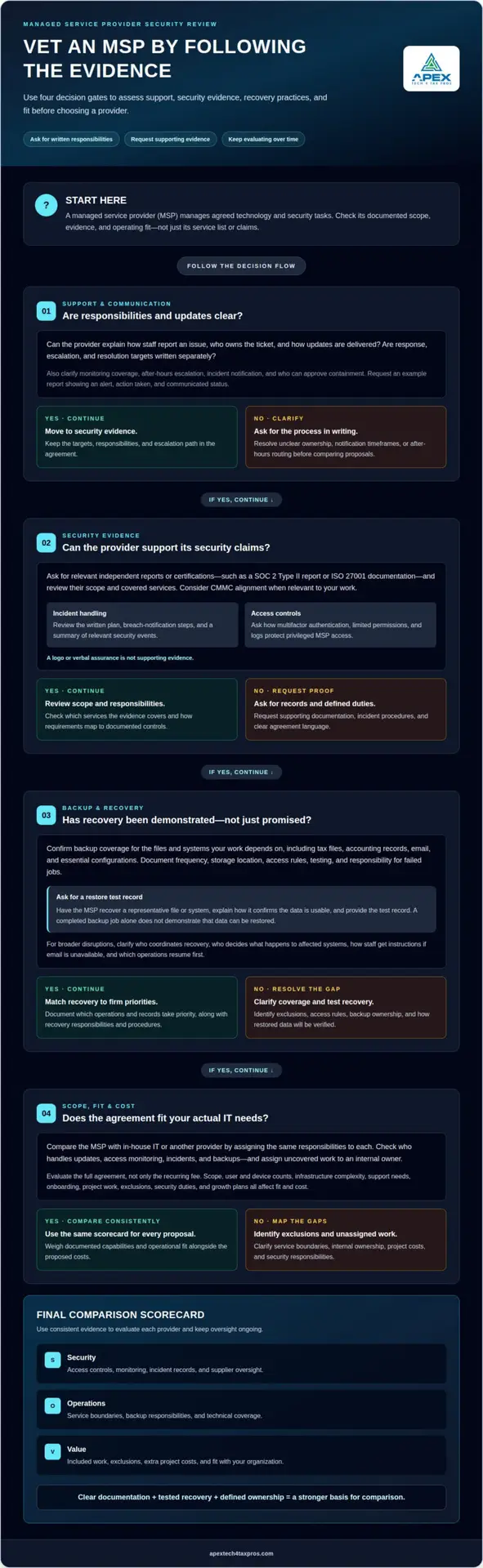
Ask the MSP to explain how staff report an issue, who owns the ticket, and how updates are delivered. Request written service-level targets for each priority, covering response, escalation, and resolution. Response time is when someone acknowledges a request; resolution time is when the underlying problem is addressed. Keeping these measures distinct makes the agreement easier to evaluate.
Ask what proactive monitoring covers and how alerts reach a technician. If Microsoft email access fails, for example, clarify who identifies the issue, contacts your firm, and tracks restoration. Request a sample report showing the alert, action taken, and status communicated. Ensure the monitoring scope names the systems and accounts covered, rather than relying on a general promise to watch your network.
After-hours support needs a clear escalation path. Ask how the MSP routes a critical incident, who can approve containment, and how your decision-maker receives updates. Specify notification timeframes and the incident-management process in the agreement. Include what happens if the primary contact is unavailable and how each escalation is recorded for later review.
No single certification fits every organization. Ask which independent reports or certifications the MSP can provide, such as a SOC 2 Type II report or ISO 27001 documentation, and review their scope and covered services. Consider CMMC alignment when it is relevant to your work. Request supporting evidence, not just a logo or a verbal claim.
Assess incident response by reviewing the written plan, breach notification steps, and a summary of relevant security events. Ask how the provider records lessons learned and tracks corrective actions. For compliance support, clarify whether it maps your requirements to documented controls and provides reports for your records. Spell out responsibilities in the agreement rather than leaving them to assumptions.
2. Backup, recovery, and disaster recovery
A backup is useful only if your organization can restore the information it needs. Ask the MSP to map backup coverage to your infrastructure, including tax files, accounting records, email, and essential system configurations. A backup that covers shared folders but misses application data, for example, may not restore a tax office’s full workflow. Clarify which systems and files are excluded, too.
Document backup frequency, storage location, access rules, and testing procedures. If a third party maintains backups, understand how its security practices protect stored information. Ask who can access backup copies, how access is controlled, and whether administrative actions are logged. The agreement should assign responsibility for monitoring backup jobs and addressing failures, rather than leaving these tasks implicit.
Testing should demonstrate that data can actually be restored. Ask the MSP to recover a representative file or system, explain how it confirms the restored data is usable, and provide a test record. For example, it could restore a deleted client folder and confirm staff can open the recovered documents. This distinguishes a functioning recovery process from a completed backup job.
Disaster recovery addresses broader disruptions, such as ransomware or unavailable office systems. Ask who coordinates recovery, who decides what happens to affected systems, and how staff receive instructions if email is unavailable. The plan should explain which operations resume first, how progress is communicated, and how the provider handles records that may have been affected during an incident.
Match recovery priorities to your firm’s work. A seasonal tax office may prioritize current client files differently from archived records. Document those priorities, responsibilities, and recovery procedures as part of your security planning. A tax-focused security plan can help organize them alongside your firm’s broader safeguards.
3. What Is a Managed Service Provider?
A managed service provider (MSP) manages agreed technology and security tasks for an organization. Knowing how to vet a managed service provider for security starts with due diligence before engagement and continues throughout the supplier relationship. NIST cybersecurity supply chain guidance recommends both steps. Request documented responsibilities, security practices, and audit logs that support the provider’s claims.
Compare an MSP with in-house IT or another provider by assigning the same responsibilities to each. Evaluate who manages updates, monitors access, handles incidents, and maintains backups. Ask for examples of technical procedures and evidence, such as access-review records. Then assign uncovered work to an internal owner. This shows the provider’s actual contribution and helps your team identify gaps in the proposed service.
Assess cybersecurity as a set of connected controls. Ask how identity checks, endpoint protection, network defenses, logging, and backups work together. Privileged MSP access can expose systems if an account is misused or compromised. Reduce that risk with multifactor authentication, permissions limited to necessary tasks, and logs that record account access and changes.
MSP pricing depends on scope, user and device counts, infrastructure complexity, and support requirements. Compare the full agreement, including onboarding, project work, and security responsibilities, rather than judging only the recurring fee. A practical way to vet a managed service provider for security is to weigh documented capabilities and operational fit alongside proposed costs.
Use a scorecard to compare proposals against consistent evidence:
- Security: access controls, monitoring, incident records, and supplier oversight.
- Operations: service boundaries, backup responsibilities, and technical coverage.
- Value: included work, exclusions, extra project costs, and fit with your organization.
A proposal with clear access limits and documented responsibilities is easier to evaluate than broad promises unsupported by records.
4. Assessing IT needs, industry, compliance, and budget
Start with the work your systems must support. List the applications, devices, data, and business processes that keep operations running. A tax office, for example, depends on tax software, secure access to taxpayer records, and seasonal staffing. Ask how the MSP’s services match those needs, what remains your responsibility, and how the division of work is documented. A useful baseline is a clear map of systems, owners, and procedures.
Industry obligations can change that map. Defense contractors may need to align systems with CMMC and NIST SP 800-171 requirements, according to the U.S. Department of Defense. Healthcare organizations may need to address HIPAA safeguards, according to the U.S. Department of Health and Human Services. Ask the MSP to explain how its technical controls support relevant compliance work, and distinguish operational assistance from legal advice.
Next, test business continuity and growth against real scenarios. Could the arrangement support adding 50 employees without renegotiating the entire agreement? Ask how onboarding, user access, support coverage, and incident procedures would adapt. Clarify which changes count as included service and which become separate projects. This helps reveal whether the agreement fits your plans or creates unexpected operational gaps.
Compare budgets using the full scope, not a headline fee. Include recurring services, onboarding, project work, hardware, backup, and any internal time your team must provide. Evaluate proposals using the same assumptions about users, devices, locations, security responsibilities, and support. A lower fee may leave important tasks to your staff; a higher fee is worthwhile only if its documented services address real needs.
For tax professionals, an IT system assessment can help map existing systems, risks, and compliance priorities. Use that picture to define what the MSP must support, what your firm retains internally, and which procedures should be reflected in the agreement.
Pricing depends on the scope of recurring services, onboarding, project work, hardware, backup, and the internal time your team must provide. Users, devices, locations, security responsibilities, and support coverage also affect the comparison. A lower fee may leave more work with your staff.
Apex Tech 4 Tax Pros: Customized Written Information Security Plan (WISP)
Apex Tech 4 Tax Pros helps tax and accounting professionals document their security practices with a Customized Written Information Security Plan (WISP). Turn to this work when your MSP review reveals unclear responsibilities, gaps in written procedures, or a need to describe how your firm protects sensitive information.
A WISP IT System Assessment can identify security weaknesses to address in your plan and provider discussions. Cybersecurity Awareness Training helps staff recognize and handle security risks, while a Secure Virtual Desktop supports secure tax preparation workflows. These services complement your MSP relationship; they do not replace evaluating the provider’s controls, contract, and documented responsibilities.
For support aligning your written security practices with your firm’s needs, contact Apex Tech 4 Tax Pros.
Make Your Next Security Decision With Confidence
Choosing an MSP is not the end of your security work; it’s the beginning of an ongoing partnership. Use what you’ve learned about how to vet a managed service provider for security to keep expectations clear as your systems, staff, and responsibilities change. Document who owns each task, how changes are approved, and how your firm will review the relationship over time.
Tax professionals also need security practices that fit the realities of their work. Apex Tech 4 Tax Pros can support that effort with a Customized Written Information Security Plan (WISP), Cybersecurity Awareness Training, and Risk Assessments. These offerings help connect written procedures, staff awareness, and identified risks to your firm’s day-to-day operations.
To discuss a practical next step for your tax practice, contact Apex Tech 4 Tax Pros. A clear plan can make security decisions easier to manage and help your team move forward with greater confidence.
Frequently Asked Questions
How Long Does It Take to Choose an MSP?
A careful MSP selection often takes four to eight weeks. Use that period to define requirements, review security documentation, compare proposals against the same scope, and resolve contract questions. For example, document internal staff responsibilities and data handover expectations before signing. The goal isn’t to rush a decision, but to choose a provider whose responsibilities and terms fit your operations.
How do I evaluate an MSP’s security posture?
Evaluate the MSP’s documented controls against the systems and information it will handle. Review how it oversees its own suppliers, records security changes, and addresses assessment findings. For a tax firm, trace a staff member’s workflow from sign-in to access to client files, then consider how security events are escalated. Revisit the evaluation when your systems, services, or provider responsibilities change.
What Does a Strong MSP Partnership Look Like?
A strong partnership has clear ownership, useful reporting, and a shared understanding of the agreement. Your firm knows which decisions remain internal, while the MSP documents its assigned work and communicates material changes. For example, a new tax application should prompt a discussion about access, staff procedures, and who maintains its security records. Regular reviews keep expectations aligned as your business changes.
How can you verify an MSP’s security certifications, audit reports, and penetration test results?
Request the relevant certificate and current SOC 2 Type II report, then examine their scope, coverage, and date. Check whether the report addresses the services and systems involved in your relationship. For penetration testing, request a summary showing what was tested, significant findings, and remediation status. A report with redactions can still help if it clearly explains the assessment’s boundaries and follow-up.
What security controls should you require from an MSP for access management, MFA, encryption, and endpoint protection?
Require named accounts, least-privilege permissions, and MFA for provider access. MFA verifies identity, but it does not protect stored data on its own. Ask how encryption protects sensitive information and how endpoint protection alerts are reviewed and addressed. Define how access is removed when an MSP worker no longer needs it. These written controls help limit exposure and clarify accountability.
What questions should you ask an MSP about backups, disaster recovery, and ransomware recovery testing?
Ask which data and systems are covered, who controls backup access, and how recovery tests demonstrate usable results. For ransomware scenarios, ask how the MSP identifies a clean restore point and who approves restoration. Request a sample test record showing the systems covered, issues found, and corrective actions. This evidence helps you assess whether recovery procedures match your firm’s operating priorities.