
If the IRS conducted a Safeguards Rule audit on your firm this morning, would your current document exchange process pass, or would it trigger a penalty that starts at $51,744 per violation? You likely recognize that protecting sensitive taxpayer data is no longer optional; it’s a foundational requirement of your professional liability. Most tax professionals feel the constant tension of trying to meet these high-stakes regulatory standards while managing clients who find new portals frustrating or complex. It’s a difficult balance to maintain when your focus should be on accuracy and client service.
This guide provides a pragmatic framework to implement secure file sharing for accountants that satisfies federal mandates without sacrificing the seamless experience your practice requires. You’ll discover how to bridge the gap between technical security and daily operations by aligning your document collection with a robust Written Information Security Plan (WISP). We’ll outline the specific steps to ensure your firm remains compliant with the FTC Safeguards Rule through 2026 while protecting your reputation from the fallout of a data breach. By the end of this article, you’ll have a clear roadmap for choosing a tailored solution that offers both legal protection and operational efficiency.
Key Takeaways
- Understand why standard email attachments represent a critical vulnerability and how transitioning to a professional-grade portal protects your firm from devastating data breaches.
- Navigate the complexities of the IRS “Security Six” and the FTC Safeguards Rule to ensure your document exchange protocols meet mandatory federal encryption standards.
- Identify the essential technical specifications, such as AES 256-bit encryption, required to implement secure file sharing for accountants while maintaining your brand’s professional integrity.
- Learn how to successfully migrate clients away from risky communication habits by establishing a “Hard No” policy and providing a seamless onboarding experience that builds long-term trust.
- Discover how to bridge the gap between your technical tools and your Written Information Security Plan (WISP) to create a comprehensive, compliant shield for your practice.
Beyond Email: Defining Secure File Sharing for Professional Tax Practices
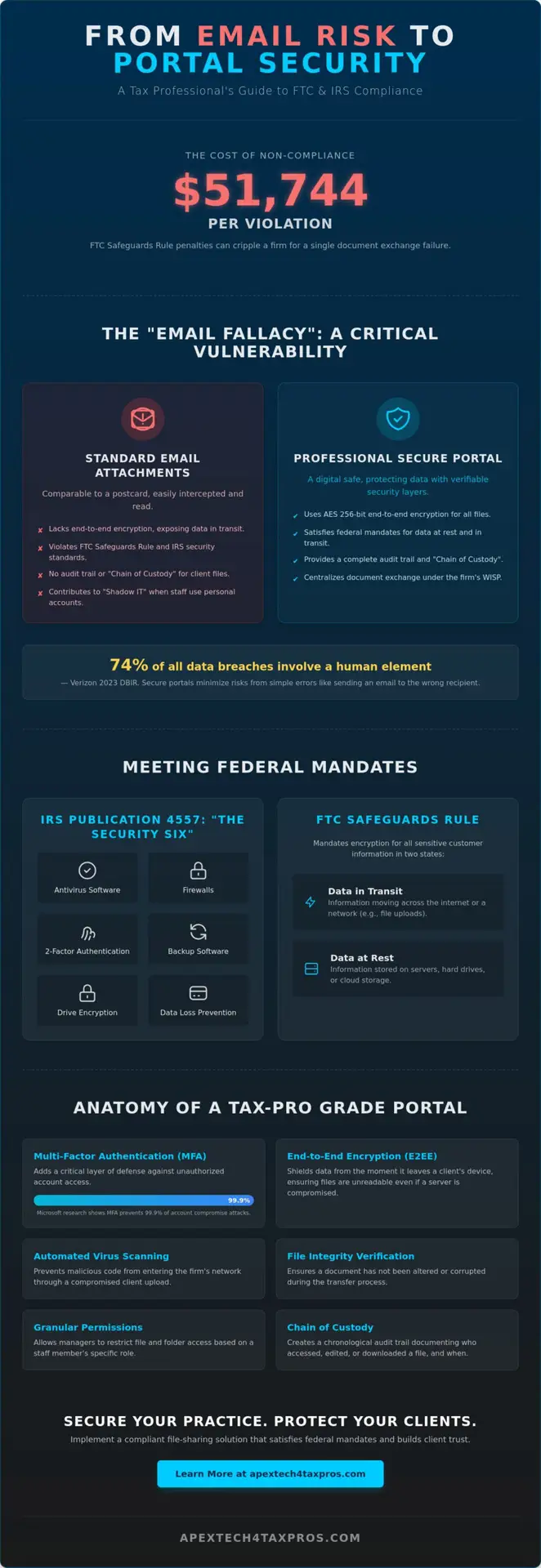
Secure file sharing for accountants isn’t just a digital convenience; it’s a fundamental requirement for maintaining financial data integrity. For professional tax practices across the country, this refers to the controlled, encrypted transmission and storage of sensitive financial records. It ensures that documents like 1040s and K-1s remain uncorrupted and accessible only to verified parties. This level of protection creates a “Chain of Custody,” providing a chronological audit trail that documents exactly who accessed, edited, or downloaded a file and when they did it.
The “Email Fallacy” remains a significant threat to the industry. Many firms still rely on standard email attachments, yet the 2023 Verizon Data Breach Investigations Report highlighted that 74% of all breaches involve a human element, including social engineering or simple errors. Standard email is comparable to a postcard sent through a public sorting facility. It lacks the robust encryption required to protect taxpayer identities from interception. Professional practices must distinguish between consumer-grade cloud storage and specialized portals that utilize Managed File Transfer (MFT) technologies. These systems provide the administrative control and security protocols necessary to meet federal standards.
The Risks of Conventional Document Exchange
Unencrypted email attachments frequently violate the Gramm-Leach-Bliley Act (GLBA) and the IRS Publication 4557 standards. For a tax professional, “data at rest” refers to information stored on a local hard drive or server, while “data in transit” describes data moving across the internet or a local network. Both states require encryption to prevent unauthorized access. Shadow IT poses another silent threat. This occurs when staff use personal file-sharing accounts to bypass slow internal systems. This practice removes data from the firm’s protective umbrella, creating a 100% visibility gap for the managing partner and violating the firm’s Written Information Security Plan (WISP).
Anatomy of a Secure Portal
A professional-grade portal relies on End-to-End Encryption (E2EE) to shield taxpayer data from the moment it leaves the client’s device. This ensures that even if a server is compromised, the files remain unreadable to hackers. Multi-Factor Authentication (MFA) adds a critical layer of defense; Microsoft’s security research indicates that MFA prevents 99.9% of account compromise attacks. Modern portals also include these features:
- Automated Virus Scanning: This prevents malicious code from entering the firm’s network through a client upload.
- File Integrity Verification: This ensures a document hasn’t been altered or corrupted during the transfer process.
- Granular Permissions: Managers can restrict access to specific folders based on the staff member’s role.
By implementing secure file sharing for accountants, firms bridge the gap between technical necessity and regulatory compliance. This proactive approach signals to clients that their sensitive data is in safe, capable hands, reinforcing the trust that is essential to the tax professional’s role.
Regulatory Mandates: IRS Publication 4557 and the FTC Safeguards Rule
The IRS doesn’t view data security as a suggestion. Under Publication 4557, practitioners must implement the “Security Six” to protect taxpayer data. This framework includes antivirus software, firewalls, two-factor authentication, backup software, drive encryption, and data loss prevention. While many firms focus on internal hardware, the most vulnerable point is often the transfer of sensitive data. Implementing secure file sharing for accountants isn’t just about convenience; it’s a direct response to the federal mandate to protect information during transmission. Your EFIN is your lifeline. Without it, your firm’s operations stop immediately.
The FTC Safeguards Rule requires financial institutions, including tax preparers, to encrypt all sensitive customer information both at rest and in transit. Failure to comply leads to devastating results. Beyond civil penalties that can exceed $50,120 per violation as of 2024, the IRS may suspend or revoke your Electronic Filing Identification Number. This isn’t a hypothetical threat. The IRS has increased its oversight of smaller firms to ensure they aren’t the “weak link” in the financial system.
Documentation is the backbone of your defense. Your Written Information Security Plan (WISP) must explicitly detail your file-sharing protocols. If an auditor asks how you move 1040s from a client’s smartphone to your desktop, a verbal explanation won’t suffice. You need a documented, repeatable process that proves you’ve safeguarded the data integrity of every file in your care. This dual-expert approach to IT and tax law ensures you’re prepared for any regulatory inquiry.
IRS Publication 4557 Compliance Standards
IRS Publication 4557 focuses on the entire lifecycle of a document. It requires specific safeguards when you transmit data over public networks. Secure portals provide the necessary audit trails, recording every login, upload, and download with a timestamp. This granular tracking proves you maintained control over the data. Proper secure file sharing for accountants also automates retention policies, ensuring you don’t hold sensitive data longer than the required three-year or seven-year cycles, which reduces your overall liability profile.
The FTC Safeguards Rule Update for 2026
Recent updates to the Safeguards Rule, with additional reporting requirements coming into focus for 2026, place heavier burdens on small firms. You’re now required to report data breaches involving at least 500 consumers to the FTC within 30 days of discovery. Professional portals simplify this by providing instant logs of exactly what was compromised and when. This level of readiness helps you bridge the gap between technical requirements and daily tax operations. If you’re unsure if your current setup meets these 2026 standards, you can review your compliance strategy with a specialist who understands the Dallas tax landscape.
Evaluating Solutions: Essential Features for a Tax-Pro Grade Portal
Selecting the right platform for secure file sharing for accountants is a critical decision for any Dallas firm. It’s not just about moving files from point A to point B; it’s about maintaining a continuous chain of custody that satisfies federal regulators. A professional-grade portal acts as a digital vault, ensuring that sensitive tax data remains protected against evolving cyber threats while providing a seamless experience for your clients. This isn’t a luxury; it’s a necessary safeguard for your practice’s reputation and legal standing.
Security Features You Cannot Compromise On
The foundation of a secure portal is AES 256-bit encryption. This is the same standard used by financial institutions and the military to protect top-secret data. To verify that a vendor maintains these standards, you should demand SOC 2 Type II compliance. This certification involves a rigorous audit over a 6 to 12-month period to prove the vendor’s systems are truly secure and reliable. These requirements are echoed in IRS Publication 4557, which serves as the blueprint for tax professional data security and privacy mandates.
We also recommend platforms that utilize Zero-Knowledge architecture. Zero-Knowledge architecture is the safest choice because it ensures the service provider never has access to your decryption keys, meaning your data stays private even if the provider’s own servers are compromised. To further reduce risk, use in-portal messaging. This feature eliminates the need for sensitive context in emails, which are often the weakest link in a firm’s security chain. Other essential security elements include:
- KBA (Knowledge-Based Authentication): This is essential for electronic signatures on Form 8879, as it uses dynamic questions to ensure the signer is who they claim to be.
- Granular Permissions: Multi-staff firms need to restrict access so employees only see the specific client folders required for their assigned tasks.
- Custom Branding: White-labeling the portal with your firm’s logo builds immediate trust and reduces “phishing anxiety” for your clients by providing a familiar environment.
Workflow and Integration Capabilities
A secure portal shouldn’t slow your firm down. The best secure file sharing for accountants integrates directly with tax preparation software such as Drake, UltraTax, or CCH Axcess. This connectivity allows you to push completed returns directly to the client for review without manual downloads. For firms handling high volumes, look for bulk upload capabilities and automated folder structure creation. These tools can save a solo practitioner or small firm up to 10 hours of administrative work every week during the peak of tax season.
Client adoption is the final piece of the puzzle. If a portal is too difficult to use, clients will revert to insecure methods like texting photos of their W-2s. Modern solutions offer mobile-friendly interfaces that allow clients to use their smartphone cameras as high-resolution document scanners. This feature ensures you receive clear, legible PDFs instead of blurry images, directly improving your firm’s processing speed and data accuracy.
Implementation Strategy: Moving Clients from Email to Secure Portals
Transitioning clients from the convenience of email to the safety of a portal requires a firm, protective stance. You can’t leave data security to chance. Your firm must establish a “Hard No” policy regarding sensitive attachments. This isn’t about being difficult; it’s about fulfilling your role as a trusted advisor. According to the 2023 Verizon Data Breach Investigations Report, 74% of breaches involve a human element, primarily through social engineering and email. By shifting to secure file sharing for accountants, you eliminate the primary vector for identity theft in your practice.
Onboarding should be a structured, three-step process to ensure adoption. Provide a one-page PDF guide that illustrates how to upload documents. Frame the shift as a value-add. Clients gain 24/7 access to their historical tax records and receive faster processing times. When documents are organized within a portal, your team spends approximately 15% less time chasing missing files. This efficiency translates directly to a quicker turnaround for the client’s return.
Overcoming Client Resistance
Password fatigue is the most common objection you’ll face. You can mitigate this by selecting portals that offer Single Sign-On (SSO) options or biometric authentication on mobile devices. Don’t just tell clients to use the portal; educate them on why. Use educational templates that explain the risks of unencrypted email. Your “Security First” marketing angle becomes a competitive edge in the Dallas market. When you prioritize their safety, you’re not just a tax preparer; you’re a guardian of their financial identity.
Internal Firm Protocols
Security is only as strong as your team’s discipline. Train your staff on a standardized “Safe Share” workflow. This ensures every employee follows the same steps for every document. Conduct regular audits of your portal access logs every 30 days to monitor for unusual activity. Standardizing file naming conventions, such as “YYYY-ClientName-DocumentType,” ensures that retrieval is immediate and accurate. This level of technical precision is what bridges the gap between basic compliance and true data integrity. Secure file sharing for accountants works best when it is backed by a rigorous Internal Information Security Plan.
Ready to safeguard your practice and meet IRS regulatory standards? Explore our secure document portal solutions tailored for tax professionals.
The Bigger Picture: Integrating File Sharing into Your WISP
A secure portal serves as a critical entry point for data, but it doesn’t constitute a complete defense strategy on its own. Under IRS Publication 4557 and the FTC Safeguards Rule updated in June 2023, tax professionals must demonstrate that their secure file sharing for accountants is part of a broader, documented framework. Relying solely on a software subscription without a Written Information Security Plan (WISP) leaves a firm vulnerable to regulatory fines and catastrophic data breaches. We bridge the gap between technical tools and the administrative requirements mandated by federal law.
Documenting Your File Sharing in the WISP
IRS auditors don’t just look for the presence of a portal; they look for the “how” and “who” behind your data transfers. Your WISP must explicitly describe the protocols used to move sensitive 1040 or 1120S documents from a client’s device to your server. This includes:
- Assigning a Security Coordinator: Designating a specific individual to monitor file-sharing integrity ensures accountability.
- Vendor Due Diligence: Performing an annual review of your portal provider’s SOC 2 Type II reports or ISO 27001 certifications.
- Access Control: Documenting exactly which staff members have permission to view specific folders.
Apex Tech 4 Tax Pros assists firms by validating these document security measures. We ensure that your actual daily workflows match your written promises to the IRS. This validation is a core step in maintaining data integrity across your entire practice.
Total Practice Protection
True security requires a multi-layered approach. You can’t rely on a single tool to protect 20 years of practice growth. We combine secure file sharing for accountants with automated cloud backups and quarterly risk assessments to create a resilient environment. A generic WISP template often misses the nuances of a Dallas tax firm’s specific hardware and software stack. Our team provides the clinical precision needed to tailor your security plan to your unique operations.
If your firm operates without a documented security plan, you’re essentially driving without insurance. Taking the step to formalize your protocols protects your license and your clients’ trust. Protect your firm today with a customized WISP from Apex Tech 4 Tax Pros. We draw on decades of expertise in both IT and tax preparation to safeguard your practice against evolving digital threats.
Strengthen Your Practice Against Evolving Regulatory Demands
Transitioning your practice to a modern infrastructure requires more than just new software; it demands a commitment to the standards set by IRS Publication 4557 and the FTC Safeguards Rule. By 2026, the margin for error regarding client data has vanished. You’ve seen how moving clients from vulnerable email attachments to dedicated portals is the first step in maintaining data integrity. Integrating secure file sharing for accountants into your Written Information Security Plan (WISP) ensures your firm remains resilient against evolving cyber threats.
Apex Tech 4 Tax Pros brings over 20 years of specialized IT and tax compliance expertise to your practice. As a family-owned business, we’re dedicated to protecting professional practices through rigorous adherence to IRS Publication 4557 standards. We bridge the gap between complex federal mandates and your daily operations. Ensure your firm is compliant with a professional WISP assessment. Protecting your clients’ legacy is the best way to secure your own.
Frequently Asked Questions
Is it illegal for an accountant to receive tax documents via email?
It isn’t strictly illegal under criminal law, but it violates the FTC Safeguards Rule updated in June 2023. Sending unencrypted Social Security numbers or bank details via standard email fails to meet the reasonable security standards required by IRS Publication 4557. Practitioners who ignore these mandates risk professional sanctions and significant liability if a client’s data is intercepted by unauthorized parties during transmission.
What is the difference between a client portal and a cloud drive?
A client portal provides a dedicated, encrypted gateway specifically designed for secure file sharing for accountants, whereas a cloud drive is a general-purpose storage tool. Portals include mandatory multi-factor authentication and detailed audit logs required by the IRS. These features are often missing or optional in basic cloud drives, which makes portals the superior choice for maintaining regulatory compliance in a high-stakes tax environment.
How long should I keep client files in a secure sharing portal?
You should retain most tax records for 3 years from the date the return was filed, according to IRS guidelines. However, for certain claims or deductions, the period extends to 7 years. Your secure sharing portal should be purged according to these specific retention schedules to minimize data liability. Keeping files longer than necessary increases your firm’s risk profile in the event of a security incident.
Does the FTC Safeguards Rule apply to solo practitioners?
Yes, the FTC Safeguards Rule applies to all financial institutions, which includes solo tax practitioners regardless of their client volume. Since June 9, 2023, even one-person firms must maintain a Written Information Security Plan (WISP) and implement specific technical safeguards to protect taxpayer data. Compliance isn’t optional for small firms; it’s a federal requirement that ensures every practitioner maintains a baseline level of data integrity.
Can I use a free version of Dropbox or Google Drive for client files?
You shouldn’t use free versions of consumer cloud services because they typically lack the required Business Associate Agreements and advanced encryption standards. These free tiers often fail to provide the 256-bit AES encryption at rest and in transit that the IRS considers necessary for protecting sensitive financial information. Professional secure file sharing for accountants requires enterprise-level security that free consumer accounts simply don’t offer to their users.
What happens if a client refuses to use the secure portal?
If a client refuses to use a secure portal, you risk a data breach that could lead to fines of $100,000 per violation under the Gramm-Leach-Bliley Act. You should explain that 90 percent of data breaches originate from compromised emails, making the portal a non-negotiable requirement for their own identity protection. Firm owners must prioritize their regulatory obligations and the safety of the entire practice over individual client convenience.
How do I prove to the IRS that my file sharing is secure?
You prove security by documenting your processes in a Written Information Security Plan (WISP), which is now mandatory for obtaining or renewing an EFIN. During an IRS audit, you’ll need to show your WISP and provide audit logs from your secure portal to demonstrate consistent compliance. These logs serve as concrete evidence that your firm follows the technical safeguards described in IRS Publication 4557 and the FTC Safeguards Rule.
Does secure file sharing include electronic signatures?
Most professional portals integrate electronic signatures, but they must meet IRS Knowledge-Based Authentication requirements for documents like Form 8879. The IRS requires that the identity of the signer is verified through specific challenge questions or multi-factor authentication to ensure the signature is legally binding. Using an integrated portal ensures that the signature and the document remain within a protected environment throughout the entire signing process.