
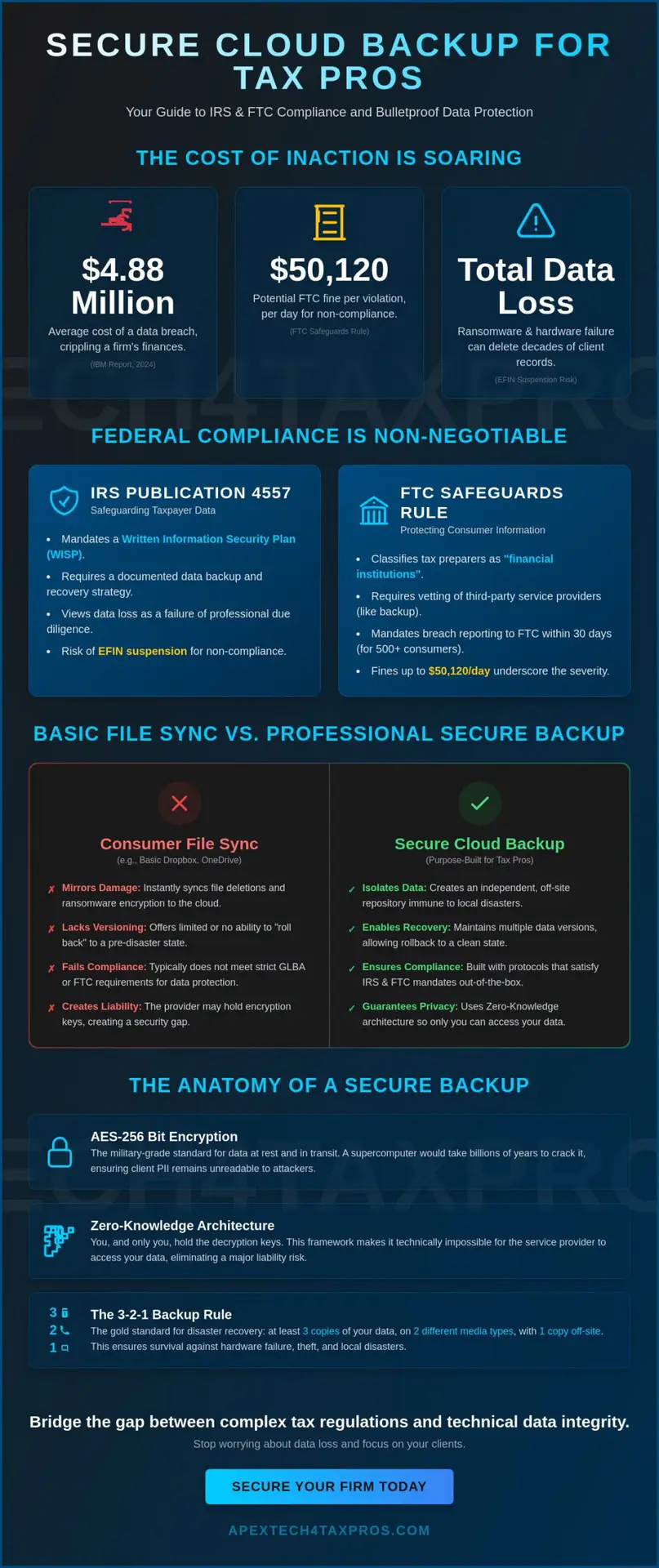
With the average cost of a data breach climbing to $4.88 million according to IBM’s 2024 report, relying on basic file syncing is no longer a viable strategy for your firm. You understand the high stakes of tax season, yet the fear of a ransomware attack deleting decades of client records remains a constant weight on your shoulders. Many tax professionals mistakenly believe that consumer-grade storage satisfies federal mandates, but true secure cloud backup requires a more disciplined, regulatory-focused approach to protect your practice from FTC fines that can reach $50,120 per violation per day.
We recognize that your focus should remain on your clients’ success, not on the technical minutiae of manual backups or the rising tide of AI-powered phishing. This guide promises to show you how to implement an automated data protection strategy that satisfies the strict requirements of IRS Publication 4557 and the FTC Safeguards Rule. We’ll provide a methodical preview of the essential encryption standards, multi-factor authentication protocols, and the Written Information Security Plan (WISP) necessary to secure your practice and ensure a fast recovery if your hardware fails.
Key Takeaways
- Discover how to align your data recovery strategy with IRS Publication 4557 and the FTC Safeguards Rule to maintain full regulatory compliance.
- Learn why a secure cloud backup must utilize zero-knowledge architecture and AES-256 bit encryption to protect sensitive taxpayer social security numbers.
- Master the 3-2-1 backup rule to ensure your firm remains operational through hardware failures, theft, or localized environmental disasters.
- Identify the essential steps for inventorying client PII and vetting third-party providers for mandatory GLBA and multi-factor authentication standards.
- Understand the importance of bridging the gap between complex tax regulations and technical data integrity through specialized, industry-specific safeguards.
The Role of Secure Cloud Backup in IRS and FTC Compliance
A professional secure cloud backup isn’t just a folder in the cloud. It’s a specialized remote backup service designed to ensure data availability and integrity through every stage of the tax cycle. While many firms use basic file syncing tools, these services often fail to meet the archiving requirements of federal law. If a file is deleted or encrypted by ransomware on your local machine, a sync service immediately mirrors that damage in the cloud. A true backup solution maintains multiple versions of your data, allowing you to roll back to a clean state before the corruption occurred.
Tax preparers often confuse storage with protection. High-quality backup systems create an encrypted, off-site repository that remains independent of your local environment. This distinction is vital for maintaining the continuity of your practice. It ensures that your firm can recover from a total server failure or a localized disaster without losing a single client record. Our team has spent 20 years bridging the gap between tax preparation and IT security, ensuring your regulatory burdens are handled with clinical precision.
IRS Publication 4557 and Data Availability
IRS Publication 4557 serves as the official roadmap for safeguarding taxpayer data. For the 870,679 professionals holding PTINs as of 2025, the mandate is clear: you must have a written plan for data backup and recovery. The IRS views data loss as a failure of professional due diligence. Losing client records to a hardware failure without a secondary off-site backup can lead to the suspension of your Electronic Filing Identification Number (EFIN). We’ve seen firms rely on manual USB drives for years, but these methods don’t satisfy modern standards. They’re vulnerable to the same physical threats, like fire or theft, that endanger your primary server.
The FTC Safeguards Rule Mandate
The FTC Safeguards Rule classifies tax preparers as financial institutions, placing them under intense regulatory scrutiny. As of 2024, any security breach involving more than 500 consumers must be reported to the FTC within 30 days. Non-compliance is expensive, with potential fines reaching $50,120 per violation per day. Your secure cloud backup must be integrated into your Written Information Security Plan (WISP). This isn’t just about storage; it’s about vetting your backup provider as a service provider that meets AES-256 encryption standards. We help you implement these safeguards so you can focus on your clients with absolute confidence.
Technical Standards: What Makes a Backup ‘Secure’ for Tax Firms?
Data integrity in the tax industry relies on technical precision that far exceeds consumer standards. While a generic cloud provider might offer basic encryption, a professional secure cloud backup solution must implement specific architecture to protect sensitive client PII. It’s not enough to simply have files off-site. You must ensure that those files are inaccessible to unauthorized parties, including the cloud provider’s own employees. This is why the “Zero-Knowledge” standard has become the benchmark for high-stakes financial data.
Encryption Protocols for Financial Data
Encryption is the primary safeguard for data at rest and in transit. For tax professionals, the standard is AES-256 bit encryption, a military-grade protocol that would take billions of years for a supercomputer to crack. However, the method of deployment is just as important as the algorithm itself. Many providers use server-side encryption, where they manage the decryption keys for you. For a tax firm, this creates a liability gap. We recommend end-to-end encryption with a Zero-Knowledge framework. Zero-Knowledge is a system where only the firm holds the decryption keys, ensuring that even the service provider cannot access the data. This level of control is essential because you are legally obligated to have a data security plan under the Gramm-Leach-Bliley Act (GLBA).
Implementing these protocols ensures that if a breach occurs at the data center level, your client’s Social Security numbers and financial histories remain unreadable. It’s a pragmatic approach to protective reassurance. If you aren’t sure if your current setup meets these rigorous standards, you can evaluate your firm’s compliance readiness with our specialized team.
Ransomware Defense and Immutability
Ransomware remains the most significant threat to tax professionals in 2026. The 2024 Verizon Data Breach Investigations Report (DBIR) noted that 44% of ransomware attacks target professional services, and unencrypted backups are the first things hackers look for. To counter this, your secure cloud backup should include “immutable” storage. Immutability means that once data is written to the backup, it cannot be changed, deleted, or overwritten for a specified period. Even if a hacker gains administrative access to your network, they can’t touch your historical records in the immutable vault.
This protection is where true backup diverges from simple “sync” services like OneDrive or Google Drive. Syncing is designed for convenience; it mirrors your current local state. If ransomware encrypts your local files, the sync service immediately overwrites your good files with the encrypted versions in the cloud. A professional backup system uses versioning and archiving to keep multiple “points in time.” This allows you to recover your entire database from the hour before the infection occurred, effectively neutralizing the attacker’s leverage. Combining this with mandatory Multi-Factor Authentication (MFA) creates a disciplined, multi-layered defense that guards your practice against the most aggressive modern threats.
Cloud vs. Local Backup: Why a Hybrid Approach Wins for Firms
Relying on a single backup method creates a single point of failure that your practice cannot afford. We advocate for the 3-2-1 Backup Rule, a disciplined standard that requires maintaining three copies of your data on two different types of media, with at least one copy stored off-site. For tax professionals, this manifests as a hybrid strategy. You keep one copy on your local server for immediate access and another in a secure cloud backup vault for disaster resilience. This dual-layered approach ensures that a hardware failure on April 14th doesn’t result in two days of downtime while you wait for a massive cloud restore to complete over the internet.
Local backups are the first line of defense against common equipment malfunctions. If a hard drive fails, you can often restore your tax software and client databases in minutes. However, local storage alone is insufficient for full regulatory compliance. If your office suffers a fire, flood, or burglary, your local copies disappear along with your primary machines. A hybrid model bridges this gap, providing the speed of local recovery with the absolute safety of the cloud. It’s a pragmatic solution that ensures your data integrity remains intact even when physical environments fail.
The Vulnerability of Physical Media
Many firms still rely on external hard drives or USB sticks, but these physical devices carry significant risks. Mechanical drives are prone to “bit rot” and hardware failure, often without warning. More importantly, an unencrypted backup drive is a massive security liability. If a drive containing client PII is stolen from a car or home, the FTC Safeguards Rule considers it a reportable data breach if it involves at least 500 consumers. Human error also plays a role. We’ve seen countless instances where manual rotations were forgotten during the height of tax season, leaving the firm without a current off-site copy for weeks at a time.
The Scalability of the Cloud
The transition to a paperless office has led to an explosion in data volume. With 870,679 PTIN holders competing for clients in 2025, your ability to manage growing digital records efficiently is a competitive advantage. A secure cloud backup scales automatically as your client list grows, eliminating the need to purchase and maintain expensive new hardware every few years. This flexibility also supports the modern, mobile tax professional. If your physical office becomes inaccessible, your team can securely recover files to any location, ensuring your firm remains operational and compliant regardless of external circumstances.
How to Implement a Disaster Recovery Strategy for Your Practice
Implementing a robust disaster recovery strategy requires moving beyond the “set it and forget it” mentality often found in consumer-grade software. For a tax practice, recovery is a mission-critical function that must be documented and tested to survive a regulatory audit. You should begin by formalizing your data inventory, ensuring every piece of client PII is accounted for across your entire network. This methodical approach transforms a technical utility into a disciplined safeguard that protects your firm’s professional longevity.
Automating your backup schedule is non-negotiable during the intensity of tax season. When you’re processing hundreds of returns, you don’t have the capacity for manual data management or rotation. A professional secure cloud backup runs quietly in the background, capturing changes in real-time or at set hourly intervals without human intervention. This automation removes the risk of human error, which remains a leading cause of data loss in professional services according to the 2024 Verizon DBIR.
Mapping Your Firm’s Data Footprint
Identifying where your data lives is the first step in building a secure cloud backup. Many professionals overlook “hidden” data repositories like local Outlook PST files, QuickBooks company files, or scanned PDFs stored on individual workstations. You need to identify mission-critical data that requires hourly snapshots versus archival records that can be backed up daily. Every server and workstation in your office must be included in the backup scope to prevent gaps in your recovery chain that could lead to an IRS EFIN suspension.
The Audit Trail: Proving Compliance
Documentation is the bridge between technical security and legal compliance. Your backup protocol shouldn’t exist only in your head; it must be a core component of your Written Information Security Plan (WISP). IRS inspectors and FTC auditors look for a clear audit trail that proves your backups are functioning correctly and that you are performing due diligence. We recommend a three-step approach to verification:
- Maintain logs of successful backup completions for at least one year to provide a historical record of data integrity.
- Configure automated email alerts to notify your team immediately of any failed backup attempts or connectivity issues.
- Formalize your “Service Provider” agreement with your cloud host to ensure they meet the specific encryption standards required by the Safeguards Rule.
Finally, you must test your recovery process with periodic “fire drills.” A backup is only as good as your ability to restore it under pressure. We recommend conducting a full restoration test at least twice a year to ensure your data remains intact and accessible. If you’re ready to move beyond generic solutions and implement a plan tailored specifically to the tax industry, you can schedule a disaster recovery consultation with our specialists to secure your firm’s future.
The Apex Tech 4 Tax Pros Difference: Purpose-Built Security
Choosing a technology partner requires more than evaluating a feature list. It demands a relationship with a trusted advisor who understands that a single compliance error can jeopardize your EFIN and your firm’s reputation. At Apex Tech 4 Tax Pros, we specialize in bridging the gap between complex federal tax regulations and technical data integrity. Our secure cloud backup solutions are not generic storage buckets; they’re engineered to address the specific vulnerabilities of tax software and the high-stakes environment of tax season.
We recognize that tax professionals are often caught between the clinical precision of IT requirements and the heavy regulatory burden of the IRS. Our mission is to provide protective reassurance through technical expertise. We don’t just sell software; we implement a disciplined, multi-layered defense that integrates directly with your mandatory Written Information Security Plan (WISP). This ensures that your firm remains compliant with the FTC Safeguards Rule while you focus on delivering accuracy for your clients.
More Than Just a Backup Provider
Our history is rooted in over 20 years of experience in the trenches of both healthcare IT and tax preparation. This dual expertise allows us to approach your firm’s security with a unique perspective that general IT firms lack. We understand the nuances of IRS Publication 4557 because we’ve spent decades protecting sensitive financial and medical data. As a family-owned business, we prioritize personal accountability. When you partner with us, you aren’t just another account number in a database; you’re a local professional whose success we’re mission-driven to protect. We speak both “IRS” and “IT” fluently, allowing us to translate complex federal mandates into pragmatic, everyday safeguards for your office.
Next Steps: Securing Your Practice Today
The transition from a vulnerable state to a secure, compliant one begins with a clear understanding of your current environment. Many firms rely on a template-based WISP that hasn’t been properly implemented or tested. We help you move beyond paperwork to a professional security plan that actually functions when a server fails or a cyberattack occurs. Securing your practice in 2026 requires a proactive stance rather than a reactive one. Your first step should be a comprehensive look at your data footprint to identify where client Social Security numbers and financial records might be exposed.
Don’t wait for a hardware failure or an IRS audit to discover the gaps in your strategy. You can secure your firm’s future with a professional Risk Assessment today. Our team will help you identify vulnerabilities, automate your secure cloud backup, and ensure your practice meets every requirement of the FTC Safeguards Rule with confidence and clarity.
Securing Your Practice’s Legacy and Regulatory Standing
Implementing a secure cloud backup is no longer a luxury for tax professionals; it’s a fundamental requirement for maintaining data integrity and meeting the strict standards of IRS Publication 4557. You’ve learned that a hybrid approach, combining local speed with the off-site resilience of the cloud, provides the most reliable defense against hardware failure and ransomware. By adhering to technical standards like Zero-Knowledge encryption and mandatory Multi-Factor Authentication, you ensure that your clients’ most sensitive information remains shielded from unauthorized access.
With over 20 years of specialized experience in IT and federal compliance, our team has built a reputation for bridging the gap between technical security and tax regulation. We’ve engineered our solutions specifically to meet the rigorous demands of the tax industry, earning the trust of tax professionals nationwide. Your practice deserves a guardian that understands the weight of your regulatory burdens and the value of your client relationships. Take the first step toward worry-free data protection by choosing a partner who treats your firm’s security as a personal mission. Schedule Your Professional Risk Assessment with Apex Tech 4 Tax Pros today to verify your compliance and safeguard your practice. We’re here to ensure you can focus on your clients with absolute confidence.
Frequently Asked Questions
Is Google Drive or Dropbox considered a secure cloud backup for tax pros?
No, consumer-grade sync services like Google Drive or Dropbox don’t meet the technical requirements for a secure cloud backup because they lack immutable storage. These tools are designed for file sharing rather than disaster recovery; they immediately mirror file deletions or ransomware encryption across all connected devices. A professional backup system isolates your data in a separate vault to ensure you can roll back to a clean state if your primary system is compromised.
What does the IRS require for data backup in Publication 4557?
IRS Publication 4557 requires tax professionals to maintain a written backup and recovery plan as part of their broader security posture. This mandate ensures that taxpayer data remains available even after a hardware failure or natural disaster. Failing to implement these safeguards can result in the suspension of your EFIN, as the IRS views data availability as a core component of professional due diligence for all 870,679 PTIN holders.
How often should a tax practice back up its data?
Your practice should back up its data at least once every 24 hours, though hourly snapshots are the preferred standard for active firms. During the 2026 tax season, the high volume of digital records makes manual daily backups risky and prone to human error. Automating this process ensures that your most recent client entries are protected without adding to your administrative burden during the busiest months of the year.
What is Zero-Knowledge encryption and why do I need it?
Zero-Knowledge encryption is a security architecture where only you hold the decryption keys, meaning your provider cannot access your client’s Social Security numbers. This standard is vital for fulfilling your obligations under the Gramm-Leach-Bliley Act (GLBA). It provides a protective layer of assurance that even if your provider’s servers are compromised, your sensitive financial data remains unreadable and secure from unauthorized eyes.
Can I use an external hard drive instead of the cloud?
You shouldn’t rely solely on an external hard drive, although it can serve as the local component of a hybrid 3-2-1 strategy. Physical drives are vulnerable to mechanical failure, theft, and localized disasters like fire or flood. A secure cloud backup provides the off-site redundancy required by the FTC Safeguards Rule, ensuring your practice remains operational if your physical office becomes inaccessible for any reason.
What happens if my cloud backup provider is hacked?
If your provider is hacked, your data remains safe provided you’ve implemented Zero-Knowledge encryption and Multi-Factor Authentication (MFA). Since the provider doesn’t have your keys, the attackers only gain access to encrypted, useless data. This architecture is a primary reason why we vet every service provider against NIST Special Publication 800-53 Revision 5 standards to ensure your practice is shielded from supply chain vulnerabilities.
Does the FTC Safeguards Rule require encrypted backups?
Yes, the FTC Safeguards Rule mandates encryption for all customer financial information to prevent unauthorized access during a breach. The 2026 IRS guidelines have intensified scrutiny on these systems due to a rise in fraudulent filings from credential compromise incidents. Implementing TLS 1.3 for data in transit and AES-256 for data at rest ensures your practice meets the mandatory compliance requirements currently enforced by federal regulators.
How long does it take to recover my data after a ransomware attack?
Recovery speed depends on your data architecture and the specific restoration method used by your firm. While a local restore can bring your tax software back online in under an hour, a cloud-only recovery is limited by your office’s download speed. A hybrid strategy allows you to meet the NIST Cybersecurity Framework 2.0 goals for rapid recovery, ensuring your practice remains resilient even after a catastrophic server failure.