
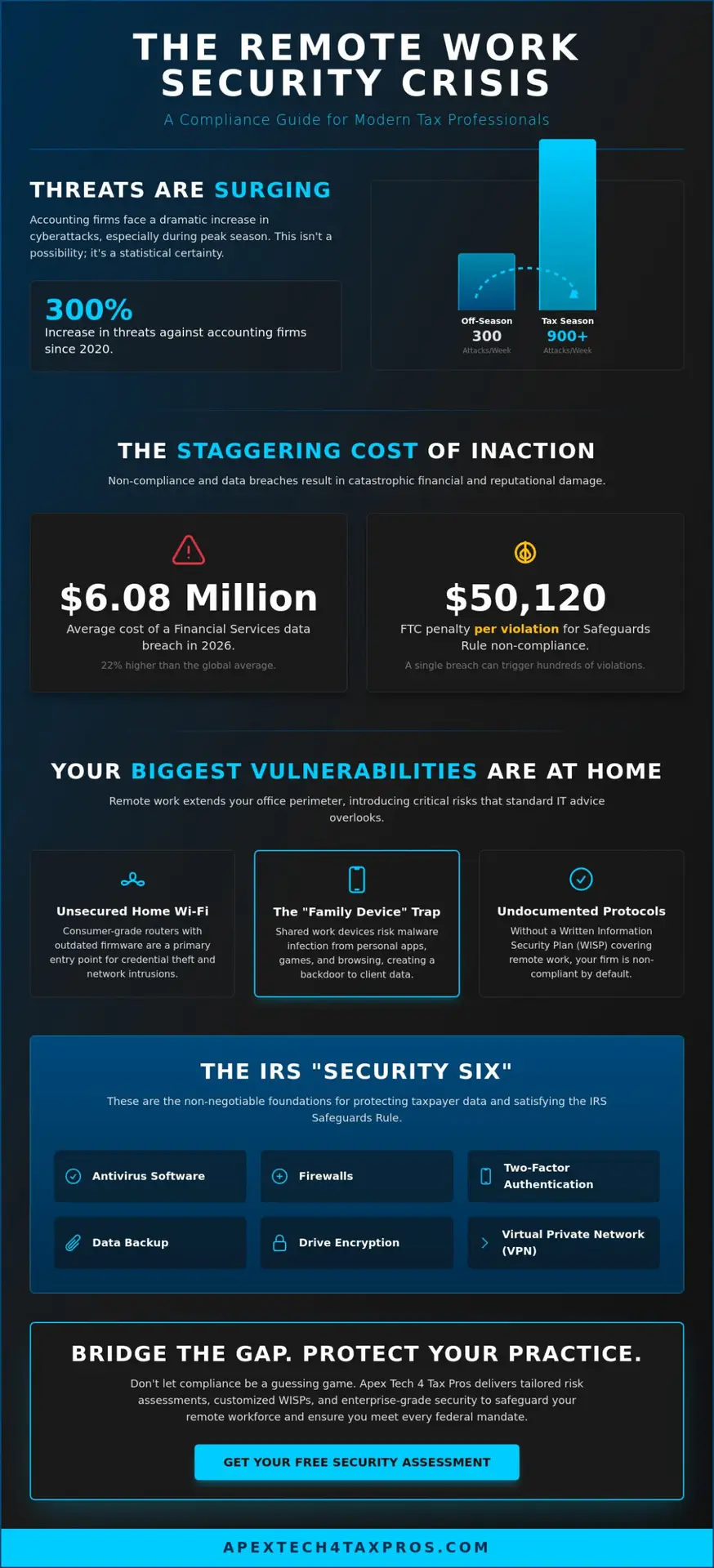
Did you know that accounting firms now face an average of 300 cyberattacks every week, a figure that surges to over 900 during the peak of tax season? This 300% increase in threats since 2020 makes remote work security no longer a technical luxury; it’s a federal mandate. You likely feel the pressure of keeping your team productive at home while worrying about an IRS audit or a devastating data breach. We understand that bridging the gap between tax preparation and complex IT requirements is a heavy burden for any firm owner. It’s difficult to monitor employee behavior behind a home router, especially when the average cost of a financial services breach has climbed to $6.08 million in 2026.
You deserve to feel confident that your remote practice is protected and compliant. This guide provides a clear roadmap to secure your operations while satisfying the IRS Safeguards Rule and the latest WISP mandates. You’ll learn how to implement the IRS “Security Six” and protect your clients from identity theft. We’ll also help you finalize a Written Information Security Plan that covers your remote employees. This ensures you avoid the FTC’s non-compliance penalties, which reached $50,120 per violation in January 2025, and provides the protective reassurance your clients expect from a trusted advisor.
Key Takeaways
- Understand how the IRS Safeguards Rule extends to home offices and why remote protocols must be documented in your Written Information Security Plan (WISP).
- Identify the specific risks of unsecured home Wi-Fi and the “family device trap” to prevent unauthorized access to sensitive taxpayer data.
- Discover the essential technical steps for remote work security, such as enterprise-grade encryption and Zero-Trust protocols, to keep your data secure outside the office.
- Establish a clear roadmap for achieving “reasonable safeguards” that protect your practice from identity theft and the heavy financial penalties of non-compliance.
- Learn how tailored risk assessments and a customized WISP bridge the gap between your technical needs and complex federal regulatory requirements.
Understanding Remote Work Security in the Tax Industry
Remote work security is the specific branch of your Written Information Security Plan (WISP) that governs data protection beyond the four walls of your primary office. It isn’t a separate policy but a critical integration that ensures your firm remains compliant regardless of where your team logs in. Under IRS Publication 4557, remote work security for tax practitioners is defined as the implementation of administrative, technical, and physical safeguards to ensure the confidentiality and integrity of taxpayer information when processed or stored outside the traditional office environment.
The legal distinction between convenience and compliance is often where small firms stumble. While working from a home office or a local coffee shop offers flexibility, the IRS treats these locations as professional extensions of your practice. This means every mobile device and home router must meet the same “Reasonable Safeguards” as your main server room. Failure to bridge this gap between convenience and regulatory standards leaves your firm vulnerable to both hackers and federal auditors. We’ve seen that many practitioners assume a password-protected laptop is enough, but without documented protocols, you’re technically out of compliance the moment you leave the office.
The Evolving Regulatory Landscape for 2026
The compliance environment has shifted significantly. As of January 2025, the Federal Trade Commission adjusted civil penalties for Safeguards Rule violations to as high as $50,120 per occurrence. For a small firm, a single breach involving a few hundred clients can be financially catastrophic. During a compliance audit, the IRS now scrutinizes “virtual offices” with the same level of detail as traditional brick-and-mortar locations. They want to see documented proof of how your staff handles sensitive files at home. Beyond financial fines, persistent non-compliance or a major disclosure can lead to the permanent loss of your Preparer Tax Identification Number (PTIN), which effectively ends your professional practice.
Why General Cybersecurity Advice Fails Tax Pros
Standard IT advice often focuses on reactive patching and basic antivirus software. However, tax professionals handle high-value financial identities that are prized by cybercriminals far more than simple credit card numbers. In 2025, the average cost of a data breach in the financial services sector reached $6.08 million, a figure 22% higher than the global average. You need more than just a basic firewall or a consumer-grade laptop. Your practice requires proactive risk assessments and specific mandates for data encryption. For example, any remote connection must utilize a secure, encrypted tunnel to prevent credential harvesting on home Wi-Fi networks. General business advice doesn’t account for the fact that accounting firms are currently targeted by an average of 300 cyberattacks per week. This number often triples during tax season, reaching over 900 incidents weekly. Our tailored approach bridges the gap between general IT and the strict regulatory standards you must uphold.
Critical Security Vulnerabilities in the Remote Tax Environment
Maintaining remote work security requires a deep understanding of the unique vulnerabilities that exist outside your office’s managed perimeter. While your main office might have enterprise-grade firewalls, a home office often relies on consumer-grade routers that haven’t seen a firmware update in years. This creates a prime entry point for credential harvesting. In 2025, 88% of web application attacks involved the use of stolen or brute-forced credentials. Without a dedicated security layer, your staff’s home network becomes the weakest link in your compliance chain. Hackers don’t sleep during tax season. They know your team is distracted and more likely to make mistakes.
The “Family Device” trap is a common but dangerous oversight. When a staff member shares a work laptop with a spouse or child, the risk of malware infection through personal software or gaming platforms increases. Personal apps don’t follow the same data integrity standards as professional tax preparation tools. If a family member inadvertently downloads a keylogger, every keystroke entered into your tax software is transmitted directly to a cybercriminal’s server. Conducting a formal risk assessment is the first step in identifying which of these vulnerabilities poses the greatest threat to your specific firm.
Home Network and Public Wi-Fi Risks
Unencrypted home routers are highly susceptible to “Man-in-the-Middle” attacks. In these scenarios, a bad actor intercepts the data flowing between your employee’s laptop and your firm’s server. A standard home firewall simply isn’t designed to repel the 300 to 900 attacks per week that accounting firms currently face. To ensure your firm covers every technical base, referencing a professional CPA cybersecurity checklist can help you identify specific gaps in your current home-office setups. Staff should be prohibited from using public Wi-Fi without a secure tunnel, and home routers must be configured with WPA3 encryption and unique, complex administrative passwords.
Device Management and the BYOD Conflict
The “Bring Your Own Device” (BYOD) model often feels like a cost-saver, but the hidden compliance costs are substantial. When employees use personal hardware, you lose the ability to enforce critical updates or monitor for suspicious behavior. This lack of oversight makes it nearly impossible to guarantee remote work security to the standard required by the IRS. Managed Service Provider (MSP) oversight is necessary to ensure every remote laptop is equipped with enterprise-grade encryption and remote-wipe capabilities. Physical security is equally vital. Tax documents sitting on home printers or sensitive data visible on a monitor in a shared living space can lead to unauthorized disclosures. Under IRC Section 6713, these disclosures can result in civil penalties of $250 per violation, increasing to $1,000 if the incident is related to identity theft.
WISP Compliance: Integrating Remote Work into Your Security Plan
The transition to hybrid and permanent work-from-home models has fundamentally changed the way the IRS views data protection. It’s a common misconception that a Written Information Security Plan (WISP) only covers the physical confines of your main office. In reality, the Gramm-Leach-Bliley Act (GLBA) and the FTC Safeguards Rule require your plan to encompass every location where taxpayer data is accessed. This means your remote work security protocols must be explicitly documented within your WISP to remain compliant. A WISP is not a static document but a living framework for remote operations that must be reviewed and updated as your team’s technology evolves.
To meet the standard of “Reasonable Safeguards,” your plan must detail how you protect data in transit and at rest on remote devices. This begins with formalizing “Rules of Behavior” for your staff. These rules act as a professional contract, outlining that work hardware is for business use only and that sensitive screens must never be visible to unauthorized individuals, including family members. You can find the foundational requirements for these administrative controls in IRS Publication 4557, which serves as the gold standard for tax office data protection. Documenting these expectations isn’t just about checking a box; it’s about building a culture of vigilance that shields your firm from the average $9.62 million cost of a U.S. data breach in 2026.
Documenting Remote Access Protocols
Your WISP should clearly define who has access to your cloud environment and the specific conditions required for that access. Multi-Factor Authentication (MFA) is no longer a suggestion; it’s a mandatory safeguard for every remote login. In 2025, 88% of web application attacks involved stolen credentials, making MFA your most effective defense against unauthorized entry. Additionally, your plan must include a rigorous procedure for revoking access. When a staff member leaves the firm, their ability to reach your systems must be terminated immediately to prevent “ghost” access, which is a frequent source of data compromises in professional services.
Annual Risk Assessments for the Virtual Office
Compliance requires more than just initial setup; it demands ongoing verification. You’re required to conduct annual risk assessments that specifically include your remote setups. This involves inventorying every laptop, tablet, and mobile device used for tax preparation to ensure they all run current, encrypted operating systems. A remote “walkthrough” or a digital audit helps identify security gaps, such as outdated software or unmanaged home routers. By updating your remote work security protocols annually, you demonstrate to the IRS that your firm is proactive in its mission to protect taxpayer integrity against increasingly sophisticated AI-powered phishing and impersonation tactics.
A 5-Step Checklist for Securing Your Remote Tax Practice
Securing a remote practice requires a disciplined, methodical approach that goes beyond simply handing a laptop to an employee. It’s about building a defensive perimeter that follows the data wherever it goes. By following this 5-step checklist, you can bridge the gap between basic connectivity and professional-grade remote work security. These steps ensure you meet the high standards of the IRS while protecting your firm from the $9.62 million average cost of a U.S. data breach. Implementation isn’t just about software; it’s about establishing a culture of vigilance that protects both your reputation and your clients’ financial identities.
- Step 1: Enforce Enterprise-Grade Encryption. Ensure all remote devices utilize full-disk encryption to protect data if hardware is lost.
- Step 2: Implement a Secure VPN or ZTNA. Use a business-grade tunnel, typically costing between $6 and $15 per user in 2026, to shield data from home network vulnerabilities.
- Step 3: Mandate Secure Cloud Backups. Protect against the 82% of financial institutions that experienced ransomware in 2025 by ensuring all work-in-progress is backed up to a secure, off-site location.
- Step 4: Conduct Monthly Cybersecurity Training. Regular education is a mandate under IRS Publication 4557 and remains your best defense against AI-powered phishing.
- Step 5: Verify Home Office Physical Security. Use a standardized checklist to ensure staff work in private areas with lockable storage for any physical documents.
Technical Implementation: VPNs and Encryption
There’s a significant difference between a consumer VPN and a business-grade secure tunnel. While a consumer tool might mask an IP address, a professional solution provides a managed, encrypted pathway directly to your firm’s sensitive resources. In 2026, the cost of these services remains accessible, often ranging from $6 to $10 per user for small teams. Alongside the tunnel, you must enable hardware encryption. Microsoft’s BitLocker is often included with your operating system, but third-party file-sharing encryption tools may cost between $3 and $15 per user. Don’t forget to enforce automatic screen locks and session timeouts. If a staff member steps away from their desk, the system should lock within minutes to prevent unauthorized viewing by non-employees.
The Human Element: Training and Awareness
Technology alone can’t stop a staff member from clicking a malicious link. This is why staff training is a direct requirement of IRS Publication 4557. You should implement simulated phishing attacks to keep remote staff vigilant against increasingly sophisticated deepfake audio and impersonation tactics. These simulations provide a safe environment for employees to learn the red flags of a breach. We recommend creating an open door policy where reporting a suspected incident is encouraged rather than punished. A quick report can be the difference between a minor incident and a full-scale data compromise. To begin formalizing these procedures, you can download our FREE WISP Download Template which includes sections for remote staff training and behavior.
How Apex Tech 4 Tax Pros Safeguards Your Remote Workforce
Managing a distributed team adds layers of complexity to your already demanding schedule. At Apex Tech 4 Tax Pros, we don’t just provide generic technical support; we act as a specialized guardian for your practice. Our approach to remote work security is built on over 20 years of experience in high-stakes environments. We provide the technical precision required to meet federal standards while offering the protective reassurance you need to focus on your clients. We understand that your regulatory burdens are heavy, and our mission is to ensure your sensitive data remains in safe, capable hands.
Our services are specifically engineered to bridge the gap between tax preparation and IT security. We offer a suite of solutions designed to address the unique risks of the 2026 landscape:
- Customized WISP Development: We create a Written Information Security Plan that explicitly details your remote and hybrid protocols, ensuring you satisfy the FTC Safeguards Rule and GLBA mandates.
- Specialized Awareness Training: Our expert-led sessions are tailored for tax professionals, teaching your staff to recognize increasingly sophisticated AI-powered phishing and deepfake impersonation tactics.
- Remote Infrastructure Audits: We conduct thorough risk assessments to identify vulnerabilities in home offices, from unmanaged routers to unsecured hardware, providing a clear roadmap for remediation.
- Secure Cloud Backup: Our solutions ensure that data integrity is maintained across your entire team, protecting you against the 82% of financial institutions that faced ransomware attacks in 2025.
Bridging the Gap Between Tax Prep and IT
A generic IT provider often lacks the specialized knowledge of IRS Publication 4557 or the nuances of tax-specific compliance. We bridge this gap by speaking your language and understanding the high-pressure environment of tax season. Our dual-expert approach means we understand both the technical requirements of remote work security and the professional standards of the accounting industry. As a family-owned business, we value personal accountability. We aren’t a faceless corporation; we’re your trusted advisor, dedicated to the specific success of your practice.
Get Started with Your Remote Security Strategy
Securing your practice shouldn’t be a source of technical confusion or fear. You can begin today by downloading our FREE WISP template to establish a baseline for your remote operations. This tool helps you identify immediate gaps in your current strategy. For those who require a more comprehensive, professional solution, we offer personalized compliance consultations to help you navigate the complex 2026 regulatory landscape. Don’t leave your firm’s future to chance. Ensure your remote practice meets IRS standards with a customized WISP and gain the peace of mind that comes from professional protection.
Securing Your Practice in a Distributed World
Achieving robust remote work security is a continuous process that requires both technical precision and a commitment to ongoing vigilance. We’ve established that integrating home office protocols into your Written Information Security Plan (WISP) is a mandatory step under the FTC Safeguards Rule. By implementing the IRS “Security Six” and mandating monthly awareness training, you protect your practice from the $9.62 million average cost of a data breach in 2026. These measures ensure your firm remains a trusted guardian of sensitive taxpayer data.
Apex Tech 4 Tax Pros leverages over 20 years of experience in specialized compliance to help you bridge the gap between tax preparation and complex IT requirements. As IRS Safeguards Rule experts, we offer tailored solutions specifically engineered for the accounting industry. You don’t have to navigate these regulatory burdens without support. Our team provides the protective reassurance you need to focus on your clients while we handle the technical safeguards. Secure Your Remote Practice with a Customized WISP and begin your journey toward a fully compliant, secure future. We’re here to ensure your practice remains resilient in an ever-changing threat landscape.
Frequently Asked Questions
Is a VPN enough to satisfy IRS remote work security requirements?
No, a VPN is only one component of the IRS “Security Six” and isn’t a standalone compliance solution. While a business-grade tunnel protects data in transit, IRS Publication 4557 requires a multi-layered defense including multi-factor authentication (MFA), drive encryption, and a Written Information Security Plan. In 2025, 88% of web application attacks involved stolen credentials, which proves that encryption alone can’t stop an intruder who has bypassed a weak login.
Can my remote staff use their personal computers for tax preparation?
Using personal computers is highly discouraged because it makes enforcing federal remote work security standards nearly impossible. Personal devices often lack enterprise-level encryption and are frequently shared with family members, which creates a “Family Device” trap. This lack of control increases the risk of unauthorized disclosure, potentially triggering civil penalties under IRC Section 6713 that range from $250 to $1,000 per violation if identity theft occurs.
What are the most common remote security gaps found in tax firm audits?
Auditors frequently find that firms lack a WISP that specifically addresses “virtual office” protocols or fail to implement MFA on all remote access points. Many practices also neglect to conduct formal risk assessments for home environments, leaving unmanaged routers as easy entry points for hackers. In 2025, accounting firms faced an average of 300 cyberattacks per week, yet many still lacked documented procedures for revoking staff access immediately upon termination.
How often should I update my WISP for remote work protocols?
You’re required to review and update your WISP at least annually or whenever your firm undergoes a significant operational change. Transitioning staff to hybrid roles or adopting new cloud-based tax software in 2026 qualifies as a major change that necessitates a plan update. Regular updates ensure your administrative safeguards remain effective against the 300% increase in cyberattacks the industry has seen since 2020.
Does the IRS require specific cybersecurity training for remote employees?
Yes, annual security awareness training is a mandatory administrative safeguard under the FTC Safeguards Rule and IRS Publication 4557. This training must be documented and should cover specific threats like AI-powered phishing and physical security at home. Given that ransomware hit 82% of financial institutions in 2025, regular training is your most effective tool for maintaining data integrity across a distributed workforce.
What happens if a remote staff member’s laptop is stolen?
If a laptop is stolen, you must immediately execute the incident response procedures defined in your WISP. If the device utilized full-disk encryption like BitLocker, the risk of a data breach is significantly lower. However, if unencrypted taxpayer data is compromised, a key amendment to the GLBA requires you to notify the FTC within 30 days if the incident affects 500 or more consumers.
Is home Wi-Fi considered “unsecured” under the FTC Safeguards Rule?
Standard consumer home Wi-Fi is generally classified as an unsecured network for remote work security purposes. Without a managed secure tunnel, data transmitted over home routers is susceptible to interception via Man-in-the-Middle attacks. Tax professionals are responsible for ensuring that “Reasonable Safeguards” are in place, which typically involves mandating WPA3 encryption or the use of a business-grade VPN for all remote connections.
How much does it cost to implement a compliant remote work security plan?
The cost of technical tools is relatively low compared to the $50,120 per-violation fines for non-compliance. In 2026, business VPN services typically cost between $6 and $15 per user monthly, while file encryption tools range from $3 to $15 per user. While we don’t set these market prices, these verified industry rates show that the primary investment for most firms is the time required for professional risk assessments and WISP customization.