
What if your firm’s backup has plenty of storage but can’t restore the files and systems you need when work stops? That’s the question to ask before choosing cloud backup for accounting firms. Storage capacity matters, but it doesn’t show which data is covered, how it’s protected, or what recovery involves.
If you’re unsure whether client records, accounting applications, email, and shared files are included, start by defining what your firm relies on. This guide explains how to compare backup options by coverage, security, recoverability, and fit, so you can ask providers informed questions and connect your choice to the firm’s wider security plan.
¿Qué pasa si su empresa tiene espacio de sobra en las copias de seguridad, pero no puede restaurar los archivos y sistemas que necesita cuando el trabajo se interrumpe? Esa es una pregunta clave al elegir copias de seguridad en la nube para empresas contables. La capacidad de almacenamiento no revela qué datos están cubiertos, cómo se protegen ni cómo se recuperan.
Empiece por identificar los registros, las aplicaciones contables, el correo electrónico y los archivos compartidos de los que depende su empresa. Esta guía le ayudará a comparar cobertura, seguridad, recuperación y compatibilidad, y a hacer preguntas útiles a los proveedores para integrar la decisión en el plan general de seguridad.
Key Takeaways
- Map the data and systems your firm relies on, including tax records, accounting files, and business documents, before comparing backup options.
- Compare cloud backup for accounting firms by coverage, protection controls, recovery support, and clearly defined provider responsibilities.
- Understand that backup supports data protection but doesn’t establish compliance on its own; keep your WISP, applicable requirements, and technical safeguards distinct.
- Choose a responsible owner and follow a practical process to document the decision, review access, and check that restoration works as expected.
What does cloud backup for accounting firms need to protect?
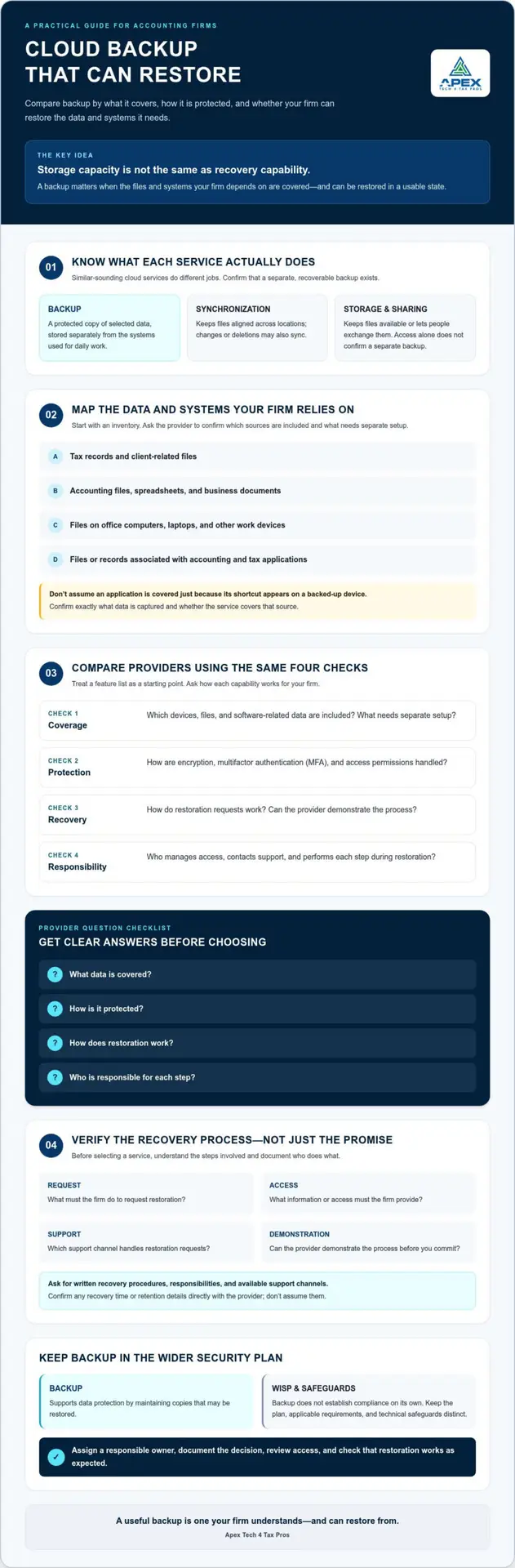
Cloud backup is a protected copy of data stored separately from the systems a firm uses for daily work. It can help preserve important information if working files become unavailable, but the firm needs to confirm exactly what the service covers and how a copy can be restored.
Backup keeps a recoverable copy of selected data; synchronization keeps files aligned across locations and may also sync changes or deletions. File sharing lets people access or exchange documents, while ordinary cloud storage describes where files are kept. Those functions may be useful, but none by itself confirms that a separate backup exists or can be recovered.
Online backup services vary in their coverage and service details. A broad comparison of online backup services can provide general market context, but an accounting firm should verify specific capabilities directly with each provider.
Which accounting firm data and systems should be considered?
Start with an inventory of the information and technology the firm depends on, then ask the provider to confirm which sources are included. Consider:
- Tax records and client-related files
- Accounting files, spreadsheets, and business documents
- Files stored on office computers, laptops, and other devices used for firm work
- Software-related data, including files or records associated with accounting and tax applications
Don’t assume an application’s data is covered just because its icon or shortcut appears on a backed-up device. Confirm what is captured and whether the provider’s service covers the relevant data source.
Why is cloud storage not automatically a complete backup?
A file in cloud storage may be accessible from another device, but access alone doesn’t establish how a separate copy is maintained or whether it can be restored to a usable state. Ask the provider how backup copies are created, what data is included, and what the restoration process involves. For cloud backup for accounting firms, those answers help distinguish a storage feature from a recovery capability the firm has verified.
How should accounting firms compare cloud backup providers?
Compare providers against the same requirements, then ask them to explain how each claimed capability works. A feature list is a starting point, not proof that the service covers your firm’s data or supports a recovery process you can use.
| Comparison area | Questions to ask |
|---|---|
| Data coverage | Which devices, files, and software-related data are included? What needs separate setup? |
| Protection controls | How are encryption, multifactor authentication (MFA), and access permissions handled? |
| Recovery support | How do restoration requests work? Can the provider demonstrate the process? |
| Service responsibilities | Who manages access, contacts support, and performs each step during restoration? |
Before choosing, ask four questions: What data is covered? How is it protected? How does restoration work? Who is responsible for each step?
What security controls should a firm ask about?
Ask the provider to explain how data is encrypted, how MFA protects account sign-in, and how permissions limit access to backup data. Clarify who can access the copies, how that access is granted or changed, and what account protections are available. The National Institute of Standards and Technology’s federal guidelines on cloud security offer additional context for evaluating cloud-related security and privacy considerations. Firms reviewing their broader security posture can also explore a WISP IT System Assessment.
How can you assess recovery capability before choosing?
Ask what the firm must do to request restoration, what information or access it needs to provide, and which support channel handles the request. Don’t assume a recovery time or retention period; confirm what the provider actually offers and whether it fits your needs. Request written documentation of recovery procedures, provider and firm responsibilities, and available support channels. If possible, ask the provider to demonstrate the process before you commit.
For a practical next step, review backup as part of your firm’s broader data-protection approach, rather than evaluating it in isolation.
Is cloud backup secure and enough to meet an accounting firm’s obligations?
No. Cloud backup can support data protection, but no single tool establishes compliance by itself. A backup service addresses a part of the security picture: protecting selected data copies and supporting recovery. The firm still needs to consider who can access information, how staff handle it, and how the business would respond to a security incident.
Keep the terms distinct. A Written Information Security Plan (WISP) is the firm’s documented security plan. The FTC Safeguards Rule is a regulation that may apply to a firm, while IRS publications provide tax-professional security guidance. Technical safeguards, such as access controls and backup, are measures used to protect information. A backup service can support a broader program, but it doesn’t replace that program or determine whether the firm meets its obligations.
How does backup fit into a tax firm’s WISP?
Document backup as one part of the firm’s security approach. Record which data sources the service covers, who is responsible for managing it, and how the firm will review whether it still fits its operations. Consider it alongside access permissions, staff practices, and incident planning. A customized WISP document can be a related planning resource, but the firm should ensure its plan reflects its actual systems and procedures.
What should firms verify before relying on a backup service?
Check the service scope, account protections, recovery steps, and responsibilities for both the provider and the firm. Confirm how staff can request a restoration and what support channel to use. Then review current IRS Publication 4557, Publication 5708, and FTC Safeguards Rule guidance, and confirm how requirements apply to your firm. This information is educational, not legal advice.
To review backup within your broader security plan, request a security assessment from Apex Tech 4 Tax Pros.
How can an accounting firm choose and implement cloud backup with confidence?
A clear process turns provider claims into a decision the firm can document and review. For cloud backup for accounting firms, work through these steps:
- Inventory the data. List the devices, business files, and software-related data the firm needs protected.
- Define recovery needs. Identify which information the firm would need first to resume essential work, and clarify expectations with the provider.
- Assess providers. Ask each provider the same questions about coverage, protection, recovery, retention, and responsibilities. Confirm answers rather than relying on assumptions or sales claims.
- Document the decision. Record the selected service, confirmed features, configuration, assigned roles, and restoration process.
- Test restoration. Schedule a recovery test with the provider and review what worked, what needs attention, and who will follow up.
What should be included in a provider evaluation?
Use a consistent question set so each provider is measured against the same firm requirements. Keep confirmed service details separate from unverified statements. For example, note whether a provider confirmed a particular data source is included, rather than assuming coverage because it was mentioned during a sales conversation. Review the wider compliance context with current IRS guidance, including Publication 4557 and Publication 5708, and confirm what applies to your firm.
What are sensible next steps after selecting a provider?
Assign one person to manage provider contact, review who has account access, and coordinate periodic recovery checks. Keep configuration details and restoration instructions somewhere authorized staff can find them. After each test, document the result and any follow-up actions; revisit the process when firm systems or responsibilities change.
Backup is one part of a broader security plan, not a substitute for reviewing the firm’s WISP and other safeguards. To discuss how your backup decisions fit into that plan, book a WISP assessment or email info@at4tp.com.
Make backup a practical part of your security plan
Choosing cloud backup for accounting firms means looking beyond storage space. Confirm which data is covered, how the provider protects access, and what the restoration process requires. Then document your decision, assign someone to manage provider contact and access reviews, and schedule recovery checks so the process stays connected to your firm’s real needs.
Backup supports data protection, but it doesn’t replace a broader security plan or establish compliance on its own. Review it alongside your WISP, staff practices, access controls, and incident procedures. If you’d like help assessing how these pieces fit together, book a WISP assessment or email info@at4tp.com.
Apex Tech 4 Tax Pros supports tax professionals with bilingual service and more than 20 years of combined tax and IT experience. Explore how Apex Tech 4 Tax Pros can help your firm strengthen its security plan. With clear responsibilities and a recovery process you’ve reviewed, you can move forward with greater confidence.
Frequently Asked Questions
What is the difference between cloud backup and cloud storage?
Cloud backup is a protected copy of selected data, maintained separately so it can be restored if working files are lost or unavailable. Cloud storage holds files for access, and syncing keeps versions aligned across locations. Storage or syncing may be useful, but neither automatically confirms a separate backup exists or explains whether the firm can recover a usable copy.
Is cloud backup secure enough for accounting firms?
Cloud backup can support an accounting firm’s data protection, but no service can guarantee security on its own. Before choosing cloud backup for accounting firms, ask how the provider protects data, controls access, and secures accounts. Confirm the service scope and responsibilities in writing, then consider the backup alongside staff practices, access controls, and the firm’s broader security plan.
What accounting firm data should be backed up?
Consider tax records, accounting files, business documents, and relevant data stored on firm devices or used by accounting and tax software. Start by inventorying the records, systems, and devices the firm relies on. Then ask the provider to confirm which sources are covered and whether any require separate setup. Don’t assume an application’s data is included just because its files are accessible online.
How often should an accounting firm test its cloud backups?
Set a documented recovery-test schedule that reflects the firm’s needs and the provider’s capabilities. Ask the provider what testing options are available and how restoration works, then record the planned frequency, responsible person, and results. After each test, note any issues and follow-up actions. Review the schedule when systems, data sources, provider services, or firm responsibilities change.
Does cloud backup alone make an accounting firm compliant?
No. Cloud backup is one safeguard within a wider security program; it doesn’t establish compliance by itself. A firm should consider backup alongside its Written Information Security Plan (WISP), access controls, staff practices, and incident procedures. Requirements can depend on the firm’s circumstances, so review current IRS and FTC guidance and confirm what applies. This information is educational, not legal advice.
For structured data about this article and its questions, consider adding Article and FAQPage schema.