
What good is a Written Information Security Plan if it describes a tax practice you don’t actually run? A WISP shouldn’t be paperwork filed away after it’s written. It should guide how your firm protects taxpayer data across the devices, software, staff, and workflows you rely on every day.
It’s understandable to be unsure what belongs in the plan, especially when regulatory language feels distant from daily work or a generic template doesn’t fit your operations. A useful WISP connects security requirements to practical safeguards and clear responsibilities. This guide explains what a WISP does, which areas it should address, and how to keep it accurate as your practice changes. You’ll learn how to use a template as a starting point, check whether written policies match your real security practices, and choose a sensible next step for creating or reviewing your plan. The goal is a document that supports the way your firm works while helping protect the sensitive information clients entrust to you.
Key Takeaways
- Understand how a WRITTEN INFORMATION SECURITY PLAN helps organize your tax practice’s approach to protecting sensitive information.
- Map the information, people, systems, procedures, and review practices your plan should address.
- Turn written expectations into daily habits by assigning responsibility, documenting procedures, and training staff.
- Decide whether a free template is a suitable starting point or whether your firm’s operations call for a tailored plan.
What Is a Written Information Security Plan for a Tax Practice?
A Written Information Security Plan (WISP) is a set of written policies and procedures describing how a tax practice protects sensitive information. It explains what information the firm handles, who may access it, and how staff should protect it during everyday work. For a tax office, that can include taxpayer records received through client portals, stored in tax software, or shared among authorized staff.
Tax practices handle personal and financial information that clients trust them to safeguard. A WISP helps make that responsibility understandable and actionable. It is the plan, not the regulation and not the security software. Tools such as firewalls, encryption, and multifactor authentication can support the practices documented in the plan. The IRS’s Publication 5708 guide to creating a WISP offers tax professionals an official resource for developing their plan.
What Does a WISP Do for a Tax Office?
A useful WISP turns broad security expectations into clear instructions. It can document who handles taxpayer records, how access is approved, and what staff should do when using or sharing information. These written steps help owners and employees follow consistent practices instead of relying on memory or informal assumptions. The plan should reflect the office’s actual systems and workflows, not describe an idealized firm.
How Is a WISP Different From the FTC Safeguards Rule?
The FTC Safeguards Rule is a regulation that sets information security requirements for covered financial institutions. A WISP is the firm’s written description of its security approach. IRS Publication 4557 offers tax professionals guidance on safeguarding taxpayer data, while the FTC rule provides regulatory requirements that may apply to a firm. The two are connected, but they aren’t interchangeable: a document alone doesn’t secure data, and security tools alone don’t explain the firm’s policies and responsibilities. Review current IRS and FTC guidance to understand what applies to your practice.
A template can help organize the work, but it still needs to match your operations. A customized WISP for tax professionals can be developed around a firm’s specific data, systems, and workflows.
What Should a Tax Preparer’s Written Information Security Plan Cover?
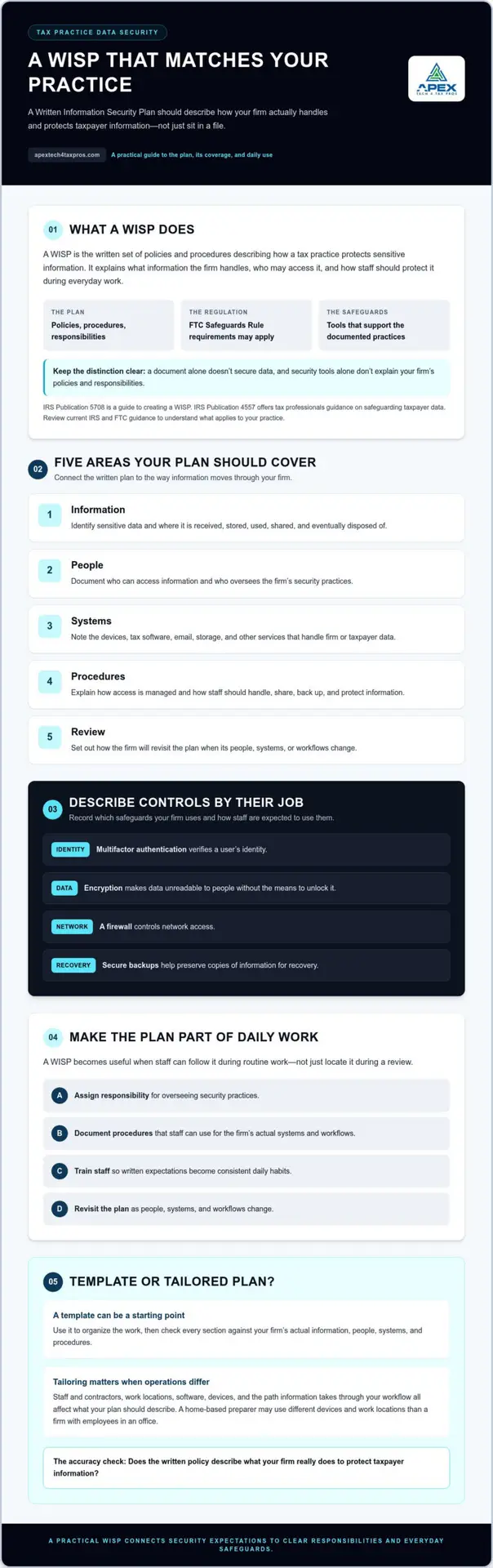
A practical Written Information Security Plan should describe five connected areas: the information your firm handles, the people responsible for protecting it, the systems that store or process it, the procedures staff follow, and how the plan is reviewed. The aim is to make the plan specific enough to guide your actual work, not just list general security goals.
- Information: Identify sensitive data, where it is received, stored, used, shared, and eventually disposed of.
- People: Document who can access information and who is responsible for overseeing security practices.
- Systems: Note the devices, tax software, email, storage, and other services that handle firm or taxpayer data.
- Procedures: Explain how access is managed and how staff should handle, share, back up, and protect information.
- Review: Set out how the firm will revisit the plan when its people, systems, or workflows change.
Which Firm Details Make a WISP Specific?
Consider your staff and contractors, work locations, software, devices, and the path information takes from a client through your workflow. For example, a home based preparer may use different devices and work locations than a firm with employees in an office. Copied language can miss those differences, leaving procedures that don’t match how information is actually handled. The IRS guide to creating a WISP offers a tax professional reference, but your plan still needs accurate details about your own practice.
How Should a WISP Describe Security Controls?
Describe controls by what they do: multifactor authentication verifies a user’s identity; encryption makes data unreadable to people without the means to unlock it; and a firewall controls network access. Secure backups help preserve copies of information for recovery. Record which safeguards your firm uses and how staff are expected to use them. For example, note which systems require multifactor authentication and who is responsible for managing access. Check current IRS and FTC guidance to confirm which expectations apply to your practice. A customized WISP can help align written policies with your firm’s operations.
How Can a Tax Practice Put Its WISP Into Daily Use?
A WISP becomes useful when staff can follow it during routine work, not just locate it during a review. Put the plan into practice with a clear sequence:
- Identify information: Track the sensitive data your firm handles and where it moves or is stored.
- Assign responsibility: Name the person who coordinates security tasks and keeps the plan accessible.
- Document procedures: Write down practical steps for handling information and using safeguards.
- Train staff: Explain what the procedures look like in everyday situations, such as sharing files or responding to suspicious messages.
- Review and update: Revisit the plan when staff, software, work locations, or data handling practices change.
A WISP connects assigned responsibilities, everyday procedures, and security safeguards so staff know how to protect taxpayer information in practice.
Who Is Responsible for Keeping the Plan Current?
Assign a specific person to coordinate the plan, communicate updates, and track whether documented procedures still reflect the firm’s operations. That person may need to work with others who understand the office’s software or workflows. Choose responsibilities that make sense for your firm’s size and structure, and document who handles each task. For background, the IRS guidance on Written Information Security Plans can help tax professionals understand WISP planning.
How Do Training and Risk Reviews Support the WISP?
Staff training helps turn written expectations into repeatable habits. Employees who understand the firm’s procedures can more easily notice when actual practices no longer match the plan. A risk assessment can help identify gaps to address, such as an access process that no longer fits the firm’s workflow. Consider cybersecurity awareness training to support staff education.
If you need help connecting the plan to your firm’s day to day operations, explore WISP support for tax professionals.
Should You Use a WISP Template or Get Help Tailoring Your Plan?
A template can give you a useful structure, while a tailored plan can help connect that structure to your firm’s actual systems, staff, and workflows. Neither option is effective just because a document exists. Your WRITTEN INFORMATION SECURITY PLAN needs accurate details, practical procedures your team follows, and attention as your practice changes.
When Is a Template a Reasonable Starting Point?
A free template can help a solo preparer or small firm organize the work. Treat it as a starting framework, not proof that your plan fits your operations or meets every expectation that applies to your practice. Review each section: Do the listed systems match the ones you use? Are the people and responsibilities accurate? Do the procedures reflect how taxpayer data actually moves through your office? If a section describes a safeguard you don’t use, revise it rather than leaving inaccurate language in the plan.
When Can an Assessment Help Clarify Next Steps?
Consider additional help if you’re unsure where sensitive information is stored, how staff or vendors access it, or whether written procedures match your security practices. A risk assessment can help surface gaps to address before you revise the plan. Check current IRS and FTC guidance for requirements relevant to your firm; this article isn’t legal advice. The WISP IT System Assessment is one option for getting a clearer picture of your security needs.
Apex Tech 4 Tax Pros develops customized WISPs for tax and accounting professionals. Its services also include risk assessments, cybersecurity awareness training, and secure cloud backup. If you’re ready to review your plan, an assessment can help you identify practical next steps.
Make Your WISP a Practical Part of Your Practice
A useful WRITTEN INFORMATION SECURITY PLAN reflects how your tax practice handles information, assigns security responsibilities, and uses safeguards. A template can provide structure, but its details must match your firm’s real systems and procedures. Keep the plan current as your staff, technology, or workflows change, and make sure employees understand how to put it into practice.
If you’re unsure whether your plan reflects your operations, an assessment can help clarify practical next steps. Apex Tech 4 Tax Pros provides customized WISPs and cybersecurity support for tax and accounting professionals, including risk assessments, staff training, and secure cloud backup.
Ready to review your plan? Discuss a WISP IT System Assessment or email info@at4tp.com. A plan that fits the way you work can make protecting client information more manageable.
Preguntas frecuentes
¿Qué es un plan escrito de seguridad de la información para preparadores de impuestos?
Un plan escrito de seguridad de la información, o WISP, documenta cómo una práctica tributaria organiza la protección de información confidencial. Puede explicar quién tiene responsabilidades de seguridad, cómo debe manejar el personal los datos de los contribuyentes y qué medidas de protección utiliza la firma. El plan debe describir las prácticas reales y no sustituye las herramientas de seguridad ni la revisión de los requisitos oficiales aplicables.
¿Los preparadores de impuestos necesitan un plan escrito de seguridad de la información?
Los profesionales de impuestos deben consultar las guías vigentes del IRS y la FTC para determinar qué requisitos de seguridad de la información se aplican a su firma. La respuesta puede depender de las actividades y circunstancias de cada práctica, así que no conviene tratar una explicación general como asesoría legal. Un WISP documenta el enfoque de seguridad de la firma, pero no demuestra por sí solo que se hayan cumplido todos los requisitos aplicables.
¿Qué debe incluir un plan escrito de seguridad de la información?
Un plan útil debe reflejar la información, los sistemas, las personas y los procedimientos reales de la firma. Puede identificar dónde se maneja la información de los contribuyentes, quién tiene acceso, quién coordina las tareas de seguridad y qué medidas se usan, como la autenticación multifactor, el cifrado o las copias de respaldo. Evite declaraciones genéricas que no correspondan a sus operaciones y confirme los elementos específicos en las guías vigentes del IRS y la FTC.
¿Con qué frecuencia debe actualizar una oficina de impuestos su WISP?
No existe un calendario único que necesariamente funcione para todas las firmas. Revise el plan cuando los cambios en el personal, el software, los lugares de trabajo o los procedimientos para manejar datos puedan volverlo inexacto. Registre las revisiones y actualizaciones para comprobar si el plan todavía coincide con las prácticas diarias. Consulte las guías oficiales vigentes para conocer cualquier expectativa de revisión que corresponda a su firma.
¿Puedo usar una plantilla gratuita de WISP para mi práctica de impuestos?
Sí. Una plantilla gratuita puede ofrecer una estructura útil, pero no conoce los flujos de datos, sistemas, responsabilidades del personal ni procedimientos de su firma. Adapte cada sección y confirme que describa lo que su práctica realmente hace. Si no está seguro de cómo evaluar sus sistemas o identificar brechas, considere una evaluación de riesgos o apoyo para personalizar el WISP antes de depender del documento en las operaciones diarias.