
What should a tax preparer do when an unexpected message asks for a client’s tax documents or a password reset? Effective cyber security training helps staff pause, recognize warning signs, and follow a clear reporting process before sensitive taxpayer information is put at risk.
Generic annual training may cover familiar security basics but miss the decisions your team faces during intake, return preparation, filing, and busy-season communication. Staff need guidance that fits those daily tasks, including how to handle suspicious emails, protect client information, and report a possible security incident promptly.
This article explains how to build practical training around the risks and responsibilities of a tax practice. You’ll learn which topics matter most, how to give employees clear steps for raising concerns, and how to connect training with your firm’s Written Information Security Plan (WISP). Training works best as part of a broader security program, not as a standalone lesson. Staff awareness complements documented procedures and safeguards, but does not replace them.
Key Takeaways
- Shape cyber security training around each team member’s role and the technology they use in the tax practice.
- Give staff clear steps for protecting taxpayer information, securing accounts, and reporting concerns.
- Make training repeatable by teaching relevant procedures, practising responses, and documenting follow-up.
- Use the WISP to document the firm’s security program and clarify responsibilities. Training supports the plan but does not replace safeguards.
Why does cyber security training matter in a tax practice?
Cyber security training helps tax staff recognize risks involving taxpayer information and respond according to the firm’s procedures. The goal isn’t to make every employee an IT expert. It’s to help each person make safer decisions during routine work and know whom to tell when something seems wrong.
Role-relevant cybersecurity training for tax professionals teaches staff how to protect taxpayer information while carrying out their specific responsibilities. That means connecting security guidance to real tasks, not relying only on generic examples.
What makes tax-office training different from generic security awareness?
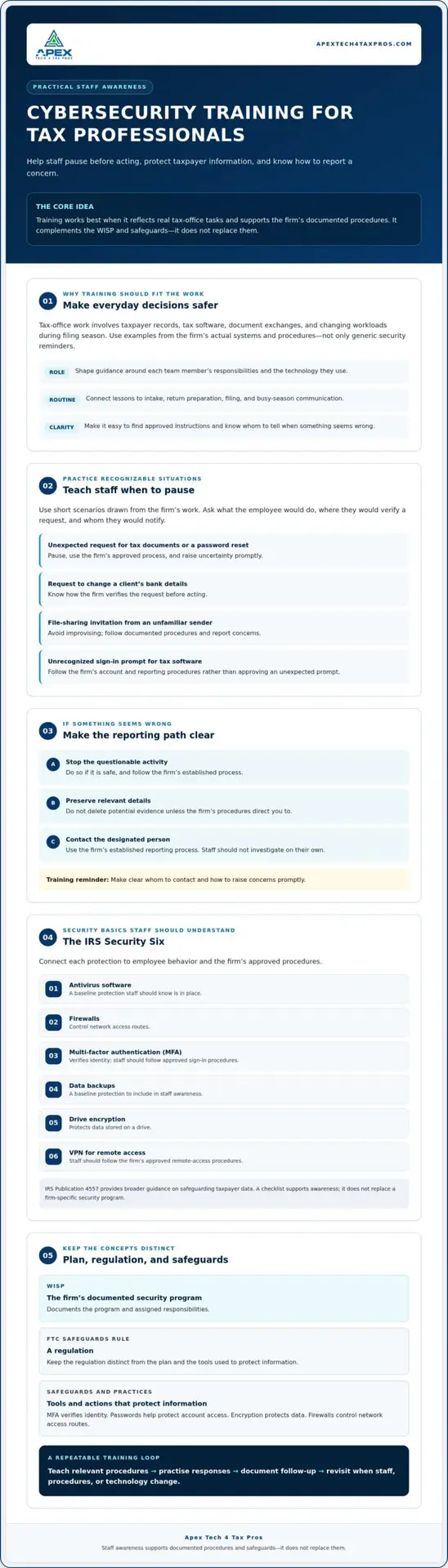
Tax work involves handling taxpayer records, using tax software, exchanging documents, and managing changing workloads during filing season. Training should reflect how your firm performs those tasks. For example, staff need to know which approved process to use when accessing a client file or receiving an unexpected message about a return.
General security awareness training introduces common principles, but your examples and instructions should match your firm’s systems and documented procedures. That makes lessons easier to apply. Apex Tech 4 Tax Pros provides cybersecurity awareness training for tax professionals focused on this industry’s work.
How does training fit into a firm’s security program?
Training is one part of a broader security program. A Written Information Security Plan (WISP) documents the firm’s security program and assigned responsibilities. The FTC Safeguards Rule is a regulation, while safeguards such as MFA and encryption are tools or practices used to protect information. Training helps staff understand their role, but it doesn’t replace the WISP or technical safeguards.
Review your procedures and risk assessment when shaping lessons. Then make sure staff know where to find guidance and how to raise concerns. If you need help documenting your security program, explore custom WISP support.
What should cyber security training teach tax professionals?
Useful cyber security training gives staff clear actions for protecting taxpayer information, securing access, and reporting concerns. Teach employees to pause before responding to unexpected requests, use approved methods to share files, and avoid sending sensitive records through unapproved channels. If a message or activity seems unusual, they should follow the firm’s reporting procedure and raise uncertainty promptly.
MFA verifies identity, passwords help protect access to accounts, encryption protects data, and firewalls control network access routes. Staff should understand these different roles. They should also know the firm’s rules for using tax software remotely, protecting devices, and keeping login credentials private.
Which everyday tax-office scenarios should staff practise?
Use short scenarios drawn from the firm’s actual work: an unexpected request to change a client’s bank details, a file-sharing invitation from an unfamiliar sender, or an unrecognized sign-in prompt for tax software. Ask staff what they would do, where they would verify a request, and whom they would notify. The right response is to follow documented procedures, avoid improvising, and escalate promptly when unsure.
Incident-reporting practice should make the first steps clear: stop the questionable activity if safe to do so, preserve relevant details, and contact the designated person using the firm’s established process. Staff shouldn’t investigate on their own or delete potential evidence unless procedures direct them to.
How should training explain the IRS Security Six?
The IRS Security Six describes baseline protections that tax professionals should understand: antivirus software, firewalls, multi-factor authentication, data backups, drive encryption, and a VPN for remote access. Connect each item to employee behavior, such as using MFA when prompted and following approved remote-access procedures. IRS Publication 4557 provides broader guidance on safeguarding taxpayer data.
A checklist supports awareness, but it doesn’t replace a firm-specific security program. For tax-focused cybersecurity awareness training, Apex Tech 4 Tax Pros can help firms build staff understanding around their work and procedures.
How can a tax firm make cybersecurity training practical and repeatable?
Build training around the way your firm works, then revisit it as staff, procedures, or technology change. Use a straightforward process to keep lessons relevant:
- Identify roles: Note who handles taxpayer records, manages accounts, and oversees security.
- Review procedures: Check that instructions reflect the firm’s current systems and approved practices.
- Teach relevant behaviours: Explain the security actions expected of each person.
- Practise responses: Use brief scenarios to rehearse decisions and reporting steps.
- Document follow-up: Record topics covered, questions raised, and updates needed.
Connect lessons to the controls staff use. For example, the IRS Security Six includes data backups, so training can clarify the firm’s approved backup procedures and each person’s responsibilities. The NIST Small Business Cybersecurity Corner offers practical guidance to inform a firm’s approach. Set training frequency and documentation according to current official guidance and your risk-based security program, rather than assuming one schedule fits every practice.
How can small and seasonal firms fit training into busy workflows?
Plan training around natural points in the operational calendar, such as onboarding, workflow changes, or preparation for a busy period. New staff can learn the procedures tied to their roles, while existing staff can review updates when systems or processes change. Keep examples specific to the tools and responsibilities they actually use.
How can a firm tell whether training is useful?
Look beyond completion records. Ask staff how they would handle a realistic situation, invite questions, and check whether they know the appropriate reporting steps. Unclear answers may reveal a procedure or topic that needs more explanation. Training records help document activity, but completion alone doesn’t prove compliance or prevent every incident.
For help making staff learning relevant to tax-practice workflows, explore cybersecurity awareness training.
How can a WISP and training work together to protect taxpayer data?
A Written Information Security Plan (WISP) documents a firm’s security program, including the safeguards and responsibilities that apply to its work. Training helps staff understand how to carry out their assigned responsibilities in daily practice. The plan sets out what the firm expects; education helps turn those expectations into consistent actions.
Neither replaces the other. Training alone doesn’t satisfy every applicable requirement, and it can’t substitute for appropriate technical safeguards. A firm should review current IRS and FTC materials and consult a qualified adviser about obligations that apply to its circumstances. Treat compliance guidance as a starting point for review, not legal advice.
When should a firm consider outside training or assessment support?
Consider additional support if procedures are unclear, systems or workflows have changed, or staff aren’t sure who handles a security concern. Tax-focused WISP and IT system assessments can help a firm review its documented program and technology in context. Cybersecurity awareness training and a customized WISP may also help when staff need clearer guidance or the written plan needs attention.
What is a sensible next step for improving staff readiness?
Start with one practical review: compare a staff procedure with what people actually do, then identify the most useful training priority. That might mean clarifying who receives reports, explaining an approved process, or updating instructions after a workflow change. If the firm needs help documenting its security program, custom WISP support can help make responsibilities and procedures clearer.
Keep the process manageable and revisit it as the firm changes. To discuss tax-focused cyber security training or a WISP assessment, email info@at4tp.com.
Build a security routine your team can rely on
Effective cyber security training gives tax professionals practical guidance they can use in daily work, from protecting taxpayer information to following clear procedures when a concern arises. Tailor lessons to staff roles and workflows, then reinforce them with practice and follow-up.
A WISP documents the firm’s security program and responsibilities; training helps staff understand how to carry them out. Both matter, and neither replaces appropriate technical safeguards. Review procedures as your systems and operations change, and confirm firm-specific obligations using current IRS and FTC guidance or advice from a qualified professional.
Apex Tech 4 Tax Pros offers cybersecurity awareness training, risk assessments, and customized WISPs for tax professionals. To make staff readiness part of your security program, book a WISP IT System Assessment or email info@at4tp.com to discuss practical training for your firm.
Frequently Asked Questions
What is cyber security training for tax professionals?
Cyber security training for tax professionals teaches staff how to protect taxpayer information and follow the firm’s security procedures. It connects security principles to tax-office responsibilities, such as handling client records, using tax software, and reporting a concern. Effective training helps employees understand what actions their roles require, rather than expecting them to interpret security rules on their own.
What should cybersecurity training cover at a tax preparation firm?
Training should cover recognizing suspicious messages, protecting taxpayer records, using approved file-sharing methods, and reporting concerns through the firm’s process. Include account security topics such as password practices and multi-factor authentication, plus the firm’s rules for remote access. Use examples based on staff roles and systems so employees can connect guidance to their daily work.
How often should tax preparers receive cybersecurity training?
There isn’t one schedule that fits every firm. Set training frequency by reviewing current IRS and FTC guidance, your firm’s written procedures, and its risk-based security program. Revisit training when staff join, systems or workflows change, or a review identifies a knowledge gap. Keep records of training and follow-up, and confirm any specific obligations that apply to your practice.
Does cybersecurity training satisfy WISP or FTC Safeguards Rule requirements?
No. Training supports a firm’s security program, but it doesn’t replace the Written Information Security Plan (WISP), required safeguards, or other applicable responsibilities. The WISP documents the program and assigned roles; training helps staff understand those roles. Because obligations can depend on a firm’s circumstances, review current IRS and FTC materials and consult a qualified adviser for guidance.
How can a small tax firm make security training practical during tax season?
Keep training focused on procedures employees need for their roles, and plan it around onboarding, workflow changes, and the firm’s operating calendar. Use brief scenario discussions to practise decisions without disrupting essential work. For example, ask staff where they would report an unexpected request. Clarify the reporting contact and steps in advance, then address questions or gaps as they arise.