
Automation can speed up patching, but it can’t decide which updates are most urgent or whether a policy fits a tax practice. A practical patch management policy for tax preparers assigns responsibility, prioritizes updates by risk, and sets clear expectations for deployment and documentation. It gives the firm a consistent way to maintain software while accounting for the systems and data it relies on.
Tax professionals need updates handled promptly through a process that respects day-to-day operations. A policy clarifies who makes decisions, how exceptions are handled, and what records show the firm is following its security practices. Automation can support the process, while clear oversight keeps it aligned with the firm’s needs.
This article explains how to assess patch risk, organize testing and deployment, preserve useful compliance records, and use automated tools responsibly. It also shows how written security procedures can connect patching decisions to a tax firm’s broader information protection program.
Key Takeaways
- Prioritize updates by considering vulnerability severity, active exploitation, and the systems and taxpayer data they could affect.
- Use controlled testing and staged deployment to catch compatibility issues before updates reach every work device.
- Keep a clear record of patch decisions, deployment results, and exceptions to support security oversight and compliance documentation.
- Automation can help identify and deploy missing updates, while a risk assessment and customized WISP can connect patching to your firm’s broader security practices.
Risk metrics including CVSS, EPSS, and CISA KEV
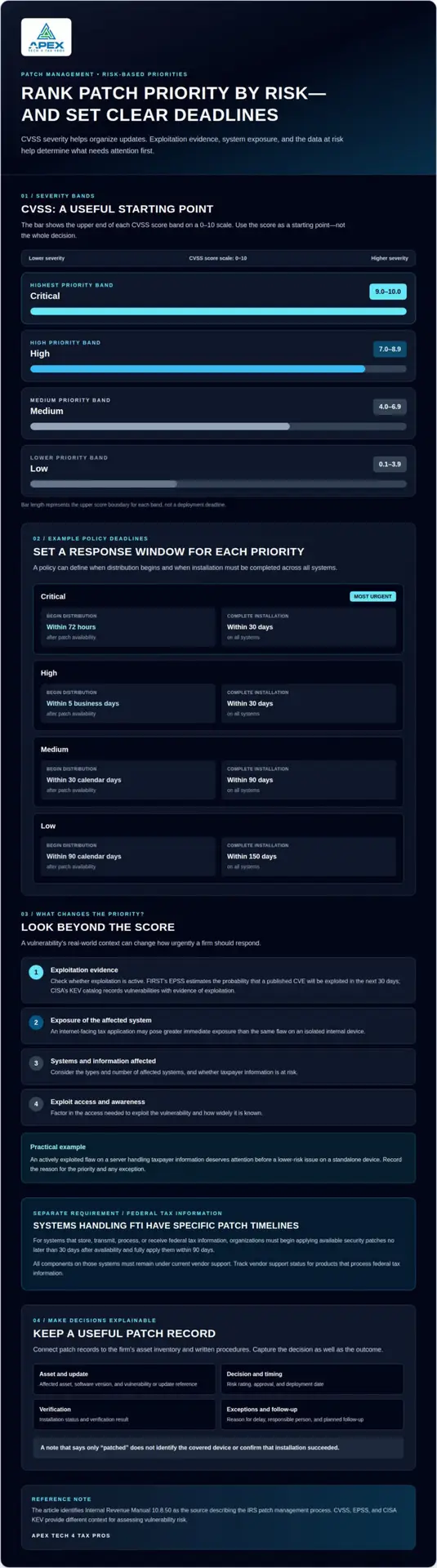
CVSS scores estimate vulnerability severity: critical vulnerabilities rate 9.0-10.0, high vulnerabilities 7.0-8.9, medium vulnerabilities 4.0-6.9, and low vulnerabilities 0.1-3.9. Treat the score as a starting point, not the whole decision. A flaw affecting an internet-facing tax application may pose greater immediate exposure than the same flaw on an isolated internal device.
EPSS and CISA’s Known Exploited Vulnerabilities catalog add useful context. FIRST’s EPSS estimates the probability that a published CVE will be exploited in the next 30 days. CISA’s KEV catalog records vulnerabilities with evidence of exploitation. The Internal Revenue Service identifies Internal Revenue Manual 10.8.50 as the source describing its patch management process.
A policy can set risk-based deadlines staff can apply consistently. For critical-priority patches, distribution must begin within 72 hours after patch availability, with installation completed on all systems within 30 days. For high-priority patches, distribution must begin within 5 business days, with installation completed on all systems within 30 days. For medium-priority patches, distribution must begin within 30 calendar days, with installation completed on all systems within 90 days. For low-priority patches, distribution must begin within 90 calendar days, with installation completed on all systems within 150 days.
Prioritize updates based on the data at risk, the types and number of affected systems, the access needed to exploit the vulnerability, and how widely it is known. For example, an actively exploited flaw on a server handling taxpayer information deserves attention before a lower-risk issue on a standalone device. Record the reason for the priority and any exception so the firm can explain its decision.
If an unpatched system is compromised, isolate it from the network, preserve relevant logs, and activate the firm’s incident response procedures. Assess which systems and taxpayer information may be affected, secure impacted accounts from a trusted device, and document the actions taken and findings.
Testing, staged deployment, and verification
Testing helps confirm that an update works with the tax software, operating system, and devices your office relies on. A controlled release process can reveal problems before they affect production work.
Preproduction Patch Testing
Preproduction testing means applying an update in a controlled environment before installing it on production systems. Use a test platform that reflects the office’s actual software and devices, then check that essential functions still work.
Keep testing within authorized systems and change procedures. Don’t use live taxpayer information in a test environment unless it is approved to handle it. For example, after an operating-system update, check whether a tax application opens, imports a sample file, and communicates with required services. If the patch causes errors or slows performance, pause deployment and record the issue for review.
Staged Deployment and Validation
Staged deployment sends an approved patch to a limited group of devices before wider rollout. Start with a representative workstation or small pilot group, monitor the results, and expand deployment once core tasks remain stable.
Set a clear approval point at each stage. Before authorizing the next release, the designated person should review installation status, application behavior, and user reports. If the pilot reveals a failure, stop the rollout, document the affected systems, and follow the firm’s change process. This limits disruption while keeping updates on track.
After deployment, verify that the patch installed and the affected system works as expected. Check the software version or deployment report, review failure alerts, and test relevant security controls, such as access settings. Monitoring should identify devices that missed the update, not just show overall progress. Record the patch reference, test result, approval, deployment status, and any follow-up action. This evidence helps staff distinguish a successful installation from one that needs remediation.
A customized Written Information Security Plan can document patch testing, authorization, and verification procedures alongside the organization’s broader security practices.
Audit evidence and regulatory requirements
Tax preparation firms must maintain written security procedures and a Written Information Security Plan (WISP) to protect customer information under federal data-security requirements, including the Gramm-Leach-Bliley Act Safeguards Rule. The IRS’s Publication 4557 provides an overview of safeguarding client data. The FTC Safeguards Rule requires covered financial institutions to maintain an information security program with safeguards appropriate to their risks. Together, these requirements make patch oversight part of a firm’s broader security controls.
For systems that store, transmit, process, or receive federal tax information, organizations must begin applying available security patches no later than 30 days after availability. Patches must be fully applied within 90 days after availability. All components on those systems must remain under current vendor support. Firms should track vendor support status for products that process federal tax information.
Useful audit evidence should show both the update’s status and the reasoning behind the decision. Record the affected asset, software version, vulnerability or update reference, risk rating, approval, deployment date, and verification result. Include exceptions, the reason for any delay, the person responsible, and planned follow-up. A record that says only “patched” doesn’t show which device was covered or whether installation succeeded.
Keep these records connected to the firm’s asset inventory and written procedures. For example, if a vendor ends support for a tax application, document which systems use it, the resulting security concern, and the decision made in response. Revisit the WISP when a security assessment identifies a material gap or testing reveals a control failure. This creates a traceable basis for managing vulnerabilities, assigning resources, and showing how the firm’s controls protect taxpayer information.
Automated patch management tools
Automation can help a tax office find and apply updates across operating systems, applications, and servers. A patch management tool can scan devices for missing patches, download approved updates, and deploy them with less manual work. It can also report which components succeeded, failed, or still need attention. The key is to automate repeatable tasks while keeping human oversight over risk decisions, testing, and exceptions.
Build a reliable inventory before relying on scan results. Track each component from acquisition through retirement, including its vendor, software version, device owner, and whether it handles sensitive taxpayer information. Define which systems the tool scans, who approves updates, and who reviews its reports. Otherwise, a missed laptop or unsupported application can remain outside the process even when a dashboard shows broad coverage.
Explicitly include remote workers and personal devices in the policy. State which devices may access taxpayer information, what operating-system and application updates are required, and how the firm will monitor compliance. If a personal device can’t meet those controls, prohibit access to sensitive data from that device and direct work to an authorized one.
Automation doesn’t eliminate the need for testing. Configure the tool to deploy approved updates in stages, monitor installation results, and flag failures for review. Updates may require a restart or temporarily take a system offline, so schedule deployment around tax-office operations. Keep a recovery plan and backup available for systems where an update disrupts service. Use reports to find devices that missed installation, assign follow-up, and document the outcome.
Automated platforms reduce repetitive work, but they can’t decide whether a patch is compatible with every tax application or business process. Define approval roles, escalation steps, and exception documentation before enabling automatic deployment. To align technical controls with a written security process, discuss patch workflow planning for your tax office.
Apex Tech 4 Tax Pros
Apex Tech 4 Tax Pros helps tax firms connect patching practices with the broader safeguards in their Written Information Security Plan. Turn to the team when patch responsibilities, risk priorities, or documentation need to fit your actual systems and operations. A risk assessment can identify gaps; a customized WISP can record procedures and accountability; Cybersecurity Awareness Training can help staff follow them. Secure Cloud Backup can support recovery planning if an update disrupts access to business data.
Together, these measures help make patch management part of an organized security program rather than an isolated IT task. For guidance on aligning your tax office’s controls and written procedures, contact Apex Tech 4 Tax Pros.
Make Patch Governance Part of Your Next Business Decision
Patch management works best with a clear owner and regular updates as your tax practice changes. When you add software, devices, or remote work arrangements, revisit who approves updates and how patch decisions fit your written security practices. This keeps the policy useful after its initial draft and helps staff understand their responsibilities. A patch management policy for tax preparers should support how the firm operates, not sit apart from everyday decisions.
Apex Tech 4 Tax Pros can help connect those responsibilities to a customized Written Information Security Plan, risk assessments, and Cybersecurity Awareness Training. These resources can help you shape a security program around your firm’s needs and give staff a clearer path to follow. Talk with Apex Tech 4 Tax Pros about your next security step, and move forward with a policy your practice can put to work.
Frequently Asked Questions
What should a patch management policy for tax preparers include?
The policy should define covered systems, who owns patch decisions, and how exceptions are handled. Include an asset inventory, risk-ranking criteria, testing and approval responsibilities, deployment records, and a process for failed updates. For example, specify who reviews vendor alerts and who follows up when a remote laptop misses an update. Keep the policy aligned with the firm’s WISP and actual technology environment.
What safeguards does the FTC Safeguards Rule require for software patching?
The FTC Safeguards Rule requires covered financial institutions to maintain an information security program with safeguards appropriate to their risks. A patching procedure can support that program by assigning responsibility for updates, tracking vulnerabilities, and documenting unresolved issues. The Rule does not establish a universal patch calendar. Set deadlines based on system exposure, vulnerability risk, and applicable requirements for the data being handled.
How often should tax preparers patch operating systems, applications, and network devices?
Set patch frequency by risk, vendor release information, and the system’s role. For systems that store, transmit, process, or receive federal tax information, available patches must begin being applied no later than 30 days after availability and be fully applied within 90 days. For other devices, define policy deadlines by severity and exposure, and include routers, firewalls, and software, not only workstations.
How should a tax preparation firm prioritize critical and zero-day security patches?
Prioritize evidence of active exploitation, internet exposure, and access to taxpayer data. Check whether a vulnerability appears in CISA’s Known Exploited Vulnerabilities catalog, then consider its CVSS severity and EPSS exploitation estimate. A zero-day may not yet have a vendor patch. Where practical, reduce exposure by disabling the affected service or limiting access, monitor vendor notices, and deploy the fix after it is released and tested.
What patch testing, approval, deployment, and rollback steps should a tax firm follow?
Assign an authorized approver, test the update on a representative device, and confirm that tax software and essential workflows still operate. Release it to a limited group before wider deployment, then review installation results and user-reported problems. Before rollout, define how to stop deployment and restore service if a patch causes errors. Record the approval, test outcome, affected devices, and any corrective action.
How should tax preparers document patch status and exceptions for compliance audits?
Maintain a record linking each update to the affected asset, software version, vulnerability or update reference, risk decision, approval, deployment result, and exception history. For a delayed patch, record the reason, responsible person, interim safeguards, and planned follow-up. Compare tool reports against the asset inventory so offline or missed devices aren’t overlooked, and review approved exceptions regularly to identify items needing action.