
Disaster tax relief isn’t automatic for every loss; eligibility depends on the disaster and the taxpayer’s circumstances. IT disaster recovery tax pros need to distinguish tax-relief questions from the technical work of restoring records and systems. For casualty losses, taxpayers can use Form 4684 to calculate a loss and include it with their return, according to the Internal Revenue Service.
After a disaster, clear answers matter, especially when client records or tax-office operations are disrupted. A CPA or enrolled agent experienced in preparing returns for disaster survivors can assess relevant tax considerations. This article explains how to choose that expertise, how disaster-related tax relief may apply, and why preserving access to tax records matters during recovery. It also covers how IT disaster recovery for tax pros can support efforts to restore operations and protect sensitive client information.
Key Takeaways
- Identify whether disaster-related tax relief may apply by considering the affected area, the taxpayer’s circumstances, and the type of loss.
- Choose tax help with experience handling disaster-related returns and casualty-loss issues, especially when records or filing operations were disrupted.
- Assess recovery plans by weighing their scope and the business impact of downtime or lost data, rather than relying on price alone.
- Use a WISP, risk assessments, staff training, and secure cloud backup to strengthen a tax practice’s preparedness and protect taxpayer information.
Tax considerations after a disaster
Federal disaster tax relief depends on the declared disaster area and the taxpayer’s connection to it. The IRS generally authorizes relief for areas where FEMA identifies at least one area qualifying for its Individual Assistance program. A taxpayer may also qualify if their home, tax records, main workplace, or tax accountant is in the affected area. Relief workers in the area may qualify as well.
Relief can change filing and payment deadlines, but the dates depend on the disaster and location. The IRS may extend certain federal deadlines by up to one year. Taxpayers outside the disaster area may qualify if their preparer is in the affected area and cannot file or pay on their behalf. Businesses should distinguish an extension from a refund: more time to file or pay does not itself create a refund, which depends on the return and claim.
For property losses, the type of disaster and its date can affect the tax calculation. For disasters occurring from December 28, 2020, through July 4, 2025, the casualty loss reduction is $500. For disasters occurring on or after July 5, 2025, the reduction is $100 per casualty, and the loss must exceed 10% of adjusted gross income to qualify. Starting in 2026, personal casualty losses from officially recognized state-declared disasters can be deducted.
- Taxpayers can use Form 4684 to calculate a casualty loss and include the form with their tax return, according to the Internal Revenue Service.
- An amended return may let a taxpayer claim a disaster-related loss on a prior-year return. The deadline for filing Form 1040-X to claim disaster-loss deductions sooner is usually October 15, unless the filing deadline was extended.
- Processing times for disaster-related refunds claimed through an amended return can vary.
Before claiming relief, identify the disaster declaration, the affected location, the loss type, and the applicable filing deadline. IRS Publication 547 covers basic disaster tax relief provisions, while Topic No. 515 addresses casualty, disaster, and theft losses. A CPA or enrolled agent experienced with disaster-survivor returns can help evaluate records and claims, especially when the usual tax files were damaged or destroyed.
How much does IT disaster recovery planning and service typically cost for small businesses?
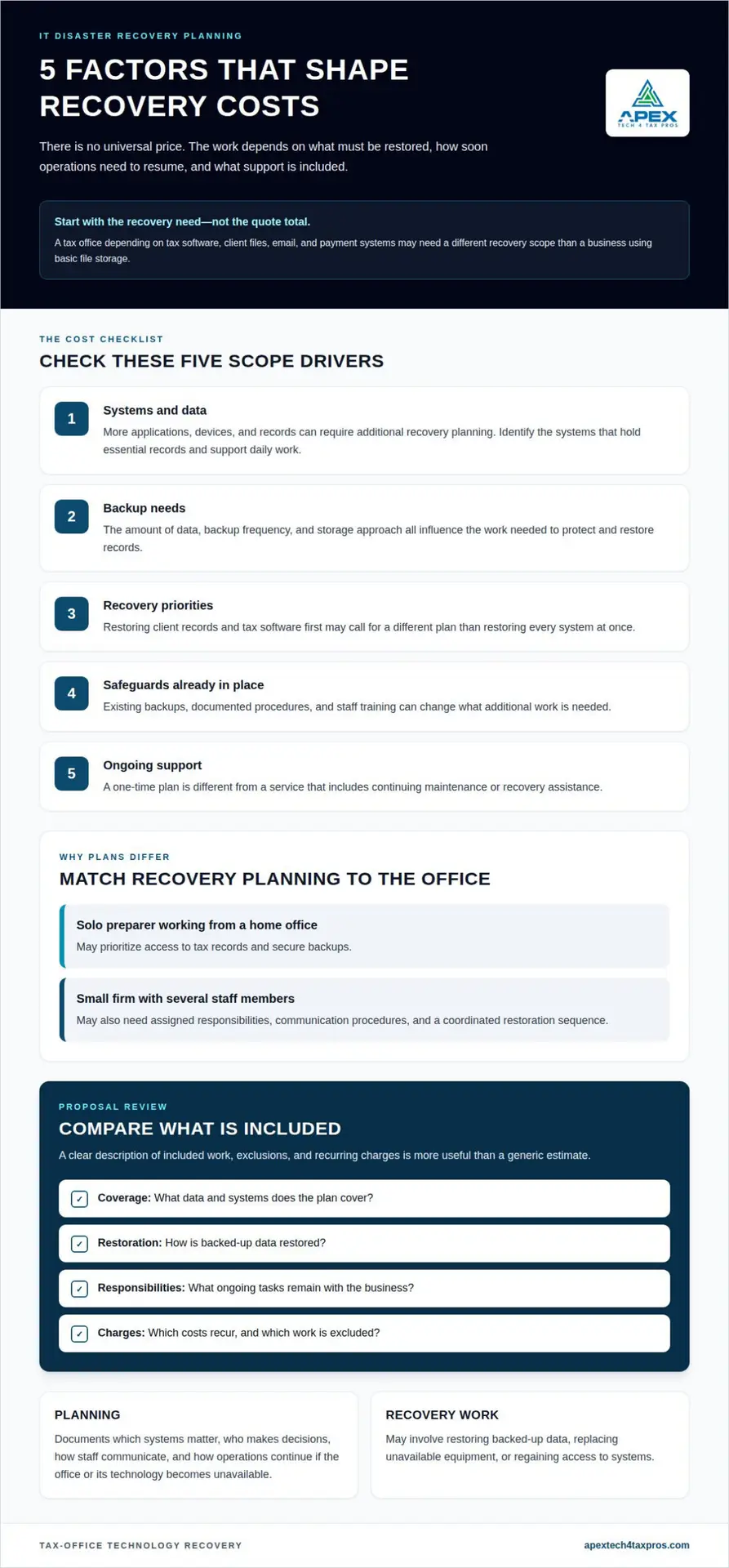
There is no universal price for disaster recovery planning or service. The scope depends on what a small business needs restored, how quickly operations must resume, and which systems hold essential records. A tax office that relies on tax software, client files, email, and payment systems has different recovery needs from a business using only basic file storage.
Planning and recovery can involve separate work. A plan documents which systems matter, who makes decisions, how staff communicate, and how operations continue if the office or its technology becomes unavailable. Recovery work may include restoring backed-up data, replacing unavailable equipment, or regaining access to systems. The scope also depends on the provider’s role and the business’s responsibilities.
Several practical factors shape a project’s cost:
- Systems and data: More applications, devices, and records can require additional recovery planning.
- Backup needs: The amount of data, backup frequency, and storage approach influence the work.
- Recovery priorities: Restoring client records and tax software first may require a different plan than restoring every system at once.
- Existing safeguards: Current backups, documented procedures, and staff training can change the work needed.
- Ongoing support: A one-time plan differs from a service that includes continuing maintenance or recovery assistance.
For example, a solo preparer working from a home office may prioritize access to tax records and secure backups. A small firm with several staff members may also need assigned responsibilities, communication procedures, and a coordinated restoration sequence. These differences make a clear description of included work, exclusions, and recurring charges more useful than a generic estimate.
Compare proposals by matching each item to a recovery requirement, not by comparing totals alone. Ask what data and systems the plan covers, how backup restoration is handled, and what ongoing tasks remain with the business. A tax-office risk assessment can help clarify which safeguards and recovery priorities deserve attention.
How do disaster recovery costs compare with the financial cost of downtime or data loss?
A recovery plan has a defined scope, while downtime losses can build as work is interrupted. For a tax office, unavailable tax software can delay return preparation, client communication, and document access at once. A damaged backup can add manual reconstruction work. Tax professionals planning IT disaster recovery can weigh preparation costs against the operational consequences of restoring service.
Estimate the impact by listing what stops when a system becomes unavailable. Compare lost billable work, staff time spent restoring operations, temporary tools, and client follow-up. If taxpayer records are lost, include the work needed to reconstruct files and correct affected processes. These categories make the trade-off more specific than comparing a recovery proposal with an assumed average loss.
- Downtime: Identify the tax software, email, internet access, and records staff need to serve clients.
- Recovery labor: Account for time spent restoring files, resetting access, and checking that records are usable.
- Delayed work: Consider appointments, return preparation, and filing tasks that must be rescheduled or completed later.
- Data loss: Identify which documents would need reconstruction if the latest usable copy were unavailable.
For example, losing access to client documents during a filing period can disrupt scheduled appointments and work already underway. Restoring documents from a usable backup may reduce reconstruction work, while an incomplete backup can leave staff searching email or requesting records again. For tax pros weighing IT recovery plans, the key factors are data importance, backup condition, and recovery sequence.
Use a simple worksheet to compare the two sides. Record the systems and records at risk, the work that would stop, the staff effort needed for manual recovery, and the services included in the recovery plan. Then compare those impacts with the plan’s setup and ongoing costs. The goal is not to assign a speculative dollar value to every disruption. Instead, identify recovery gaps that could interrupt client service or consume staff time, then prioritize protections.
What tax and compliance risks should businesses consider when outsourcing disaster recovery?
Outsourcing recovery can help restore systems, but it does not transfer every tax or compliance responsibility. A tax firm still needs to know who controls taxpayer records, who can access them, and who makes decisions during an outage. For example, a recovery provider may restore files, while the firm decides how to resume client work.
Start with access. A provider may need credentials or permissions to restore applications and backups. Limit access to the systems needed for recovery, assign an internal contact, and document how access will be removed when the work ends. If a provider restores files from an older backup, staff should identify which records need review before using them for tax work.
Clarify the recovery agreement before an incident. It should describe the data and systems covered, the provider’s role, communication procedures, and how the firm will receive restored records. For instance, a plan covering file restoration but not tax software leaves a key operational dependency unresolved. Businesses should also understand which tasks remain theirs, including client communication and tax filings.
Disaster-related deadlines raise a separate concern. Disaster relief applies to tax preparers who cannot file returns or make payments for clients because of a disaster. Practitioners in affected areas can follow guidance on procedures to self-identify their clients for disaster relief. A recovery provider may restore system access, but that technical work is distinct from determining which clients qualify for relief or handling tax matters.
- Access: Define who can reach taxpayer records and for what recovery purpose.
- Restoration: Identify who checks that restored files are complete and usable.
- Communication: Set a contact and escalation path for the provider and firm.
- Tax work: Assign responsibility for deadlines, client notices, and disaster-relief procedures.
Documenting responsibilities helps prevent gaps between system recovery and tax operations. Clear role assignments also help staff distinguish technical restoration from decisions about client communication, filing tasks, and records review. When each responsibility has an owner, the firm and its recovery provider can coordinate without confusing system access with tax or compliance decisions.
Apex Tech 4 Tax Pros
Apex Tech 4 Tax Pros helps tax professionals strengthen the planning and safeguards that support recovery. If your firm is reviewing how it protects taxpayer records, manages staff responsibilities, or prepares for system disruption, a risk assessment can identify security priorities. A Customized Written Information Security Plan (WISP) documents the firm’s information security approach, while Cybersecurity Awareness Training helps staff understand their role in protecting sensitive data.
Secure Cloud Backup can support access to stored business information after disruption. Together, these offerings address different parts of preparedness: assessing risks, documenting protections, building staff awareness, and safeguarding data. They don’t replace disaster tax advice or determine which clients qualify for relief, but they can help tax offices plan for security and continuity considerations.
Used together, these services connect documented security practices with staff awareness and protected records. They give a tax practice a clearer foundation for managing information security responsibilities alongside broader recovery planning.
Make preparedness part of your next business decision
Treat recovery planning as an operating decision, not something to postpone until systems fail. Set clear priorities: which records and tools must be available first, who coordinates staff, and how the firm will maintain secure access during disruption. These decisions give your tax practice a practical starting point for strengthening continuity.
For IT disaster recovery, tax pros should connect technology planning with the responsibilities of serving clients and protecting their information. A focused review can help clarify where procedures, staff readiness, or data safeguards need attention, then guide the next improvements at a manageable pace.
Apex Tech 4 Tax Pros can help tax firms build that foundation through tailored security planning and assessment. Contact Apex Tech 4 Tax Pros to discuss a practical next step for your practice. A considered plan can make recovery decisions clearer when your team needs them most.
Frequently Asked Questions
What are the tax benefits of IT disaster recovery planning for businesses?
IT disaster recovery planning does not itself create a tax benefit. Its value is operational: a business can organize access to records, preserve information needed for tax reporting, and resume work after disruption. For example, keeping accounting records available may help a business prepare accurate returns after equipment damage. Any tax treatment arises from applicable tax rules and the business’s specific expenses or losses, not simply from having a recovery plan.
Are IT disaster recovery expenses tax deductible in the United States?
Some expenses may receive tax treatment as business costs, but deductibility depends on the expense, how the business uses it, and its accounting circumstances. A recurring service and a major technology purchase may be treated differently. Keep invoices, contracts, and records showing the business purpose and period covered. A tax professional can assess how each expense should be reported in the business’s situation.
Can businesses deduct disaster recovery software, cloud backup, and cybersecurity costs?
Possibly, but evaluate software, backup subscriptions, and cybersecurity services by their purpose and accounting treatment rather than grouping them automatically. For example, a business may have a recurring cloud-backup charge alongside a separate software purchase. Keep each agreement and invoice, note which systems the service supports, and record when the cost was incurred. These details help a tax professional evaluate the expense’s treatment.
Do tax credits apply to business continuity or disaster recovery technology investments?
Do not assume that buying continuity or recovery technology automatically qualifies a business for a tax credit. Eligibility depends on a specific tax provision and its requirements, not simply on whether a purchase improves resilience. Keep purchase records and identify the business use of each system. A tax professional can assess whether a particular investment fits an available credit and how it interacts with other tax treatment.