
What Is a WISP? Your Guide to Information Security Plans
Your tax firm may have security tools in place but no clear plan for how they fit together. A WISP, or Written Information Security Plan, documents how your firm approaches protecting taxpayer information and connects its security practices to its operations.
It’s understandable to be unsure whether a WISP applies to your practice or how a written plan differs from regulations and security tools. Each has a distinct role: rules set requirements that may apply, tools provide technical protections, and the plan records how your firm addresses information security. Confirm applicable requirements with authoritative sources for your circumstances.
This guide explains what a tax-practice WISP should document, how to connect risks with safeguards and responsibilities, and how to keep the plan aligned with changes in your firm. You’ll also find a practical way to check what your current documentation covers and identify questions that remain.
Key Takeaways
- A WISP documents your firm’s approach to protecting taxpayer information. It doesn’t replace security tools or guarantee compliance.
- A useful plan connects the information and systems your firm uses with relevant risks, safeguards, responsibilities, and review.
- A practical workflow can help you turn general security guidance into steps that fit your firm’s operations.
- A template may need closer review if your systems, responsibilities, or understanding of risks have changed.
What does WISP mean for tax professionals?
A Written Information Security Plan (WISP) describes how a tax practice identifies risks to taxpayer information and organizes its safeguards, responsibilities, and procedures. It records the firm’s approach to information security. It doesn’t guarantee that data is safe or replace the protections themselves.
Tax professionals handle sensitive information such as tax returns, Social Security numbers, and financial records. A written plan can help staff understand who is responsible for security tasks and which procedures to follow. These practices support information security, which includes protecting information’s confidentiality, integrity, and availability. A plan is distinct from both the rules that may apply to a firm and the tools used to protect its systems and data.
Why does a tax practice need a written security plan?
Documenting responsibilities and procedures makes a firm’s security approach easier to follow and review. For example, staff should be able to find out who manages access to client records and what steps to follow when a security concern arises. IRS publications offer guidance for tax professionals, but each firm should confirm which federal requirements apply to its operations.
Is a WISP the same as the FTC Safeguards Rule?
No. A WISP is a plan; the FTC Safeguards Rule is a regulation. The regulation sets requirements for covered financial institutions, while a firm’s written plan documents how it addresses information security. Technical measures, such as multifactor authentication or encryption, are safeguards, not the plan or the regulation. Applicability and obligations can depend on a firm’s circumstances, so verify details with authoritative sources. For more information about a customized plan, see the customized WISP document resource and consult current IRS and FTC guidance.
What should a tax office WISP document and connect?
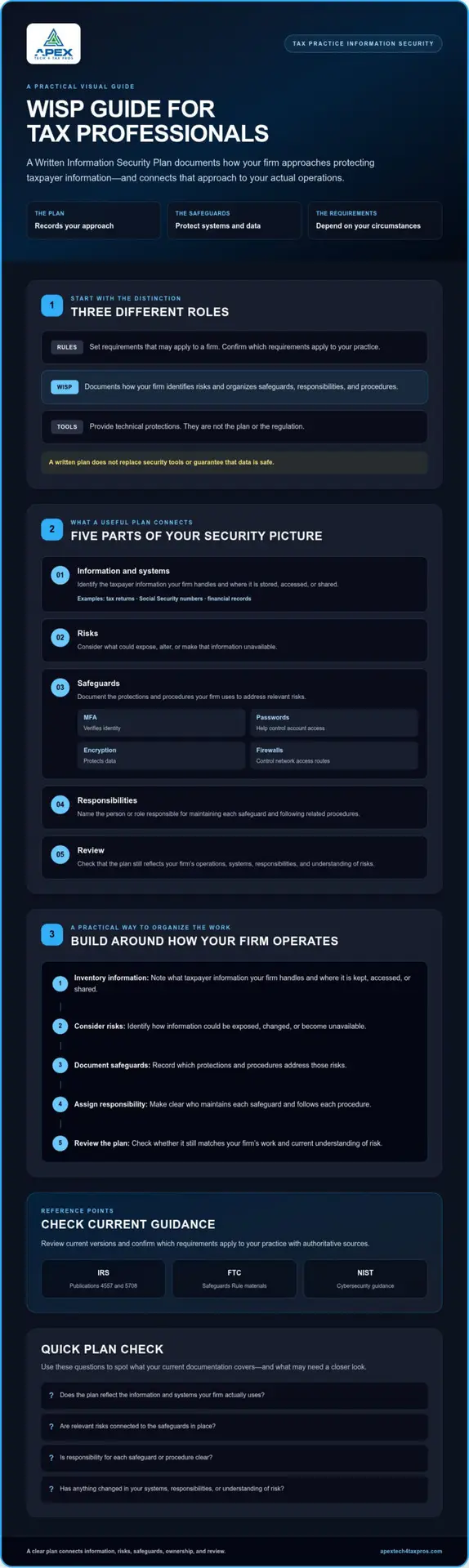
A useful plan reflects the firm’s actual work, systems, and risks. It isn’t a universal form or a substitute for technical safeguards. Instead, it connects the information a tax office handles with risks to that information, the protections in place, the people responsible, and a process for review.
The IRS describes written information security plans as required by law for tax professionals. Firms should still confirm current requirements and applicability with authoritative sources.
- Information and systems: What taxpayer information does the firm handle? Where is it stored, accessed, or shared?
- Risks: What could expose, alter, or make that information unavailable?
- Safeguards: Which protections and procedures address those risks?
- Responsibilities: Who maintains each safeguard and follows the related procedures?
- Review: When will the firm check that the plan still matches its operations?
How do risks, safeguards, and responsibilities fit together?
Start by mapping where taxpayer information is handled. Then consider relevant risks, such as unauthorized access or loss of access, and document the safeguards the firm uses to address them. Assigning each task to a named person or role makes accountability clearer without assuming every firm needs the same structure.
Security tools have different jobs. Multifactor authentication (MFA) verifies identity, passwords help control account access, encryption protects data, and firewalls control network access routes. A plan should make clear which safeguards the firm uses and who is responsible for them.
Which IRS and FTC resources should firms consult?
Review IRS Publications 4557 and 5708, current FTC Safeguards Rule materials, and NIST guidance. Check for updated versions and confirm which requirements apply to your practice. If you need help making the written plan specific to your operations, explore the custom WISP document service. You can also learn more about WISP support for tax professionals.
How can you make a WISP practical for your tax firm?
Build the plan around how your firm actually handles taxpayer information, rather than assumptions about how a tax office should operate. Use this workflow to organize the work, then confirm current requirements with authoritative sources such as the IRS, FTC, and NIST. The FTC cybersecurity guidance offers additional context for practical safeguards.
- Step 1, Inventory information: Note what taxpayer information your firm handles, where it moves, and which devices, software, or people access it.
- Step 2, Review risks: Consider where information could be accessed improperly, exposed, changed, or become unavailable.
- Step 3, Document safeguards: Record the protections and procedures currently in place. Note questions that still need answers instead of assuming a safeguard exists.
- Step 4, Assign ownership: Identify who is responsible for maintaining each safeguard and following its related procedures.
- Step 5, Schedule review: Revisit the plan when meaningful changes affect systems, staff, workflows, or known risks.
How should a small or seasonal practice start?
Keep the first pass manageable. Map the information flows, devices, software, and people involved in your practice, then record current safeguards and unresolved questions. A solo preparer can document who handles each task. A seasonal firm can also consider how processes shift as staff and workloads change. If you need help evaluating your technology environment, explore a WISP IT system assessment.
How do staff training and technical safeguards support the plan?
Written procedures only help if the people expected to follow them understand what to do. Relevant education can reinforce how to recognize suspicious messages and handle taxpayer information securely. Technical safeguards support those practices, but they don’t replace clear instructions or staff awareness. To discuss how a written plan can connect with your firm’s operations, contact Apex Tech 4 Tax Pros.
When should you get help with a tax-practice WISP?
A downloaded template can give your written plan a useful structure, but completing a form doesn’t confirm that it reflects your firm’s systems, procedures, or responsibilities. Consider a closer review if no one is sure who owns key security tasks, your technology or workflow has changed, or you can’t confidently answer questions about current safeguards. The goal is to identify gaps and make the plan more specific, not to assume that a document alone guarantees compliance or prevents a breach.
Can a tax preparer use a free WISP template?
Yes. A template can be a starting point if you adapt it with accurate details about the information your firm handles, the systems and devices in use, and who performs relevant tasks. Compare it with your actual operations and current IRS and FTC guidance before relying on it. A template is not, by itself, proof that your firm meets every applicable requirement, and it doesn’t replace professional advice about your circumstances.
What is a sensible next step if the plan feels incomplete?
Write down the specific questions you can’t answer. For example: Which systems hold taxpayer information? Who handles access changes? Do documented safeguards match the technology in use? Those unanswered items can help you decide whether to review the plan internally, seek a risk assessment, or get support developing a customized document.
Apex Tech 4 Tax Pros develops customized Written Information Security Plans for tax and accounting professionals and offers risk assessments, cybersecurity awareness training, and secure cloud backup. These services can help firms assess security gaps, train staff, and document an approach suited to their operations.
To discuss an assessment or the questions you’d like to resolve, email info@at4tp.com.
Keep your security plan useful as your firm changes
A WISP stays relevant when someone checks that its documented responsibilities and safeguards still match how the firm operates. Changes to staff, systems, or workflows are good prompts to revisit the plan and note anything that needs follow-up. For example, if a new system changes where taxpayer information is stored or accessed, check whether the plan still describes the firm’s practices accurately.
Apex Tech 4 Tax Pros offers customized plans, risk assessments, cybersecurity awareness training, and secure cloud backup for tax and accounting professionals. If you want help reviewing your documentation or identifying gaps, the company’s WISP services can support that work.
For help deciding what your plan needs, email Apex Tech 4 Tax Pros about a WISP assessment.
Frequently Asked Questions
What does WISP stand for in the tax-preparation industry?
WISP stands for Written Information Security Plan. For a tax practice, it is a document describing how the firm approaches protecting taxpayer and client information, including its safeguards and responsibilities. At Apex Tech 4 Tax Pros, we understand this is separate from laws or rules that may apply to the firm and from the technology used to protect systems and data. The plan should reflect the practice’s own operations, rather than assume one format fits every firm.
Does every tax preparer need a WISP?
Whether a particular requirement applies depends on the firm and the rules governing its activities. Tax professionals should review current IRS and FTC resources, then confirm their circumstances with an appropriate professional if applicability is unclear. A WISP can help document a firm’s security approach, but this article offers general education, not legal advice or a determination of any firm’s specific obligations.
Is a WISP the same thing as the FTC Safeguards Rule?
No. A WISP is a written plan; the FTC Safeguards Rule is a regulation. A firm’s plan can document its information security approach, but it is not the regulation itself and does not guarantee compliance. Check current FTC Safeguards Rule guidance to understand its scope and requirements, and confirm how they apply to your tax practice before relying on a general explanation.
How often should a tax office review its WISP?
Set a review process and revisit the plan when meaningful changes affect the firm’s systems, staff, workflows, or security risks. For example, adopting new software or changing who handles sensitive information may mean documented procedures need attention. Do not assume a specific review interval is legally required; check current guidance for applicable expectations and identify who will verify that the plan still reflects the firm’s practices.