
Could a vulnerability scan come back clean while taxpayer information still moves through untracked devices, staff accounts, or service providers? A scan can reveal technical weaknesses, but a tax office cybersecurity risk assessment should also examine how information flows through your practice and where exposure may remain.
A technical report can identify problems without making it clear what to fix first. A practical assessment connects your technology to daily operations, helping you understand which information, people, and processes are affected and what actions could reduce risk.
This guide explains what an assessment should examine, how to prioritize risks to taxpayer information and business operations, and how to turn findings into safeguards with assigned owners and follow-up actions. You’ll also learn how assessment results can inform a customized Written Information Security Plan and help your team manage security more confidently.
Key Takeaways
- A tax office cybersecurity risk assessment looks beyond devices to how taxpayer information moves through staff, systems, and service providers.
- Use vulnerability scans to surface technical weaknesses, but don’t treat them as a full review of process and people-related risks.
- Document verified findings with their evidence, affected data or systems, business impact, and a responsible owner.
- Turn assessment results into practical safeguards and WISP updates, using firewalls, encryption, passwords, and MFA for their distinct purposes.
What Does a Tax Office Cybersecurity Risk Assessment Examine?
A tax office cybersecurity risk assessment is a structured review of the information, systems, people, and safeguards that affect taxpayer data. It helps identify where information is handled, what could expose it, and which protections are already in place. It’s an evaluation process, not a security product or a Written Information Security Plan (WISP). The IRS’s Publication 4557 offers guidance on protecting taxpayer data.
Which taxpayer information and workflows belong in scope?
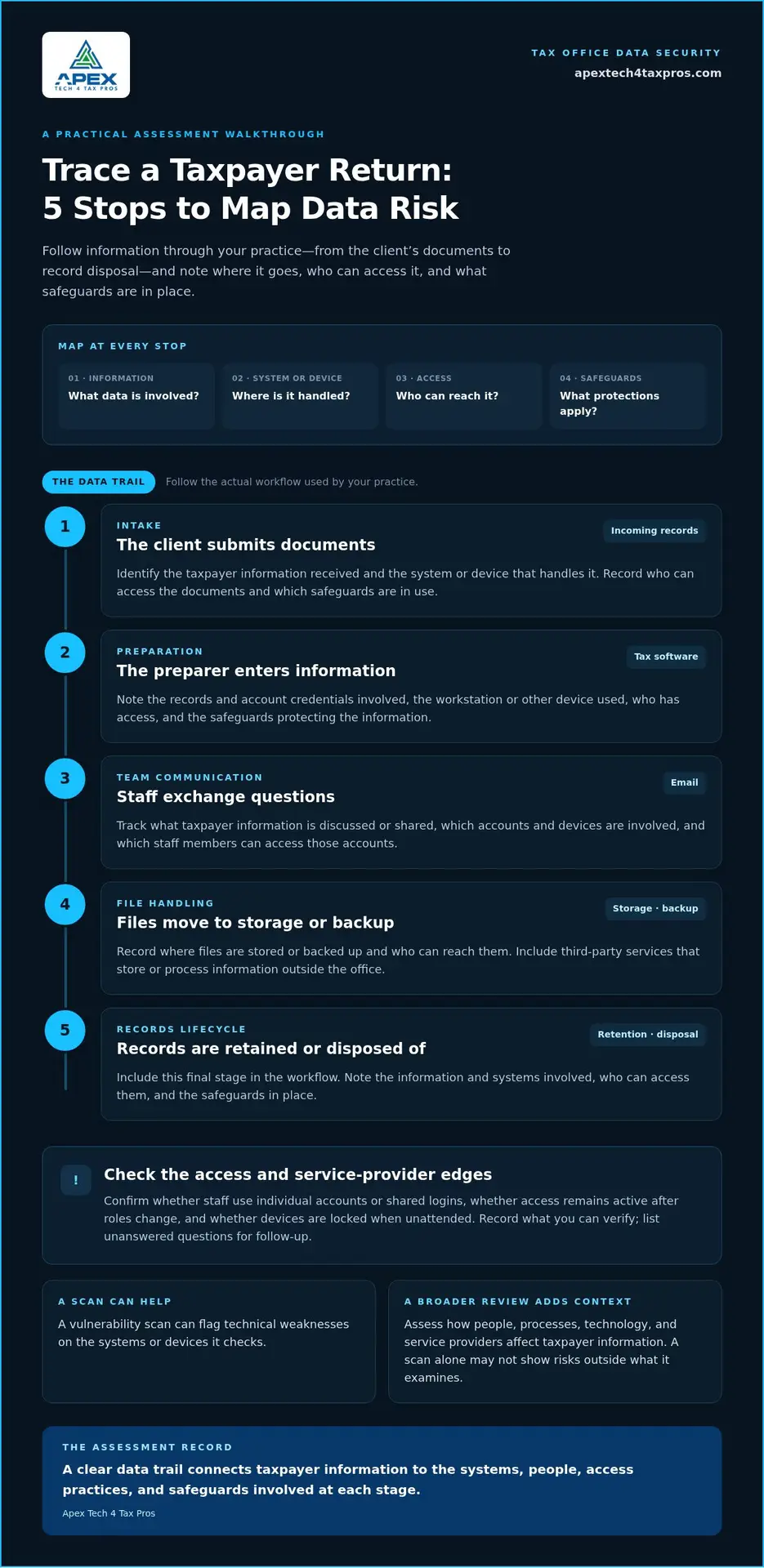
Trace a return through your practice: a client submits documents, a preparer enters information into tax software, staff exchange questions by email, files move to storage or backup, and records are retained or disposed of. At each step, record the information involved, the system or device handling it, who can access it, and the safeguards in use.
Include taxpayer records and account credentials, tax software, email, workstations and mobile devices, backups, and document-sharing workflows. Check whether staff use individual accounts or shared logins, whether access remains active after roles change, and whether devices are locked when unattended. Third-party services matter too, because information may be stored or processed outside the office. Record what you can verify and list unanswered questions as follow-up items.
How do IRS and FTC guidance relate to an assessment?
IRS Publication 4557 provides tax-data protection guidance, while Publication 5708 helps tax and accounting practices develop a WISP. The WISP is the written plan describing a firm’s security program. An assessment helps identify and document risks that can inform the plan. Neither is itself a technical safeguard.
The FTC Safeguards Rule sets requirements for covered financial institutions. Whether specific requirements apply depends on the firm’s circumstances, so tax professionals should review the rule and their obligations carefully. Firewalls control access routes, encryption protects data, and multi-factor authentication verifies identity. Apex Tech 4 Tax Pros provides a tax-practice-focused cybersecurity risk assessment service to help connect findings to practical improvements.
How Is a Tax Office Risk Assessment Different from a Vulnerability Scan?
A scan checks for certain technical weaknesses on the systems it examines. A broader tax office cybersecurity risk assessment considers how weaknesses could affect taxpayer information in the context of the firm’s people, processes, and service providers. Neither approach alone establishes that a firm complies with every applicable requirement.
| Area | Vulnerability scan | Risk assessment |
|---|---|---|
| Purpose | Find discoverable technical weaknesses. | Understand risks to taxpayer information and operations. |
| Scope | Selected systems or devices. | Technology, access practices, information handling, staff, and service-provider dependencies. |
| Typical output | Potential weaknesses for review. | Documented findings, context, priorities, and follow-up actions. |
| Limitation | May miss risks outside what it scans. | Depends on accurate information and appropriate follow-through. |
What can a vulnerability scan identify, and what can it miss?
Automated scanning can flag technical issues on the systems or devices it checks. Results need interpretation: a flagged issue may require validation, while an unscanned process or account won’t appear in the report. A scan generally won’t explain whether staff share logins, how documents are sent, or what happens when a service provider handles client information. Treat scan results as evidence to assess, not an automatic compliance conclusion.
Why assess people, processes, and technology together?
Consider a client document received by email, opened by a preparer, entered into tax software, then saved or shared for review. Trace who accessed it, which accounts and devices were involved, what safeguards applied, and whether a service provider stored or transmitted it. This can reveal gaps a device-only review might miss, such as an overly broad account permission or a document stored in an unexpected location. The details vary by firm, so the review should reflect actual operations.
The NIST Cybersecurity Framework offers a structure for organizing cybersecurity work. Apex Tech 4 Tax Pros’ risk assessment approach connects technical findings with everyday handling of taxpayer information.
How Can a Tax Office Prioritize and Document Assessment Findings?
A useful tax office cybersecurity risk assessment should leave the firm with a clear record of what needs attention, why it matters, and who will move it forward. Prioritize findings by considering the information involved, who could access it, and the potential effect on client service or business operations. Don’t assume every finding carries equal urgency or rely on a score that has no clear basis.
What should a useful assessment record contain?
For each finding, separate what has been verified from what still needs investigation. Record the affected system or asset, the taxpayer information involved, the evidence supporting the finding, and any safeguards already in place. For example, note the account or device involved and the specific access or handling practice observed. Use plain language so firm leaders can understand the issue and make decisions without interpreting technical shorthand.
Then move each finding through a practical sequence:
- Record the finding: Describe the observed weakness or concern and note whether it is verified or still an assumption.
- Assess business impact: Consider the data involved, who could access it, and how exposure or disruption could affect the practice.
- Assign an owner: Name the person responsible for coordinating the approved corrective action.
- Set a review date: Choose a date to check progress and determine whether the action remains appropriate.
- Document progress: Track the current status, supporting evidence, and any remaining work.
How should the firm track remediation and review?
Keep the record active. Mark actions as planned, in progress, completed, or awaiting a decision, and capture what changed when an issue is addressed. Review the assessment when meaningful changes affect the practice, such as new software, devices, staff access, or service-provider relationships. Set review timing to reflect the firm’s operations rather than assuming one interval works for every practice.
Use findings to update the WISP so it reflects actual risks, assigned responsibilities, and safeguards. Apex Tech 4 Tax Pros develops customized WISPs that can translate assessment results into a written plan. Explore tax-practice cybersecurity support and the steps available for putting findings into action.
How Can a Tax Office Turn Assessment Results into Stronger Protection?
A tax office cybersecurity risk assessment is useful when verified findings lead to changes the firm can put into practice. For each finding, decide whether to update the WISP, adjust a technical safeguard, clarify a procedure, or help staff recognize a recurring risk. Record the action and who is responsible so improvements don’t stay only in the assessment report.
When should findings lead to staff training or a WISP update?
If findings point to repeated errors in handling client documents, access practices, or suspicious messages, role-relevant cybersecurity awareness training can help staff understand the safer process for their work. If written procedures don’t match how the office actually handles taxpayer information, update the WISP to reflect current responsibilities and practices.
Technical protections address different needs. A firewall controls access routes into or out of a network. Encryption protects data by making it unreadable without the means to decrypt it. Passwords help protect accounts, while multi-factor authentication verifies identity through an additional step. Match each safeguard to the gap it is meant to address, then document how the practice uses it.
What is a practical next step for a tax-office owner?
Choose one verified finding and turn it into an action with a named owner, a review date, and a way to document progress. For example, if the assessment identifies unnecessary account access, assign someone to review permissions and record the changes made. Then use the same approach for the remaining priorities, updating the WISP as procedures and safeguards change.
For support connecting findings to practical improvements, book a WISP IT system assessment. Apex Tech 4 Tax Pros provides risk assessments, customized WISPs, cybersecurity awareness training, and secure cloud backup for tax and accounting professionals.
Turn Assessment Findings into a Clear Protection Plan
A practical tax office cybersecurity risk assessment does more than identify weaknesses. It helps you understand how taxpayer information moves through your practice, distinguish a broad review from a vulnerability scan, and turn verified findings into assigned actions. Documenting those actions and keeping your Written Information Security Plan aligned with daily operations makes security easier to manage.
Apex Tech 4 Tax Pros specializes in customized Written Information Security Plans and cybersecurity solutions for tax and accounting professionals. Its services include risk assessments, cybersecurity awareness training, and secure cloud backup to help safeguard sensitive client data.
Book a WISP IT system assessment to connect your findings with practical safeguards for your firm. Start with clear priorities and a plan for putting them into action.
Frequently Asked Questions
What is a cybersecurity risk assessment for a tax office?
A cybersecurity risk assessment for a tax office is a structured review of the information the firm handles, the systems and people that access it, and the safeguards in place. It helps the firm identify weaknesses, consider possible effects on client information and business operations, and plan documented improvements. It’s broader than an automated scan and distinct from a Written Information Security Plan, which documents the firm’s security program.
Is a vulnerability scan the same as a cybersecurity risk assessment?
No. A vulnerability scan checks selected systems or devices for certain discoverable technical weaknesses. A broader assessment also considers how taxpayer information moves through staff workflows, accounts, and relationships with service providers. Scan results can provide useful evidence, but they need interpretation and follow-up. A scan alone doesn’t assess every operational risk or establish that a firm meets all requirements that may apply to it.
How often should a tax office conduct a cybersecurity risk assessment?
Review the assessment when meaningful changes affect the firm’s information, technology, staff responsibilities, or operations. A review can help determine whether existing safeguards and written procedures still reflect how the practice works. Don’t treat an old assessment as a permanent picture of security. For timing or other obligations that may apply to your firm, consult current IRS publications and FTC Safeguards Rule requirements.
What should a tax office do after a cybersecurity risk assessment?
Document each finding, the evidence supporting it, affected information or systems, existing safeguards, and potential business impact. Assign an owner to each approved corrective action and track its status and follow-up. Use relevant findings to update security procedures and the WISP, or identify where staff training may help. Revisit actions when circumstances change, and record whether the safeguards addressed the original concern.
Does a small tax office need a cybersecurity risk assessment?
A small office can benefit from assessing how it handles and protects taxpayer information, even if its technology setup is simple. Map the information, accounts, devices, workflows, and service providers involved, then document relevant risks and practical improvements. Firm size alone doesn’t show which requirements apply. Review current IRS and FTC primary sources to understand obligations based on your firm’s circumstances.