
A BYOD policy is only as effective as the habits it supports. A bring your own device (BYOD) policy for accountants should define which personal devices may connect, what firm data employees may access, and how work information must be protected. It should also explain device registration, privacy boundaries, and the steps to take if a device is lost or an employee leaves.
Using personal phones or computers can be convenient, but that convenience depends on everyone following the same safeguards. A sound policy needs more than a password rule: staff need clear instructions for handling client information and using work apps on personal devices.
This article covers essential policy provisions, including data separation, encryption, secure wireless access, device approval, and employee consent. It also explains practical implementation and training, so the policy can guide everyday behavior instead of sitting unread.
Key Takeaways
- Set rules for encrypting work data and keeping it separate from personal files and cloud storage.
- Define which devices can connect, how employees register them, and what safeguards secure network access.
- Make lost-device reporting, access removal, and acceptable-use expectations clear before an incident occurs.
- Turn written rules into everyday practice with staff training and regular policy reviews.
1. How can companies protect sensitive data on personal devices in a BYOD environment?
A bring your own device (byod) policy for accountants can let employees use familiar personal devices and may reduce technology expenses. Company-issued devices give a firm clearer control over its equipment, while personal devices can mix work files with personal data. The policy should identify the corporate data employees need for each task and assess how that information moves between devices, applications, and firm systems.
Require encryption for confidential and personal data stored on a device and for work information sent through approved channels. Encryption makes data harder to read without appropriate access. For example, if a preparer downloads a client document to finish a return, the policy should specify where the file may be stored and how it must be protected. A general BYOD rule does not secure information saved on a device.
Keep business and personal information separate. A designated workspace or business application can help stop client files from mixing with personal photos, messages, or notes. State whether employees may copy work documents to personal cloud storage. Also specify which cloud storage employees should use for business and how the firm protects documents stored there.
Map the information involved, not just the device. Note whether a mobile app displays taxpayer data, saves files locally, or sends information to another service. Use this review to limit each employee’s access to the information needed for their work. That way, protections reflect the data’s exposure rather than assuming every app or file carries the same risk.
A bring your own device (byod) policy for accountants should also set privacy boundaries in plain language. Explain what business information the firm may manage and what personal information is outside that scope. Employees should understand these limits before using a personal device for firm work. Clear boundaries support practical safeguards while respecting the personal use of each device.
2. Wireless security and device registration
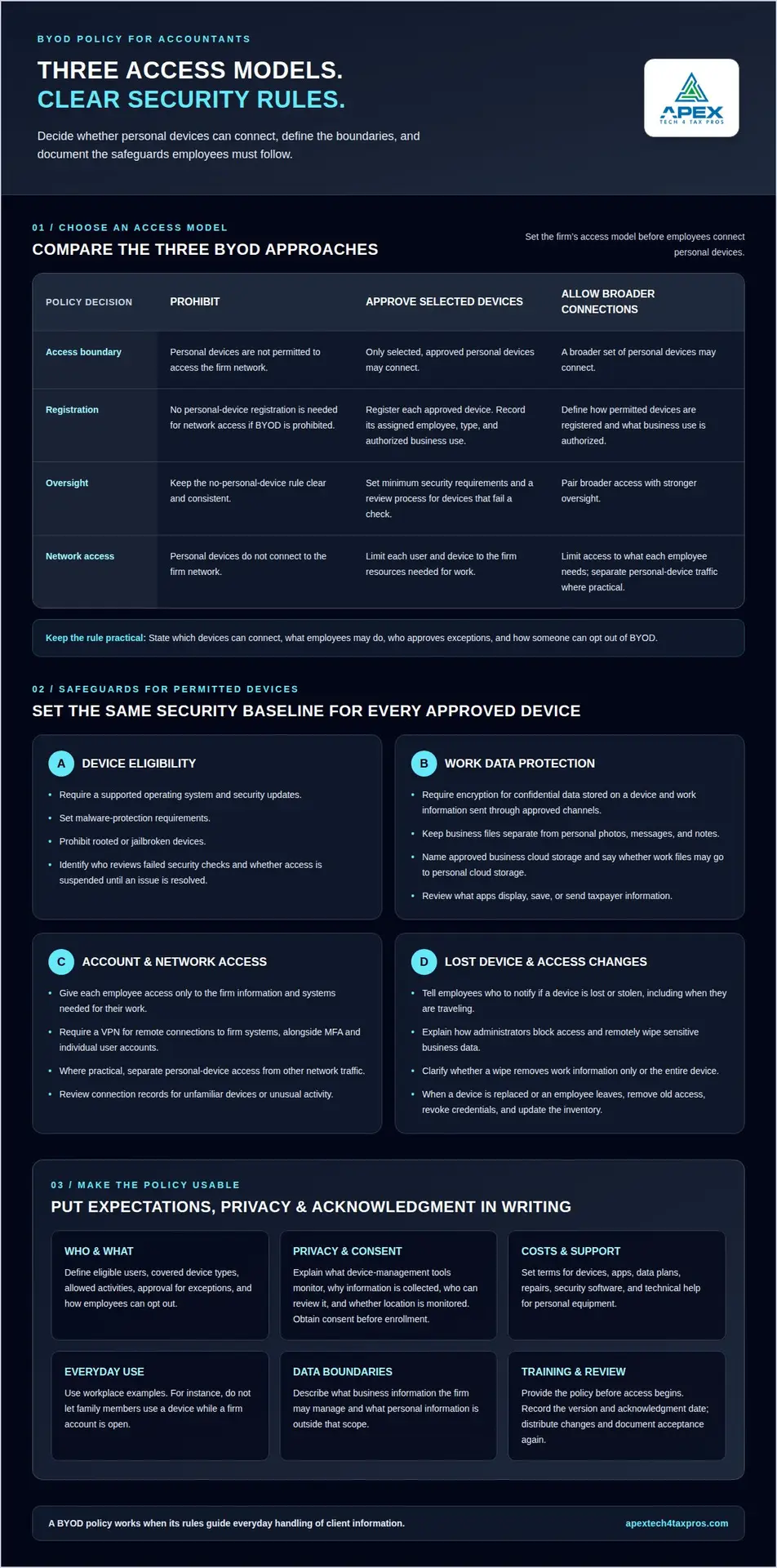
Choose the firm’s access model before employees connect personal devices to its network. The firm can prohibit personal-device access, approve selected devices, or allow broader connections with stronger oversight. Register each approved device and record its assigned employee, type, and authorized business use. This inventory shows which devices can reach firm systems and helps administrators remove access when circumstances change.
Set minimum security requirements before approving a device. It should use a supported operating system, receive security updates, and meet the firm’s malware-protection requirements. Prohibit rooted or jailbroken devices because they can bypass built-in safeguards. Define who reviews devices that fail a security check and whether access is suspended until the problem is resolved. Clear criteria make approvals consistent rather than dependent on informal judgment.
Limit network access to what each employee needs. A phone used for work email, for example, may not need access to tax software or shared storage. Where practical, separate personal-device access from other network traffic, and review connection records for unfamiliar devices or unusual activity. Require a VPN for remote connections to firm systems, alongside MFA and individual user accounts. Each control addresses a different aspect of access security.
Explain employee privacy and monitoring rules just as clearly. Describe what the firm’s device-management tools monitor, why the information is collected, and who can review it. Obtain employee consent before enrollment and disclose any location monitoring. If a device is lost or stolen, administrators can block access and remotely wipe sensitive business data. State whether a wipe affects work information only or the entire device.
Specify how registration changes when an employee replaces a phone, leaves the firm, or opts out of BYOD. Remove the old device from approved access, revoke its credentials, and update the inventory. Tell employees how to report a lost device and where to direct enrollment questions. A documented process gives employees and administrators clear steps to follow when access changes.
3. What should a BYOD policy cover?
Define who may use a personal device for work, which activities are allowed, and who approves exceptions. An employee might use a personal phone for calendar access but need separate approval to handle client documents. State whether the rules apply to phones, tablets, and computers, and explain how employees can opt out through a clear process.
Who pays for devices, apps, data plans, and support? Set out the firm’s cost-sharing terms. BYOD may reduce technology expenses, but security software and support can still cost the firm. Clarify which apps the firm provides, whether employees cover device repairs, and what technical help is available for personal equipment. Specific terms prevent mismatched expectations about a damaged phone or a new work app.
Describe the response process for a lost or stolen device, including who receives the report and coordinates follow-up. Employees should know how to report a loss outside normal work routines, such as while traveling. Explain how the firm records the incident, identifies affected business records, and decides whether further response steps are needed.
Use workplace examples to define acceptable use. Employees should not let family members use a device while a firm account is open or use work access for unrelated activities. Explain how personal use during work affects support and permitted access. Require employees to follow reasonable security procedures for work data while respecting boundaries around personal files.
Provide the written policy before access begins and collect each employee’s acknowledgment. Record the policy version and acknowledgment date so there is a clear record of the applicable terms. When rules change, distribute the updated version and document acceptance again. This gives employees and managers a shared reference when questions arise.
4. BYOD policy implementation and staff training
Roll out the policy through a defined process, not an email attachment alone. Start by listing the personal devices that connect to the firm network and the information employees access. Assign an owner for approvals, access control, exceptions, and incident reports. IT and HR can coordinate technical settings and employee communications so the rules fit both operational needs and workplace procedures.
Place the formal policy in the employee handbook or maintain it as a standalone document. Before enrollment, explain the purpose of each requirement, how to get help, and what happens when a device no longer meets the standard. For example, show employees how to report an operating-system update problem before access to corporate software is affected. A clear route for questions makes the process easier to follow.
Train staff with realistic accounting-work examples. Ask employees to identify a suspicious tax-document email, report an unexpected login prompt, and describe what they would do if a mobile device went missing. Practice makes reporting expectations concrete. Training should also explain which files employees may open on personal devices and why some client records require more restricted access.
Review the policy when the firm changes software, access rules, or its device-approval process. Tell employees what changed and when the updated procedures take effect. Use staff questions and incident reports to spot instructions that are hard to follow, then address those gaps in training. Keep records of policy versions, employee acknowledgments, and completed training so managers can confirm who received the current guidance.
Build staff readiness with cybersecurity awareness training for tax professionals that reinforces threat recognition, safe browsing, and device security habits.
Apex Tech 4 Tax Pros
Apex Tech 4 Tax Pros helps tax and accounting firms turn BYOD security expectations into practical, documented safeguards. If your policy needs clearer roles, device rules, or incident procedures, a customized Written Information Security Plan can capture how your firm protects sensitive information and manages security risks.
Risk Assessments can reveal gaps between written rules and current practices, while Cybersecurity Awareness Training helps staff recognize threats and follow secure procedures. Secure Cloud Backup can support the protection and recovery of business data. These services can complement a BYOD policy when your firm is formalizing its approach or updating procedures as work practices change.
For help aligning your written plan, risk review, training, and data protection practices, contact Apex Tech 4 Tax Pros.
Make BYOD a deliberate business decision
Treat the policy as a decision about work boundaries, not just a device rule. A firm might allow routine scheduling on personal phones while keeping taxpayer documents in a controlled work environment. This distinction helps owners weigh convenience against the sensitivity of each task and assign access deliberately as services and workflows evolve.
Before expanding BYOD access, decide who owns the policy and how employees should raise exceptions. A named owner gives staff a clear contact when a new app, work pattern, or device raises a question the written rules do not address. It also supports consistent decisions across seasonal and ongoing operations, even as responsibilities shift.
A well-shaped bring your own device (BYOD) policy for accountants should fit the way your firm works while keeping responsibility for taxpayer information clear. If you’d like help translating your firm’s decisions into a practical security plan, contact Apex Tech 4 Tax Pros. A thoughtful next step can make secure work practices easier to sustain.
Frequently Asked Questions
What should a BYOD policy cover?
Define who approves exceptions and how employees request them. A seasonal preparer who needs temporary access from a new tablet, for example, should follow the same documented approval process as permanent staff. Specify who reviews requests, records decisions, and removes temporary access afterward. This keeps decisions consistent when work needs change instead of leaving access to informal messages.
Which applications are acceptable?
Approve applications selected for specific work tasks, such as tax software or an approved client portal. Before approval, consider whether an app supports the firm’s login and data-protection controls and whether it stores client information outside firm-managed systems. An app used only for scheduling may need different access from one that opens tax records. List approved apps in policy materials and tell employees when that list changes.
Which devices are acceptable?
Set acceptance criteria based on whether a device supports the firm’s required security settings and approved software. An older phone that cannot receive operating-system security updates, for example, should not access firm systems. Define supported device types and operating systems, and make access conditional on meeting those standards. Apply the same criteria to temporary staff and employees working away from the office.
How can companies protect sensitive data on personal devices in a BYOD environment?
Reduce exposure by limiting the client information a personal device can access or retain. Let a preparer open only the records needed for an assigned task, for example, rather than giving broad access to client files. Avoid unnecessary local copies and keep work records available through firm-controlled storage. This limits the information at risk when personal use and work activity overlap.
What are the main BYOD security risks?
Common risks include accidental disclosure through lock-screen notifications, screenshots, shared family devices, or unapproved apps. Outdated software or exposed credentials can also make a device a route into firm systems. A notification showing a client’s name, for example, may reveal private information in a public place. Clear work boundaries and limited access help reduce avoidable exposure.
What does the law say?
For U.S. tax professionals, the FTC Safeguards Rule and IRS Publication 4557 are key parts of the information-security framework. A firm’s BYOD rules should support its broader written security plan, not replace it. The plan should address how taxpayer information is protected across the firm’s systems and work practices. Specific obligations depend on the rules that apply to the firm and its activities.