
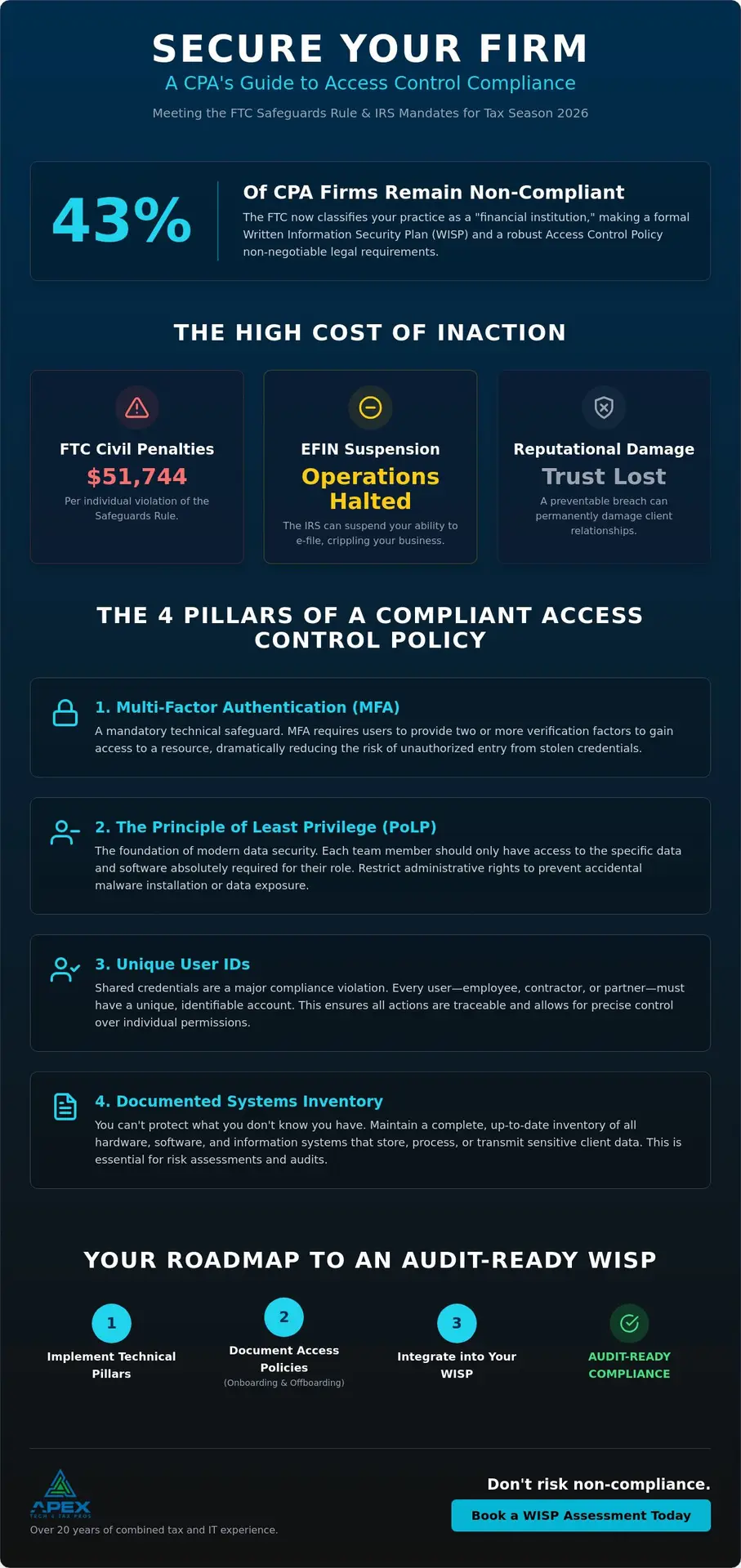
According to June 2026 data from Transform 42 Inc, 43% of CPA firms remain non-compliant with the FTC Safeguards Rule. To satisfy the IRS WISP mandate, your access control policy for cpa firm must include multi-factor authentication (MFA), the principle of least privilege, unique user IDs, and a documented inventory of all information systems. Implementing these safeguards doesn’t have to be a burden; it is a practical way to protect your clients while ensuring your firm meets federal standards. Compliance brings relief, not fear. We understand that managing remote staff access while deciphering technical jargon feels overwhelming, but these requirements are simply about putting the right safety nets in place.
We’ve spent over 20 years helping tax pros bridge the gap between tax preparation and IT infrastructure. This guide provides a structured path to updating your Written Information Security Plan (WISP) with mandatory access elements. We’ll explore the technical pillars of identity management, physical office safeguards, and the best way to document these workflows. By the end, you’ll have a clear roadmap to making your firm “audit-ready” and secure for the 2026 tax season.
Key Takeaways
- Understand why the FTC Safeguards Rule classifies your practice as a financial institution and how this changes your legal documentation requirements.
- Discover how to implement the Principle of Least Privilege to create an effective access control policy for cpa firm workflows that protects sensitive tax data.
- Learn the mandatory multi-factor authentication (MFA) standards you must apply across all financial systems to stay compliant with 2026 mandates.
- Establish professional onboarding and offboarding procedures that ensure data access is granted and revoked immediately as your team changes.
- Identify the specific steps needed to integrate your access controls into your Written Information Security Plan (WISP) for an audit-ready office.
The Regulatory Mandate: Why Access Control is Vital for CPA Firms
Regulators have shifted their focus from general data privacy to specific, enforceable technical standards. For years, many tax professionals relied on a “clean desk policy” or verbal agreements to keep client data safe. In 2026, these informal methods are no longer sufficient for federal audits. The Federal Trade Commission (FTC) now classifies all CPA firms, regardless of their size, as “financial institutions” under the Gramm-Leach-Bliley Act. This classification means your firm must meet the same rigorous data protection standards as a local bank or a national credit union.
There is a critical legal distinction between simply having “authorized access” and being in “regulatory compliance.” Authorized access means your team can get into the files they need to do their jobs. Regulatory compliance, however, requires a documented Access control system that proves exactly who has access, why they have it, and how that access is monitored. Without a formal access control policy for cpa firm operations, you can’t prove to an auditor that you’ve restricted sensitive data to only those who absolutely need it.
IRS Publication 4557 and Your Practice
IRS Publication 4557, “Safeguarding Taxpayer Data,” serves as the definitive roadmap for tax professionals. It outlines the “Security Six” essential safeguards, where controlling access is a primary pillar. This publication emphasizes that preventing the unauthorized disclosure of Personally Identifiable Information (PII) isn’t just a best practice; it’s a requirement for maintaining your PTIN and e-file provider status. Access control is a mandatory technical safeguard under federal law designed to restrict system resources to only those users with a legitimate business need. By documenting these permissions, you protect your clients from identity theft and your firm from administrative scrutiny.
The Consequences of Policy Gaps
The stakes for non-compliance have never been higher. If an audit reveals that your access control policy for cpa firm management is missing or inadequate, the fallout can be swift. We’ve seen the following consequences impact firms in our network:
- FTC Civil Penalties: As of June 2026, the FTC can impose civil penalties of up to $51,744 per violation for failing to comply with the Safeguards Rule.
- E-file Provider Suspension: The IRS has the authority to suspend your Electronic Filing Identification Number (EFIN), effectively shutting down your ability to operate during tax season.
- Reputational Damage: A data breach is painful, but a “preventable” breach caused by a lack of basic access controls can permanently break the trust you’ve spent decades building with your clients.
Compliance doesn’t have to be a source of constant anxiety. When you understand the “why” behind these mandates, it becomes much easier to implement the “how.” Transitioning from a state of potential vulnerability to secure compliance is simply about putting the right guardrails in place.
Technical Pillars of a Modern Access Control Policy
Building an effective access control policy for cpa firm environments requires a shift from “trust by default” to “verify by design.” This transition shouldn’t feel like a hurdle; instead, think of it as a series of automated safety nets that catch human errors before they become data breaches. By implementing specific technical controls, you ensure that your firm meets the rigorous standards set by the FTC Safeguards Rule without needing to micromanage your staff every hour.
Enforcing the Principle of Least Privilege
The Principle of Least Privilege (PoLP) is the foundation of modern data security. It means that every member of your team, from the seasonal intern to the senior partner, should only have access to the specific data and software required for their current tasks. For example, a data entry clerk doesn’t need administrative rights to install software or access the firm’s full historical client database. By restricting administrative privileges, you significantly reduce the risk of accidental malware installations. Regularly auditing these permissions ensures that “access creep” doesn’t occur as staff members change roles or take on new responsibilities. If you aren’t sure where your current vulnerabilities lie, a professional Risk Assessment can provide the clarity you need to tighten these controls effectively.
Authentication and Identity Management
Identity management is your first line of defense against external threats. Modern standards have moved beyond simple passwords to robust, long passphrases that are harder for automated tools to crack. However, even the strongest passphrase needs a second layer. Multi-factor authentication (MFA) is now a non-negotiable requirement for all financial systems. Industry research from Microsoft has shown that MFA can thwart over 99% of bulk phishing attacks by requiring a second form of verification. For firms using cloud-based tax software, centralized identity management allows you to manage all user credentials from a single dashboard, making it easier to monitor logins and revoke access instantly when someone leaves the firm.
Technical safeguards must also extend to the physical workstation. Automated session timeouts and screen locks are essential; they ensure that if a preparer steps away from their desk, the sensitive data remains protected from prying eyes. Additionally, your policy must mandate encryption for data at rest on your servers and data in transit during client communications. These layers work together to create a secure environment where your team can focus on tax preparation rather than worrying about digital intruders.
Administrative and Physical Access Safeguards
Technical locks and encryption are essential, but they can’t protect your practice if the administrative “doors” are left ajar. A truly robust access control policy for cpa firm environments must account for both the human element and the physical space where your team operates. This involves moving beyond digital passwords to include structured protocols for how people enter and exit your firm’s ecosystem, both physically and professionally. When these administrative safeguards are documented in your WISP, they transform from casual office habits into enforceable security standards.
The Critical Offboarding Checklist
Managing seasonal staff and remote contractors is a standard part of the tax profession, yet it often creates significant security gaps during the offboarding process. Your policy should mandate the immediate revocation of all digital credentials the moment a team member leaves. We recommend a structured checklist that includes:
- Disabling access to tax preparation software and cloud storage.
- Collecting firm-owned hardware, including laptops, tablets, and encrypted mobile devices.
- Updating shared internal access codes or physical keycard permissions.
- Changing passwords for any administrative accounts the individual may have accessed.
Promptly closing these loops ensures that former employees or contractors cannot inadvertently or intentionally access sensitive client data after their tenure ends. It is a simple step that provides immense relief during a federal audit.
Securing the Physical Tax Office
Physical security is often overlooked in the digital age, but the FTC Safeguards Rule is clear about protecting physical assets. Your server rooms and cabinets containing paper tax records must remain locked and accessible only to authorized personnel. We also need to address the danger of “shadow IT.” This occurs when staff members use unmanaged USB devices or personal external hard drives to move files. Your access control policy for cpa firm safety should strictly prohibit the use of unauthorized storage devices to prevent data from leaving your secure environment.
Maintaining a professional “clean-desk” protocol is another vital layer of protection. This means ensuring that no client files, social security numbers, or PII are left visible on desks when staff members are away or when visitors are in the office. To make these policies stick, regular Cybersecurity Awareness Training is essential. It helps your team understand the “why” behind the rules, turning them into active participants in your firm’s defense rather than seeing compliance as just another chore. By combining these physical habits with your technical controls, you create a comprehensive shield for your practice.
Integrating Access Control into Your WISP
A Written Information Security Plan (WISP) serves as the definitive blueprint for your firm’s data protection strategy. It isn’t merely a document you file away; it’s a living framework that dictates how your office functions. At the heart of this framework lies your access control policy for cpa firm operations. You can’t effectively protect client data if you haven’t documented exactly who can touch it and under what conditions. This documentation is a primary requirement under the FTC Safeguards Rule, which mandates that you maintain an accurate “Inventory of Information Systems.” This inventory ensures you know every device, software, and cloud platform where client data lives, allowing you to apply the technical pillars we discussed earlier.
If you’re starting from scratch, don’t feel like you have to reinvent the wheel. We offer a FREE WISP Download Template to help you establish a solid foundation. This resource allows you to begin customizing your plan with the specific job roles and software unique to your practice, turning a complex federal mandate into a manageable to-do list. Having this starting point provides immediate relief from the burden of starting with a blank page.
Mapping Controls to Regulatory Requirements
Your WISP must explicitly align with the nine key requirements of the FTC Safeguards Rule. Specifically, the “User Access Management” section of your plan should detail the technical and administrative controls you’ve implemented. This includes documenting how you grant permissions, how MFA is enforced, and the specific schedule for reviewing these access rights. We suggest a quarterly review schedule to account for seasonal staff changes. A WISP is a living document, not a one-time filing. It requires regular updates to reflect changes in your staff, your technology, and the evolving regulatory landscape.
Continuous Monitoring and Reporting
The FTC requires every firm to designate a “Qualified Individual” to oversee and enforce the security program. This person is responsible for ensuring that the access control policy for cpa firm safety remains effective and that staff members are following the established protocols. For many of the independent tax preparers we work with, the firm owner takes on this role. This individual must oversee the annual reporting requirements and ensure that Risk Assessment findings are documented and addressed. Our Dallas-based team has spent over 20 years helping pros navigate these requirements, ensuring that your documentation is exactly what an auditor will look for to verify that your firm is “audit-ready.”
Professional Support for Tax Practice Compliance
Managing the intersection of federal law and IT infrastructure is a lot to ask of any busy professional. While we’ve discussed the technical and administrative pillars, integrating them into a cohesive access control policy for cpa firm operations requires precision. A customized approach ensures that your security plan reflects how you actually work, rather than just being a document that sits on a shelf. We’re here to help you trade that compliance anxiety for professional confidence and a clear path forward.
How do I move from vulnerability to secure compliance?
We offer structured solutions that take the guesswork out of the FTC Safeguards Rule. Our Seasonal subscription ($649.99) and Yearly subscription ($1,099.99) are designed specifically for tax offices and both include a free customized WISP. These plans integrate the technical safeguards we’ve covered, such as MFA and encryption, into a seamless workflow that protects your clients. Protect your firm with a Customized WISP from Apex Tech 4 Tax Pros and ensure your documentation meets every federal standard for the 2026 season.
Why choose a specialized partner for my regulatory adherence?
With over 20 years of experience in both tax and IT, we understand the unique pressures you face during filing season. We also work closely with our sister company, APEX Tax Solutions, to provide a holistic view of your practice’s health and security. Our specialized Risk Assessments identify the hidden vulnerabilities in your access control policy for cpa firm security that generic checklists often miss. We bridge the gap between tax preparation and secure infrastructure so you can focus on your clients. Schedule your Risk Assessment today and let us help you secure your practice for the 2026 season and beyond.
Securing Your Firm’s Legacy for the 2026 Tax Season
Protecting your practice from federal penalties and data breaches is a continuous journey rather than a one-time task. By establishing a formalized access control policy for cpa firm operations, you’ve taken the most critical step toward meeting the latest FTC Safeguards Rule mandates. Remember that effective security relies on the combination of technical pillars like MFA and administrative habits like structured employee offboarding. These layers of defense don’t just satisfy regulators; they provide the peace of mind you need to focus on serving your clients during the busiest months of the year.
We’re here to help you navigate these complex requirements with our deep IRS Publication 4557 expertise and specialized risk assessments for accounting firms. Our team provides the dedicated support tax professionals need to bridge the gap between tax preparation and modern IT security. You don’t have to carry the weight of compliance alone. Secure Your Firm’s Compliance with a Customized WISP today and step into the 2026 tax season with total confidence in your data security. Your hard work deserves the protection of a professional security framework.
Frequently Asked Questions
Does a sole proprietor CPA need a formal access control policy?
Yes, all tax professionals are considered financial institutions under the FTC Safeguards Rule, regardless of their firm’s size. While solo practitioners handling data for fewer than 5,000 consumers are exempt from certain requirements, like the written risk assessment, they must still implement fundamental safeguards. This includes having a documented plan for how you control access to taxpayer data to protect against unauthorized disclosure.
Is Multi-Factor Authentication (MFA) legally required for CPA firms?
Yes, MFA is a mandatory technical requirement under the FTC Safeguards Rule for any system containing nonpublic personal client information. This is a vital component of a compliant access control policy for cpa firm workflows. Implementation is no longer optional; it’s a federal standard designed to thwart bulk phishing attacks that target tax professional credentials.
How often should a CPA firm review its employee access rights?
You should review employee access rights at least quarterly, or immediately following any staff turnover. The FTC mandates regular monitoring and testing of your safeguards to ensure they remain effective. A quarterly schedule is particularly helpful for tax offices that hire seasonal preparers, as it ensures credentials are revoked the moment the filing deadline passes.
What is the “Principle of Least Privilege” in an accounting context?
The Principle of Least Privilege means ensuring that each team member only has access to the specific client files and software tools they need to perform their job. For example, an administrative assistant shouldn’t have the same administrative rights as a senior partner. This minimizes the risk of accidental data deletion or unauthorized software installations that could compromise your network.
Can I use a generic WISP template for my access control policy?
A generic template is an excellent starting point, but it won’t satisfy an auditor unless it’s customized to your specific firm. Your policy must reflect your actual inventory of information systems and your unique job roles. A “canned” document that doesn’t match your daily office operations is often viewed as non-compliant during a federal review.
What happens if the IRS audits my firm and I don’t have an access control policy?
Failure to provide a documented policy can lead to the suspension of your Electronic Filing Identification Number (EFIN) and significant civil penalties. As of June 2026, the FTC can impose fines of up to $51,744 per violation for non-compliance with the Safeguards Rule. Beyond the financial cost, you risk losing the trust of your clients if a breach occurs.
Are physical locks and cameras enough to satisfy the Safeguards Rule?
No, physical security is just one layer of the required protections. The Safeguards Rule requires a comprehensive approach that includes technical controls like encryption and MFA, as well as administrative controls like staff training. Relying solely on physical locks leaves your digital data vulnerable to remote attacks, which are the primary threat to tax practices today.
Who should be responsible for managing access controls in a small firm?
The firm must designate a “Qualified Individual” to oversee the security program, a role that typically falls to the firm owner or a senior partner in small practices. This individual is responsible for ensuring the access control policy for cpa firm security is consistently applied. They also handle the annual reporting requirements and ensure that any identified vulnerabilities are addressed promptly.