
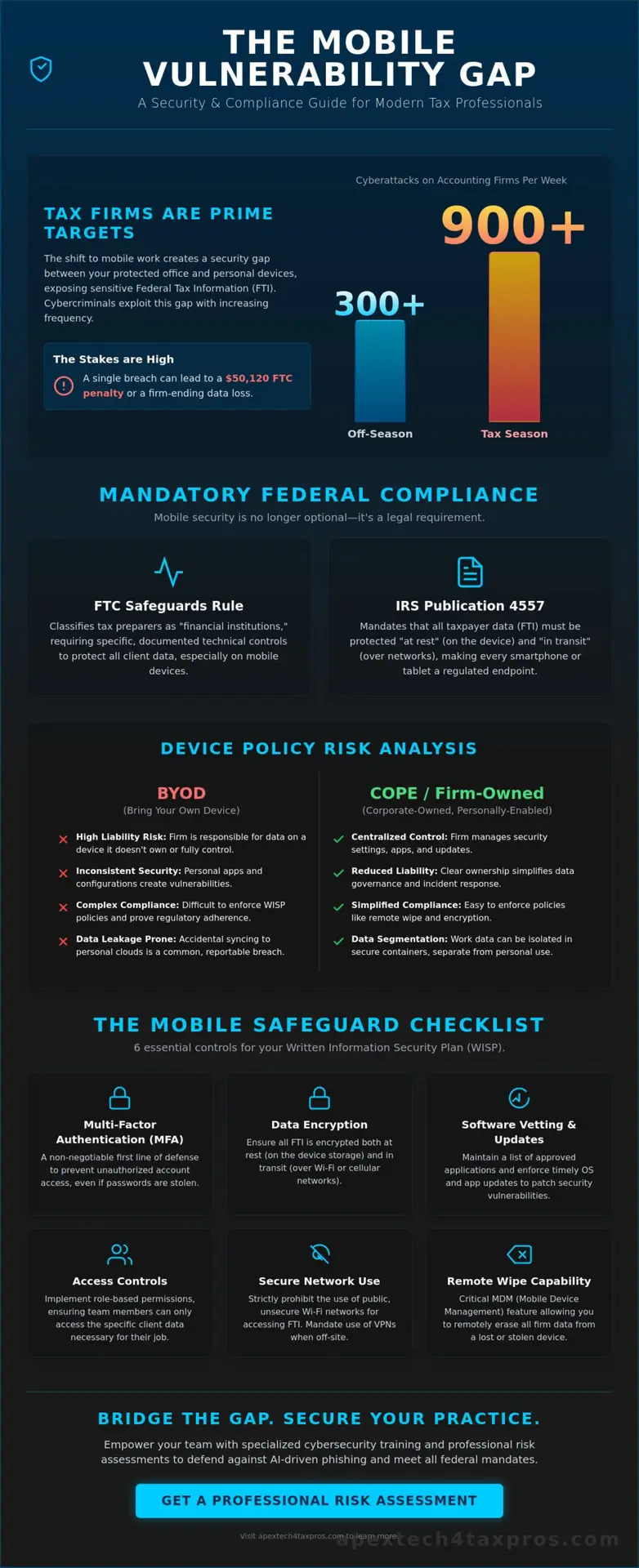
Accounting firms now face an average of 300 cyberattacks every week, a figure that can surge to over 900 during the height of tax season. You likely feel the weight of this reality every time you manage mobile device security for tax pros on your personal phone or sync a document to a tablet. It’s natural to worry that a single lost device or a sophisticated AI-powered phishing link could lead to a firm-ending breach or a $50,120 penalty for non-compliance with the FTC Safeguards Rule.
You deserve the confidence that your mobility doesn’t compromise your professional integrity. This guide will help you master the technical safeguards and regulatory requirements needed to protect client data while ensuring your practice remains fully compliant with IRS Publication 4557. We’ll bridge the gap between complex federal mandates and practical firm management by exploring the nuances of MDM technology, identity-first security models, and the essential updates required for your Written Information Security Plan (WISP).
Key Takeaways
- Identify the specific “Mobile Vulnerability Gap” in your practice to ensure Federal Tax Information (FTI) remains protected even when accessed outside the office.
- Discover how to integrate mobile device security for tax pros into your mandatory Written Information Security Plan (WISP) to meet 2026 regulatory standards.
- Compare the liability risks of “Bring Your Own Device” (BYOD) models against more secure alternatives like “Corporate-Owned, Personally Enabled” (COPE) systems.
- Master the six essential technical controls, including MFA and software vetting, required to satisfy the FTC Safeguards Rule and IRS mandates.
- Learn how specialized cybersecurity training can empower your team to recognize and deflect AI-driven phishing attempts targeting mobile platforms.
The Mobile Vulnerability Gap: Why Tax Pros Are Primary Targets
The “Mobile Vulnerability Gap” represents the precarious space between your firm’s hardened office network and the fluid environment of remote device access. While your desktop workstations likely sit behind enterprise grade firewalls, your smartphone often operates in a security vacuum. This gap is where professional standards can slip, creating a bridge for bad actors to access Federal Tax Information (FTI). Because FTI contains a comprehensive map of a taxpayer’s identity, it remains the ultimate prize for cybercriminals.
Modern tax preparation has shifted toward mobile first applications, allowing you to review returns or message clients from anywhere. However, these apps carry inherent risks. They often reside on personal devices that lack the rigorous administrative controls found on office hardware. In this context, Mobile security is best defined as the technical and administrative control of data on non traditional endpoints. Without this control, your firm remains exposed to both technical exploits and human error. You aren’t just managing a phone; you’re managing a portal into your firm’s most sensitive assets.
The Rise of Smishing and Mobile Phishing in Finance
Cybercriminals have pivoted from traditional email to “smishing” (SMS phishing) because text messages boast significantly higher open rates. In early 2026, financial services became the target for almost 50% of all observed phishing attacks. These hackers capitalize on the psychological urgency of tax season. When a notification pops up on your phone claiming a “critical IRS account lock,” the instinct to react quickly often overrides your professional caution. Modern attacks are now designed to intercept mobile authentication codes in real time, bypassing even standard multi factor authentication if the user is sufficiently distracted.
Data Leakage vs. Data Theft: Understanding the Difference
It’s vital to distinguish between data leakage and data theft, as both trigger mandatory IRS breach reporting requirements. Data leakage is often accidental. It occurs when client files sync to a personal cloud service, an unencrypted backup, or even a shared family photo stream. Data theft, conversely, involves malicious intent through malware or the physical loss of a device. Whether the exposure is a result of a misplaced phone or a background app “leaking” contact info, the regulatory consequences are the same. Implementing robust mobile device security for tax pros ensures that neither scenario leads to a compromise of your firm’s integrity or a violation of the FTC Safeguards Rule.
Regulatory Mandates: IRS Publication 4557 and the FTC Safeguards Rule
In the current regulatory environment, federal agencies no longer view mobile security as an optional IT preference. The FTC Safeguards Rule explicitly classifies tax preparers as “financial institutions,” which subjects your firm to rigorous data protection standards. As of 2026, these rules require more than just a verbal policy against using personal phones for work. You must implement specific technical controls to protect client data. Failure to meet these standards isn’t just a security risk; it’s a legal liability that can result in penalties as high as $50,120 per violation.
To remain compliant, your firm must align its mobile usage with the standards set forth in IRS Publication 4557. This document mandates that taxpayer data be protected both at rest and in transit. When a staff member accesses a tax return via a tablet or smartphone, that device becomes a regulated endpoint. You’re required to take “reasonable steps” to secure these devices, which now includes active administrative safeguards like remote wipe capabilities and encrypted containers. If you haven’t reviewed your current protocols, a professional risk assessment can identify where your mobile device security for tax pros might be falling short of these federal expectations.
The Mandatory WISP and Mobile Integration
Every tax professional is required to maintain a Written Information Security Plan (WISP). However, many firms make the mistake of leaving mobile devices out of this critical document. Your WISP must include a dedicated section that outlines how mobile endpoints are managed, who is authorized to use them, and a complete inventory of every device that touches client data. You’re also required to conduct periodic risk assessments to ensure that new mobile threats, like AI-driven smishing, are addressed in your security posture. Documentation is your primary defense during an IRS audit.
Encryption Standards for FTI on Mobile Devices
Encryption is the cornerstone of protecting Federal Tax Information (FTI). The IRS and FTC look for FIPS 140-2 encryption standards, which is the federal benchmark for cryptographic modules. You must ensure that full-disk encryption (FDE) is active on all hardware used by your staff. A significant and common vulnerability lies in unencrypted mobile backups. When a phone automatically syncs to a personal iCloud or Google Drive account, it often moves sensitive client data into an unmanaged, unencrypted cloud environment. This creates a “shadow IT” problem that violates data integrity standards and requires immediate technical intervention to prevent accidental leaks.
BYOD vs. Firm-Owned Devices: A Risk-Benefit Analysis
Choosing between personal phones and firm-issued hardware isn’t just about budget. It’s about control. For many small firms, Bring Your Own Device (BYOD) seems like an easy way to reduce overhead. However, this model often complicates your compliance posture. When you allow staff to access FTI on their personal hardware, you essentially extend your firm’s regulatory perimeter into their private lives. This makes maintaining consistent mobile device security for tax pros a significant administrative hurdle.
A viable alternative is the Corporate-Owned, Personally Enabled (COPE) model. Under COPE, the firm provides the device. This allows you to pre-configure security settings and ensure that the hardware meets the standards of the FTC Safeguards Rule before it ever touches client data. Firm-owned devices offer maximum compliance control, while BYOD requires robust software-level partitioning.
The Legal Complexity of BYOD in Tax Practices
Privacy concerns create a significant friction point in BYOD environments. If a staff member leaves the firm, you must have the ability to remove business data without deleting their personal photos or messages. Managing the “Shadow IT” risk is equally challenging. You can’t easily control which personal apps have access to the device’s clipboard or cloud sync features. If a staff member uses a third party app that automatically backs up their gallery, and they happen to take a photo of a client’s W-2, that sensitive data is now sitting on an unmanaged server. Drafting a clear “Right to Audit” clause is essential for any firm choosing the BYOD path. You must have the documented authority to inspect and, if necessary, remotely wipe business data from a personal device.
Total Cost of Ownership (TCO) for Secure Mobile Fleets
When you evaluate the Total Cost of Ownership, don’t just look at the price of a new smartphone. Consider the cost of a breach. The average cost of a data breach for a small business reached $164,000 in 2025. This far outweighs the investment in secure hardware or Mobile Device Management (MDM) software licenses. Software licenses for MDM solutions provide the oversight needed to enforce encryption and track device health. Additionally, firm-owned equipment purchases often qualify for tax incentives under Section 179. This allows you to deduct the full purchase price in the year you buy the equipment. This makes the COPE model more financially accessible than it might first appear for a growing practice.
The Mobile Safeguard Checklist: 6 Essential Controls for Your WISP
Transforming your mobile policy from a passive document into an active defense requires specific technical controls. Your Written Information Security Plan (WISP) is the foundation of your compliance, but it must be supported by the “ground truth” of how your devices actually operate. To satisfy the 2026 requirements of the FTC Safeguards Rule, you need a repeatable framework for mobile device security for tax pros. This checklist serves as your roadmap for hardening every tablet and smartphone that touches your firm’s data.
- Mandatory Multi-Factor Authentication (MFA): You must enforce MFA for every application that accesses tax software or client files. Biometric locks like FaceID are excellent, but they should be paired with a secondary authenticator app rather than SMS codes, which are vulnerable to interception.
- Software Vetting Process: Don’t allow staff to download unverified apps on devices used for work. Establish a “whitelisted” library of approved tax preparation and communication tools.
- Remote Wipe Capabilities: This is your ultimate kill switch. If a device is lost or a staff member leaves the firm, you must be able to instantly erase all professional data from a central dashboard.
- Automatic OS Updates: Zero-day vulnerabilities are a primary entry point for hackers. Enforcing automatic operating system updates ensures that security patches are applied the moment they’re released.
- Disabling Insecure Features: Turn off “auto-join” for unsecured Wi-Fi networks and keep Bluetooth discovery disabled when it’s not in use. These small steps significantly reduce your device’s attack surface.
- Centralized Oversight: You need a single pane of glass to verify that these controls are active on every device in your fleet.
If your current plan doesn’t explicitly address these mobile endpoints, you’re likely out of compliance with IRS standards. You can start closing these gaps today by using our FREE WISP Download Template to build a more resilient security posture.
Implementing Mobile Device Management (MDM)
Mobile Device Management (MDM) is the gold standard for firms seeking to automate their compliance. MDM software allows you to push security policies to every staff device simultaneously. Features like geofencing can restrict app access based on location, while app whitelisting prevents the installation of high-risk software. Most importantly, MDM simplifies the annual IRS risk assessment process. Instead of manually checking every phone, you can generate a compliance report that proves encryption is active and MFA is enforced across your entire firm.
Secure Connection Protocols: VPNs and Private Cellular
Public Wi-Fi is a significant liability. Using “Free Wi-Fi” at a coffee shop or airport is often a direct violation of the Safeguards Rule because these networks lack the encryption needed to protect FTI in transit. You should require staff to use an “always-on” VPN that creates a secure tunnel for all data traffic. Even better, encourage the use of private 5G or 6G cellular connections. These modern cellular protocols offer built-in encryption and security features that far exceed the protections found in public hotspots. It’s a simple technical shift that provides massive reassurance for both you and your clients.
Bridging the Gap: Professional Mobile Security for Tax Firms
At Apex Tech 4 Tax Pros, our mission is to provide the protective reassurance you need to focus on your clients. We specialize in bridging the gap between tax preparation and IT security by integrating mobile device security for tax pros directly into your firm’s operational DNA. It’s not enough to simply have a policy; you need a structured approach that aligns your technical safeguards with federal regulatory standards. By treating security as a core mission, we help you transition from a state of potential vulnerability to secure compliance.
Ongoing risk assessments are a critical component of this process. IRS standards and FTC requirements aren’t static. They evolve as new threats like AI-powered smishing emerge. Our dual-expert guardian approach ensures that your firm stays ahead of these changes. We don’t just provide a one-time setup. We offer a supportive partnership that adapts to your firm’s specific needs and the shifting regulatory landscape. This vigilance is what keeps your data safe during the high-pressure environment of tax season.
Customized WISP Development for Mobile Workforces
A generic security plan won’t protect you during an IRS or FTC audit. Your Written Information Security Plan (WISP) must be tailored to your firm’s unique device count and remote workflow. We develop documentation that explicitly details how your mobile workforce and mobile device security for tax pros interact with sensitive client data. This includes linking your mobile security protocols to a robust secure cloud backup strategy. When your mobile devices are properly managed, your client data remains protected even if hardware is damaged or lost. This level of meticulous planning ensures your firm is ready for any regulatory scrutiny.
Cybersecurity Awareness Training: The Human Firewall
Technology is only half the battle. Your staff members are your “Human Firewall,” and they must be equipped to recognize sophisticated smishing and mobile-specific social engineering. We provide specialized training that teaches your team how to handle mobile notifications under the pressure of tax season. Establishing a clear protocol for reporting lost or stolen devices immediately is just as important as the encryption itself. When your team feels confident and informed, they become an active part of your firm’s defense. Secure your firm’s mobile future with a professional WISP assessment to ensure your practice is protected from every angle.
Positioning your security posture as a client-facing value proposition can distinguish your firm from the competition. In an environment where the majority of businesses allow personal devices for work, showing your clients that you have a disciplined, family-owned approach to their data integrity builds deep trust. You aren’t just a tax preparer; you’re a guardian of their financial identity. This commitment to security provides the ultimate peace of mind for both you and those you serve.
Securing Your Firm’s Future in a Mobile World
The shift toward a mobile first tax practice offers undeniable efficiency, but it also expands your firm’s regulatory perimeter. Achieving robust mobile device security for tax pros requires a deliberate combination of technical controls like MDM and the administrative rigor of a comprehensive Written Information Security Plan. You don’t have to manage these complex federal requirements alone.
Apex Tech 4 Tax Pros brings over 20 years of niche expertise to your practice, bridging the gap between sophisticated IT security and the specific demands of tax preparation. Our family owned boutique approach combines personal accountability with a national reach, ensuring your firm meets every standard of the FTC Safeguards Rule and IRS Publication 4557. We’re dedicated to transforming your mobile endpoints from potential liabilities into secure, compliant assets.
Take the first step toward total data integrity today. Download our FREE WISP Template and start securing your mobile endpoints today. With the right safeguards in place, you can lead your firm with confidence and provide your clients with the unwavering protection they deserve.
Frequently Asked Questions
Does the IRS require me to have a mobile device policy?
Yes, the IRS requires a documented mobile device policy as part of your mandatory Written Information Security Plan (WISP). Publication 4557 mandates that you protect taxpayer data on all endpoints, including smartphones and tablets. If you allow mobile access to client files, your WISP must detail the technical and administrative controls used to safeguard that data. Failing to document these processes leaves your firm vulnerable during a federal audit.
Can I use my personal phone for work if I have a WISP?
You can use a personal phone for work, but it must strictly adhere to the safeguards outlined in your WISP. This typically requires software level partitioning to separate personal apps from professional tax data. Without these controls, a personal device becomes a significant liability that could compromise your firm’s compliance with federal regulatory standards. Implementing a clear Bring Your Own Device (BYOD) policy ensures that personal convenience doesn’t lead to a data breach.
What should I do immediately if a staff member loses their phone?
You should immediately trigger a remote wipe of the device to remove all professional data and client information. After the kill switch is activated, you must document the incident in your security logs and change all passwords associated with the apps on that device. If the device contained unencrypted data for 500 or more consumers, the FTC Safeguards Rule requires notification within 30 days. Taking these steps protects your practice from a firm ending breach.
Is biometrics (FaceID/Fingerprint) enough to meet MFA requirements?
Biometrics alone are generally insufficient to meet the multi factor authentication (MFA) requirements of the FTC Safeguards Rule. While FaceID is a secure way to unlock a device, true MFA requires two different types of factors. This means pairing biometrics with something you have, like a code from an authenticator app. Relying solely on a fingerprint doesn’t provide the layered defense necessary for mobile device security for tax pros.
Does the FTC Safeguards Rule apply to small firms with only one or two employees?
Yes, the FTC Safeguards Rule applies to all tax preparers, regardless of the number of employees in the firm. Federal law classifies tax professionals as financial institutions, which means even solo practitioners must maintain a WISP and implement technical safeguards. There is no small business exemption when it comes to protecting sensitive Federal Tax Information (FTI). Small firms are often targeted precisely because hackers assume their mobile security is less rigorous.
How do I prove mobile compliance during an IRS audit?
You prove compliance by presenting your Written Information Security Plan and the associated logs that show your policies are being enforced. Auditors will look for evidence of active encryption, MFA logs, and signed cybersecurity awareness training certificates for all staff. MDM reports are particularly effective because they provide a centralized audit trail of every mobile device’s security status. Keeping these records updated ensures that you can face an IRS audit with total confidence.
What is the difference between MDM and MAM for my tax practice?
Mobile Device Management (MDM) controls the entire hardware unit, allowing you to enforce device wide settings like passcodes and remote wipes. Mobile Application Management (MAM) focuses specifically on securing the individual apps used for tax preparation without controlling the rest of the phone. For most practices, MDM is the preferred standard because it offers more comprehensive oversight of mobile device security for tax pros.
Do I need a separate VPN for my phone if I have one for my laptop?
Yes, your mobile device needs its own dedicated VPN connection to secure data in transit. A VPN on your laptop does not protect the traffic coming from your phone or tablet, even if they’re on the same Wi-Fi network. Ensuring every endpoint has an always on VPN is a critical step in meeting the encryption standards required by IRS Publication 4557. This simple technical shift provides a secure tunnel for all client communications.