
A breach can announce itself through ordinary-looking system changes. Effective incident response for tax pros starts with recognizing warning signs, such as unexpectedly slow software, computer activity you didn’t initiate, or being locked out of a network or computer, all signs identified by the IRS. For covered incidents affecting 500 or more individuals, the Federal Trade Commission requires a report within 30 days.
It’s natural to focus first on stopping the immediate disruption. A clear, practiced plan helps your team contain the incident, restore operations, and communicate carefully with affected clients.
This guide covers what to do when you suspect a breach, how to document and review your response, and how to notify clients while meeting applicable reporting obligations. It also explains how to test and update your plan so roles, contacts, and procedures remain aligned with your tax practice.
Key Takeaways
- Build a response sequence that assigns roles, preserves useful records, and limits further access to affected systems.
- After containing an incident, document what happened and use the review to improve recovery procedures and safeguards.
- Prepare client notices and identity-protection guidance as part of your response, accounting for the state rules that apply.
- Practice the plan before tax season and revise it when your software, staff, workflows, or client-intake processes change.
Questions About Incident Response?
A written information security and incident response plan should assign roles and document containment, investigation, reporting, client communication, and recovery steps. Keep it specific to your systems, taxpayer data, and reporting contacts.
-
Recognize Possible Breach Signs
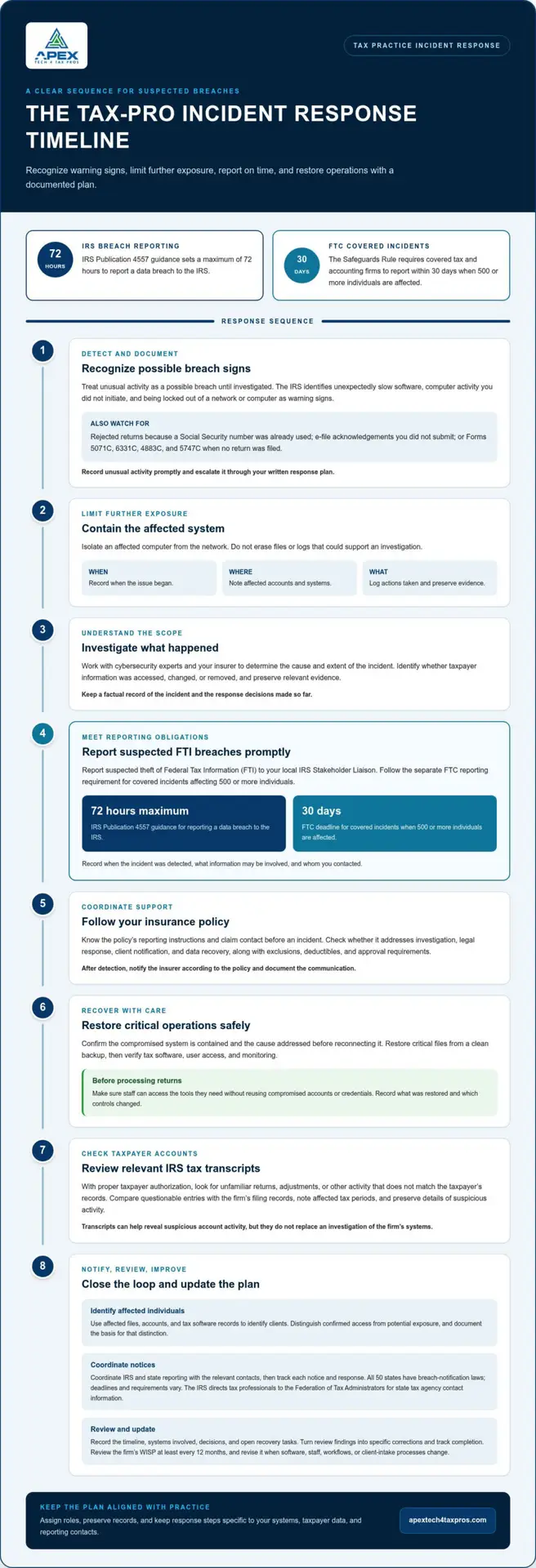
Document unusual activity promptly, and treat it as a possible breach until investigated. The IRS identifies unexpectedly slow software, computer activity without user input, and being locked out of a network or computer as warning signs. Check for rejected returns because a Social Security number was already used, or e-file acknowledgements you didn’t submit. Forms 5071C, 6331C, 4883C, and 5747C can also signal possible theft when no return was filed. Without written steps, staff may miss clues or delay escalation.
-
Contain the Breach and Investigate Its Scope
Isolate an affected computer from the network to limit further data exposure, but don’t erase files or logs that could support an investigation. Record when the issue began, which accounts or systems were involved, and what actions were taken. Work with cybersecurity experts and your insurer to determine the cause and extent of the incident. Identify whether taxpayer information was accessed, changed, or removed, and preserve relevant evidence. A written response plan helps staff follow assigned roles and avoid conflicting changes during recovery.
-
Report Possible FTI Breaches
Report suspected theft of Federal Tax Information (FTI) promptly to your local IRS Stakeholder Liaison. IRS Publication 4557 guidance sets a 72-hour maximum for reporting a data breach to the IRS. The Federal Trade Commission says the Safeguards Rule requires tax and accounting firms to report covered incidents within 30 days when 500 or more individuals are affected. This is the 30-day reporting deadline for covered incidents affecting 500 or more individuals. Record when you detected the incident, what information may be involved, and whom you contacted. Prompt reporting can help the IRS take steps against fraudulent returns.
-
Review Breach Response Coverage
Read your insurance policy before an incident and note its reporting instructions. Check whether coverage addresses investigation, legal response, client notification, and data recovery, as well as exclusions, deductibles, and approval requirements. Keep the insurer’s claim contact with your incident-response contacts. After detection, notify the insurer according to the policy and document the communication. Without clear insurance steps in the written plan, staff may be unsure whom to call or which response expenses require advance approval.
Recovery and post-incident review
Restore operations in a controlled sequence, then use the incident to strengthen safeguards and compliance. A documented review turns what happened into practical updates to your response plan.
- Restore critical operations carefully. Confirm the compromised system is contained and the cause addressed before reconnecting it. Restore critical files from a clean backup, then verify that tax software, user access, and monitoring work as expected. Record what was restored and which controls changed. Before processing returns, make sure staff can access the tools they need without reusing compromised accounts or credentials.
- Review relevant IRS tax transcripts. With proper taxpayer authorization, examine available account transcripts for unfamiliar returns, adjustments, or other activity that doesn’t match the taxpayer’s records. Compare questionable entries with the firm’s filing records and note the affected tax periods. If activity appears unauthorized, preserve the details and follow the appropriate reporting and identity-theft steps. Transcripts can help reveal suspicious account activity, but they don’t replace an investigation of the firm’s systems.
- Hold a post-incident review. Record the timeline, systems involved, decisions made, and recovery tasks still open. Ask where detection or response slowed down, whether assigned roles were clear, and which safeguards failed or worked. Turn each finding into a specific correction, such as revising an access procedure or clarifying who contacts a response partner. Track completion so the review strengthens controls rather than just creating a written record.
- Review and update the WISP. Review your firm’s WISP at least every 12 months, and revise it when operations change, such as adding software, staff, workflows, or client-intake processes. A post-incident review is a useful time to check whether written procedures match actual practice. A customized Written Information Security Plan can help document responsibilities and safeguards; keep the response plan aligned with those procedures.
Client notification and identity theft protection
Use documented findings to identify affected clients and coordinate required notifications. State requirements differ, so track each obligation separately.
-
Identify Impacted Individuals
Build a list using affected files, accounts, and tax software records. Match exposed taxpayer information to client names, contact details, and relevant tax periods. Record what information was involved, when exposure may have occurred, and the evidence supporting each conclusion. Distinguish confirmed access from potential exposure, and document the basis for that distinction. This record helps guide notification and identity-theft defenses without overstating the investigation’s findings.
-
Notify the IRS, States, and Clients
Coordinate IRS and state reporting with the relevant contacts, then track each notice and response. The IRS directs tax professionals to the Federation of Tax Administrators for state tax agency contact information. All 50 states have breach-notification laws; deadlines and requirements vary. Most states require client notice within 30 to 60 days, while some allow up to 90 days. Keep a state-by-state record of the applicable rule, deadline, delivery method, and responsible person.
- Prepare clear client notification. Explain what happened, the types of financial or tax information involved, and the steps clients can take. Use verified details, avoid speculation, and provide a contact for questions. Keep copies of approved messages and delivery records. A concise, accurate notice helps clients understand the incident and act on practical guidance, while supporting a consistent information security response.
- Offer identity-protection steps. The IRS advises tax professionals to consider Form 14039, Identity Theft Affidavit, for potentially affected clients when applicable, and to suggest an Identity Protection PIN. Explain that an IP PIN helps protect a taxpayer’s federal return from identity theft. Include these actions in the client communication where relevant, and document what guidance was provided. Tailor each message to the information exposed and the client’s circumstances.
Incident response plan testing and updates
Test the written plan before tax season, then use each exercise to improve a specific procedure. A plan is useful only if staff can apply it to the systems and workflows your practice actually uses.
- Run an annual tabletop exercise. Before each tax season, schedule a discussion-based scenario in December or January. For example, ask staff how they would respond if remote access showed unfamiliar activity during e-filing. Have each person identify their first action, escalation contact, and documentation task. Treat confusion or delays as gaps to fix, not individual failures.
- Test the response sequence, not just the document. Walk through how your accounting practice would detect an affected account, protect taxpayer records, and keep critical work moving. Include staff who handle client intake, tax software, and system administration. Use a controlled exercise that avoids exposing real taxpayer information. Schedule penetration testing before and during tax season to assess critical systems and endpoints.
- Update the plan when operations change. Review it whenever the practice adds software, staff, workflows, or client-intake processes. A new remote-work arrangement, for example, can change access responsibilities and how suspicious activity is reported. Compare written procedures with current systems, assigned roles, and contact details. Make each revision specific, dated, and clear enough for employees and contractors to follow.
- Close gaps and train affected staff. Resolve identified deficiencies in incident response policies and procedures immediately, then train employees and contractors on the changes. Ask staff to explain their assigned steps after training, such as who records an event or contacts the response lead. Keep the updated plan accessible to authorized personnel. A customized WISP document can help put current data security procedures into writing.
Apex Tech 4 Tax Pros: Customized Written Information Security Plan (WISP)
Apex Tech 4 Tax Pros helps tax and accounting professionals document security procedures with a Customized Written Information Security Plan (WISP). Turn to a tailored plan when your response steps, roles, or safeguards need to reflect how your practice actually operates. Risk Assessments can help identify gaps to address, while Cybersecurity Awareness Training helps staff understand their responsibilities. Secure Cloud Backup supports recovery planning by keeping backup needs part of your information security approach.
These offerings complement the work your team does to test, document, and update its response procedures. For help strengthening your practice’s written security planning, visit Apex Tech 4 Tax Pros.
Make Your Response Plan Part of Your Practice
A response plan works best when it informs everyday decisions. Set a recurring time to review responsibilities and make sure everyone assigned a key task knows their role. Treat incident response for tax pros as an ongoing practice, not a document that sits untouched between emergencies.
If your procedures need clearer structure, Apex Tech 4 Tax Pros offers a Customized Written Information Security Plan, Cybersecurity Awareness Training, and Risk Assessments. Choose the support that fits the gaps you’ve identified and make the next step manageable for your team.
Contact Apex Tech 4 Tax Pros or email info@at4tp.com to discuss support for your practice. A practical next step can help your team keep moving forward with confidence.
Frequently Asked Questions
How do you know your practice has been breached?
Look for corroborating evidence, not just an isolated alert. Compare account activity with staff access records and device logs; matching details can help distinguish unauthorized access from a software glitch.
What is an incident response plan for tax professionals?
It is the operational playbook for decisions during a security event. While a WISP describes the broader security program for incident response for tax pros, the response plan sets out who can make decisions, how to escalate issues, and when systems can safely return to normal use.
What cybersecurity incidents should tax preparers be prepared to handle?
Prepare for phishing, stolen credentials, ransomware, lost devices, unauthorized disclosure, and incidents involving vendors. A compromised email account, for example, may require reviewing mailbox rules and connected applications, not just changing the password.
What are the IRS requirements for tax professionals reporting a data breach?
Tax professionals should report data theft to their local IRS Stakeholder Liaison. Organize the report around the known timeline, affected systems, information types, and containment actions, and clearly distinguish confirmed findings from questions still under investigation.
How should a tax practice respond to a suspected client data breach, step by step?
Use decision checkpoints: appoint an incident lead, maintain a decision log, and preserve evidence before making changes. Before reconnecting affected systems, require a technical review of the cause, access controls, and system integrity.
Who must tax professionals notify after a data breach, and how quickly?
Potential recipients include the IRS, relevant state authorities, and affected clients. Build a notification matrix based on the information involved and the affected individuals’ states of residence; deadlines vary, so track each obligation separately.