
Your technology inventory isn’t just a list of serial numbers; it’s the “source of truth” that defines your entire firm’s security perimeter. Many tax professionals feel overwhelmed by the requirement to track every device, especially when 68% of data breaches in 2024 involved human elements like personal phones or tablets used for work. You likely worry that missing a single piece of hardware could jeopardize your PTIN renewal or lead to a $100,000 penalty under the FTC Safeguards Rule. We understand that during the high-pressure tax season, the last thing you want is more tedious documentation. It’s a heavy burden to carry alone while trying to protect your clients’ sensitive data.
The good news is that creating a technology inventory for wisp compliance tax firms doesn’t have to be a manual nightmare. This guide promises to help you build a comprehensive, IRS-compliant inventory that serves as the bedrock for your Written Information Security Plan. We’ll walk through a clear checklist of what to include, from cloud storage to home office laptops, ensuring your documentation is audit-ready for 2026. You’ll learn a streamlined process to maintain this list annually, bridging the gap between your daily operations and complex federal regulations with professional precision.
Key Takeaways
- Understand why a comprehensive asset list is a mandatory requirement under the FTC Safeguards Rule and how it serves as the foundation for your data integrity.
- Identify the specific categories of physical hardware and remote devices that must be documented to satisfy IRS Publication 4557 standards.
- Learn how to choose between manual tracking and automated tools when building a technology inventory for wisp compliance tax firms based on your specific office size.
- Master a systematic two-step approach to auditing your network, ensuring that no workstation or backup drive is left out of your security perimeter.
- Discover how to transform a raw list of hardware into a professional, audit-ready document that bridges the gap between IT security and regulatory compliance.
Why a Technology Inventory is the Backbone of IRS WISP Compliance
The IRS Publication 4557 outlines seven specific areas of security, yet none of these safeguards can function effectively without a comprehensive technology inventory for wisp compliance tax firms. This document serves as your firm’s definitive asset registry. It isn’t merely a list for insurance purposes; it’s the operational foundation of your Written Information Security Plan. Federal law, specifically the FTC Safeguards Rule (16 CFR Part 314), mandates that tax professionals identify and manage their assets to maintain data integrity. Failure to comply with these administrative safeguards can result in penalties reaching $100,000 per violation as of May 2026.
Building this inventory is a prerequisite for a legitimate risk assessment. You can’t evaluate threats to your practice if 15% or 20% of your hardware remains undocumented. This registry allows you to apply the core principles of information security management to every endpoint in your office. Beyond security, the inventory plays a critical role in your annual PTIN renewal. The IRS now ties PTIN renewal to the attestation that you have a WISP in place. Without an accurate asset list, that attestation lacks the necessary documentation to survive a professional audit.
The Connection Between Assets and Vulnerabilities
Unknown or “shadow” devices create unmanaged entry points that cybercriminals exploit with ease. In 2024, data showed that 68% of breaches involved a human element, often linked to personal devices used for work that weren’t properly inventoried. The IRS views an incomplete technology inventory as a fundamental failure of administrative safeguards. From our dual-expert perspective, we bridge the gap between technical IT management and tax compliance by ensuring every workstation and mobile device is accounted for within your security perimeter.
Regulatory Standards for 2026 Tax Practices
The updated IRS Publication 5708 provides clear guidance on how asset documentation should look for modern practices. This inventory supports the “Designated Qualified Individual” at your firm by providing the visibility needed to oversee the entire security program. In 2025, the average cost of a data breach in the financial sector reached $6.21 million, making these documentation steps more than just a compliance chore. A technology inventory is a living document that evolves alongside your firm’s hardware, software, and cloud-based assets rather than a static list filed away in a drawer.
Categorizing Your Firm Assets for the FTC Safeguards Rule
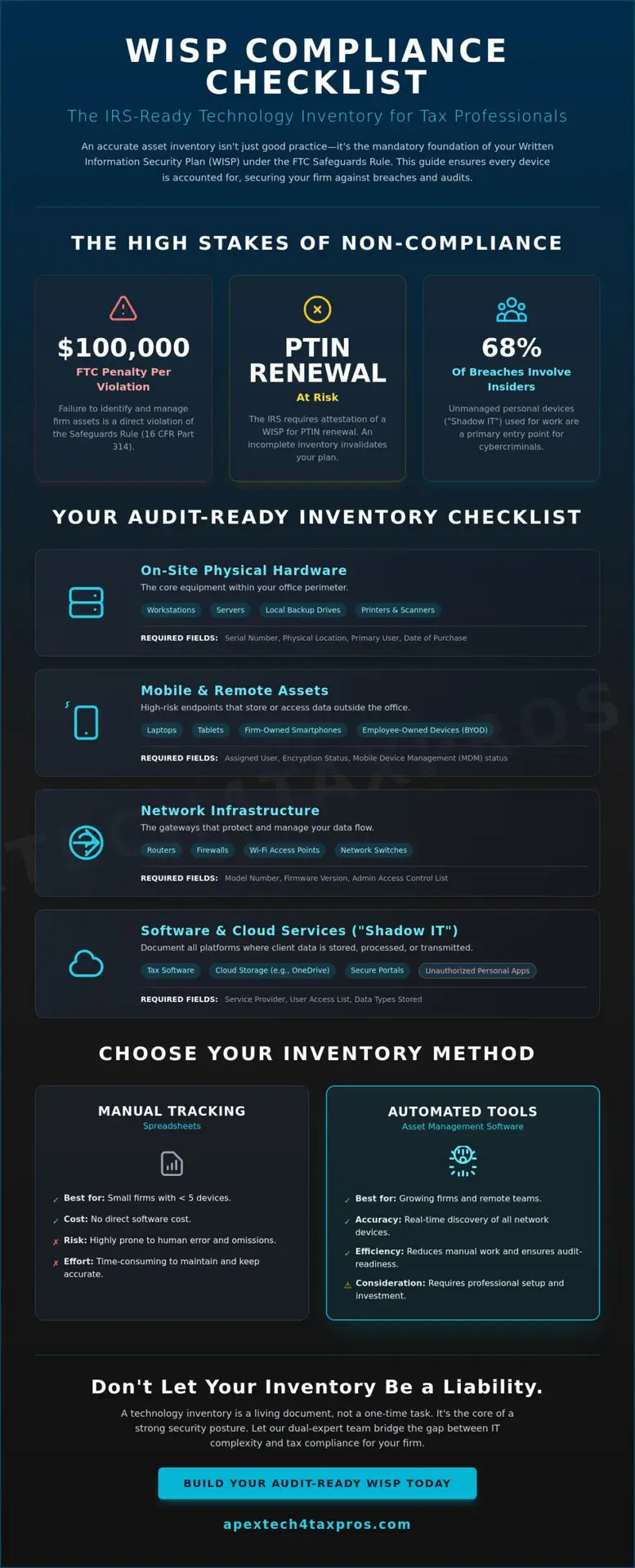
Categorizing assets is the first operational step toward building a robust technology inventory for wisp compliance tax firms. You cannot protect what you haven’t identified. Start with your core physical hardware. This includes on-site servers, individual workstations, and local backup drives. Every piece of equipment that touches taxpayer data must be logged with its serial number, physical location, and primary user. This level of detail ensures that your firm maintains high data integrity and meets the “identifying and managing assets” requirement of the FTC Safeguards Rule (16 CFR Part 314).
Mobile and remote assets require even stricter tracking because they frequently leave the safe perimeter of your office. Laptops, tablets, and firm-owned smartphones are high-risk endpoints. In 2025, 82% of financial institutions experienced a ransomware attack, often through compromised mobile devices. Your registry must also account for network infrastructure. Routers, firewalls, and Wi-Fi access points are the gates to your data. If these are not documented and regularly audited, they become invisible vulnerabilities that invite unauthorized access.
“Shadow IT” represents a growing threat to tax practices in 2026. This refers to unauthorized software or cloud storage used by staff without official approval. Whether it’s a personal Dropbox account or a non-vetted PDF editor, these tools bypass your security protocols. According to the IRS guidance on WISP, you must maintain control over where data resides. If you’re unsure where your data is flowing, a professional risk assessment can uncover hidden software gaps in your current asset list.
Personal Devices and the BYOD Dilemma
The line between personal and professional life has blurred in modern tax firms. If an employee checks firm email or accesses a client portal on their personal iPhone, that device is now part of your security scope. You must inventory these personal devices to remain compliant in a hybrid work environment. This documentation extends to virtual assets as well. VPNs and secure portals are just as vital as physical servers because they facilitate the flow of sensitive information across unsecured networks.
Peripheral and IoT Security
Don’t ignore the “silent” hardware in your office. Smart printers, scanners, and VoIP phones are often overlooked but contain internal storage and network connectivity. They’re frequently the least patched devices in a firm. Old computers sitting in a storage closet also pose a risk if they still hold unencrypted taxpayer data. Your digital inventory should categorize software versions and current patch levels. This ensures every component of your technology inventory for wisp compliance tax firms is not only present but also protected against modern exploits.
Spreadsheets vs. Asset Management Software: Choosing Your Path
Choosing the right tool to maintain your technology inventory for wisp compliance tax firms depends largely on the scale of your practice. For a solo practitioner managing only a workstation and a backup drive, a manual spreadsheet might seem like a pragmatic starting point. It offers a low-cost way to satisfy the FTC Safeguards Rule without the need for complex software integrations. However, this manual approach relies entirely on human discipline. As soon as you add a second employee or a new cloud service, the risk of data gaps increases. You don’t want to realize your list is incomplete during an active security incident.
Firms with five or more employees usually find that manual tracking becomes a liability rather than an asset. Automated asset discovery tools provide a significant advantage by scanning your network to identify every connected device in real time. These tools bridge the gap between your intended security perimeter and the actual state of your hardware. By removing the “human error” factor, dynamic tracking ensures that your records remain accurate even during the frantic pace of tax season. It’s a professional remedy for the common problem of “lost” devices that haven’t been logged.
A thorough cost-benefit analysis often reveals that the time spent manually updating a spreadsheet is more expensive than a software subscription. If an Information Security Coordinator spends four billable hours each quarter auditing serial numbers and software versions, the hidden cost of manual tracking adds up quickly. Accuracy is the primary currency of compliance; a single missed device can invalidate your entire risk assessment. Investing in automated tools isn’t just about saving time; it’s about the clinical precision required to protect taxpayer data.
When the Spreadsheet Fails
The greatest danger of a manual list is “stale data.” During a 2026 IRS compliance audit, an outdated inventory suggests a lack of administrative oversight and can lead to failed documentation reviews. Manual lists struggle to track rapid changes like software patch levels or license expirations. True compliance is a continuous state of vigilance, not a static annual event recorded on a dusty file. If your records aren’t updated in real time, you’re effectively flying blind.
Integrating Inventory with Risk Assessments
Modern management tools do more than just list hardware; they automatically flag “end-of-life” systems that no longer receive security updates. This data feeds directly into your WISP documentation, making your annual reviews far more efficient and reliable. By tailoring your tracking method to the specific complexity of your practice, you ensure that your technology inventory for wisp compliance tax firms remains a reliable safeguard. This methodical approach transitions your firm from a state of potential vulnerability to a state of secure, audit-ready compliance.
Step-by-Step: Building an Audit-Ready Technology Inventory
Creating a technology inventory for wisp compliance tax firms requires a methodical approach that goes beyond a simple list of serial numbers. Many practitioners fail audits because they treat this as a “checkbox” item rather than a disciplined security protocol. To bridge the gap between basic record-keeping and IRS-compliant documentation, you must follow a structured path that leaves no device unexamined. This process ensures that your practice remains audit-ready throughout the high-pressure tax season.
The following five steps form the core of a professional asset audit:
- Step 1: Designate your Information Security Coordinator. This individual takes personal accountability for the inventory’s accuracy and serves as the “Qualified Individual” required by the FTC Safeguards Rule to lead the audit.
- Step 2: Conduct a physical walkthrough and a network scan. A walkthrough identifies “forgotten” hardware like old laptops in storage, while a network scan reveals active IoT devices like smart printers that might otherwise remain invisible.
- Step 3: Document essential data points for every hardware asset. Ensuring your registry is granular enough for a federal review is the only way to satisfy the “identifying and managing assets” mandate.
- Step 4: Map your data flow. You must visualize exactly where taxpayer information resides at any given moment, from your client portal to your local workstation and final cloud backup.
- Step 5: Establish a “Secure Disposal” log. This ensures decommissioned tech doesn’t become a future liability and provides a paper trail for auditors.
Essential Data Points for Your Registry
An audit-ready registry must be detailed. For each hardware asset, you must record the Asset ID, Serial Number, Primary User, Encryption Status, and Physical or Cloud Location. It’s also vital to track the “Date of Last Security Review” for every device to prove ongoing vigilance to regulators. For your software applications, you must document the “Owner” of each SaaS subscription to ensure licensing and access controls are managed properly. If you find this level of detail overwhelming, you can get a customized WISP that includes these specific data fields.
The Disposal Log: Closing the Loop
IRS requirements for secure data destruction are non-negotiable. Whether you choose digital wiping or physical shredding, you must maintain a “Chain of Custody” for every hard drive that leaves your firm. In May 2025, a breach affecting 406,000 taxpayers highlighted the risks of improper data handling during hardware transitions. Your disposal log should record the date of destruction, the method used, and the signature of the person responsible. Maintaining a technology inventory for wisp compliance tax firms is the only way to ensure your security lifecycle is complete, protecting your clients’ data from the moment a device is purchased until the day it’s destroyed.
Integrating Your Inventory into a Customized WISP with Apex Tech 4 Tax Pros
Integrating a technology inventory for wisp compliance tax firms into a functional security plan is the final step in securing your practice. A list of hardware on its own is a dormant document; it only becomes an active safeguard when it’s woven into the fabric of a customized Written Information Security Plan. Apex Tech 4 Tax Pros specializes in bridging the gap between raw technical data and the rigorous standards of federal regulations. We move your firm beyond generic, one-size-fits-all templates that frequently overlook the unique hardware configurations of a modern tax office. By conducting a tailored, professional risk assessment, we ensure your asset registry serves as a reliable foundation for your entire security posture.
Surviving a federal audit under the FTC Safeguards Rule requires proof of consistent implementation rather than just a one-time effort. Our team ensures that your technology inventory remains a living component of your practice through continuous monitoring and annual reviews. This proactive approach prevents the accumulation of outdated records that can lead to compliance failures during PTIN renewal. We provide the clinical precision needed to track every workstation, cloud portal, and mobile device, ensuring that your documentation is always audit-ready. This methodical oversight transitions your firm from a state of potential vulnerability to one of disciplined, documented security.
The Protective Reassurance of Professional Oversight
Tax professionals trust us to handle the technical heavy lifting because we understand the high-stakes environment of tax preparation. Our mission-driven approach is rooted in our family-owned history, which allows us to balance technical expertise with a genuine empathy for your regulatory burdens. We act as a dual-expert guardian, protecting your practice from both cyber threats and the administrative risks of non-compliance. You don’t have to navigate the complexities of IRS Publication 5708 alone. Starting with a professional WISP evaluation allows you to identify hidden gaps in your technology inventory for wisp compliance tax firms before they become liabilities.
Next Steps for Your Firm
Taking the next step toward secure compliance is a straightforward process that yields immediate peace of mind. You can begin by downloading our free resources to assess your current documentation or schedule a consultation for a more comprehensive, tailored review of your systems. Achieving an audit-ready status is more than a legal requirement; it’s a commitment to the data integrity your clients expect. When your security plan is professionally managed, you can focus on your core mission of tax preparation without the looming fear of federal penalties. Secure your firm’s future with a customized WISP from Apex Tech 4 Tax Pros and ensure your practice is protected by over 20 years of specialized expertise.
Securing Your Practice for the 2026 Tax Season and Beyond
Your journey toward full regulatory compliance starts with a commitment to visibility. We’ve explored how a meticulous asset registry serves as the bedrock of your Written Information Security Plan. By categorizing every device and establishing a secure disposal log, you eliminate the “shadow IT” vulnerabilities that lead to costly data breaches. Maintaining a technology inventory for wisp compliance tax firms isn’t just a hurdle for PTIN renewal; it’s a vital safeguard for your firm’s reputation and your clients’ trust. Accuracy is the primary currency of compliance, and your documentation must reflect the current state of your network to survive a federal audit.
At Apex Tech 4 Tax Pros, we bring over 20 years of experience in high-compliance IT to bridge the gap between complex federal requirements and your daily operations. Our specialized focus on the tax and accounting industry means we understand the specific pressures you face during peak filing months. Whether you need to refine your current list or build a new security perimeter from scratch, we’re here to act as your dual-expert guardian. You don’t have to carry the burden of the FTC Safeguards Rule alone. Download your FREE WISP template or schedule a professional assessment today. We’re ready to help you move from a state of potential vulnerability to total audit-ready confidence.
Frequently Asked Questions
Does the IRS require a specific format for a technology inventory?
No, the IRS does not mandate a specific file format like CSV or PDF for your records. However, IRS Publication 5708 clarifies that the inventory must be comprehensive and accessible for federal review. Your technology inventory for wisp compliance tax firms should include specific data fields such as asset type, serial number, and encryption status to meet 2026 standards. A clear, structured list is far more effective than a disorganized collection of hardware receipts.
Do I need to include employee personal cell phones in my WISP inventory?
Yes, you must include any personal device that accesses firm email, client portals, or taxpayer data. The FTC Safeguards Rule (16 CFR Part 314) requires firms to identify all endpoints that interact with sensitive information. If an employee uses a personal phone for two-factor authentication or checking work messages, that device becomes a part of your security perimeter. Documenting these devices ensures you’ve accounted for all potential entry points in your risk assessment.
How often should a tax firm update its technology inventory?
You should update your inventory at least annually or whenever you add new hardware or software to your practice. The IRS considers the WISP a living document, meaning it must accurately reflect your firm’s current environment. In a 2025 survey, 82% of financial institutions that suffered breaches had outdated asset logs. Regular reviews ensure your safeguards remain effective and your PTIN renewal attestation remains truthful and accurate.
What happens if I fail to maintain an accurate inventory during an IRS audit?
Failure to maintain an accurate inventory can result in a failed compliance audit and fines up to $100,000 per violation. Inadequate documentation is often viewed as a failure of administrative safeguards under the FTC Safeguards Rule. This negligence could lead to the suspension of your e-filing privileges or a rejection of your PTIN renewal. Beyond legal penalties, an incomplete inventory leaves your firm vulnerable to untracked security threats.
Should cloud-based software like Drake or QuickBooks Online be in my inventory?
Yes, your inventory must include all software-as-a-service (SaaS) applications that store or process taxpayer data. Documenting the owner and access levels for these platforms is a specific requirement of IRS Publication 4557. Since 68% of data breaches in 2024 involved human elements, knowing exactly who has access to your cloud-based tools is a critical security safeguard. This ensures your data integrity remains intact across all third-party platforms.
What is the best way to track serial numbers for remote employees?
The most reliable method is using automated asset management software that performs a remote network scan to identify connected hardware. For smaller firms with fewer than 5 employees, a manual audit during a video call can work if you record the serial numbers and physical locations. This ensures your technology inventory for wisp compliance tax firms accounts for every laptop and tablet used outside the main office. Consistency is key to maintaining an audit-ready registry.
Is a physical hardware inventory enough for FTC Safeguards Rule compliance?
No, a physical list of hardware is only one component of full regulatory compliance. You must also document virtual assets, such as VPNs, secure portals, and cloud storage locations where data is processed. The FTC Safeguards Rule mandates a written risk assessment that covers all areas where taxpayer data resides. This includes software, network infrastructure, and any third-party service providers that handle information on your behalf.
Can I use a free WISP template to create my technology inventory?
You can use a free template as a starting point, but it usually requires significant customization to be truly audit-ready. Most generic templates lack the specific data fields needed for a professional asset registry tailored to the tax industry. While we offer a free WISP download template, we recommend a professional evaluation to ensure your inventory addresses the unique hardware and software used in your practice. A tailored plan provides better protection than a generic checkbox list.