
What if one extra sign-in step could make a stolen password less useful? MFA for tax professionals adds an identity check to accounts such as business email and tax software, helping protect access to taxpayer information. It’s a practical safeguard, though not a complete security plan.
It’s understandable to worry that new sign-in steps could slow staff during filing season. A thoughtful rollout can prioritize sensitive accounts, prepare employees, and explain recovery procedures before the rush.
This guide covers which accounts to protect first, what MFA can and can’t do, and how to include it in a broader security approach alongside your Written Information Security Plan (WISP). Make account security part of your seasonal preparation by partnering with Apex Tech 4 Tax Pros. Take the next step with a Book a WISP IT System Assessment.
Key Takeaways
- Use mfa for tax professionals to add an identity check beyond passwords on accounts that can access taxpayer information.
- Prioritize business email, tax software, remote access, and administrator accounts based on the data and permissions they expose.
- Keep MFA in perspective: it’s a security control, while the WISP documents your plan and the Safeguards Rule sets regulatory requirements.
- Roll out MFA before the seasonal rush by inventorying accounts, enabling and testing sign-in, and explaining recovery steps to staff.
Why does MFA matter for tax professionals protecting client accounts?
MFA for tax professionals adds an identity check beyond a password, making it harder for someone with only a stolen or guessed password to sign in. MFA is a sign-in method that verifies identity using at least two different types of evidence, rather than relying on a password alone. It helps protect access to accounts, but it doesn’t encrypt files or prevent every type of attack.
What does multi-factor authentication verify?
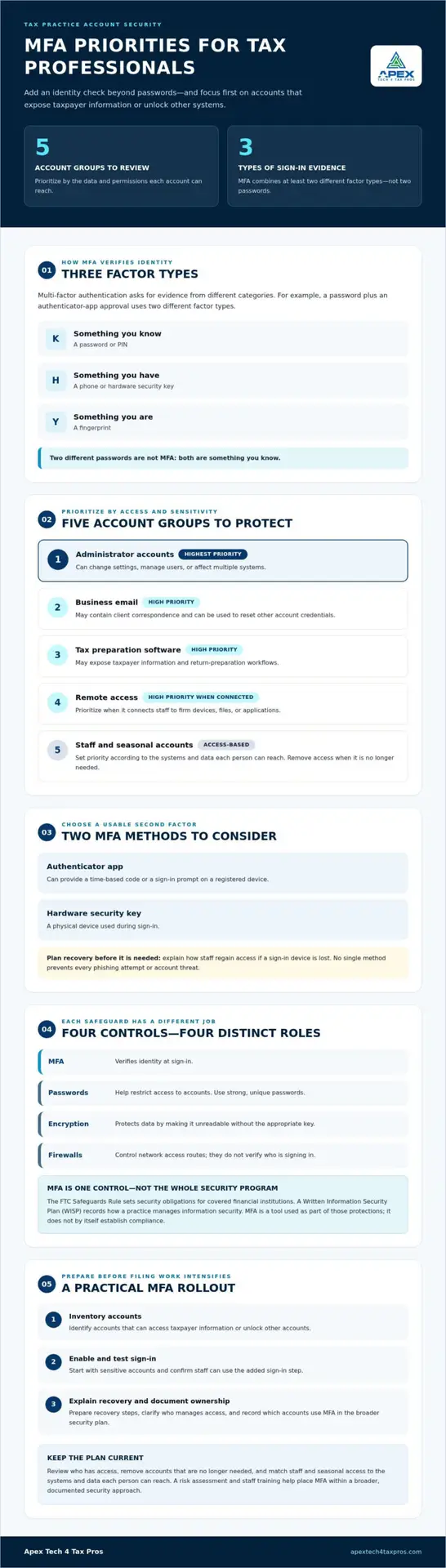
Authentication factors fall into three categories: something you know, such as a password or PIN; something you have, such as a phone or security token; and something you are, such as a fingerprint. For example, an employee enters a password and then approves a sign-in request in an authenticator app. Those steps use different factor types. Entering two different passwords doesn’t count as MFA because both are something you know. The Multi-factor authentication overview explains these factor categories and the general purpose of combining them.
Why are tax-practice accounts consequential?
Business email often supports client communication and account recovery, while tax software gives authorized users access to sensitive taxpayer workflows. If an account is misused, someone could impersonate staff or view information they shouldn’t access. MFA adds a practical check at sign-in, especially for accounts that can reach client data. Protecting access is one part of a broader approach: use strong, unique passwords, limit account permissions to work needs, and encrypt sensitive data. A firewall controls network access routes; it doesn’t verify who is signing in.
- Enable MFA on business email and tax software accounts.
- Use a separate factor, not a second password.
- Review who has access and remove accounts that are no longer needed.
Which accounts should tax professionals protect with MFA first?
Start with accounts that expose taxpayer information or can unlock other accounts. This gives a small firm a practical rollout order instead of treating every login as equally urgent. Apply the same approach to owners, full-time staff, and seasonal workers whenever they access firm systems.
How can a small firm prioritize accounts?
Use sensitivity and access level to set priorities. The list below can help you map the first phase of your MFA rollout:
- Administrator accounts: Highest priority. These accounts can change settings, manage users, or affect multiple systems.
- Business email: High priority. Email may contain client correspondence and can be used to reset other account credentials.
- Tax preparation software: High priority. Access may expose taxpayer information and return-preparation workflows.
- Remote access: High priority when it connects staff to firm devices, files, or applications.
- Staff and seasonal accounts: Prioritize according to the systems and data each person can reach; remove access when it’s no longer needed.
The IRS provides guidance on MFA for tax professionals. Record which accounts require MFA and how access is managed as part of your broader security planning. A written information security plan can help document the safeguards your practice uses.
What MFA methods can a practice consider?
An authenticator app can provide a time-based code or prompt on a registered device. A hardware security key is a physical device used during sign-in. Both are examples of a second factor, but no single method prevents every phishing attempt or account threat. Choose a method staff can use consistently, and explain recovery steps before someone loses access to their device.
For a practice-specific view of account priorities, review how Apex Tech 4 Tax Pros supports tax-practice security planning.
Does MFA alone make a tax practice secure or compliant?
No. MFA is one security control, not a complete security program and not proof by itself that a practice meets every applicable requirement. The FTC Safeguards Rule sets security obligations for covered financial institutions, while a Written Information Security Plan (WISP) records how a practice manages information security. MFA is a tool used as part of those protections. The IRS also provides tax professionals with guidance on safeguarding taxpayer data. Confirm how requirements apply to your firm; this information is educational, not legal advice.
MFA helps verify who is signing in, but it doesn’t establish that a practice has addressed every risk or fulfilled every security-program responsibility.
How does MFA fit into a WISP?
A WISP puts the practice’s security approach in writing, including the safeguards in use and who is responsible for carrying them out. Document which accounts use MFA, who manages access, and how staff regain access if a sign-in factor is lost. A customized WISP document can help organize these controls around your firm’s operations.
What protections should complement MFA?
Each safeguard has a different job. Passwords help restrict access to accounts, encryption protects data by making it unreadable without the appropriate key, and firewalls control network access routes. MFA verifies identity at sign-in. None replaces the others.
A risk assessment can help identify where taxpayer information is stored, who can reach it, and which safeguards need attention. Staff training helps employees follow security procedures and recognize suspicious requests. Together, these measures give MFA context within a broader, documented program, rather than treating an extra sign-in step as the whole plan.
How can a tax practice roll out MFA and maintain it through tax season?
A planned rollout helps staff build the new sign-in step into their routines before filing work intensifies. For mfa for tax professionals, use a clear sequence and assign someone to track progress:
- Inventory accounts: List business email, tax software, remote access, administrator accounts, and other services that handle taxpayer information.
- Prioritize access: Start with accounts that expose sensitive data or can change permissions and reset credentials.
- Enable MFA: Set it up for each account, including accounts used by seasonal staff.
- Test sign-in and recovery: Have users complete a sign-in and practice the steps for a lost or replaced authentication device.
- Document status: Record which systems use MFA, who is responsible, and what remains to be addressed.
How can firms reduce staff friction?
Give employees clear instructions and a brief demonstration before the change takes effect. Identify a support contact and explain how to recover access if a phone or security key is lost, replaced, or unavailable. Include these steps in onboarding for seasonal workers, and remove or update access during offboarding so former staff don’t retain unnecessary sign-in permissions.
How should firms document and review MFA?
Keep the account inventory and implementation status with your security procedures. Review the record when systems, staff roles, or access needs change, and check that the documented process still reflects actual practice. A practice-specific IT system assessment can help identify security gaps to address as part of rollout planning.
Maintain the process through the season: provide staff reminders, make recovery instructions accessible, and update account access as responsibilities shift. Cybersecurity awareness training can reinforce why sign-in procedures matter and help employees follow them consistently. A workable plan makes MFA a routine safeguard, not a last-minute obstacle during a busy filing day, while broader tax-practice security planning helps keep it connected to your firm’s overall protections.
Make account security part of your seasonal preparation
Set aside time before your next busy period to turn account protection into a repeatable practice, with clear ownership for setup, staff support, and keeping your security records current. A WISP IT System Assessment can help identify where your existing protections and documentation may need attention, including how mfa for tax professionals fits into your broader security approach.
Apex Tech 4 Tax Pros provides cybersecurity and compliance support tailored to tax professionals, with bilingual support and more than 20 years of combined tax and IT experience. Take the next step with a Book a WISP IT System Assessment and move forward with a security plan shaped around your practice.
Frequently Asked Questions
Is MFA required for tax professionals?
Tax professionals covered by the FTC Safeguards Rule must use multi-factor authentication to protect customer information, subject to the rule’s applicable provisions. The rule applies to covered financial institutions, so firms should assess how it applies to their own operations rather than assume size alone determines their obligations. Consult the current FTC guidance and qualified compliance counsel for firm-specific questions.
Can MFA stop phishing attacks against tax preparers?
No. MFA can add protection if a password is exposed, but it can’t prevent every phishing attempt or guarantee that a fraudulent sign-in request will be blocked. Staff should avoid entering credentials through links in unexpected messages and report suspicious requests through the firm’s established process. For mfa for tax professionals, pair account safeguards with employee awareness and a clear way to report concerns.
Which accounts should a tax preparer secure with MFA?
Secure any account that can expose taxpayer information or provide a path into firm systems. Beyond direct tax-software logins, consider connected cloud storage, client portals, and services that hold business records. Include accounts used to manage vendors or shared services. Before enabling MFA, check whether each account is active, who owns it, and whether its access matches that person’s current responsibilities.
Does MFA replace a WISP or other cybersecurity safeguards?
No. MFA is one safeguard, not a substitute for a Written Information Security Plan or other protections. A WISP documents the firm’s security approach and responsibilities; the FTC Safeguards Rule establishes requirements for covered institutions. Password practices, encryption, firewalls, staff training, and risk assessments address different parts of security. Review your plan and safeguards together, and confirm which requirements apply to your firm.
What should a tax firm do if an employee loses an MFA device?
Have the employee notify the designated account administrator promptly and follow the firm’s documented recovery process. The administrator should verify the employee’s identity before restoring access, remove or disable the lost factor where the service allows, and help register a replacement. Avoid sharing another employee’s code or leaving MFA disabled as a workaround. Record the incident and update the employee’s recovery details.